


Python Tkinter结合MySQL实现用户登录验证

发布时间:2026-10-15 |
3人浏览过
本文介绍如何使用Python的Tkinter库构建图形界面,并结合MySQL数据库实现用户登录功能。通过连接数据库、执行查询语句验证账户密码,完成从界面输入到后端数据校验的完整流程,提供具体的代码实现与效果展示。
数据库配置与数据结构
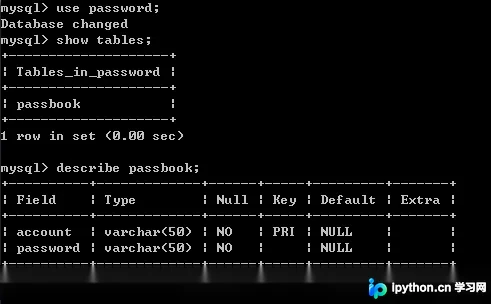
本示例已配置好数据库中的password字段,以及对应的数据表及其结构,具体信息如下所示:
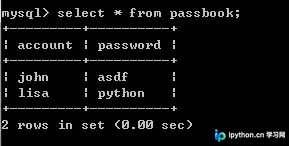
数据表中已预置的测试数据如下:
登录验证逻辑说明
核心实现逻辑为:当用户在界面输入账户和密码并点击登录按钮后,程序首先建立与数据库的连接,随后利用用户提供的参数执行相应的查询语句,最后根据数据库返回的结果给出对应的响应提示。
具体代码实现如下:
Tkinter登录界面代码实现
# -*- coding: utf-8 -*-
"""
Created on Tue Nov  6 14:29:54 2018
Description:实现tkinter的密码验证
                1.与数据库验证
Version:

@author: HJY
"""
import tkinter as tk
from tkinter import messagebox
import sys
import pymysql

class loginf():
    def __init__(self,master):
        self.master = master
        self.face = tk.Frame(self.master,)
        self.face.pack()

        tk.Label(self.face,text='账户').pack()
        self.t_account = tk.Entry(self.face,)
        self.t_account.pack()

        tk.Label(self.face,text='密码').pack()
        self.t_password = tk.Entry(self.face,)
        self.t_password.pack()
        btn_login = tk.Button(self.face,text='login',command=self.login)
        btn_login.pack()


    def login(self,):

        account = self.t_account.get()
        password = self.t_password.get()
        #判空操作:略
        print(account,password)

        #数据库处理
        connection = pymysql.connect(host='localhost',user='root',port=3306)
        try:
            with connection.cursor() as cursor:
                command1 = "use password;"
                command2 = "select password from passbook where account = (%s);"
                cursor.execute(command1)
                result = cursor.execute(command2,(account))

            connection.close()

        except:
            sys.exit()

        else:
            if result == 0:
                print('no this account!')
                tk.messagebox.showerror('Info',"Account Not Exist!")
            else:
                print('查找结果:',result)
                if cursor.fetchone()[0] == password:
                    print('Login successfully!')
                    tk.messagebox.showinfo('Info',"Login successfully!")
                    #销毁登陆界面,生成登陆后界面
                    self.face.destroy()
                    homef(self.master)

                else:
                    print('password input error')
                    tk.messagebox.showerror('Info',"Password Error!")

class homef():
    def __init__(self,master):
        self.master = master
        self.face = tk.Frame(self.master,)
        self.face.pack()
        btn_showinfo = tk.Button(self.face,text='info',command=self.showinfo)
        btn_showinfo.pack()

    def showinfo(self,):
        pass


if __name__ == '__main__':
    root = tk.Tk()
    root.title('Login with password')
    root.geometry('200x200')

    loginf(root)
    root.mainloop()
程序运行效果展示
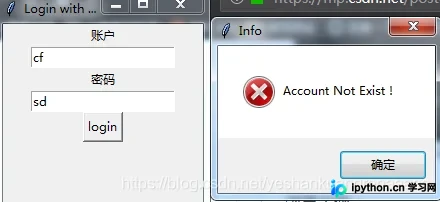
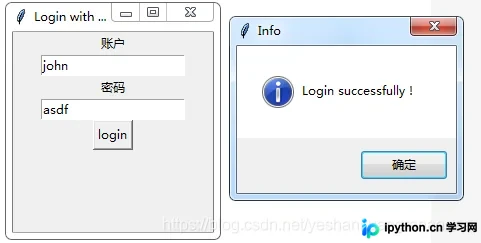
运行效果示例如下图所示:
本站声明
本文内容仅供参考,不代表本站观点。转载或引用请注明出处。如发现内容问题,请通过联系我们页面反馈。















