


Python实现多SSH隧道管理工具:突破MobaXterm限制

针对MobaXterm免费版本仅支持三个SSH隧道的限制,本文介绍使用Python编写的多隧道管理客户端。该工具基于tkinter构建图形界面,利用SSHTunnelForwarder模块实现本地端口到远程服务器的多路复用连接。文章详细解析了隧道创建、启动、停止及配置持久化(JSON加密存储)的核心代码逻辑,并提供了源码地址供开发者参考,旨在解决需要同时建立多个SSH连接时的操作不便问题。
开发背景
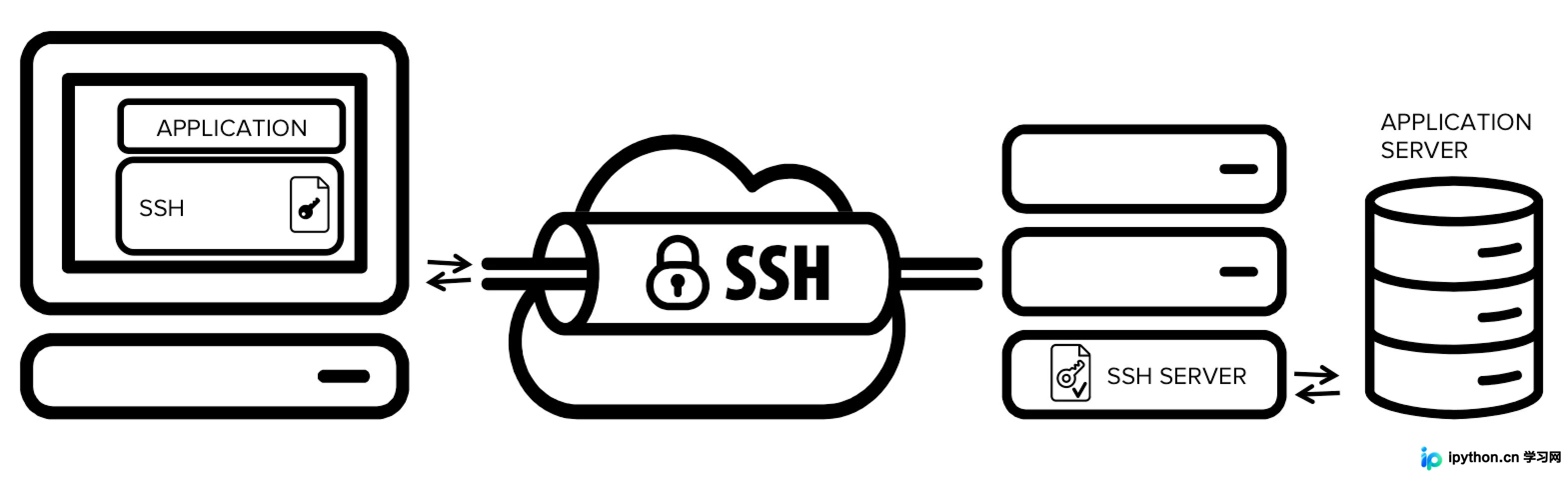
MobaXterm是一款功能强大的全能型终端工具,其内置的隧道功能在日常运维中极为常用。通常情况下,一个本地端口对应一个SSH隧道即可满足需求。然而,MobaXterm的免费版本存在限制,最多仅允许同时建立三个隧道。当用户需要进行批量数据统计或复杂查询,涉及四个或更多隧道时,频繁调整隧道配置变得极为繁琐。为了解决这一痛点,本文介绍使用Python编写的一个支持多隧道的客户端工具。
界面展示
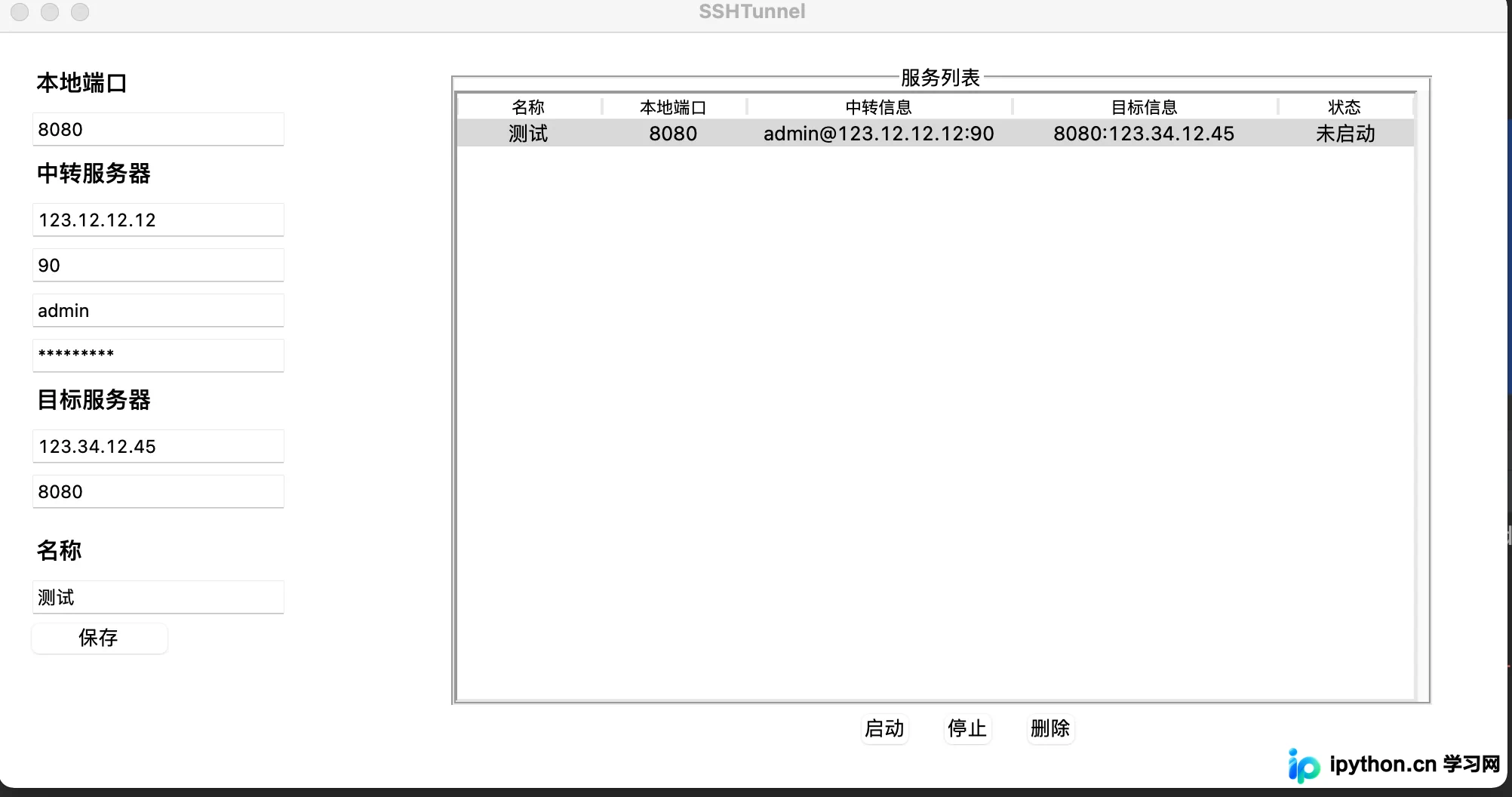
该工具的图形界面基于Python标准库tkinter构建。界面布局采用左右分栏设计:左侧区域用于输入和管理SSH隧道的相关配置信息,右侧区域则显示历史隧道列表,方便用户快速切换和管理已保存的隧道连接。
源码解析
核心隧道构建逻辑
def operate_sshtunnel(tunnel_info):
    try:
        tunnel = SSHTunnelForwarder(
            (tunnel_info.ssh_ip, int(tunnel_info.ssh_port)),
            ssh_username=tunnel_info.ssh_username,
            ssh_password=tunnel_info.ssh_password,
            remote_bind_address=(tunnel_info.remote_ip, int(tunnel_info.remote_port)),
            local_bind_address=('127.0.0.1', int(tunnel_info.localhost_port))
        )
        return tunnel
    except Exception as e:
        print(e.args[0])
        messagebox.showinfo(title='连接异常', message=e.args[0])
        return
这段代码实现了整个功能的核心部分,主要依赖SSHTunnelForwarder模块中的sshtunnel类来建立安全隧道连接。
在构建隧道时,由于主要需求是将本地端口映射到远程服务器,因此默认将本地绑定地址固定为127.0.0.1,以确保连接的安全性和规范性。
初始化与配置加载
def read_json():
    if os.path.exists('tunnel_data.json'):
        with open('tunnel_data.json', 'r', encoding='utf-8') as load_f:
            data = load_f.read()
        if len(data) > 0:
            json_str = cryptocode.decrypt(data, "EjdeB55cvQMN2WHf")
            return json.loads(json_str)
        else:
            return
def load_config():
    load_arr = read_json()
    if load_arr is not None:
        for tunnel_info_json in load_arr:
            tunnel_info = tunnel_info_class()
            tunnel_info.localhost_port = tunnel_info_json['localhost_port']
            tunnel_info.ssh_ip = tunnel_info_json['ssh_ip']
            tunnel_info.ssh_port = tunnel_info_json['ssh_port']
            tunnel_info.ssh_username = tunnel_info_json['ssh_username']
            tunnel_info.ssh_password = cryptocode.decrypt(tunnel_info_json['ssh_password'], "F1jgEg1arVyxmUqC")
            tunnel_info.remote_ip = tunnel_info_json['remote_ip']
            tunnel_info.remote_port = tunnel_info_json['remote_port']
            tunnel_info.tunnel_name = tunnel_info_json['tunnel_name']
            tree_id = insert_tree_view(tunnel_info, "未启动")
            tunnel_infos.update({tree_id: tunnel_info})
系统启动时会执行read_json函数以读取历史记录。为了保障数据安全,该模块使用cryptocode模板对明文JSON数据进行加密存储,并对敏感的ssh_password字段进行二次加密处理,防止配置信息泄露。
启动隧道服务
def start_tunnel():
    iid = treeview.selection()
    if len(iid) > 0:
        if iid not in tunnel_infos_start.keys():
            tunnel_info = tunnel_infos[iid[0]]
            tunnel = ssl_tunnel.operate_sshtunnel(tunnel_info)
            if tunnel is not None:
                try:
                    tunnel.start()
                    tunnel_infos_start.update({iid[0]: tunnel})
                    update_tree_view(iid[0], tunnel_info, "启动")
                    pass
                except Exception  as e:
                    messagebox.showinfo(title='连接异常', message=e.args[0])
    else:
        messagebox.showinfo(title='选择异常', message="未选择列表")
tunnel_infos字典用于保存所有配置的隧道信息,而tunnel_infos_start字典则记录当前已激活的隧道。当用户点击列表中的某一行时,程序会获取该行的ID,并检查该ID是否存在于tunnel_infos_start中。如果不存在,则调用相关函数启动隧道,并将新启动的隧道信息更新至tunnel_infos_start字典中,同时在界面更新状态。
停止隧道服务
def stop_tunnel():
    iid = treeview.selection()
    if len(iid) > 0:
        if iid[0] in tunnel_infos_start.keys():
            tunnel_info = tunnel_infos[iid[0]]
            tunnel = tunnel_infos_start[iid[0]]
            if tunnel is not None:
                try:
                    tunnel.stop()
                    tunnel_infos_start.pop(iid[0])
                    update_tree_view(iid[0], tunnel_info, "未启动")
                    pass
                except Exception  as e:
                    messagebox.showinfo(title='连接异常', message=e.args[0])
    else:
        messagebox.showinfo(title='选择异常', message="未选择列表")
停止服务的操作逻辑与启动相反。程序会查找对应的隧道实例并执行停止命令,随后从tunnel_infos_start字典中移除该隧道的记录,确保资源正确释放。
移除隧道配置
def remove_tunnel():
    iid = treeview.selection()
    if len(iid) > 0:
        if iid[0] in tunnel_infos_start.keys():
            stop_tunnel()
        ## 从列表删除
        treeview.delete(iid)
        tunnel_infos.pop(iid[0])
        write_json()
    else:
        messagebox.showinfo(title='选择异常', message="未选择列表")
在移除隧道时,程序会首先判断该隧道的ID是否存在于tunnel_infos_start中。如果存在,说明该隧道当前处于启动状态,程序会先停止该服务,然后从配置字典tunnel_infos中移除该条配置,并最终更新tunnel_data.json文件以持久化保存更改。
当前不足与改进方向
尽管该工具能够满足多隧道同时运行的需求,但仍存在一些局限性。首先,每次保存配置时都需要重新读写并更新tunnel_data.json文件,当隧道数量较多时,加载和保存过程会消耗较多时间。其次,由于界面设计较为简单,目前不支持直接修改已有隧道的参数,用户只能删除错误的记录后重新添加保存。未来版本可考虑增加编辑功能和异步加载机制以优化体验。
源码获取
完整源代码已开源,地址为:https://github.com/liuhao192/ssh_tunnel
本文介绍了使用Python实现SSH隧道界面功能的方法,旨在帮助用户突破MobaXterm免费版的隧道数量限制。通过合理的代码设计和界面交互,实现了高效的多隧道管理。更多关于Python SSH隧道的技术细节,欢迎查阅本站往期文章或关注后续更新,感谢大家的支持。
本站声明
本文内容仅供参考,不代表本站观点。转载或引用请注明出处。如发现内容问题,请通过联系我们页面反馈。















