


Python OpenCV数据增强实战:缩放、平移、旋转与噪声处理

本文详解Python OpenCV中的数据增强技术,涵盖按比例缩放、图像平移、旋转、镜像翻转、添加椒盐与高斯噪声及模糊处理等核心操作。通过封装常用函数,展示如何随机组合变换以扩充训练数据集,适用于模型训练前的图像预处理场景。
常见的数据增强操作包括按比例放大或缩小图片、旋转、平移、水平翻转以及改变图像通道等。
1.按比例放大和缩小
扩展缩放旨在改变图像的尺寸大小。OpenCV 提供的函数 cv2.resize()可实现此功能。图像尺寸可手动指定,或通过缩放因子自动计算。操作时需选择适当的插值方法:缩放时推荐使用 cv2.INTER_AREA,扩展时推荐使用 v2.INTER_CUBIC(速度较慢)和 v2.INTER_LINEAR。若不指定,默认使用 cv2.INTER_LINEAR。
# 缩小 -- 宽和高都缩小为原来的scale倍
def zoom_down(img,scale):
    img = cv2.resize(img,None,fx= scale,fy= scale,interpolation=cv2.INTER_CUBIC)
    return img

# 放大 -- 宽和高都放大为原来的scale倍
def zoom_up(img,scale):
    img = cv2.resize(img,None,fx= scale,fy= scale,interpolation=cv2.INTER_CUBIC)
    return img
resize函数的第二个参数为目标大小。例如,若需将图片调整为300*300像素,代码写法如下:
img = cv2.resize(img,(300,300))
2.平移图像
平移即改变对象位置。若需沿(x,y)方向移动,移动距离为(tx,ty),可通过构建移动矩阵实现:
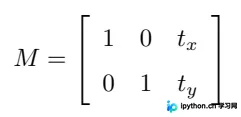
使用 Numpy 数组构建该矩阵(数据类型设为 np.float32),并将其传入函数cv2.warpAffine()。
mat_translation = np.float32([[1, 0, 20], [0, 1, 30]])
例如,上述矩阵表示将图像水平方向移动20个像素点,竖直方向移动30个像素点。
实例:
# 平移 -- 水平平移或竖直方向平移
def translation(img,tx,ty):
    height = img.shape[0]
    width = img.shape[1]
    mat_translation = np.float32([[1, 0, tx], [0, 1, ty]]) # 变换矩阵:设置平移变换所需的计算矩阵:2行3列
    img = cv2.warpAffine(img, mat_translation, (width + tx, height + ty))  # 变换函数
    return img
此处封装的tx和ty分别代表水平和竖直方向需移动的像素点数。
3.旋转图像
OpenCV 提供了一个函数:cv2.getRotationMatrix2D
# 旋转
def rotation(img,angle,scale):
    rows = img.shape[0]
    cols = img.shape[1]
    # 这里的第一个参数为旋转中心,第二个为旋转角度,第三个为旋转后的缩放因子
    # 可以通过设置旋转中心,缩放因子,以及窗口大小来防止旋转后超出边界的问题
    M = cv2.getRotationMatrix2D((cols / 2, rows / 2), angle, scale) # 向左旋转angle度并缩放为原来的scale倍
    img = cv2.warpAffine(img, M, (cols, rows)) # 第三个参数是输出图像的尺寸中心
    return img
4.镜像变换
Opencv提供了cv2.flip()函数,当第二个参数为1时执行水平翻转,为0时执行垂直翻转。为方便后续调用,此处进行了封装。
# 镜像变换
def mirror(img,mode):
    img = cv2.flip(img, mode)  # mode = 1 水平翻转 mode = 0 垂直翻
    return img
5.添加椒盐噪声
椒盐噪声表现为纯黑或纯白的像素点,通过随机生成实现。
# 添加椒盐噪声
def spiced_salt_noise(img,prob):
    output = np.zeros(img.shape,np.uint8)
    thres = 1 - prob
    for i in range(img.shape[0]):
        for j in range(img.shape[1]):
            rdn = random.random()
            if rdn < prob:
                output[i][j] = 0 # 椒盐噪声由纯黑和纯白的像素点随机组成
            elif rdn > thres:
                output[i][j] = 255
            else:
                output[i][j] = img[i][j]
    return output
6.添加高斯噪声
与椒盐噪声不同,高斯噪声呈现彩色特征,方差越大时噪声强度越高。
# 添加高斯噪声
def gasuss_noise(image, mean = 0, var = 0.01):
    '''
        添加高斯噪声
        mean : 均值
        var : 方差,方差越大越模糊
    '''
    image = np.array(image/255, dtype=float)
    noise = np.random.normal(mean, var ** 0.5, image.shape)
    out = image + noise
    if out.min() < 0:
        low_clip = -1.
    else:
        low_clip = 0.
    out = np.clip(out, low_clip, 1.0)
    out = np.uint8(out*255)
    return out
7.模糊化
实现图片模糊或平滑有多种算法,如高斯模糊、中值模糊、均值模糊等。此处使用较为普通的cv2.blur()实现,并同样进行了封装以便后续调用。
# 模糊
def blur(img,scale):
    img = cv2.blur(img,(scale,scale)) # scale越大越模糊
    return img
这里的scale即为滤波器的尺寸,通常取奇数,scale值越大图像越模糊。
8.重新组合颜色通道
在opencv中,图像的通道顺序为BGR(蓝绿红),通过改变通道组合顺序可获得不同效果。
# 重新组合颜色通道
def change_channel(img):
    b = cv2.split(img)[0]
    g = cv2.split(img)[1]
    r = cv2.split(img)[2]
    brg = cv2.merge([b, r, g]) # 可以自己改变组合顺序
    return brg
实例
我有以下几张测试图片:
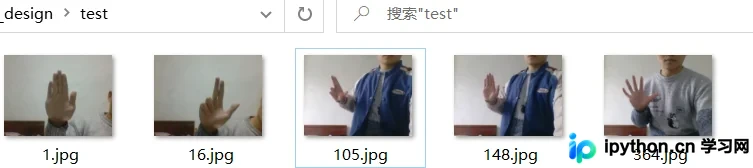
我希望随机地对这些图片进行一些变换,最终执行结果如下:
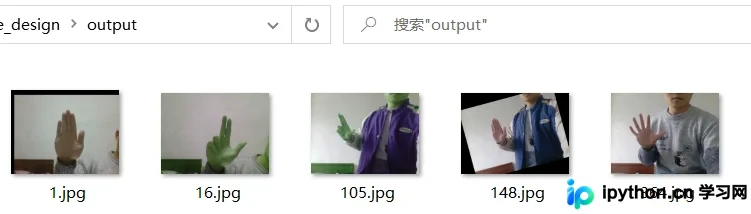
可以看到程序对我的图片随机进行了各种变换,我这里只是一次变换,读者也可以尝试对图片同时进行多种变换。
本次程序如下:
#!/usr/bin/env python
# -*- coding: utf-8 -*-
# @Time : 2022/2/18 16:30
# @Author : 若谷
# @File : Data_Augumentation.py
# @Software: PyCharm
import numpy as np
import cv2
import random
import os
import sys


# 缩小 -- 宽和高都缩小为原来的scale倍
def zoom_down(img, scale):
    img = cv2.resize(img, None, fx=scale, fy=scale, interpolation=cv2.INTER_CUBIC)
    return img


# 放大 -- 宽和高都放大为原来的scale倍
def zoom_up(img, scale):
    img = cv2.resize(img, None, fx=scale, fy=scale, interpolation=cv2.INTER_CUBIC)
    return img


# 平移 -- 水平平移或竖直方向平移
def translation(img, tx, ty):
    height = img.shape[0]
    width = img.shape[1]
    mat_translation = np.float32([[1, 0, tx], [0, 1, ty]])  # 变换矩阵:设置平移变换所需的计算矩阵:2行3列
    img = cv2.warpAffine(img, mat_translation, (width + tx, height + ty))  # 变换函数
    return img


# 旋转
def rotation(img, angle, scale):
    rows = img.shape[0]
    cols = img.shape[1]
    # 这里的第一个参数为旋转中心,第二个为旋转角度,第三个为旋转后的缩放因子
    # 可以通过设置旋转中心,缩放因子,以及窗口大小来防止旋转后超出边界的问题
    M = cv2.getRotationMatrix2D((cols / 2, rows / 2), angle, scale)  # 向左旋转angle度并缩放为原来的scale倍
    img = cv2.warpAffine(img, M, (cols, rows))  # 第三个参数是输出图像的尺寸中心
    return img


# 镜像变换
def mirror(img, mode):
    img = cv2.flip(img, mode)  # mode = 1 水平翻转 mode = 0 垂直翻
    return img


# 添加椒盐噪声
def spiced_salt_noise(img, prob):
    output = np.zeros(img.shape, np.uint8)
    thres = 1 - prob
    for i in range(img.shape[0]):
        for j in range(img.shape[1]):
            rdn = random.random()
            if rdn < prob:
                output[i][j] = 0  # 椒盐噪声由纯黑和纯白的像素点随机组成
            elif rdn > thres:
                output[i][j] = 255
            else:
                output[i][j] = img[i][j]
    return output


# 模糊
def blur(img, scale):
    img = cv2.blur(img, (scale, scale))  # scale越大越模糊
    return img


# 添加高斯噪声
def gasuss_noise(image, mean=0, var=0.01):
    '''
        添加高斯噪声
        mean : 均值
        var : 方差,方差越大越模糊
    '''
    image = np.array(image / 255, dtype=float)
    noise = np.random.normal(mean, var ** 0.5, image.shape)
    out = image + noise
    if out.min() < 0:
        low_clip = -1.
    else:
        low_clip = 0.
    out = np.clip(out, low_clip, 1.0)
    out = np.uint8(out * 255)
    return out


# 重新组合颜色通道
def change_channel(img):
    b = cv2.split(img)[0]
    g = cv2.split(img)[1]
    r = cv2.split(img)[2]
    brg = cv2.merge([b, r, g])  # 可以自己改变组合顺序
    return brg


# 随机进行以上操作
def Data_Augument():
    for i in images_list:
        img = cv2.imread(image_dir+i) # 图片路径+图片名字
        cv2.imshow('img',img)
        functions = [('zoom_down', [img, 0.8]), # 第一个参数为函数名,后面为函数调用时的参数
                     ('zoom_up', [img, 1.2]),
                     ('translation', [img, 20, 30]),
                     ('rotation', [img, 15, 0.9]),
                     ('mirror', [img, 1]),
                     ('spiced_salt_noise', [img, 0.01]),
                     ('blur', [img, 5]),
                     ('gasuss_noise', [img, 0, 0.01]),
                     ('change_channel', [img])]
        choice = random.choice(functions) # 随机选择一个函数执行
        this_module = sys.modules[__name__]  # 当前文件

        res = getattr(this_module, choice[0])(*choice[1])
        cv2.imwrite(output_dir + i, res)


if __name__ == '__main__':
    image_dir = './test/' # 源图片路径
    images_list = os.listdir(image_dir)
    nums = len(os.listdir(image_dir))
    print('found %d pictures' % nums)
    output_dir = './output/' # 图像变换后的保存路径
    Data_Augument() # 执行
    print('finished!')
总结
还有其他很多的数据增强操作,例如随机裁剪图像、添加颜色扰动等等。另外也有其他库可以进行这些操作,例如Keras中的图片预处理process库。我这种是离线式的,希望能将变换后的图片保存下来。
以上就是深入了解Python Opencv数据增强的详细内容,更多关于Python Opencv数据增强的资料请关注本站其它相关文章!
本站声明
本文内容仅供参考,不代表本站观点。转载或引用请注明出处。如发现内容问题,请通过联系我们页面反馈。















