


OpenCV Python身份证信息识别全流程解析

本文详细解析使用OpenCV-Python与CnOcr库进行身份证信息识别的完整流程。内容涵盖图像加载、灰度转换、中值滤波、二值化、Canny边缘检测、轮廓提取与透视变换校正,以及基于形态学操作的文本区域定位。最后通过CnOcr模型对提取的文本块进行识别,输出姓名、身份证号等关键信息。
本文介绍如何利用OpenCV-Python结合CnOcr库完成身份证信息识别的完整案例。整个识别流程主要包含三个核心阶段:首先通过图像预处理定位并检测身份证区域,其次提取该区域内的文本信息,最后利用OCR技术识别具体文本内容。关于CnOcr的详细官方文档及识别过程的演示视频,可访问CnOcr官网或观看相关视频。
前置环境
运行本案例需要预先安装OpenCV-Python、Numpy以及CnOcr库。本文测试使用的Python版本为3.6,OpenCV-Python版本为3.4.1.15。需要注意的是,若使用OpenCV 4.x及以上版本,部分API的操作方式可能存在差异。上述依赖库均推荐使用Pip进行安装,具体安装步骤此处不再赘述。
识别过程
首先,导入必要的依赖库cv2、numpy和cnocr,并定义一个名为show的图像显示函数,以便在后续处理过程中实时查看中间结果:
import cv2
import numpy as np
from cnocr import CnOcr
def show(image, window_name):
    cv2.namedWindow(window_name, 0)
    cv2.imshow(window_name, image)
    cv2.waitKey(0)
    cv2.destroyAllWindows()
# 加载CnOcr的模型
ocr = CnOcr(model_name='densenet_lite_136-gru')
身份证区域查找
为了从原始图像中清晰裁剪出身份证区域,需对加载的图像依次执行灰度处理、滤波处理、二值化处理、边缘检测、膨胀处理、轮廓查找、透视变换(用于校正)以及图像旋转和固定大小等一系列预处理操作。
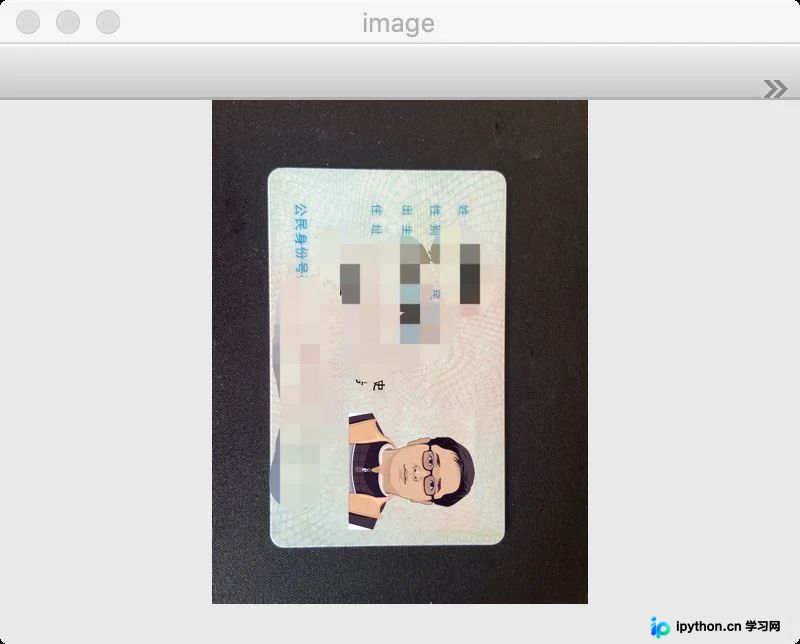
原始图像
使用OpenCV的imread方法读取本地存储的身份证图片文件。
image = cv2.imread('card.png')
show(image, "image")
灰度处理
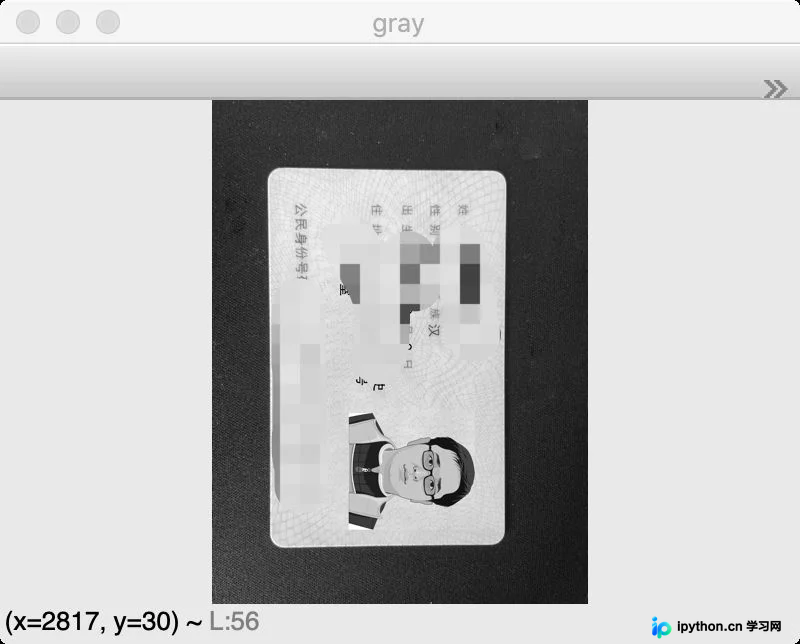
将三通道的BGR彩色图像转换为单通道灰度图像,因为后续的大部分OpenCV图像处理操作均基于灰度图像进行。
gray = cv2.cvtColor(image, cv2.COLOR_BGR2GRAY)
show(gray, "gray")
中值滤波
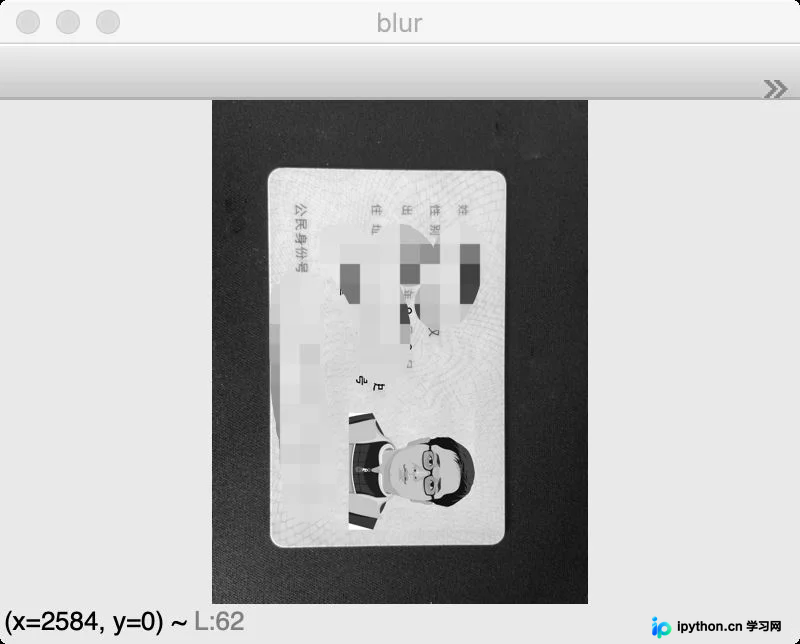
应用中值滤波(即模糊处理)以去除图像中不必要的噪点,提升图像质量。
blur = cv2.medianBlur(gray, 7)
show(blur, "blur")
二值处理
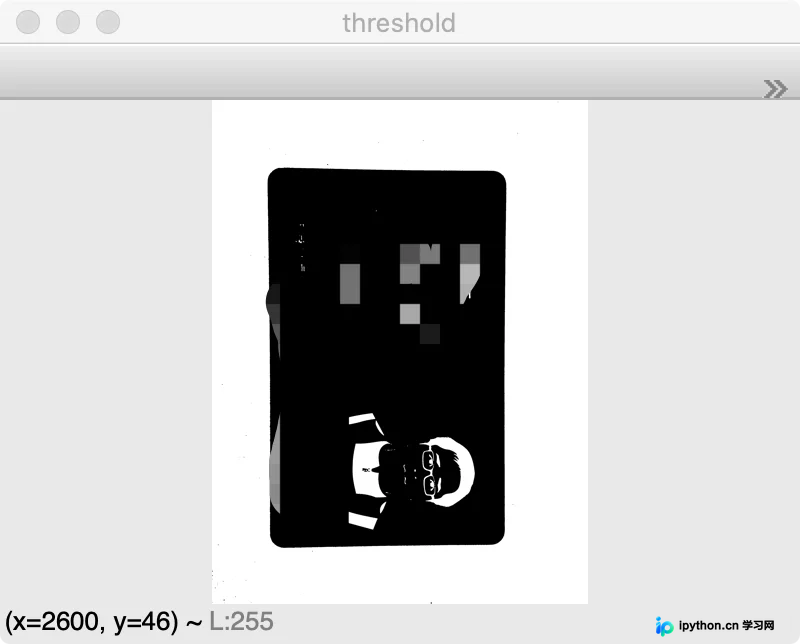
进行二值化处理,使图像呈现非黑即白的效果。此处采用cv2.THRESH_BINARY_INV结合cv2.THRESH_OTSU(大津法)进行自适应阈值二值化,处理后图像能更清晰地区分背景与身份证区域。
threshold = cv2.threshold(blur, 0, 255, cv2.THRESH_BINARY_INV + cv2.THRESH_OTSU)[1]
show(threshold, "threshold")
边缘检测
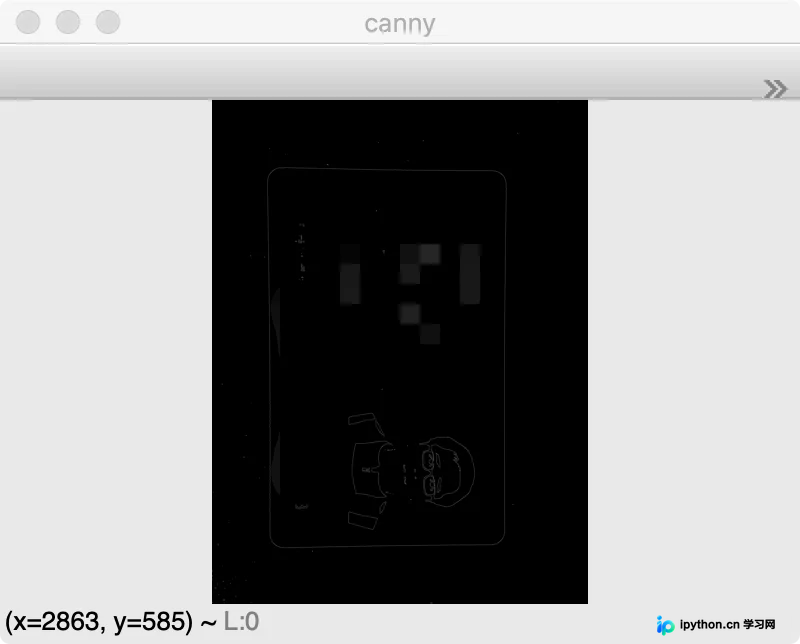
使用OpenCV中常用的Canny算法检测图像中的边缘信息。
canny = cv2.Canny(threshold, 100, 150)
show(canny, "canny")
边缘膨胀
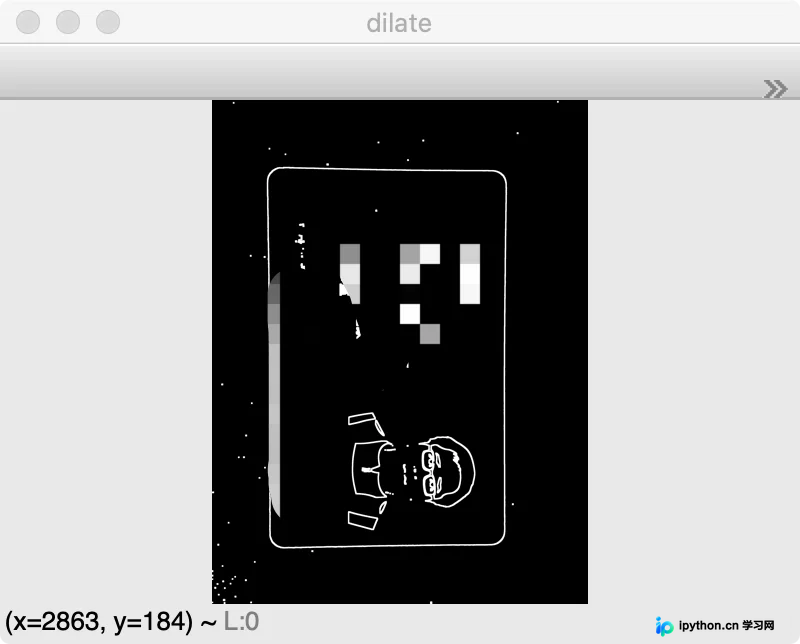
为了使上一步检测到的边缘更加连贯,使用膨胀操作对白色边缘进行膨胀处理,使边缘线条变粗,增强连通性。
kernel = np.ones((3, 3), np.uint8)
dilate = cv2.dilate(canny, kernel, iterations=5)
show(dilate, "dilate")
轮廓检测
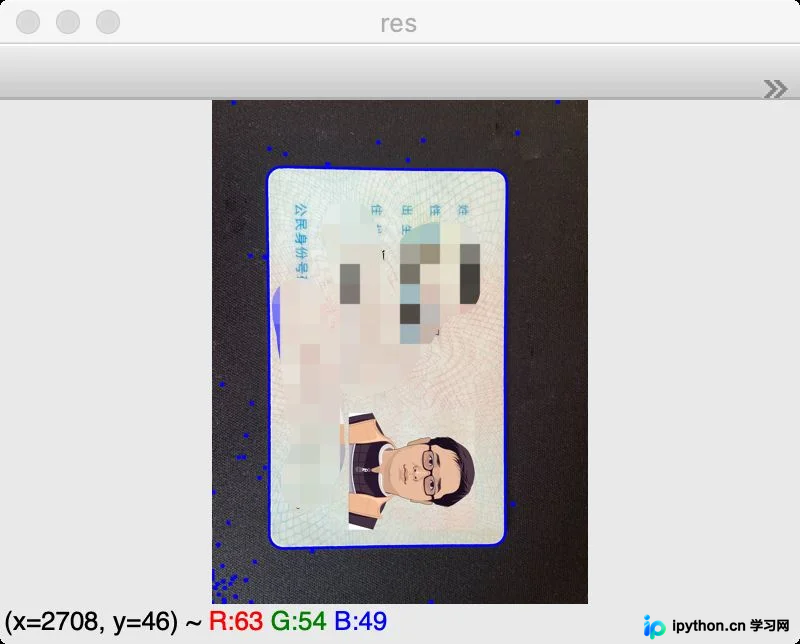
使用findContours函数对经过膨胀处理的图像进行轮廓检测。此时可以看到背景中仍存在较多噪点,但身份证主体部分已被轮廓包围。
binary, contours, hierarchy = cv2.findContours(dilate, cv2.RETR_EXTERNAL, cv2.CHAIN_APPROX_SIMPLE)
image_copy = image.copy()
res = cv2.drawContours(image_copy, contours, -1, (255, 0, 0), 20)
show(res, "res")
轮廓排序
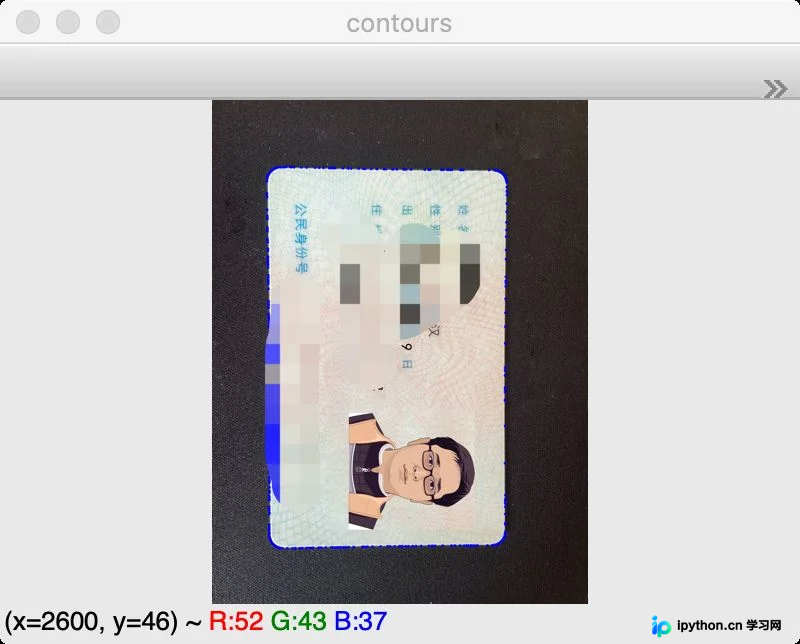
根据轮廓面积进行排序,从而准确提取出面积最大的身份证轮廓。
contours = sorted(contours, key=cv2.contourArea, reverse=True)[0]
image_copy = image.copy()
res = cv2.drawContours(image_copy, contours, -1, (255, 0, 0), 20)
show(res, "contours")
透视变换
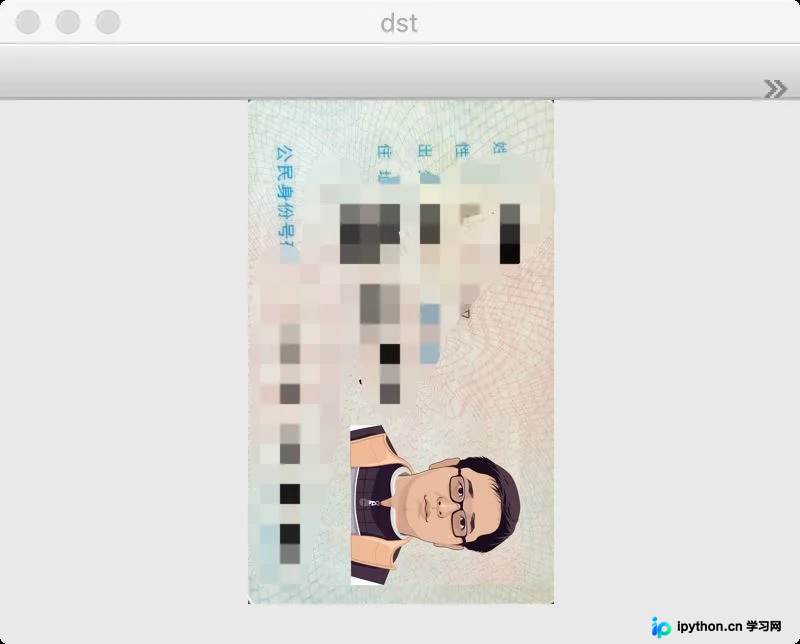
通过近似提取轮廓的四个顶点,并按顺序排序后,利用warpPerspective函数对选定图像区域进行透视变换,即对倾斜的身份证图像进行校正。
epsilon = 0.02 * cv2.arcLength(contours, True)
approx = cv2.approxPolyDP(contours, epsilon, True)
n = []
for x, y in zip(approx[:, 0, 0], approx[:, 0, 1]):
    n.append((x, y))
n = sorted(n)
sort_point = []
n_point1 = n[:2]
n_point1.sort(key=lambda x: x[1])
sort_point.extend(n_point1)
n_point2 = n[2:4]
n_point2.sort(key=lambda x: x[1])
n_point2.reverse()
sort_point.extend(n_point2)
p1 = np.array(sort_point, dtype=np.float32)
h = sort_point[1][1] - sort_point[0][1]
w = sort_point[2][0] - sort_point[1][0]
pts2 = np.array([[0, 0], [0, h], [w, h], [w, 0]], dtype=np.float32)

# 生成变换矩阵
M = cv2.getPerspectiveTransform(p1, pts2)
# 进行透视变换
dst = cv2.warpPerspective(image, M, (w, h))
# print(dst.shape)
show(dst, "dst")
固定图像大小
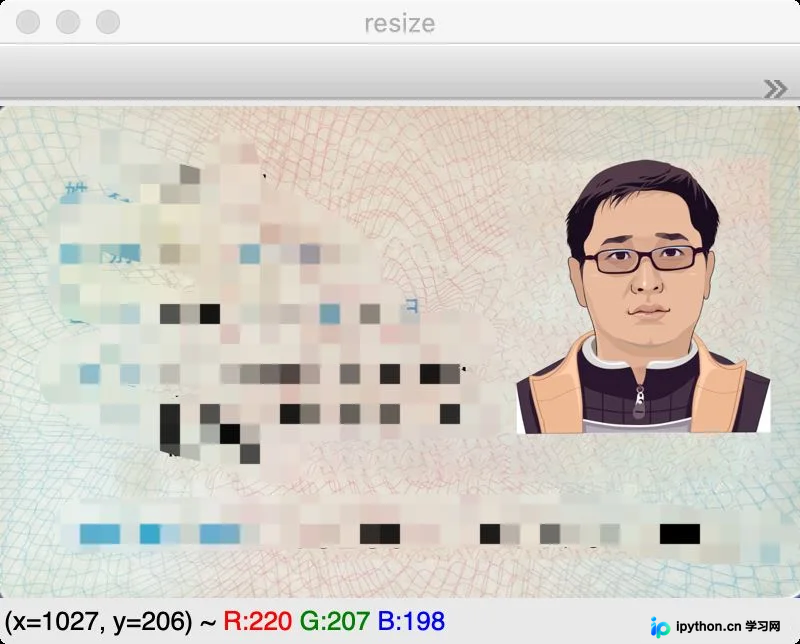
对图像进行正向化处理,通过判断图像宽高,若宽度小于高度,则将图像旋转90度。随后将图像resize到指定大小(1084x669),以便后续处理。
if w < h:
    dst = np.rot90(dst)
resize = cv2.resize(dst, (1084, 669), interpolation=cv2.INTER_AREA)
show(resize, "resize")
检测身份证文本位置
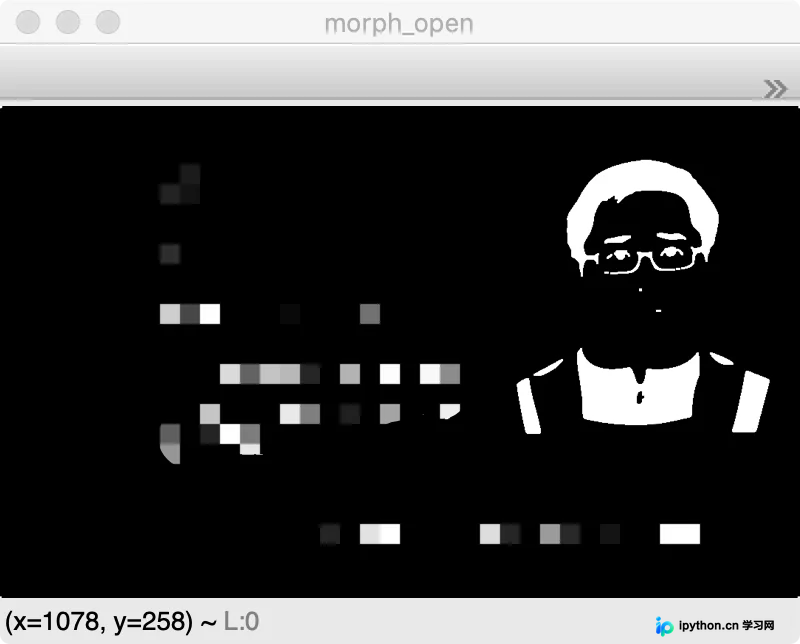
经过灰度化、二值化、滤波以及开闭运算后,图像中的文本区域主体逐渐显现出来。
temp_image = resize.copy()
gray = cv2.cvtColor(resize, cv2.COLOR_BGR2GRAY)
show(gray, "gray")
threshold = cv2.threshold(gray, 0, 255, cv2.THRESH_BINARY_INV + cv2.THRESH_OTSU)[1]
show(threshold, "threshold")
blur = cv2.medianBlur(threshold, 5)
show(blur, "blur")
kernel = np.ones((3, 3), np.uint8)
morph_open = cv2.morphologyEx(blur, cv2.MORPH_OPEN, kernel)
show(morph_open, "morph_open")
极度膨胀
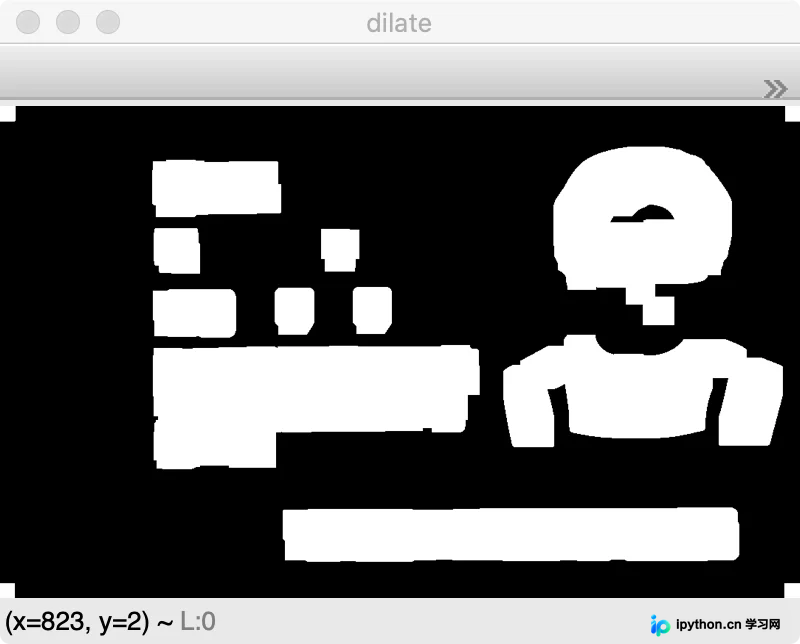
使用较大的卷积核进行膨胀处理,使白色区域加深加大,从而更明显地凸显出文本区域。
kernel = np.ones((7, 7), np.uint8)
dilate = cv2.dilate(morph_open, kernel, iterations=6)
show(dilate, "dilate")
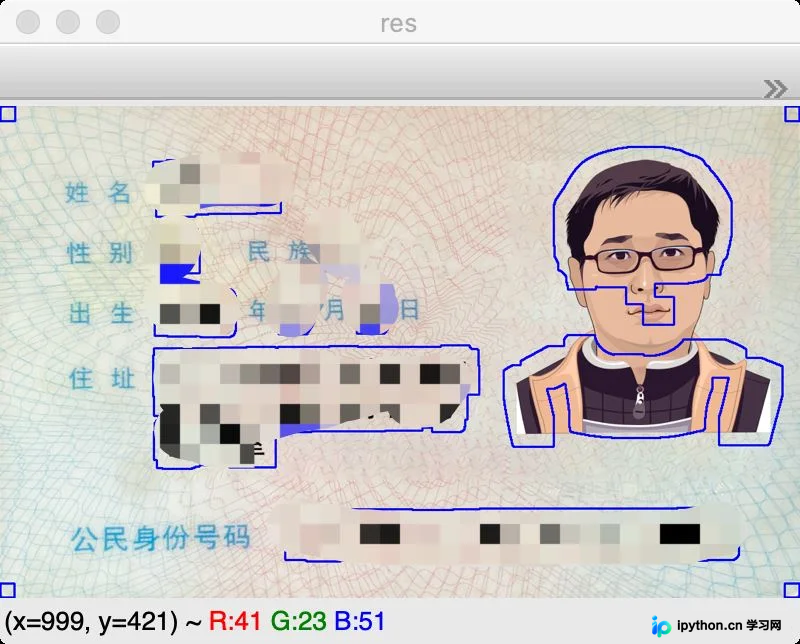
轮廓查找文本区域
再次使用轮廓查找功能,定位并提取出白色的块状文本区域。
binary, contours, hierarchy = cv2.findContours(dilate, cv2.RETR_EXTERNAL, cv2.CHAIN_APPROX_SIMPLE)
resize_copy = resize.copy()
res = cv2.drawContours(resize_copy, contours, -1, (255, 0, 0), 2)
show(res, "res")
筛选出文本区域
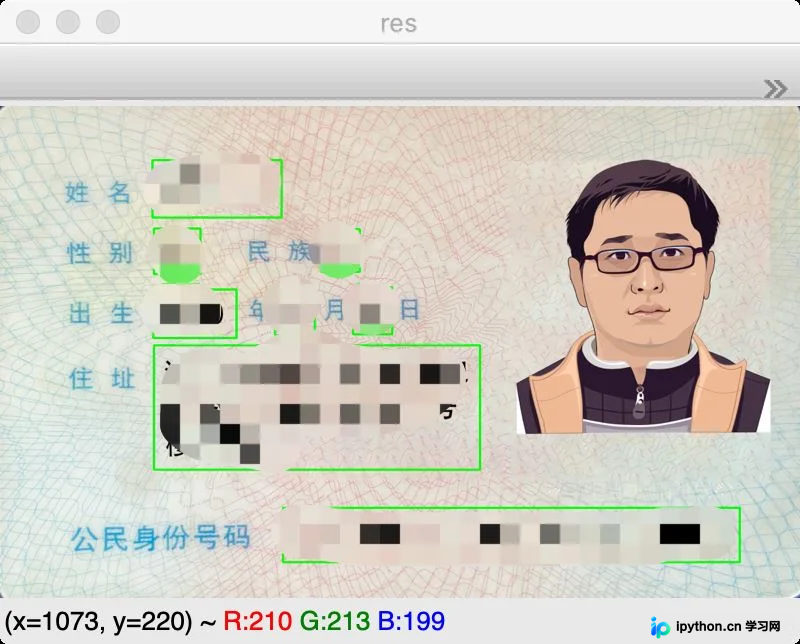
在上一步轮廓检测中,选中的轮廓包含部分噪点。通过观察图像,使用近似轮廓处理,并应用特定逻辑筛选出有效的文本区域。同时定义文本描述信息列表,将筛选出的文本区域位置信息加入指定集合。至此,所需的文本区域已被清晰提取。
labels = ['姓名', '性别', '民族', '出生年', '出生月', '出生日', '住址', '公民身份证号码']
positions = []
data_areas = {}
resize_copy = resize.copy()
for contour in contours:
    epsilon = 0.002 * cv2.arcLength(contour, True)
    approx = cv2.approxPolyDP(contour, epsilon, True)
    x, y, w, h = cv2.boundingRect(approx)
    if h > 50 and x < 670:
        res = cv2.rectangle(resize_copy, (x, y), (x + w, y + h), (0, 255, 0), 2)
        area = gray[y:(y + h), x:(x + w)]
        blur = cv2.medianBlur(area, 3)
        data_area = cv2.threshold(blur, 0, 255, cv2.THRESH_BINARY_INV + cv2.THRESH_OTSU)[1]
        positions.append((x, y))
        data_areas['{}-{}'.format(x, y)] = data_area

show(res, "res")
对文本区域进行排序
由于检测到的文本区域在y轴方向上由下至上排列,而x轴方向上从左到右无序,因此需要应用特定逻辑对文本区域坐标进行排序,以符合阅读顺序。
positions.sort(key=lambda p: p[1])
result = []
index = 0
while index < len(positions) - 1:
    if positions[index + 1][1] - positions[index][1] < 10:
        temp_list = [positions[index + 1], positions[index]]
        for i in range(index + 1, len(positions)):
            if positions[i + 1][1] - positions[i][1] < 10:
                temp_list.append(positions[i + 1])
            else:
                break
        temp_list.sort(key=lambda p: p[0])
        positions[index:(index + len(temp_list))] = temp_list
        index = index + len(temp_list) - 1
    else:
        index += 1
识别文本
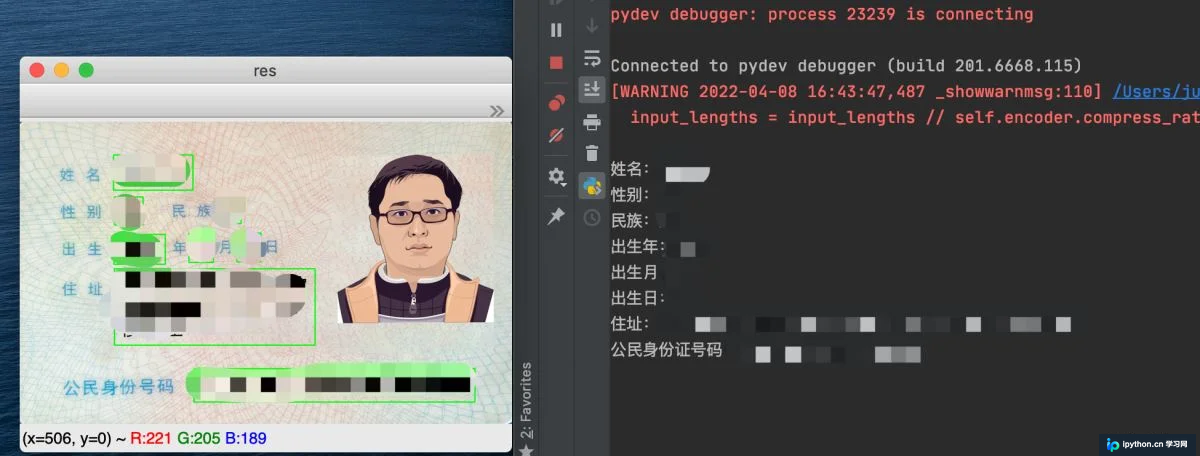
对排序后的各个文本区域逐一使用CnOcr进行识别,最后汇总并输出所有识别结果。
positions.sort(key=lambda p: p[1])
result = []
index = 0
while index < len(positions) - 1:
    if positions[index + 1][1] - positions[index][1] < 10:
        temp_list = [positions[index + 1], positions[index]]
        for i in range(index + 1, len(positions)):
            if positions[i + 1][1] - positions[i][1] < 10:
                temp_list.append(positions[i + 1])
            else:
                break
        temp_list.sort(key=lambda p: p[0])
        positions[index:(index + len(temp_list))] = temp_list
        index = index + len(temp_list) - 1
    else:
        index += 1
结语
通过上述步骤,成功完成了身份证信息的提取。需要注意的是,文中涉及的部分数字参数(如卷积核大小、迭代次数等)在不同场景下可能需要适当调整。以下提供完整的实现代码:
代码
import cv2
import numpy as np
from cnocr import CnOcr

def show(image, window_name):
    cv2.namedWindow(window_name, 0)
    cv2.imshow(window_name, image)
    # 0任意键终止窗口
    cv2.waitKey(0)
    cv2.destroyAllWindows()


ocr = CnOcr(model_name='densenet_lite_136-gru')

image = cv2.imread('card.png')
show(image, "image")
gray = cv2.cvtColor(image, cv2.COLOR_BGR2GRAY)
show(gray, "gray")
blur = cv2.medianBlur(gray, 7)
show(blur, "blur")
threshold = cv2.threshold(blur, 0, 255, cv2.THRESH_BINARY_INV + cv2.THRESH_OTSU)[1]
show(threshold, "threshold")
canny = cv2.Canny(threshold, 100, 150)
show(canny, "canny")
kernel = np.ones((3, 3), np.uint8)
dilate = cv2.dilate(canny, kernel, iterations=5)
show(dilate, "dilate")
binary, contours, hierarchy = cv2.findContours(dilate, cv2.RETR_EXTERNAL, cv2.CHAIN_APPROX_SIMPLE)
image_copy = image.copy()
res = cv2.drawContours(image_copy, contours, -1, (255, 0, 0), 20)
show(res, "res")
contours = sorted(contours, key=cv2.contourArea, reverse=True)[0]
image_copy = image.copy()
res = cv2.drawContours(image_copy, contours, -1, (255, 0, 0), 20)
show(res, "contours")
epsilon = 0.02 * cv2.arcLength(contours, True)
approx = cv2.approxPolyDP(contours, epsilon, True)
n = []
for x, y in zip(approx[:, 0, 0], approx[:, 0, 1]):
    n.append((x, y))
n = sorted(n)
sort_point = []
n_point1 = n[:2]
n_point1.sort(key=lambda x: x[1])
sort_point.extend(n_point1)
n_point2 = n[2:4]
n_point2.sort(key=lambda x: x[1])
n_point2.reverse()
sort_point.extend(n_point2)
p1 = np.array(sort_point, dtype=np.float32)
h = sort_point[1][1] - sort_point[0][1]
w = sort_point[2][0] - sort_point[1][0]
pts2 = np.array([[0, 0], [0, h], [w, h], [w, 0]], dtype=np.float32)

M = cv2.getPerspectiveTransform(p1, pts2)
dst = cv2.warpPerspective(image, M, (w, h))
# print(dst.shape)
show(dst, "dst")
if w < h:
    dst = np.rot90(dst)
resize = cv2.resize(dst, (1084, 669), interpolation=cv2.INTER_AREA)
show(resize, "resize")
temp_image = resize.copy()
gray = cv2.cvtColor(resize, cv2.COLOR_BGR2GRAY)
show(gray, "gray")
threshold = cv2.threshold(gray, 0, 255, cv2.THRESH_BINARY_INV + cv2.THRESH_OTSU)[1]
show(threshold, "threshold")
blur = cv2.medianBlur(threshold, 5)
show(blur, "blur")
kernel = np.ones((3, 3), np.uint8)
morph_open = cv2.morphologyEx(blur, cv2.MORPH_OPEN, kernel)
show(morph_open, "morph_open")
kernel = np.ones((7, 7), np.uint8)
dilate = cv2.dilate(morph_open, kernel, iterations=6)
show(dilate, "dilate")
binary, contours, hierarchy = cv2.findContours(dilate, cv2.RETR_EXTERNAL, cv2.CHAIN_APPROX_SIMPLE)
resize_copy = resize.copy()
res = cv2.drawContours(resize_copy, contours, -1, (255, 0, 0), 2)
show(res, "res")
labels = ['姓名', '性别', '民族', '出生年', '出生月', '出生日', '住址', '公民身份证号码']
positions = []
data_areas = {}
resize_copy = resize.copy()
for contour in contours:
    epsilon = 0.002 * cv2.arcLength(contour, True)
    approx = cv2.approxPolyDP(contour, epsilon, True)
    x, y, w, h = cv2.boundingRect(approx)
    if h > 50 and x < 670:
        res = cv2.rectangle(resize_copy, (x, y), (x + w, y + h), (0, 255, 0), 2)
        area = gray[y:(y + h), x:(x + w)]
        blur = cv2.medianBlur(area, 3)
        data_area = cv2.threshold(blur, 0, 255, cv2.THRESH_BINARY_INV + cv2.THRESH_OTSU)[1]
        positions.append((x, y))
        data_areas['{}-{}'.format(x, y)] = data_area

show(res, "res")

positions.sort(key=lambda p: p[1])
result = []
index = 0
while index < len(positions) - 1:
    if positions[index + 1][1] - positions[index][1] < 10:
        temp_list = [positions[index + 1], positions[index]]
        for i in range(index + 1, len(positions)):
            if positions[i + 1][1] - positions[i][1] < 10:
                temp_list.append(positions[i + 1])
            else:
                break
        temp_list.sort(key=lambda p: p[0])
        positions[index:(index + len(temp_list))] = temp_list
        index = index + len(temp_list) - 1
    else:
        index += 1
for index in range(len(positions)):
    position = positions[index]
    data_area = data_areas['{}-{}'.format(position[0], position[1])]
    ocr_data = ocr.ocr(data_area)
    ocr_result = ''.join([''.join(result[0]) for result in ocr_data]).replace(' ', '')
    # print('{}:{}'.format(labels[index], ocr_result))
    result.append('{}:{}'.format(labels[index], ocr_result))
    show(data_area, "data_area")

for item in result:
    print(item)
show(res, "res")
至此,关于使用OpenCV Python进行身份证信息识别的介绍已完成。如需了解更多相关Python身份证识别内容,请搜索本站历史文章或浏览后续相关文章。希望大家今后多多支持本站!
本站声明
本文内容仅供参考,不代表本站观点。转载或引用请注明出处。如发现内容问题,请通过联系我们页面反馈。















