


Python复现MobileNet:深度可分离卷积原理与代码详解

本文详解MobileNet轻量级神经网络在Python中的复现过程。重点解析Depthwise Separable Convolution(深度可分离卷积)如何大幅减少参数量,并通过Keras代码展示网络结构构建、图像预处理及预测流程,帮助开发者理解并应用该模型。
MobileNet模型概述
MobileNet属于轻量级神经网络架构。与其他复杂结构相比,它未必在精度上占据绝对优势,但其显著特点是计算量小、模型体积轻盈。
该模型由Google团队专为智能手机及嵌入式设备等资源受限场景设计。其核心创新在于引入了深度可分离卷积(Depthwise Separable Convolution)机制。
为了理解这一机制,我们需要对比标准卷积与深度可分离卷积的参数计算方式。
以标准卷积为例,假设输入通道数为16,输出通道数为32,卷积核大小为3×3。此时,32个3×3的卷积核会分别对16个输入通道进行遍历计算,最终生成32个输出通道。该过程的参数量计算为:16(输入通道)× 32(输出通道)× 3(高)× 3(宽)= 4608个参数。
若采用深度可分离卷积,过程分为两步:首先使用16个3×3的卷积核分别处理16个输入通道,生成16个特征图谱;随后使用32个1×1的卷积核对这16个特征图谱进行逐点卷积(Pointwise Convolution)以调整通道数。此过程的参数量为:16×3×3(深度卷积部分)+ 16×32×1×1(逐点卷积部分)= 656个参数。
通过上述对比可见,深度可分离卷积能显著降低模型所需的参数量,从而减轻计算负担。
深度可分离卷积的具体网络结构如下图所示。
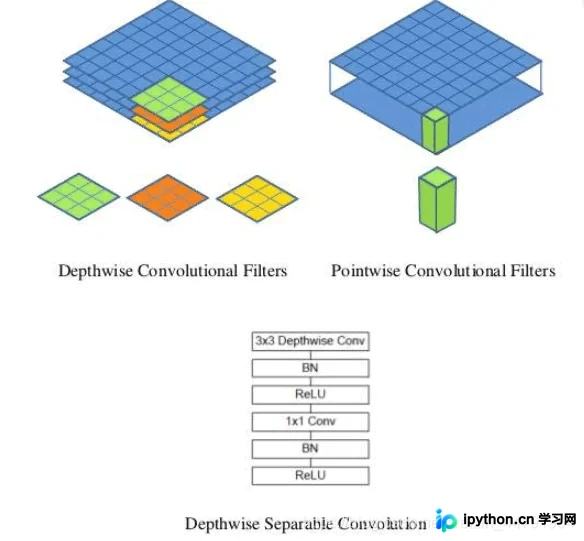
在Keras框架中构建模型时,可直接调用DepthwiseConv2D层来实现深度卷积部分,随后再接一个1×1的卷积层来调整通道数量。
通俗来说,深度可分离卷积相当于将3×3卷积核的“厚度”限制为单层,使其在输入张量上逐层滑动,每次卷积生成一个输出通道;完成深度卷积后,再通过1×1卷积调整特征图的厚度(即通道数)。
MobileNet的整体网络结构如上图所示。其中“Conv dw”代表深度卷积层,每个深度卷积层后均紧跟一个1×1卷积层用于通道变换。
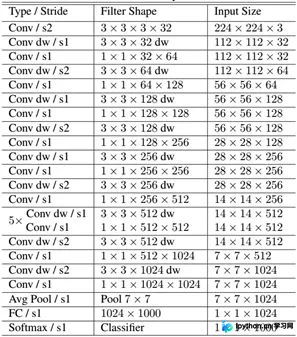
以下是MobileNet网络部分的Python实现代码。
#-------------------------------------------------------------#
#   MobileNet的网络部分
#-------------------------------------------------------------#
import warnings
import numpy as np
from keras.preprocessing import image
from keras.models import Model
from keras.layers import DepthwiseConv2D,Input,Activation,Dropout,Reshape,BatchNormalization,GlobalAveragePooling2D,GlobalMaxPooling2D,Conv2D
from keras.applications.imagenet_utils import decode_predictions
from keras import backend as K
def MobileNet(input_shape=[224,224,3],
              depth_multiplier=1,
              dropout=1e-3,
              classes=1000):
    img_input = Input(shape=input_shape)
    # 224,224,3 -> 112,112,32
    x = _conv_block(img_input, 32, strides=(2, 2))
    # 112,112,32 -> 112,112,64
    x = _depthwise_conv_block(x, 64, depth_multiplier, block_id=1)
    # 112,112,64 -> 56,56,128
    x = _depthwise_conv_block(x, 128, depth_multiplier,
                              strides=(2, 2), block_id=2)
    # 56,56,128 -> 56,56,128
    x = _depthwise_conv_block(x, 128, depth_multiplier, block_id=3)
    # 56,56,128 -> 28,28,256
    x = _depthwise_conv_block(x, 256, depth_multiplier,
                              strides=(2, 2), block_id=4)
    # 28,28,256 -> 28,28,256
    x = _depthwise_conv_block(x, 256, depth_multiplier, block_id=5)
    # 28,28,256 -> 14,14,512
    x = _depthwise_conv_block(x, 512, depth_multiplier,
                              strides=(2, 2), block_id=6)
    # 14,14,512 -> 14,14,512
    x = _depthwise_conv_block(x, 512, depth_multiplier, block_id=7)
    x = _depthwise_conv_block(x, 512, depth_multiplier, block_id=8)
    x = _depthwise_conv_block(x, 512, depth_multiplier, block_id=9)
    x = _depthwise_conv_block(x, 512, depth_multiplier, block_id=10)
    x = _depthwise_conv_block(x, 512, depth_multiplier, block_id=11)
    # 14,14,512 -> 7,7,1024
    x = _depthwise_conv_block(x, 1024, depth_multiplier,
                              strides=(2, 2), block_id=12)
    x = _depthwise_conv_block(x, 1024, depth_multiplier, block_id=13)
    # 7,7,1024 -> 1,1,1024
    x = GlobalAveragePooling2D()(x)
    x = Reshape((1, 1, 1024), name='reshape_1')(x)
    x = Dropout(dropout, name='dropout')(x)
    x = Conv2D(classes, (1, 1),padding='same', name='conv_preds')(x)
    x = Activation('softmax', name='act_softmax')(x)
    x = Reshape((classes,), name='reshape_2')(x)
    inputs = img_input
    model = Model(inputs, x, name='mobilenet_1_0_224_tf')
    model_name = 'mobilenet_1_0_224_tf.h5'
    model.load_weights(model_name)
    return model
def _conv_block(inputs, filters, kernel=(3, 3), strides=(1, 1)):
    x = Conv2D(filters, kernel,
               padding='same',
               use_bias=False,
               strides=strides,
               name='conv1')(inputs)
    x = BatchNormalization(name='conv1_bn')(x)
    return Activation(relu6, name='conv1_relu')(x)
def _depthwise_conv_block(inputs, pointwise_conv_filters,
                          depth_multiplier=1, strides=(1, 1), block_id=1):
    x = DepthwiseConv2D((3, 3),
                        padding='same',
                        depth_multiplier=depth_multiplier,
                        strides=strides,
                        use_bias=False,
                        name='conv_dw_%d' % block_id)(inputs)
    x = BatchNormalization(name='conv_dw_%d_bn' % block_id)(x)
    x = Activation(relu6, name='conv_dw_%d_relu' % block_id)(x)
    x = Conv2D(pointwise_conv_filters, (1, 1),
               padding='same',
               use_bias=False,
               strides=(1, 1),
               name='conv_pw_%d' % block_id)(x)
    x = BatchNormalization(name='conv_pw_%d_bn' % block_id)(x)
    return Activation(relu6, name='conv_pw_%d_relu' % block_id)(x)
def relu6(x):
    return K.relu(x, max_value=6)
图像预测流程
完成网络构建后,可使用以下代码进行图像预测。
def preprocess_input(x):
    x /= 255.
    x -= 0.5
    x *= 2.
    return x
if __name__ == '__main__':
    model = MobileNet(input_shape=(224, 224, 3))
    img_path = 'elephant.jpg'
    img = image.load_img(img_path, target_size=(224, 224))
    x = image.img_to_array(img)
    x = np.expand_dims(x, axis=0)
    x = preprocess_input(x)
    print('Input image shape:', x.shape)
    preds = model.predict(x)
    print(np.argmax(preds))
    print('Predicted:', decode_predictions(preds, 1))
训练好的MobileNet模型权重可从https://github.com/fchollet/deep-learning-models/releases下载,获取方式便捷。预测结果示例如下:
Predicted: [[('n02504458', 'African_elephant', 0.7590296)]]以上为Python中MobileNet模型复现的完整解析。如需了解更多MobileNet相关技术细节,欢迎查阅本站其他文章。
本站声明
本文内容仅供参考,不代表本站观点。转载或引用请注明出处。如发现内容问题,请通过联系我们页面反馈。















