


Python实现邮件发送:163与QQ邮箱配置及附件发送详解

发布时间:2026-10-12 |
2人浏览过
本文详细介绍如何使用Python标准库smtplib和email模块实现邮件发送功能。内容涵盖163邮箱与QQ邮箱的SMTP服务器配置、端口设置及授权码获取步骤,并提供发送纯文本、多收件人及带附件邮件的完整代码示例。此外,还展示了如何通过封装类来简化多人邮件与附件发送的操作流程,适用于自动化通知与日常办公场景。
本文分享使用Python实现邮件发送功能的具体代码示例,供读者参考学习。
所需依赖库如下:
在Python中实现邮件发送,主要依赖smtplib和MIMEText模块。在编写具体代码前,需先导入相关包。
import smtplib
from email.mime.text import MIMEText
以下是使用163邮箱发送邮件的具体代码实现:
import smtplib
from email.mime.text import MIMEText
'''
发送邮件函数,默认使用163smtp
:param mail_host: 邮箱服务器,16邮箱host: smtp.163.com
:param port: 端口号,163邮箱的默认端口是 25
:param username: 邮箱账号 xx@163.com
:param passwd: 邮箱密码(不是邮箱的登录密码,是邮箱的授权码)
:param recv: 邮箱接收人地址,多个账号以逗号隔开
:param title: 邮件标题
:param content: 邮件内容
:return:
'''

def send_mail(username, passwd, recv, title, content, mail_host='smtp.163.com', port=25):
  msg = MIMEText(content)  # 邮件内容
  msg['Subject'] = title   # 邮件主题
  msg['From'] = username   # 发送者账号
  msg['To'] = recv      # 接收者账号列表
  smtp = smtplib.SMTP(mail_host, port=port)   # 连接邮箱,传入邮箱地址,和端口号,smtp的端口号是25
  smtp.login(username, passwd)          # 登录发送者的邮箱账号,密码
  # 参数分别是 发送者,接收者,第三个是把上面的发送邮件的 内容变成字符串
  smtp.sendmail(username, recv, msg.as_string())
  smtp.quit() # 发送完毕后退出smtp
  print('email send success.')

if __name__ == '__main__':
  email_user = 'xxxx@163.com' # 发送者账号
  email_pwd = 'xxxxx' # 发送者密码,授权码
  maillist = 'xxxx@qq.com'
  title = '测试邮件标题'
  content = '这里是邮件内容'
  send_mail(email_user, email_pwd, maillist, title, content)
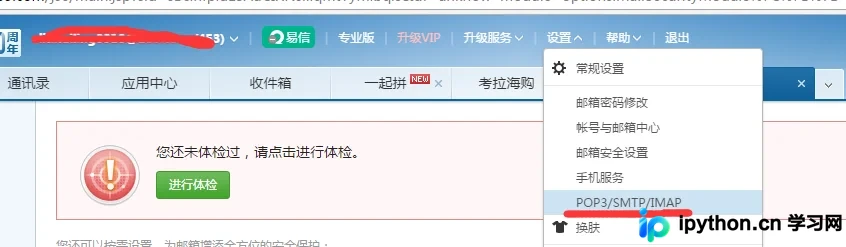
获取163邮箱授权码的方法如下:
首先登录163邮箱,依次点击“设置”->“POP3/SMTP/IMAP”,界面如下图所示:
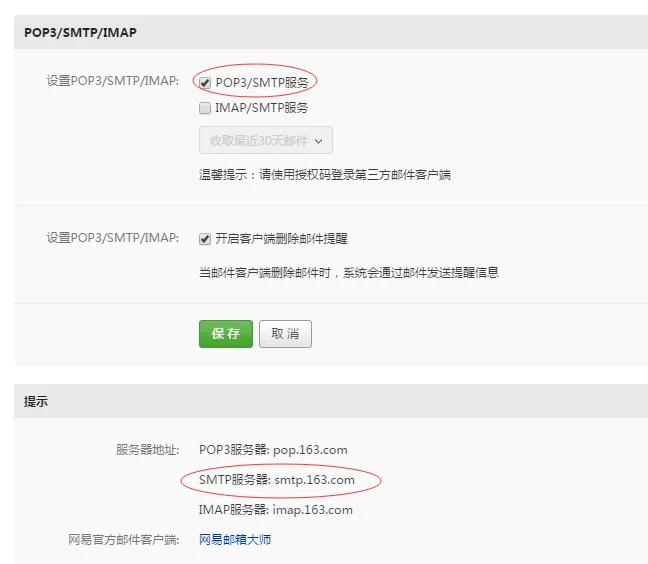
开启SMTP服务后,即可查看SMTP服务器的host地址:
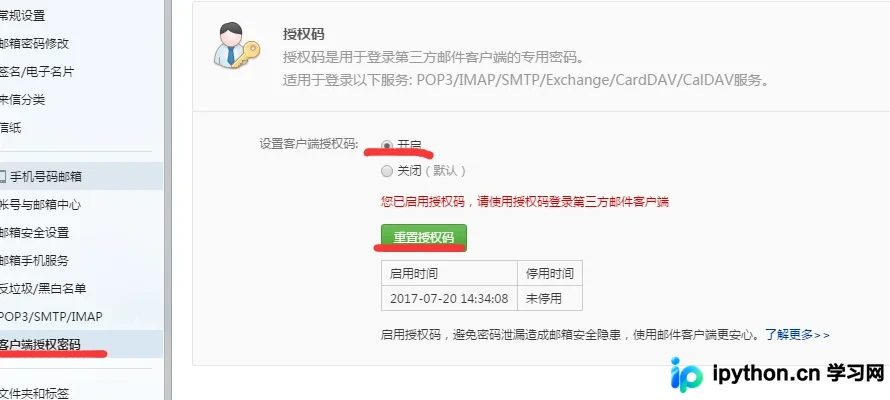
点击“客户端授权密码”选项,按照提示重置并获取授权码:
以下是使用QQ邮箱发送邮件的具体代码实现:
import smtplib
from email.mime.text import MIMEText
'''
发送邮件函数,默认使用163smtp
:param mail_host: 邮箱服务器,qq邮箱host: smtp.qq.com
:param port: 端口号,qq邮箱的默认端口是: 456
:param username: 邮箱账号 xx@163.com
:param passwd: 邮箱密码(不是邮箱的登录密码,是邮箱的授权码)
:param recv: 邮箱接收人地址,多个账号以逗号隔开
:param title: 邮件标题
:param content: 邮件内容
:return:
'''
#qq邮箱发送邮件
def send_mail(username, passwd, recv, title, content, mail_host='smtp.qq.com', port=456):
  msg = MIMEText(content)  # 邮件内容
  msg['Subject'] = title   # 邮件主题
  msg['From'] = username   # 发送者账号
  msg['To'] = recv      # 接收者账号列表
  smtp = smtplib.SMTP_SSL(mail_host, port=port)   # 连接邮箱,传入邮箱地址,和端口号,smtp的端口号是25
  smtp.login(username, passwd)          # 登录发送者的邮箱账号,密码
  # 参数分别是 发送者,接收者,第三个是把上面的发送邮件的 内容变成字符串
  smtp.sendmail(username, recv, msg.as_string())
  smtp.quit() # 发送完毕后退出smtp
  print('email send success.')

if __name__ == '__main__':
  email_user = 'xxx@qq.com' # 发送者账号
  email_pwd = 'WOSHINIGE123' # 发送者密码,授权码
  maillist = 'xxxx@qq.com'
  title = '测试邮件标题'
  content = '这里是邮件内容'
  send_mail(email_user, email_pwd, maillist, title, content)
支持发送多个收件人并附带附件:
# import smtplib
# from email.mime.text import MIMEText
# '''
# 发送邮件函数,默认使用163smtp
# :param mail_host: 邮箱服务器,qq邮箱host: smtp.163.com
# :param port: 端口号,qq邮箱的默认端口是: 25
# :param username: 邮箱账号 xx@163.com
# :param passwd: 邮箱密码(不是邮箱的登录密码,是邮箱的授权码)
# :param recv: 邮箱接收人地址,多个账号以逗号隔开
# :param title: 邮件标题
# :param content: 邮件内容
# :return:
# '''
import smtplib
from email.mime.text import MIMEText
from email.mime.multipart import MIMEMultipart

#邮箱服务器地址
email_host = 'smtp.163.com'
#发送者
email_user = 'xxxx@163.com'
#授权码
email_pwd = 'WOSHINIGE123'
#多个收件人,使用分号分隔
maillist ='xxxx@qq.com;aaaa@qq.com'
#对多个收件人进行分割,以;为标准,返回结果是list['xxxx@qq.com','aaaa@qq.com']
email_info = maillist.split(';')
#构造一个发附件的邮件内容对象
new_msg = MIMEMultipart()
#邮件正文内容
new_msg.attach(MIMEText('test email.....'))
#邮件主题
new_msg['Subject'] = 'test email'
#邮件发送者
new_msg['From'] = email_user
#邮件接收者,多个收件人的账号使用,连接,传入类型是str
new_msg['To'] = ','.join(email_info)
#打开a.txt读取文本内容
att = MIMEText(open('a.txt').read())
att["Content-Type"] = 'application/octet-stream'
# 发送附件就得这么写,固定格式,filename指定附件的名字
att["Content-Disposition"] = 'attachment; filename="haha.txt"'
new_msg.attach(att)
# 连接邮箱,传入邮箱地址,和端口号,smtp的端口号是25
smtp = smtplib.SMTP(email_host, port=25)
# 发送者的邮箱账号,密码,先登录
smtp.login(email_user, email_pwd)
smtp.sendmail(email_user, email_info, new_msg.as_string())
smtp.quit()
print('email send success.')
当指定多个收件人时,账号之间使用分号(;)进行分隔。在调用smtp.sendmail时,传入的收件人类型应为列表(list);而在构建邮件对象new_msg['To']字段时,接收类型应为字符串(str)。
通过封装类的方式实现邮件发送,该方式同时支持发送多人邮件及添加附件:
import smtplib
from email.mime.text import MIMEText
from email.mime.multipart import MIMEMultipart

class SendMail(object):
 def __init__(self, username, passwd, recv, title, content, file=None, email_host='smtp.163.com', port=25):
  self.username = username
  self.passwd = passwd
  self.recv = recv
  self.title = title
  self.content = content
  self.file = file
  self.email_host = email_host
  self.port = port

 def send_mail(self):
  msg = MIMEMultipart()
  #发送内容的对象
  if self.file:#处理附件的
   att = MIMEText(open(self.file, encoding='utf-8').read())
   att["Content-Type"] = 'application/octet-stream'
   att["Content-Disposition"] = 'attachment; filename="%s"'%self.file
   msg.attach(att)
  msg.attach(MIMEText(self.content))#邮件正文的内容
  msg['Subject'] = self.title # 邮件主题
  msg['From'] = self.username # 发送者账号
  #将多个账号'aaa.@qq.com;bbbb@163.com' 以分号分割,分割为list
  self.recv = self.recv.split(';')
  if isinstance(self.recv, list):
   msg['To'] = ','.join(self.recv)
  else:
   msg['To'] = self.recv # 接收者账号列表
  if self.username.endswith('qq.com'): #如果发送者是qq邮箱
   self.smtp = smtplib.SMTP_SSL(self.email_host, port=self.port)
  else:
   self.smtp = smtplib.SMTP(self.email_host, port=self.port)
  #发送邮件服务器的对象
  self.smtp.login(self.username, self.passwd)
  try:
   self.smtp.sendmail(self.username, self.recv, msg.as_string())
  except Exception as e:
   print('出错了。。', e)
  else:
   print('发送成功!')
  self.smtp.quit()

if __name__ == '__main__':
 m = SendMail(
  username='zzzzz@163.com', passwd='xxxxxxx',file='a.txt', recv='xxxxxx@qq.com;xxxxxx@qq.com',
  title='多个收件人', content='哈哈哈啊哈哈哈哈', email_host='smtp.163.com', port=25
 )
 m.send_ma
以上即为本文的全部内容,希望这些示例能对您的学习有所帮助。欢迎继续支持本站获取更多技术资源。
本站声明
本文内容仅供参考,不代表本站观点。转载或引用请注明出处。如发现内容问题,请通过联系我们页面反馈。















