


Python+OpenCV实现鼠标画瞄准星的方法详解

本文介绍如何使用Python和OpenCV实现动态瞄准星功能,通过鼠标回调函数控制圆圈与十字线的绘制。支持滚轮调整半径、加减号调节变化量,旨在提升关键点标注的精准度,特别适用于回归任务及人脸关键点定位场景。
瞄准星由一个外圆及内部十字线构成,模拟射击游戏中狙击枪开镜的视觉效果。本方案并非在静态图像上直接绘制固定图形,而是实现瞄准星随鼠标位置动态移动的功能。在图像标注任务中,尤其是回归类任务,借助该辅助工具可显著提升关键点标注的精确度。
关于鼠标回调函数的具体实现细节,可参考:opencv-python的鼠标交互操作
函数说明
导入cv2模块后,可通过help(cv2.circle)和help(cv2.line)分别查看绘制圆形与直线的函数帮助文档:
cv2.circle()
该函数包含四个必需参数:
img:作为底图的图像,数据类型需为uint8的ndarray
center:圆心坐标,必须为包含两个数值的tuple类型,格式为(x, y)
radius:圆的半径,必须为整数类型
color:颜色值,为包含三个数值的tuple或list,格式为(b, g, r)
其余参数为可选:
thickness:线条宽度,必须为大于0的整数,默认值为1
lineType:线条类型,可选值包括cv2.LINE_4、cv2.LINE_8和cv2.LINE_AA。其中cv2.LINE_AA表示抗锯齿处理,能使线条更加平滑,绘制圆形时推荐使用此类型。
cv2.line()
line(img, pt1, pt2, color[, thickness[, lineType[, shift]]]) -> img . @brief Draws a line segment connecting two points. . . The function line draws the line segment between pt1 and pt2 points in the image. The line is . clipped by the image boundaries. For non-antialiased lines with integer coordinates, the 8-connected . or 4-connected Bresenham algorithm is used. Thick lines are drawn with rounding endings. Antialiased . lines are drawn using Gaussian filtering. . . @param img Image. . @param pt1 First point of the line segment. . @param pt2 Second point of the line segment. . @param color Line color. . @param thickness Line thickness. . @param lineType Type of the line. See #LineTypes. . @param shift Number of fractional bits in the point coordinates.
该函数同样包含四个必需参数:
img:作为底图的图像,数据类型需为uint8的ndarray
pt1:线段起点坐标,必须为包含两个数值的tuple类型,格式为(x, y)
pt2:线段终点坐标,类型要求同上
color:颜色值,为包含三个数值的tuple或list,格式为(b, g, r)
其余参数为可选:
thickness:线条宽度,必须为大于0的整数,默认值为1
lineType:线条类型,可选值包括cv2.LINE_4、cv2.LINE_8和cv2.LINE_AA。其中cv2.LINE_AA表示抗锯齿处理,能使线条更加平滑,绘制圆形时推荐使用此类型。
简单的例子
# -*- coding: utf-8 -*-

import cv2
import numpy as np


def imshow(winname, image):
    cv2.namedWindow(winname, 1)
    cv2.imshow(winname, image)
    cv2.waitKey(0)
    cv2.destroyAllWindows()


if __name__ == '__main__':
    image = np.zeros((256, 256, 3), np.uint8)
    center = (128, 128)
    radius = 50
    color = (0, 255, 0)
    thickness = 2

    pt_left = (center[0] - radius, center[1])
    pt_right = (center[0] + radius, center[1])
    pt_top = (center[0], center[1] - radius)
    pt_bottom = (center[0], center[1] + radius)

    cv2.circle(image, center, radius, color, thickness, lineType=cv2.LINE_AA)
    cv2.line(image, pt_left, pt_right, color, thickness)
    cv2.line(image, pt_top, pt_bottom, color, thickness)
    imshow('draw_crosshair', image)
运行结果如下:
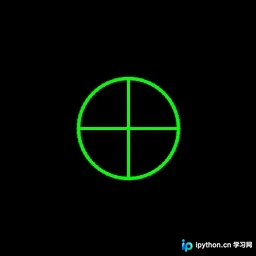
利用鼠标回调函数画瞄准星
具体操作说明:
鼠标移动时,以鼠标当前位置为圆心动态显示瞄准星
通过鼠标滚轮控制瞄准星的大小变化
使用+, -号键控制鼠标滚轮操作时瞄准星半径的变化步长
相关代码如下:
# -*- coding: utf-8 -*-

import cv2

WIN_NAME = 'draw_crosshair'


class DrawCrosshair(object):
    def __init__(self, image, color, center, radius, thickness=1):
        self.original_image = image
        self.image_for_show = image.copy()
        self.color = color
        self.center = center
        self.radius = radius
        self.thichness = thickness
        self.increment = 5

    def increase_radius(self):
        self.radius += self.increment

    def decrease_radius(self):
        self.radius -= self.increment
        self.radius = max(self.radius, 0)

    def increase_increment(self):
        self.increment += 1

    def decrease_increment(self):
        self.increment -= 1
        self.increment = max(self.increment, 1)

    def reset_image(self):
        """
        reset image_for_show using original image
        """
        self.image_for_show = self.original_image.copy()

    def draw_circle(self):
        cv2.circle(self.image_for_show,
                   center=self.center,
                   radius=self.radius,
                   color=self.color,
                   thickness=self.thichness,
                   lineType=cv2.LINE_AA)

    def draw_crossline(self):
        pt_left = (self.center[0] - self.radius, self.center[1])
        pt_right = (self.center[0] + self.radius, self.center[1])
        pt_top = (self.center[0], self.center[1] - self.radius)
        pt_bottom = (self.center[0], self.center[1] + self.radius)
        cv2.line(self.image_for_show, pt_left, pt_right,
                 self.color, self.thichness)
        cv2.line(self.image_for_show, pt_top, pt_bottom,
                 self.color, self.thichness)

    def draw(self):
        self.reset_image()
        self.draw_circle()
        self.draw_crossline()


def onmouse_draw_rect(event, x, y, flags, draw_crosshair):
    if event == cv2.EVENT_MOUSEWHEEL and flags > 0:
        draw_crosshair.increase_radius()
    if event == cv2.EVENT_MOUSEWHEEL and flags < 0:
        draw_crosshair.decrease_radius()

    draw_crosshair.center = (x, y)
    draw_crosshair.draw()


if __name__ == '__main__':
    # image = np.zeros((512, 512, 3), np.uint8)
    image = cv2.imread('luka.jpg')
    draw_crosshair = DrawCrosshair(image,
                                   color=(0, 255, 0),
                                   center=(256, 256),
                                   radius=100,
                                   thickness=2)
    cv2.namedWindow(WIN_NAME, 1)
    cv2.setMouseCallback(WIN_NAME, onmouse_draw_rect, draw_crosshair)
    while True:
        cv2.imshow(WIN_NAME, draw_crosshair.image_for_show)
        key = cv2.waitKey(30)
        if key == 27:  # ESC
            break
        elif key == ord('+'):
            draw_crosshair.increase_increment()
        elif key == ord('-'):
            draw_crosshair.decrease_increment()
    cv2.destroyAllWindows()
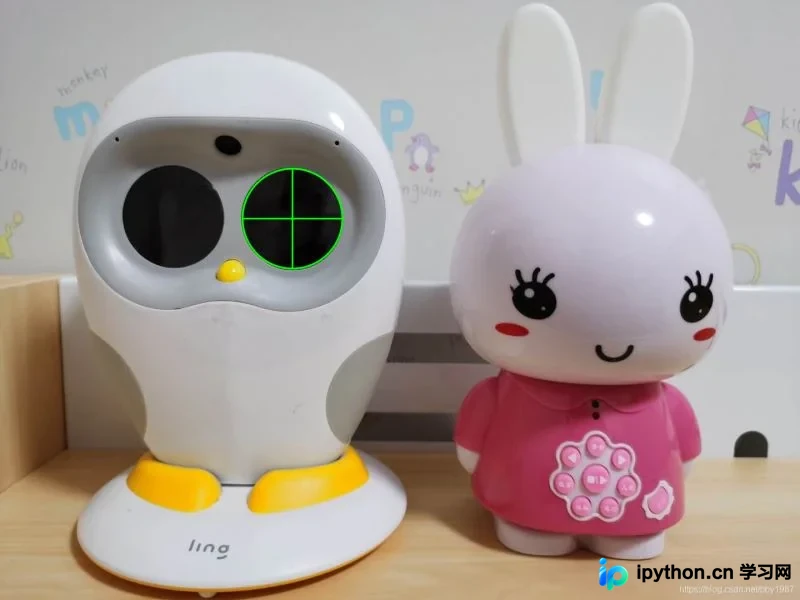
最终效果如图所示,借助瞄准星辅助,可以更精准地定位Luka的眼睛中心。同理,在进行人脸关键点标注时,该功能同样有助于更精确地确定眼睛中心位置。
到此这篇关于Python+OpenCV实现鼠标画瞄准星的方法详解的文章就介绍到这了,更多相关Python OpenCV瞄准星内容请搜索本站以前的文章或继续浏览下面的相关文章希望大家以后多多支持本站!
本站声明
本文内容仅供参考,不代表本站观点。转载或引用请注明出处。如发现内容问题,请通过联系我们页面反馈。















