Python Flask 编写第一个 RESTful API 接口教程

本教程详细讲解如何使用 Python 轻量级框架 Flask 从零构建第一个符合 RESTful 规范的 API 接口,涵盖环境搭建、路由映射、JSON解析、HTTP状态码与测试验证。
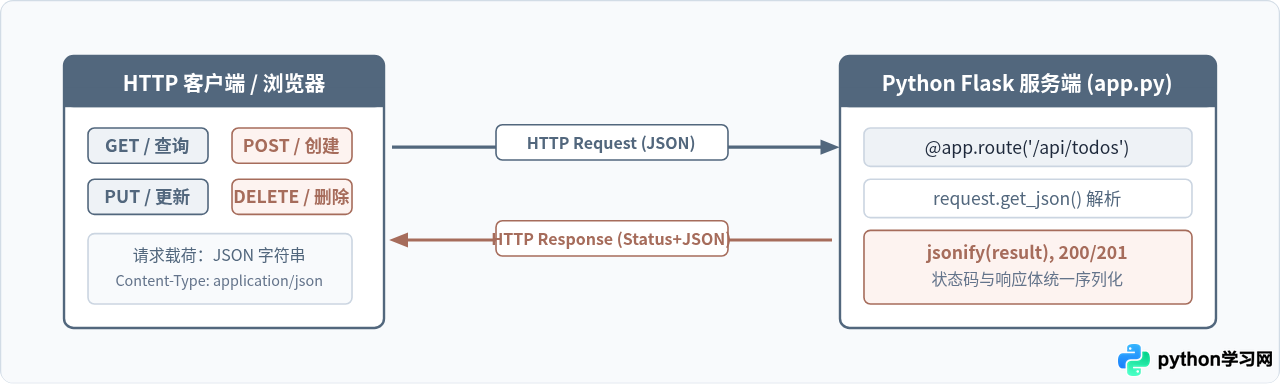
一、理解 RESTful API 的核心要素
在正式写代码之前,必须明确 REST(Representational State Transfer,表现层状态转换)并不是一种编程语言或强制性协议,而是一套基于 HTTP 协议特性的接口设计规范。
很多新手在刚接触 API 时,容易沿用传统 RPC 或动态网页表单的思维,在接口地址中拼写操作动词,比如 /api/get_todos 或 /api/delete_todo?id=1。这种设计在 RESTful 架构中被视为反模式。
在符合 REST 规范的系统中,URL 只应该表示名词(即资源实体),具体的操作则直接借由 HTTP 请求方法来表达:
- 资源定位(URI):始终使用名词复数,例如
/api/todos代表待办事项列表集合,/api/todos/1代表特定 ID 的单项资源。 - 动作表达(HTTP Method):由客户端在请求头中指定动词。读取用
GET,新建用POST,整体更新用PUT,移除用DELETE。 - 状态反馈(Status Code):服务端通过标准的 3 位 HTTP 状态码告知客户端处理结果(如
200 OK、201 Created、400 Bad Request、404 Not Found),而不是在 body 里包裹一个全部都是 200 的自定义错误结构。
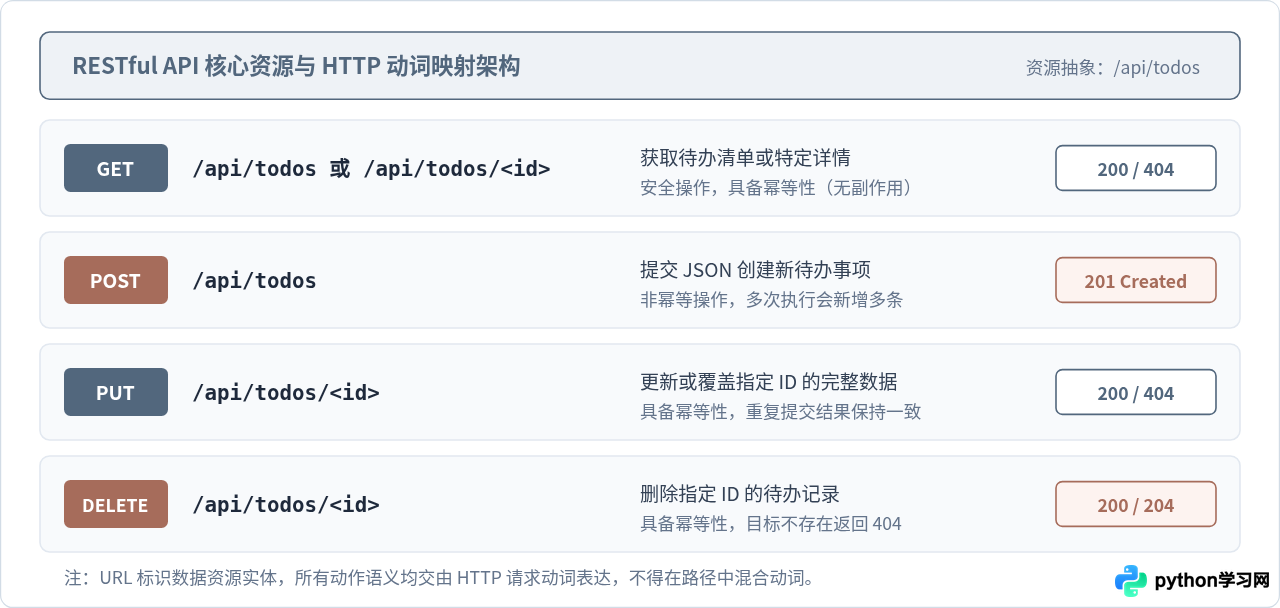
| HTTP 动词 | 端点路径 (URI) | 操作语义 | 幂等性 | 标准成功状态码 |
|---|---|---|---|---|
| GET | /api/todos |
获取待办事项全部列表 | 是(安全且只读) | 200 OK |
| GET | /api/todos/<id> |
获取指定 ID 的单个待办详情 | 是(安全且只读) | 200 OK(未找到 404) |
| POST | /api/todos |
提交新数据,创建待办事项 | 否(多次提交新增多条) | 201 Created |
| PUT | /api/todos/<id> |
完整覆盖更新指定 ID 的待办项 | 是(重复执行结果相同) | 200 OK |
| DELETE | /api/todos/<id> |
删除指定 ID 的待办记录 | 是(重复删除结果不变) | 200 OK 或 204 No Content |
二、环境准备与项目搭建
为了避免与全局 Python 运行环境发生依赖冲突,推荐始终为每个 API 项目创建独立的虚拟环境(virtual environment)。
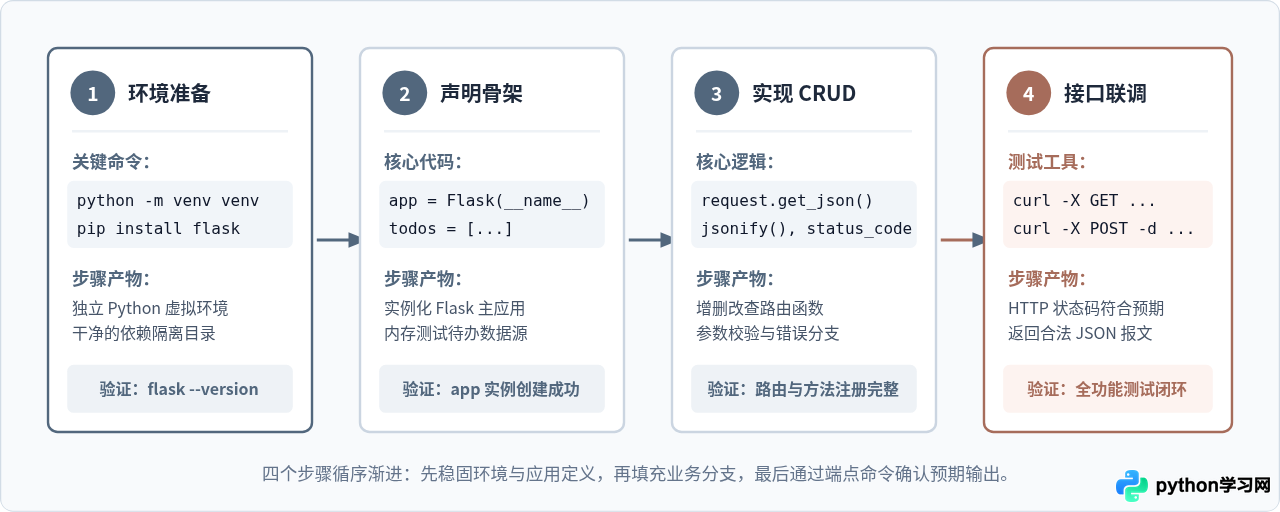
# 1. 创建项目目录并进入
mkdir flask_rest_demo
cd flask_rest_demo

# 2. 创建名为 venv 的独立虚拟环境
python3 -m venv venv

# 3. 激活虚拟环境 (macOS/Linux)
source venv/bin/activate
# Windows PowerShell 请执行: .\venv\Scripts\Activate.ps1

# 4. 安装 Flask 框架
pip install flask$ flask --version
Python 3.9.6
Flask 3.0.0
Werkzeug 3.0.1三、分步编写 RESTful 接口逻辑
我们在项目根目录下新建一个名为 app.py 的代码文件。本节将逐步剖析核心接口的实现逻辑。
1. 应用初始化与内存数据模拟
在没有接入数据库之前,使用 Python 原生列表与字典来模拟持久化存储,这是理解接口数据流转最纯粹的方式。
from flask import Flask, jsonify, request, abort

app = Flask(__name__)

# 模拟数据库存储的待办事项列表
todos = [
    {"id": 1, "title": "阅读 Flask 官方文档", "done": True},
    {"id": 2, "title": "编写第一个 RESTful API", "done": False}
]
2. 实现 GET 只读接口(列表与详情)
在 Flask 中,@app.route 默认处理 GET 请求。返回 JSON 响应必须使用 jsonify() 函数,它会自动完成两件事:将 Python 字典或列表序列化为合法 JSON 文本;将 HTTP 响应头的 Content-Type 设置为 application/json。
# 获取所有待办事项
@app.route('/api/todos', methods=['GET'])
def get_todos():
    return jsonify(todos), 200

# 获取单个待办事项
@app.route('/api/todos/<int:todo_id>', methods=['GET'])
def get_todo(todo_id):
    todo = next((item for item in todos if item["id"] == todo_id), None)
    if todo is None:
        return jsonify({"error": "未找到对应的待办事项"}), 404
return jsonify(todo), 200Flask 视图函数支持直接返回一个元组 (response, status_code)。例如 return jsonify(...), 404 会精准返回 HTTP 404 协议状态,而无需额外包装异常。
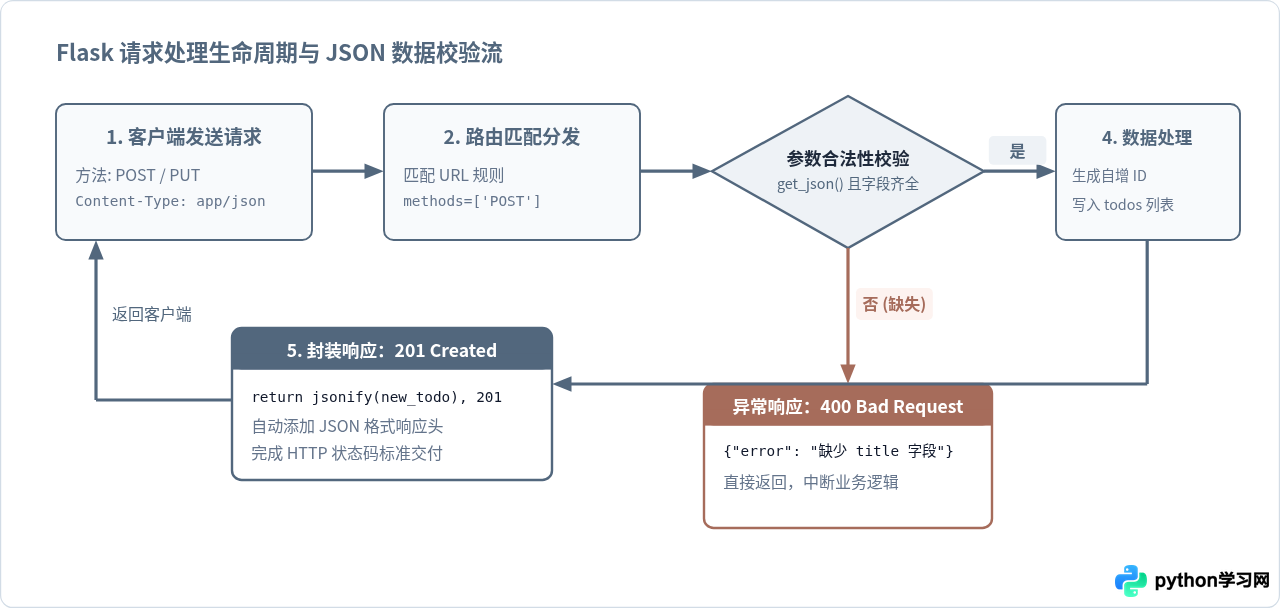
3. 实现 POST 新建接口(参数解析与校验)
创建资源时,客户端必须通过 HTTP Body 发送 JSON 字符串,且必须在请求头指明 Content-Type: application/json。
在服务端,使用 request.get_json(silent=True) 安全提取请求体。如果数据不合法或缺少核心字段,应当直接终止执行并返回 400 Bad Request。
# 创建待办事项
@app.route('/api/todos', methods=['POST'])
def create_todo():
    # 严格校验请求是否为有效 JSON
    if not request.is_json:
        return jsonify({"error": "请求体必须为 application/json 格式"}), 400

    data = request.get_json(silent=True)
    if not data or 'title' not in data or not str(data['title']).strip():
        return jsonify({"error": "title 字段为必填项且不能为空"}), 400

    # 生成自增 ID
    new_id = max((item['id'] for item in todos), default=0) + 1
    new_todo = {
        'id': new_id,
        'title': str(data['title']).strip(),
        'done': bool(data.get('done', False))
    }
    todos.append(new_todo)

    # 规范:新建资源成功必须返回 201 Created
    return jsonify(new_todo), 201
4. 实现 PUT 更新与 DELETE 删除接口
PUT 请求负责覆盖或修改资源状态。DELETE 请求负责从数据集中移除指定资源。两者操作前都需要先确认目标是否存在,若不存在统一返回 404。
# 更新待办事项
@app.route('/api/todos/<int:todo_id>', methods=['PUT'])
def update_todo(todo_id):
    todo = next((item for item in todos if item["id"] == todo_id), None)
    if todo is None:
        return jsonify({"error": "待更新的资源不存在"}), 404

    data = request.get_json(silent=True) or {}
    if 'title' in data:
        if not str(data['title']).strip():
            return jsonify({"error": "title 字段不能为空"}), 400
        todo['title'] = str(data['title']).strip()

    if 'done' in data:
        todo['done'] = bool(data['done'])

    return jsonify(todo), 200

# 删除待办事项
@app.route('/api/todos/<int:todo_id>', methods=['DELETE'])
def delete_todo(todo_id):
    global todos
    todo = next((item for item in todos if item["id"] == todo_id), None)
    if todo is None:
        return jsonify({"error": "待删除的资源不存在"}), 404

    todos = [item for item in todos if item["id"] != todo_id]
    return jsonify({"message": f"待办事项 {todo_id} 已成功删除"}), 200
四、完整可运行代码清单
以下是完整的 app.py 文件代码,你可以直接保存并在本地运行:
from flask import Flask, jsonify, request

app = Flask(__name__)

# 内存模拟数据库
todos = [
    {"id": 1, "title": "阅读 Flask 官方文档", "done": True},
    {"id": 2, "title": "编写第一个 RESTful API", "done": False}
]

@app.route('/api/todos', methods=['GET'])
def get_todos():
    # 获取待办事项列表
    return jsonify(todos), 200

@app.route('/api/todos/<int:todo_id>', methods=['GET'])
def get_todo(todo_id):
    # 获取单个待办事项详情
    todo = next((item for item in todos if item["id"] == todo_id), None)
    if todo is None:
        return jsonify({"error": "未找到对应的待办事项"}), 404
    return jsonify(todo), 200

@app.route('/api/todos', methods=['POST'])
def create_todo():
    # 新增待办事项
    if not request.is_json:
        return jsonify({"error": "请求体必须为 JSON 格式"}), 400

    data = request.get_json(silent=True)
    if not data or 'title' not in data or not str(data['title']).strip():
        return jsonify({"error": "title 字段为必填项且不能为空"}), 400

    new_id = max((item['id'] for item in todos), default=0) + 1
    new_todo = {
        'id': new_id,
        'title': str(data['title']).strip(),
        'done': bool(data.get('done', False))
    }
    todos.append(new_todo)
    return jsonify(new_todo), 201

@app.route('/api/todos/<int:todo_id>', methods=['PUT'])
def update_todo(todo_id):
    # 更新待办事项
    todo = next((item for item in todos if item["id"] == todo_id), None)
    if todo is None:
        return jsonify({"error": "待更新的资源不存在"}), 404

    data = request.get_json(silent=True) or {}
    if 'title' in data:
        if not str(data['title']).strip():
            return jsonify({"error": "title 不能为空"}), 400
        todo['title'] = str(data['title']).strip()

    if 'done' in data:
        todo['done'] = bool(data['done'])

    return jsonify(todo), 200

@app.route('/api/todos/<int:todo_id>', methods=['DELETE'])
def delete_todo(todo_id):
    # 删除待办事项
    global todos
    todo = next((item for item in todos if item["id"] == todo_id), None)
    if todo is None:
        return jsonify({"error": "待删除的资源不存在"}), 404

    todos = [item for item in todos if item["id"] != todo_id]
    return jsonify({"message": f"待办事项 {todo_id} 已成功删除"}), 200

if __name__ == '__main__':
    # 调试模式启动在本地 5000 端口
    app.run(host='127.0.0.1', port=5000, debug=True)
五、接口测试与结果验证
启动服务后,我们在新的终端窗口中使用常见的网络调试命令 curl 进行验证。通过添加 -i 参数可以同时打印出 HTTP 响应头中的状态码。
python app.py测试 1:获取初始列表(GET)
curl -i -X GET http://127.0.0.1:5000/api/todosHTTP/1.1 200 OK
Content-Type: application/json
Content-Length: 142
[
{"id": 1, "title": "阅读 Flask 官方文档", "done": true},
{"id": 2, "title": "编写第一个 RESTful API", "done": false}
]测试 2:提交新资源(POST)
curl -i -X POST http://127.0.0.1:5000/api/todos \
     -H "Content-Type: application/json" \
-d '{"title": "编写单元测试用例", "done": false}'HTTP/1.1 201 CREATED
Content-Type: application/json
Content-Length: 64
{"done": false, "id": 3, "title": "编写单元测试用例"}测试 3:参数缺失触发错误校验(POST 异常分支)
curl -i -X POST http://127.0.0.1:5000/api/todos \
     -H "Content-Type: application/json" \
-d '{"done": true}'HTTP/1.1 400 BAD REQUEST
Content-Type: application/json
Content-Length: 43
{"error": "title 字段为必填项且不能为空"}测试 4:更新指定事项(PUT)
curl -i -X PUT http://127.0.0.1:5000/api/todos/2 \
     -H "Content-Type: application/json" \
-d '{"done": true}'HTTP/1.1 200 OK
Content-Type: application/json
Content-Length: 67
{"done": true, "id": 2, "title": "编写第一个 RESTful API"}测试 5:删除事项(DELETE)
curl -i -X DELETE http://127.0.0.1:5000/api/todos/1HTTP/1.1 200 OK
Content-Type: application/json
Content-Length: 39
{"message": "待办事项 1 已成功删除"}六、RESTful 开发注意事项与常见避坑
在实际工程实践中,编写 RESTful API 常常因为对细节约定的忽视而带来维护困难。以下几点值得特别注意:
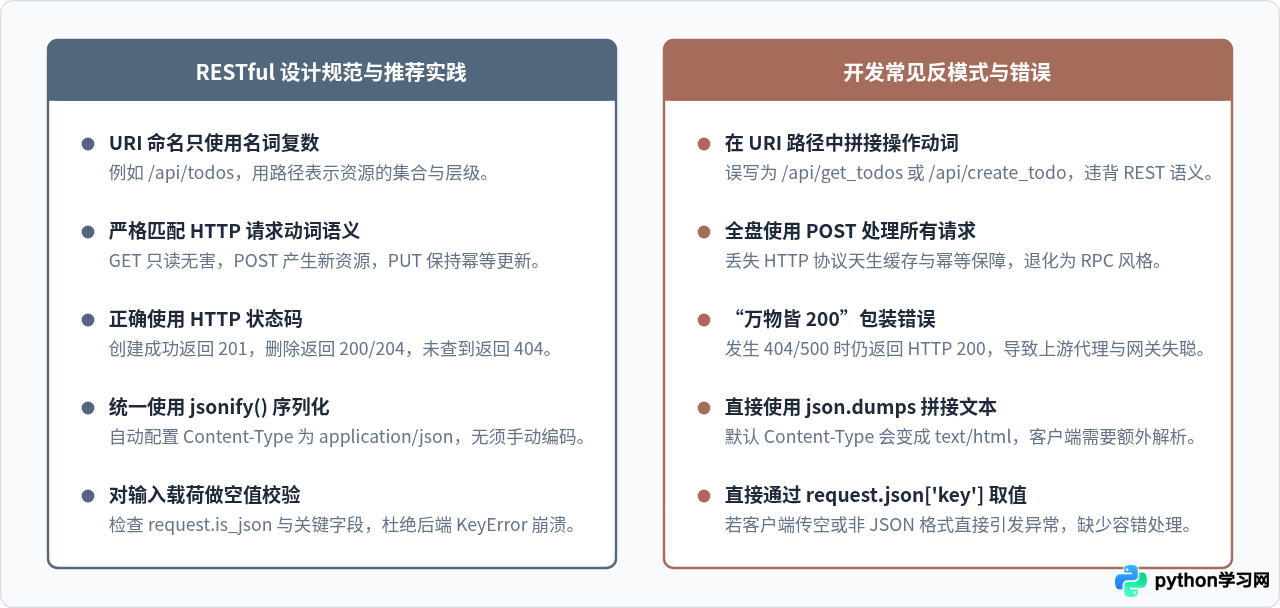
-
请求头 Content-Type 的严谨性:
使用
request.get_json()时,如果客户端没有在 Header 中带上Content-Type: application/json,Flask 默认不会将其作为 JSON 解析,返回结果会是None。在代码中通过request.is_json或设置silent=True可以避免因为解析失败抛出底层 415/500 异常。 -
绝不滥用 HTTP 200 状态码:
很多开发者习惯在所有情况下都返回
200 OK,并在 JSON 报文中塞入{"code": 40001, "msg": "密码错误"}。这种做法破坏了 HTTP 协议的分层优势,使得 CDN、反向代理(如 Nginx)、API 网关和监控告警系统无法根据状态码感知故障率。 - GET 请求绝不能带有写操作副作用: HTTP 规范明确要求 GET 是“安全方法”。网络爬虫、浏览器预加载以及各类反向代理都会频繁并发读取 GET 接口。如果把删除或修改逻辑绑定到 GET 请求上,可能导致数据在无意间被大批量修改或清除。
-
开发环境与生产部署的边界:
代码中的
app.run(debug=True)仅适用于本地编码测试。在生产环境中,开启debug=True会暴露可执行任意代码的交互式控制台,带来严重的安全漏洞;生产部署必须使用如 Gunicorn 或 uWSGI 等 WSGI 生产服务器进行承载。
本站声明
本文内容仅供参考,不代表本站观点。转载或引用请注明出处。如发现内容问题,请通过联系我们页面反馈。