


Python实现Android ADB截图工具:从基础到IP重连优化

发布时间:2026-10-12 |
3人浏览过
本文详细介绍使用Python编写Android ADB截图工具的完整实现过程。涵盖基础功能、代码结构,并重点解析如何将os.system替换为os.popen以获取命令执行结果,从而实现IP连接断开后的自动重连逻辑。文章提供初始源码与优化后最终源码,帮助开发者构建更稳定的移动端调试辅助工具。
功能概述
该工具的核心功能是将Android设备或Android终端的屏幕截图远程传输至本地电脑中,便于开发者或测试人员查看设备当前状态。
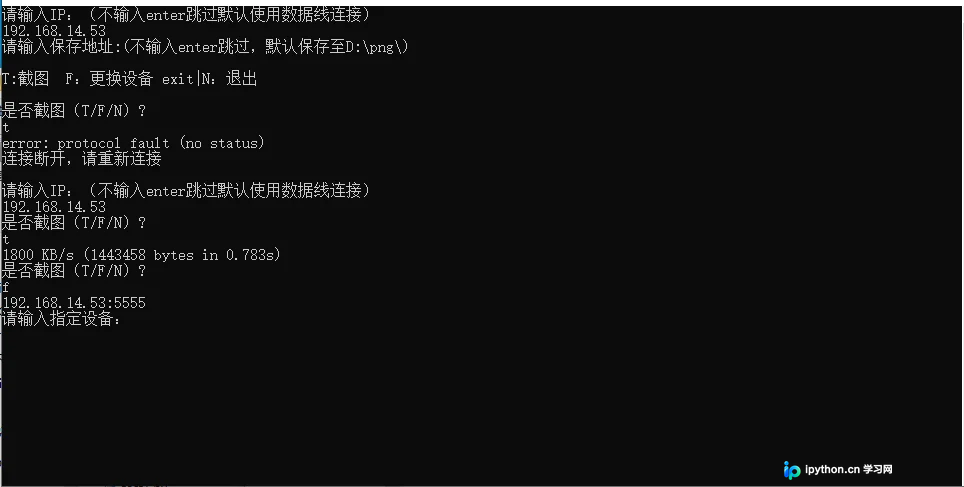
使用说明
1. 本adb截图工具适用于Android手机及各类Android终端设备。 2. 使用前提条件: - 电脑与Android终端/手机需通过数据线连接。 - Android终端/手机必须已开启开发者模式。 3. 生成的截图图片格式固定为png。
实现原理与代码演进
初始源码版本
import time
import os,sys

#截图
def screencap_cmd(filePath,devices=None):
    if filePath==None:
        filePath='D:/png/'
    if not os.path.exists(filePath):
        os.makedirs(filePath)
    filename=time.strftime("%Y%m%d%H%M%S",time.localtime())+".png"
    if devices==None:
        cmd_screencap='adb shell screencap -p sdcard/'+filename
        cmd_pull='adb pull sdcard/'+filename+' '+filePath+filename
        cmd_delete='adb shell rm sdcard/'+filename
    else:
        cmd_screencap='adb -s '+devices+' shell screencap -p sdcard/'+filename
        cmd_pull='adb -s '+devices+' pull sdcard/'+filename+' '+filePath+filename
        cmd_delete='adb -s '+devices+' shell rm sdcard/'+filename
    os.system(cmd_screencap)
    os.system(cmd_pull)
    os.system(cmd_delete)
#保存地址判断及设备信息分类调用
def screencap_info(devices=None,filePath=None):
    if filePath==None:
        filePath='D:/png/'
    if not os.path.exists(filePath):
        os.makedirs(filePath)
    if devices==None:
        screencap_cmd(filePath)
        adb_device_none(filePath)
    else:
        screencap_cmd(filePath,devices)
        adb_info(devices,filePath)
#更换设备
def change_devices():
    r=os.popen("adb devices")
    lines=r.readlines()
    lines=lines[1:-1]
    n=len(lines)
    for i in lines:
        print(i.split("\t")[0])
    devices=input("请输入指定设备:\n")
    for i in lines:
        if devices in i:
            return devices
    print("未找到改设备请重新输入!")
    change_devices()
#截图命令判断,电脑连接多个设备或使用IP截图时
def adb_info(lines,filePath=None):
    s=input("是否截图(T/F/N)?\n")
    if s=='t' or s=='T':
        if filePath==None:
            screencap_info(lines)
        else:
            screencap_info(lines,filePath)
    elif s=='N' or s=='n' or s=='exit':
        sys.exit()
    elif s=='F' or s=='f':
        devices=change_devices()
        if filePath==None:
            adb_info(devices)
        else:
            adb_info(devices,filePath)
 #截图命令判断,电脑连接仅连接一个设备时
def adb_device_none(filePath=None):
    s=input("是否截图(T/F/N)?\n")
    if s=='t' or s=='T':
        if filePath==None:
            screencap_info()
        else:
            screencap_info(None,filePath)
    elif s=='N' or s=='n' or s=='exit':
        sys.exit()
    elif s=='F' or s=='f':
        devices=change_devices()
        if filePath==None:
            adb_info(devices)
        else:
            adb_info(devices,filePath)
#使用设备判断
def adb_devices(n,lines,filePath=None):
    if n==0:
        print("请检查是否已接连或启动调试模式或安装adb环境")
        s=input("再次启动(T/F)?\n")
        if s=='t' or s=='T':
            r=os.popen("adb devices")
            lines=r.readlines()
            lines=lines[1:-1]
            n=len(lines)
            adb_devices(n,r.readlines())
        else:
            sys.exit()
    elif ":5555" in lines:
        print("T:截图  F:更换设备 exit|N:退出 ")
        if filePath==None:
            adb_info(lines)
        else:
            adb_info(lines,filePath)
    elif n==1:
        print("T:截图  F:更换设备  exit|N:退出")
        if filePath==None:
            adb_device_none()
        else:
            adb_device_none(filePath)
    elif n>1:
        for i in lines:
            print(i.split("\t")[0])
        devices=input("请输入指定设备:\n")
        for i in lines:
            if devices in i:
                print("T:截图  F:更换设备  exit|N:退出")
                if filePath==None:
                    adb_info(devices)
                else:
                    adb_info(devices,filePath)
        print("未找到改设备请重新输入!")
        if filePath==None:
            adb_devices(n,lines)
        else:
            adb_devices(n,lines,filePath)

#输入IP
def ip_info():
    ipPath=input("请输入IP:(不输入enter跳过默认使用数据线连接)\n")
    if len(ipPath)>0:
        try:
            cnd='adb connect '+ipPath
            os.system(cnd)
            return ipPath
        except:
            print("ADB调试模式为USB,需要切换到无线调试模式\n")
            print("切换方法:\n第一步:Android设备开启USB调试,并且通过USB线连接到电脑\n第二步:在终端执行以下命令”adb tcpip 5555“\n第三步:在终端执行以下命令”adb connect ip“。此时拔出USB线,应该就可以adb通过wifi调试设备\n")
            return ip_info()
if  __name__ == '__main__':
    ipPath=ip_info()
    filePath=input("请输入保存地址:(不输入enter跳过,默认保存至D:\png\)\n")
    #查询当前连接的设备
    r=os.popen("adb devices")
    lines=r.readlines()
    lines=lines[1:-1]
    n=len(lines)
    ip_add=0
    if ipPath!=None:
        for i in lines:
            if ipPath in i:
                ip_add=i.split("\t")[0]
    if len(filePath)>0:
        if ":\\" in filePath:
            if ip_add!=0:
                adb_devices(n,ip_add,filePath)
            else:
                adb_devices(n,lines,filePath)
        else:
            print("地址输入非法,使用默认地址\n")
            if ip_add!=0:
                adb_devices(n,ip_add)
            else:
                adb_devices(n,lines)
    else:
        if ip_add!=0:
            adb_devices(n,ip_add)
        else:
            adb_devices(n,lines)
优化方向:增加IP连接断开后的自动重连处理机制
在输入IP函数ip_info()中增加IP连接状态判断,并将原有的os.system替换为os.popen函数来执行cmd命令,以获取更详细的执行反馈。
r=os.popen(cnd)
#读取执行结果
lines=r.readlines()[0]
if 'unable' in lines:
    print("连接失败\n")
    return ip_info()
else:
    return ipPath
- os.system函数的局限性在于无法直接获取命令执行的具体结果内容,仅能返回执行成功(返回0)或失败(返回1)的状态码,且命令的执行结果会直接打印在终端上,这相当于调起DOS窗口执行命令,不利于程序内部逻辑处理。
- 相比之下,os.popen函数可以获取命令执行后的具体结果内容,但需要通过readlines方法读取这些结果,且执行过程不会在终端上打印输出,更适合程序内部的状态判断。
在输入IP函数ip_info()中增加IP连接判断,将os.system替换成os.popen函数执行cmd命令,具体优化代码如下:
a=os.system(cmd_screencap)
if a==0:
   os.system(cmd_pull)
   os.system(cmd_delete)
else:
   if ":5555" in devices:
            print("连接断开,请重新连接\n")
            ipPath=ip_info()
            if ipPath==None:
                ipPath=ip_info()
            else:
                device=ipPath+":5555"
                adb_info(device,filePath)
        else:
            print("设备连接断开,请更换设备\n")
            device=change_devices()
            adb_info(device,filePath)
最终完整源码
import time
import os,sys

#输入IP
def ip_info():
    ipPath=input("请输入IP:(不输入enter跳过默认使用数据线连接)\n")
    if len(ipPath)>0:
        try:
            cnd='adb connect '+ipPath
            r=os.popen(cnd)
            lines=r.readlines()[0]
            if 'unable' in lines:
                print("连接失败\n")
                return ip_info()
            else:
                return ipPath

        except:
            print("ADB调试模式为USB,需要切换到无线调试模式\n")
            print("切换方法:\n第一步:Android设备开启USB调试,并且通过USB线连接到电脑\n第二步:在终端执行以下命令”adb tcpip 5555“\n第三步:在终端执行以下命令”adb connect ip“。此时拔出USB线,应该就可以adb通过wifi调试设备\n")
            return ip_info()
#保存地址判断及设备信息分类调用
def screencap_info(devices=None,filePath=None):
    if filePath==None:
        filePath='D:/png/'
    if not os.path.exists(filePath):
        os.makedirs(filePath)
    if devices==None:
        screencap_cmd(filePath)
        adb_device_none(filePath)
    else:
        screencap_cmd(filePath,devices)
        adb_info(devices,filePath)
#更换设备
def change_devices():
    r=os.popen("adb devices")
    lines=r.readlines()
    lines=lines[1:-1]
    n=len(lines)
    for i in lines:
        print(i.split("\t")[0])
    devices=input("请输入指定设备:\n")
    for i in lines:
        if devices in i:
            return devices
    print("未找到改设备请重新输入!\n")
    change_devices()
#截图命令判断,电脑连接多个设备或使用IP截图时
def adb_info(lines,filePath=None):
    s=input("是否截图(T/F/N)?\n")
    if s=='t' or s=='T':
        if filePath==None:
            screencap_info(lines)
        else:
            screencap_info(lines,filePath)
    elif s=='N' or s=='n' or s=='exit':
        sys.exit()
    elif s=='F' or s=='f':
        devices=change_devices()
        if filePath==None:
            adb_info(devices)
        else:
            adb_info(devices,filePath)
#截图命令判断,电脑连接仅连接一个设备时
def adb_device_none(filePath=None):
    s=input("是否截图(T/F/N)?\n")
    if s=='t' or s=='T':
        if filePath==None:
            screencap_info()
        else:
            screencap_info(None,filePath)
    elif s=='N' or s=='n' or s=='exit':
        sys.exit()
    elif s=='F' or s=='f':
        devices=change_devices()
        if filePath==None:
            adb_info(devices)
        else:
            adb_info(devices,filePath)
#使用设备判断
def adb_devices(n,lines,filePath=None):
    if n==0:
        print("请检查是否已接连或启动调试模式或安装adb环境\n")
        s=input("再次启动(T/F)?\n")
        if s=='t' or s=='T':
            r=os.popen("adb devices")
            lines=r.readlines()
            lines=lines[1:-1]
            n=len(lines)
            adb_devices(n,r.readlines())
        else:
            sys.exit()
    elif ":5555" in lines:
        print("T:截图  F:更换设备 exit|N:退出\n")
        if filePath==None:
            adb_info(lines)
        else:
            adb_info(lines,filePath)
    elif n==1:
        print("T:截图  F:更换设备  exit|N:退出\n")
        if filePath==None:
            adb_device_none()
        else:
            adb_device_none(filePath)
    elif n>1:
        for i in lines:
            print(i.split("\t")[0])
        devices=input("请输入指定设备:\n")
        for i in lines:
            if devices in i:
                print("T:截图  F:更换设备  exit|N:退出")
                if filePath==None:
                    adb_info(devices)
                else:
                    adb_info(devices,filePath)
        print("未找到改设备请重新输入!")
        if filePath==None:
            adb_devices(n,lines)
        else:
            adb_devices(n,lines,filePath)
#截图
def screencap_cmd(filePath,devices=None):
    if filePath==None:
        filePath='D:/png/'
    if not os.path.exists(filePath):
        os.makedirs(filePath)
    filename=time.strftime("%Y%m%d%H%M%S",time.localtime())+".png"
    if devices==None:
        cmd_screencap='adb shell screencap -p sdcard/'+filename
        cmd_pull='adb pull sdcard/'+filename+' '+filePath+filename
        cmd_delete='adb shell rm sdcard/'+filename
    else:
        cmd_screencap='adb -s '+devices+' shell screencap -p sdcard/'+filename
        cmd_pull='adb -s '+devices+' pull sdcard/'+filename+' '+filePath+filename
        cmd_delete='adb -s '+devices+' shell rm sdcard/'+filename
    a=os.system(cmd_screencap)
    if a==0:
        os.system(cmd_pull)
        os.system(cmd_delete)
    else:
        if ":5555" in devices:
            print("连接断开,请重新连接\n")
            ipPath=ip_info()
            if ipPath==None:
                ipPath=ip_info()
            else:
                device=ipPath+":5555"
                adb_info(device,filePath)
        else:
            print("设备连接断开,请更换设备\n")
            device=change_devices()
            adb_info(device,filePath)
if  __name__ == '__main__':
    ipPath=ip_info()
    filePath=input("请输入保存地址:(不输入enter跳过,默认保存至D:\png\)\n")
    #查询当前连接的设备
    r=os.popen("adb devices")
    lines=r.readlines()
    lines=lines[1:-1]
    n=len(lines)
    ip_add=0
    if ipPath!=None:
        for i in lines:
            if ipPath in i:
                ip_add=i.split("\t")[0]
    if len(filePath)>0:
        if ":\\" in filePath:
            if ip_add!=0:
                adb_devices(n,ip_add,filePath)
            else:
                adb_devices(n,lines,filePath)
        else:
            print("地址输入非法,使用默认地址\n")
            if ip_add!=0:
                adb_devices(n,ip_add)
            else:
                adb_devices(n,lines)
    else:
        if ip_add!=0:
            adb_devices(n,ip_add)
        else:
            adb_devices(n,lines)
到此这篇关于python编写adb截图工具的文章就介绍到这了,更多相关python adb截图工具内容请搜索本站以前的文章或继续浏览下面的相关文章希望大家以后多多支持本站!
本站声明
本文内容仅供参考,不代表本站观点。转载或引用请注明出处。如发现内容问题,请通过联系我们页面反馈。















