


Python Tkinter实现弹球小游戏完整代码解析

发布时间:2026-10-13 |
3人浏览过
本文详细介绍使用Python Tkinter库开发弹球小游戏的完整过程,涵盖Ball与Paddle类的核心逻辑、碰撞检测算法及主循环机制。通过解析关键代码段,帮助开发者理解图形界面编程中的对象移动、边界判断与交互处理,适合Python入门及游戏开发初学者参考。
本文分享一个使用Python编写的弹球小游戏示例,供读者参考学习。
弹球游戏实现
1. Ball 类设计
draw方法负责控制球的移动逻辑,包括碰撞检测、反弹处理以及球与挡板(Paddle)的交互判定。
2. Paddle 类设计
draw方法负责控制挡板的移动,同时处理碰撞检测以确定游戏是否继续,并监听键盘事件以响应用户操作。
3. 主循环逻辑
主循环负责绘制Ball和Paddle对象,执行update更新状态,并通过sleep控制帧率。
完整代码实现
from Tkinter import *
import random
import time
class Ball:
  def __init__(self, canvas, paddle, color):
    self.canvas = canvas
    self.paddle = paddle
    self.id = canvas.create_oval(10, 10, 25, 25, fill=color)
    self.canvas.move(self.id, 245, 100)
    startx = [-3, -2, -1, 1, 2, 3]
    random.shuffle(startx)
    self.x = startx[0]
    self.y = -3
    self.canvas_height = self.canvas.winfo_height()
    self.canvas_width = self.canvas.winfo_width()
    self.hit_bottom = False
  def draw(self):
    self.canvas.move(self.id, self.x, self.y)
    pos = self.canvas.coords(self.id)#top-left bottom-right
    if (pos[1] <= 0 or self.hit_paddle(pos) == True):
      self.y = -self.y
    if (pos[0] <= 0 or pos[2] >= self.canvas_width):
      self.x = -self.x
    if (pos[3] >= self.canvas_height):
      self.hit_bottom = True
  def hit_paddle(self, pos):
    paddle_pos = self.canvas.coords(self.paddle.id)
    if (pos[2] >= paddle_pos[0] and pos[0] <= paddle_pos[2]):
      if (pos[3] >= paddle_pos[1] and pos[3] <= paddle_pos[3]):
        return True
    return False
class Paddle:
  def __init__(self, canvas, color):
    self.canvas = canvas
    self.id = canvas.create_rectangle(0, 0, 100, 10, fill = color)
    self.x = 0
    self.canvas.move(self.id, 200, 300)
    self.canvas_width = self.canvas.winfo_width()
    self.canvas.bind_all("<Key-Left>", self.turn_left)
    self.canvas.bind_all("<Key-Right>", self.turn_right)
  def draw(self):
    pos = self.canvas.coords(self.id)
    if (pos[0] + self.x >= 0 and pos[2] + self.x <= self.canvas_width):
      self.canvas.move(self.id, self.x, 0)
    #self.x = 0
  def turn_left(self, event):
    self.x = -4
  def turn_right(self, event):
    self.x = 4
tk = Tk()
tk.title("Game")
tk.resizable(0, 0)#not resizable
tk.wm_attributes("-topmost", 1)#at top
canvas = Canvas(tk, width = 500, height = 500, bd = 0, highlightthickness = 0)
canvas.pack()
tk.update()#init
paddle = Paddle(canvas, 'blue')
ball = Ball(canvas, paddle, 'red')
while 1:
  if (ball.hit_bottom == False):
    ball.draw()
    paddle.draw()
  tk.update_idletasks()
  tk.update()
  time.sleep(0.01)
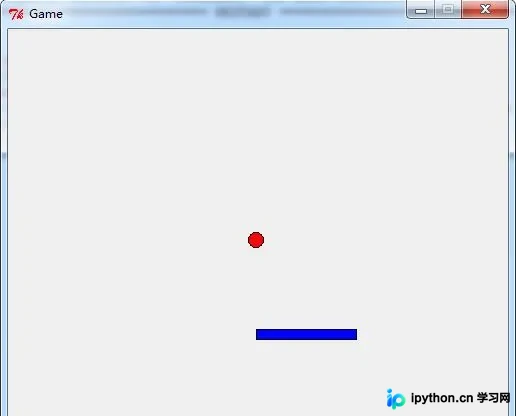
运行效果如下图所示:
更多关于Python相关内容感兴趣的读者可查看本站专题:《Python编码操作技巧总结》、《Python数据结构与算法教程》、《Python函数使用技巧总结》、《Python字符串操作技巧汇总》及《Python入门与进阶经典教程》
希望本文所述对大家Python程序设计有所帮助。
本站声明
本文内容仅供参考,不代表本站观点。转载或引用请注明出处。如发现内容问题,请通过联系我们页面反馈。















