


Python基于urllib与BeautifulSoup抓取京东商品图片实战

发布时间:2026-10-13 |
4人浏览过
本文介绍使用Python 2.7结合urllib与BeautifulSoup库,实现从京东网站批量爬取商品图片的方法。通过解析页面DOM结构获取图片链接与商品名称,自动创建目录并按名保存。代码包含URL构造、异常处理及进度显示,适用于学习网页抓取与文件存储操作。
本示例代码基于Python 2.7版本编写,核心依赖urllib库进行网络请求,并采用BeautifulSoup进行HTML页面解析。在运行程序前,请确保已安装相关第三方库。开发环境推荐使用PyCharm。以下直接展示核心实现代码。
# -*- coding: utf-8 -*
import re
import os
import urllib
import urllib2
from bs4 import BeautifulSoup
def craw(url,page):
 html1=urllib2.urlopen(url).read()
 html1=str(html1)
 soup=BeautifulSoup(html1,'lxml')
 imagelist=soup.select('#J_goodsList > ul > li > div > div.p-img > a > img')
 namelist=soup.select('#J_goodsList > ul > li > div > div.p-name > a > em')
 #pricelist=soup.select('#plist > ul > li > div > div.p-price > strong')
 #print pricelist
 path = "E:/{}/".format(str(goods))
 if not os.path.exists(path):
  os.mkdir(path)
 for (imageurl,name) in zip(imagelist,namelist):
  name=name.get_text()
  imagename=path + name +".jpg"
  imgurl="http:"+str(imageurl.get('data-lazy-img'))
  if imgurl == 'http:None':
   imgurl = "http:" + str(imageurl.get('src'))
  try:
   urllib.urlretrieve(imgurl,filename=imagename)
  except:
   continue

'''
#J_goodsList > ul > li:nth-child(1) > div > div.p-img > a > img
#plist > ul > li:nth-child(1) > div > div.p-name.p-name-type3 > a > em
#plist > ul > li:nth-child(1) > div > div.p-price > strong:nth-child(1) > i
'''

if __name__ == "__main__":
 goods=raw_input('please input the goos you want:')
 pages=input('please input the pages you want:')
 count =0.0
 for i in range(1,int(pages+1),2):
  url="https://search.jd.com/Search?keyword={}&enc=utf-8&qrst=1&rt=1&stop=1&vt=2&suggest=1.def.0.T06&wq=diann&page={}".format(str(goods),str(i))
  craw(url,i)
  count += 1
  print 'work completed {:.2f}%'.format(count/int(pages)*100)
下载的图片文件命名规则采用商品原始名称。需要注意的是,京东网站前端页面结构可能随时调整,导致图片地址的DOM属性发生变化,因此在实际编写爬虫时,需根据目标网站结构灵活调整选择器,做到举一反三。下图展示了成功下载的手机类目商品图片文件截图:
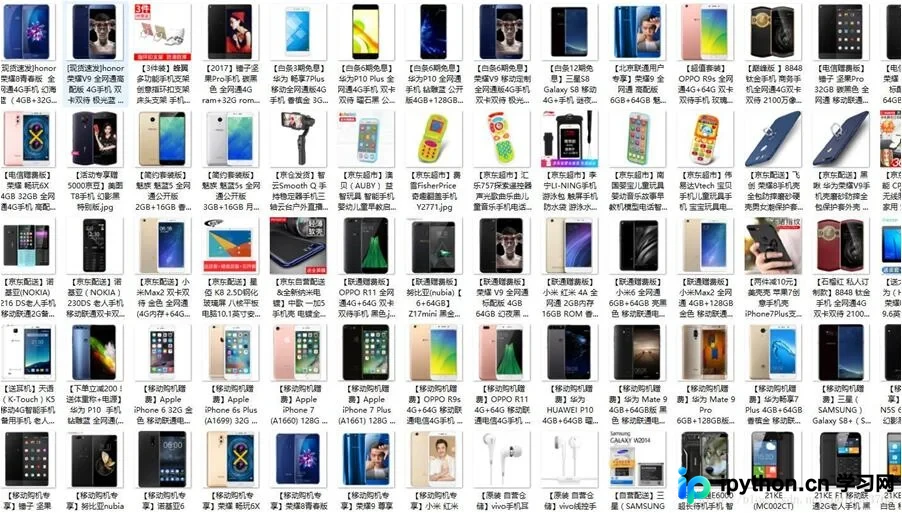
在本地测试环境中,该脚本执行效率较高,能够在不到一分钟的时间内完成100页、共计上千个商品图片的下载任务。
以上即为利用Python urllib库实现京东商品图片爬取的完整示例,希望能为读者提供有价值的参考。欢迎大家支持本站,获取更多技术分享。
本站声明
本文内容仅供参考,不代表本站观点。转载或引用请注明出处。如发现内容问题,请通过联系我们页面反馈。















