


OpenCV实现马赛克和毛玻璃滤镜效果

发布时间:2026-10-13 |
3人浏览过
本文介绍了使用OpenCV实现马赛克和毛玻璃两种图像滤镜效果的方法。马赛克通过随机选取邻域像素颜色模糊细节,毛玻璃则利用随机像素替换实现模糊效果。文章提供了具体的C++代码实现及效果展示,帮助开发者快速掌握相关图像处理技术。
本文分享了使用OpenCV实现马赛克和毛玻璃滤镜的具体代码,供读者参考。
一、马赛克效果
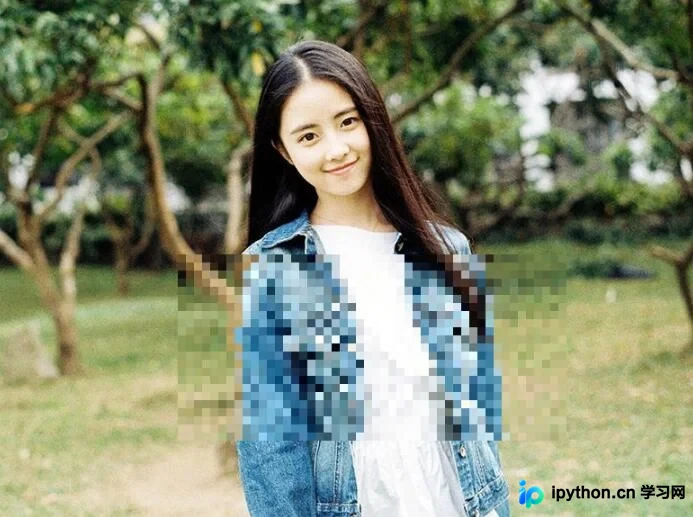
马赛克的实现原理是将图像上某个像素点一定范围邻域内的所有点,用邻域内随机选取的一个像素点的颜色代替。这种方法可以模糊细节,同时保留大体的轮廓。
以下OpenCV程序实现了马赛克效果,用户可以通过鼠标左键在图像上划定马赛克的矩形框。
#include <core\core.hpp>
#include <highgui\highgui.hpp>

using namespace cv;

Mat imageSourceCopy; //原始图像
Mat imageSource; //原始图像拷贝
int neightbourHood = 9; //马赛克上每个方框的像素大小

RNG rng;
int randomNum; //邻域内随机值

Point ptL; //左键按下时坐标
Point ptR; //右键按下时坐标

//鼠标回掉函数
void onMouse(int event, int x, int y, int flag, void *ustg);

int main()
{
  imageSourceCopy = imread("Test.jpg");
  imageSource = imageSourceCopy.clone();
  //imshow("马赛克", imageSourceCopy);
  namedWindow("马赛克");
  setMouseCallback("马赛克", onMouse);
  waitKey();
}

void onMouse(int event, int x, int y, int flag, void *ustg)
{
  if (event == CV_EVENT_LBUTTONDOWN)
  {
    ptL = Point(x, y);
  }
  if (event == CV_EVENT_LBUTTONUP)
  {
    //对鼠标画出的矩形框超出图像范围做处理,否则会越界崩溃
    x > imageSource.cols - 2 * neightbourHood ? x = imageSource.cols - 2 * neightbourHood : x = x;
    y > imageSource.rows - 2 * neightbourHood ? y = imageSource.rows - 2 * neightbourHood : y = y;

    //对鼠标从右下往右上画矩形框的情况做处理
    ptR = Point(x, y);
    Point pt = ptR;
    ptR.x < ptL.x ? ptR = ptL, ptL = pt : ptR = ptR;
    for (int i = 0; i < ptR.y - ptL.y; i += neightbourHood)
    {
      for (int j = 0; j < ptR.x - ptL.x; j += neightbourHood)
      {
        randomNum = rng.uniform(-neightbourHood / 2, neightbourHood / 2);
        Rect rect = Rect(j + neightbourHood + ptL.x, i + neightbourHood + ptL.y, neightbourHood, neightbourHood);
        Mat roi = imageSourceCopy(rect);
        Scalar sca = Scalar(
          imageSource.at<Vec3b>(i + randomNum + ptL.y, j + randomNum + ptL.x)[0],
          imageSource.at<Vec3b>(i + randomNum + ptL.y, j + randomNum + ptL.x)[1],
          imageSource.at<Vec3b>(i + randomNum + ptL.y, j + randomNum + ptL.x)[2]);
        Mat roiCopy = Mat(rect.size(), CV_8UC3, sca);
        roiCopy.copyTo(roi);
      }
    }
  }
  imshow("马赛克", imageSourceCopy);
  waitKey();
}
可以通过改变程序中neightbourHood参数的大小来调整小矩形块的大小,实现效果如下:
二、毛玻璃效果
毛玻璃效果的实现是通过用像素点邻域内随机一个像素点的颜色替代当前像素点的颜色来完成的。
#include <core\core.hpp>
#include <highgui\highgui.hpp>

using namespace cv;

int main()
{
  Mat imageSource = imread("Test.jpg");
  Mat imageResult = imageSource.clone();
  RNG rng;
  int randomNum;
  int Number = 5;

  for (int i = 0; i < imageSource.rows - Number; i++)
    for (int j = 0; j < imageSource.cols - Number; j++)
    {
      randomNum = rng.uniform(0, Number);
      imageResult.at<Vec3b>(i, j)[0] = imageSource.at<Vec3b>(i + randomNum, j + randomNum)[0];
      imageResult.at<Vec3b>(i, j)[1] = imageSource.at<Vec3b>(i + randomNum, j + randomNum)[1];
      imageResult.at<Vec3b>(i, j)[2] = imageSource.at<Vec3b>(i + randomNum, j + randomNum)[2];
    }
  imshow("毛玻璃效果", imageResult);
  waitKey();
}
实现效果如下:

以上就是本文的全部内容,希望对大家的学习有所帮助,也希望大家多多支持本站。
本站声明
本文内容仅供参考,不代表本站观点。转载或引用请注明出处。如发现内容问题,请通过联系我们页面反馈。















