


Python Matplotlib绘制自定义星形标记路径详解

发布时间:2026-10-14 |
3人浏览过
本文详解如何在Matplotlib中使用Path类绘制自定义标记路径。通过结合圆形与星形顶点数据,演示如何生成带内部挖空效果的复杂星形标记,并展示在折线图中应用该自定义标记的具体代码与效果。
Matplotlib自定义标记路径基础
标记路径
演示效果如下所示。
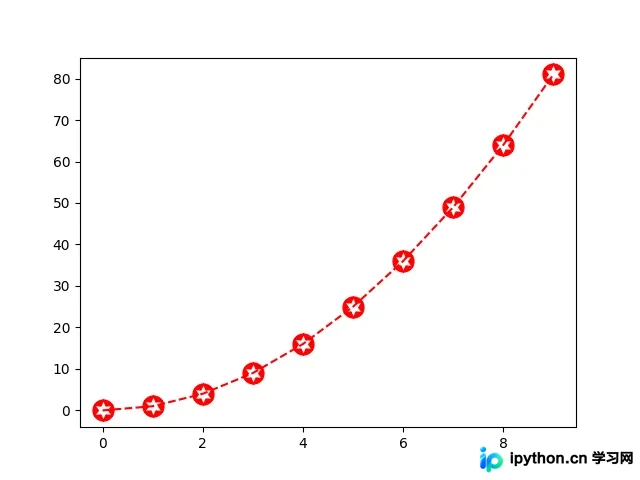
代码实现与路径构建
以下是实现该效果的具体代码示例。
import matplotlib.pyplot as plt
import matplotlib.path as mpath
import numpy as np


star = mpath.Path.unit_regular_star(6)
circle = mpath.Path.unit_circle()
# concatenate the circle with an internal cutout of the star
verts = np.concatenate([circle.vertices, star.vertices[::-1, ...]])
codes = np.concatenate([circle.codes, star.codes])
cut_star = mpath.Path(verts, codes)


plt.plot(np.arange(10)**2, '--r', marker=cut_star, markersize=15)

plt.show()
总结与展望
通过上述示例,我们了解了如何利用Path类构建复杂的几何形状作为标记。
以上就是关于Matplotlib绘制自定义标记路径的全部内容,希望能为您的开发工作提供帮助。如果您对相关内容感兴趣,欢迎继续浏览本站的其他技术专题。文中如有疏漏之处,敬请留言指正,感谢大家的支持!
本站声明
本文内容仅供参考,不代表本站观点。转载或引用请注明出处。如发现内容问题,请通过联系我们页面反馈。















