


Pygame实战:实现游戏障碍躲避计数与难度动态调整

发布时间:2026-10-13 |
1人浏览过
本文介绍如何在Pygame游戏中实现障碍躲避计数功能。通过定义计数函数显示得分,并在游戏循环中动态增加障碍速度和宽度,从而提升游戏难度。包含完整代码示例及效果展示,帮助开发者快速掌握相关技巧。
本节内容属于Pygame游戏开发系列的第八部分,旨在为读者提供具体的实现参考。
首先,我们需要定义一个用于显示躲避障碍物数量的函数。
def things_dodged(count):
 font = pygame.font.SysFont(None, 25)
 text = font.render("Dodged:"+str(count), True, black)
 gameDisplay.blit(text,(0,0))
接下来,在游戏的主循环中加入计数逻辑,并通过加速障碍物和增加其宽度来提升游戏难度。
dodged += 1
thing_speed += 1
thing_width += (dodged * 1.2)
以下是完整的代码实现。
import pygame
import time
import random

pygame.init()

white = (255,255,255)
black = (0,0,0)

car_width = 100

display_width = 800
display_height = 600


gameDisplay = pygame.display.set_mode( (display_width,display_height) )
pygame.display.set_caption('A bit Racey')
clock = pygame.time.Clock()

carImg = pygame.image.load('car.png')

def things_dodged(count):
 font = pygame.font.SysFont(None, 25)
 text = font.render("Dodged:"+str(count), True, black)
 gameDisplay.blit(text,(0,0))

def things(thingx, thingy, thingw, thingh, color):
 pygame.draw.rect(gameDisplay, color, [thingx, thingy, thingw, thingh])


def car(x, y):
 gameDisplay.blit(carImg, (x,y))


def text_objects(text, font):
 textSurface = font.render(text, True, black)
 return textSurface, textSurface.get_rect()

def message_diaplay(text):
 largeText = pygame.font.Font('freesansbold.ttf',115)
 TextSurf, TextRect = text_objects(text, largeText)
 TextRect.center = ((display_width/2),(display_height/2))
 gameDisplay.blit(TextSurf, TextRect)
 pygame.display.update()
 time.sleep(2)
 game_loop()

def crash():
 message_diaplay('You Crashed')


def game_loop():
 x = display_width * 0.45
 y = display_height * 0.8
 x_change = 0

 dodged = 0

 gameExit = False

 thing_startx = random.randrange(0, display_width)
 thing_starty = -600
 thing_speed = 7
 thing_width = 100
 thing_height = 100

 while not gameExit:
 for event in pygame.event.get():
  if event.type == pygame.QUIT:
  pygame.quit()
  quit()
  if event.type == pygame.KEYDOWN:
  if event.key == pygame.K_LEFT:
   x_change = -5
  elif event.key == pygame.K_RIGHT:
   x_change = 5
  if event.type == pygame.KEYUP:
  if event.key == pygame.K_LEFT or event.key == pygame.K_RIGHT:
   x_change = 0
  print(event)
 x += x_change
 gameDisplay.fill(white)

 things(thing_startx, thing_starty, thing_width, thing_height, black)
 thing_starty += thing_speed

 car(x,y)
 things_dodged(dodged)
 if x > display_width - car_width or x < 0:
  gameExit = True
 if thing_starty > display_height:
  thing_starty = 0 - thing_height
  thing_startx = random.randrange(0, display_width)
  dodged += 1
  thing_speed += 1
  thing_width += (dodged * 1.2)
 if y < thing_starty + thing_height:
  print('y crossover')
  if x > thing_startx and x < thing_startx + thing_width or x + car_width > thing_startx and x + car_width < thing_startx + thing_width:
  print('x crossover')
  crash()
 pygame.display.update()
 clock.tick(60)
#crash()
game_loop()
pygame.quit()
quit()
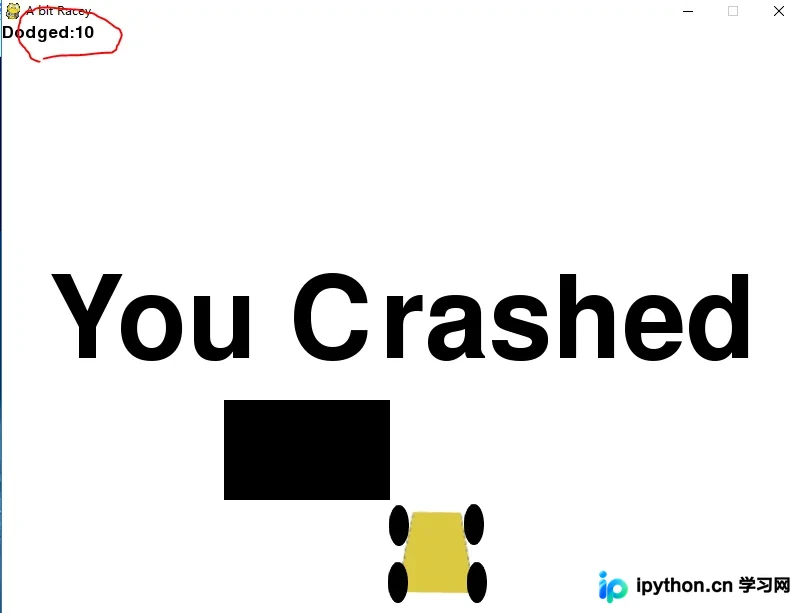
运行后的效果如下图所示。
以上就是本文的全部内容,希望能为各位的学习带来帮助,同时也欢迎大家继续支持本站。
本站声明
本文内容仅供参考,不代表本站观点。转载或引用请注明出处。如发现内容问题,请通过联系我们页面反馈。















