


Python自动化测试:集成HTMLTestRunner与自动邮件发送报告

本文详细介绍如何在Python自动化测试项目中集成HTMLTestRunner生成可视化测试报告,并通过smtplib库实现测试完成后自动发送包含附件的邮件。内容涵盖HTMLTestRunner的安装配置、代码修改以兼容Python3、测试用例执行流程以及自动邮件发送功能的完整代码实现,帮助开发者提升测试反馈效率。
在自动化测试项目中,自动发送测试报告是一项关键需求。当自动化脚本执行完毕后,系统能自动将最新的测试结果发送至指定邮箱,将原本需要主动且滞后查看的方式转变为被动且实时的接收模式,从而显著提升工作效率和响应速度。
为了清晰展示自动化测试成果,首先需要一份直观且易懂的测试报告。HTMLTestRunner 是 python 标准库 unittest 单元测试框架的一个扩展工具,它能够生成易于阅读的HTML格式测试报告。
下载地址: http://tungwaiyip.info/software/HTMLTestRunner.html
该扩展工具结构简洁,仅包含一个 .py 文件,下载后直接保存至本地即可使用。安装过程同样简单,只需将该文件复制到 Python 的安装目录中。
Windows系统:将下载的文件保存至 ../Python35/Lib 目录下
Linux(ubuntu)系统:以root权限将 HTMLTestRunner.py 文件复制到 /usr/local/Python3.7/dist-packages/ 目录下
修改HTMLTestRunner
#第 94 行
import StringIo
修改为:
import io

#第 539 行
self.outputBuffer=StringIO.StringIO()
修改为:
self.outputBuffer=io.StringIO()

#第 631 行
print >>sys.stderr, 'nTime Elapsed: %s' % (self.stopTime-self.startTime)
修改为:
print(sys.stderr, 'nTime Elapsed: %s' % (self.stopTime-self.startTime))

#第 642 行
if not rmap.has_key(cls):
修改为:
if not cls in rmap:

#第 766 行
uo=o.decode('latin-1')
修改为:
uo=o

#第 772 行
ue=e.decode('latin-1')
修改为:
ue=e
生成HTML测试报告
from selenium import webdriver
import unittest
from HTMLTestRunner import HTMLTestRunner
class Baidu(unittest.TestCase):
 def setUp(self):
  self.driver=webdriver.Firefox()
  self.driver.implicitly_wait(10)
  self.base_url="https://www.baidu.com"

 def test_baidu_search(self):
  driver=self.driver
  driver.get(self.base_url)
  driver.find_element_by_id("kw").send_keys("HTMLTestRunner")
  driver.find_element_by_id("su").click()
 def tearDown(self):
  self.driver.quit()
if __name__=="__main__":
 testunit=unittest.TestSuite()
 testunit.addTest(Baidu("test_baidu_search"))
 #定义报告存放路径
 fp=open('./result.html','wb')
 #定义测试报告
 runner=HTMLTestRunner(
  stream=fp,
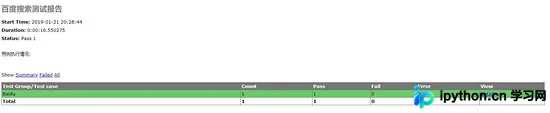
  title='百度搜索测试报告',
  description='用例执行情况:'
 )
 runner.run(testunit) # 运行测试用例
 fp.close() # 关闭报告文件
代码分析
首先,通过 import 语句导入 HTMLTestRunner 模块。
其次,使用 open() 方法以二进制写模式('wb')打开当前目录下的 result.html 文件;若该文件不存在,则自动创建。
接着,调用 HTMLTestRunner 模块中的 HTMLTestRunner 类。其中,stream 参数指定测试报告的文件句柄,title 用于定义报告的标题,description 用于定义报告的副标题。
最后,通过 HTMLTestRunner 的 run() 方法执行测试套件中组装好的测试用例。测试结束后,调用 close() 方法关闭测试报告文件。
自动发邮件
import smtplib
from email.mime.text import MIMEText
from email.header import Header
#发送邮箱服务器
smtpserver='smtp.**.com'
#发送邮箱用户/密码
user='********@**.com'
password='********'(授权码)
#发送邮箱
sender='********@**.com'
#接收邮箱
receiver='*******@**.com'
#发送邮件主题
subject='python email'
#编写html类型的邮件正文
msg=MIMEText('<HTML><H1>你好</H1></HTML>','html','utf8')
msg['Subject']=Header(subject,'utf-8')
#连接发送邮件
smtp=smtplib.SMTP()
smtp.connect(smtpserver)
smtp.login(user,password)
smtp.sendmail(sender,receiver,msg.as_string())
smtp.quit()
发送带附件的邮件
import smtplib
from email.mime.text import MIMEText
from email.header import Header
#发送邮箱服务器
smtpserver='smtp.**.com'
#发送邮箱用户/密码
user='********@**.com'
password='********'(授权码)
#发送邮箱
sender='********@**.com'
#接收邮箱
receiver='*******@**.com'
#发送邮件主题
subject='python email'
#发送的附件
sendfile=open('D:\\test.txt','rb').read()
att=MIMEText(sendfile,'base64','utf-8')
att["Content-Type"]='application/octet-stram'
att["content-Disposition"]='attachment;filename="test.txt"'
msgRoot=MIMEMultipart('related')
msgRoot['Subject']=subject
msgRoot.attach(att)
#连接发送邮件
smtp=smtplib.SMTP()
smtp.connect(smtpserver)
smtp.login(user,password)
smtp.sendmail(sender,receiver,msg.as_string())
smtp.quit()
整合自动发邮件功能
解决前述问题后,即可将自动发送邮件的功能集成到自动化测试项目中。
import smtplib
from email.mime.text import MIMEText
from email.header import Header
from email.mime.text import MIMEText
import unittest
import time
import os
#定义发送邮件
def send_mail(file_new):
 f=open(file_new,'rb')
 mail_body=f.read()
 f.close()
 msg=MIMEText(mail_body,'html','utf-8')
 msg['Subject']=Header("自动化测试报告",'utf-8')
 smtp=smtplib.SMTP()
 smtp.connect("******.com")
 smtp.login(****@**.com,*******)
 smtp.sendmail(****@**.com,****@**.com,msg.as_string())
 smtp.quit()
 print('email has send out !')
#查找测试报告目录,找到最新生成的测试报告文件
def new_report(testreport):
 lists=os.listdir(testreport)
 lists.sort(key=lambda fn: os.path.getmtime(testreport+"\\"+fn))
 file_new=os.path.join(testreport,lists[-1])
 print(file_new)
 return file_now
if __name__=='__main__':
 test_dir='D:\\testpro\\test_case'
 test_report='D:\\testpro\\report'
 discover=unittest.defaultTestLoader.discover(test_dir,pattern='test_*.py')
 now=time.strftime("%Y-%M-%D_%H_%M_%S")
 filename=test_report+'\\'+now+'result.html'
 fp=open(filename,'wb')
 runner=HTMLTestRunner(stream=fp,title='测试报告',description='用例执行情况:')
 runner.run(discover)
 fp.close()
 new_report=new_report(test_report)
 send_mail(new_report)
整个程序的执行流程主要包含三个步骤:
- 利用 unittest 框架的 discover() 方法查找匹配的测试用例,并由 HTMLTestRunner 的 run() 方法执行这些用例,从而生成最新的测试报告。
- 调用 new_report() 函数定位测试报告目录(report)下最新生成的测试报告,并返回该报告的文件路径。
- 将获取到的最新测试报告的完整路径传递给 send_mail() 函数,从而实现邮件发送功能。
以上就是本文的全部内容,希望对大家的学习有所帮助,也希望大家多多支持本站。
本站声明
本文内容仅供参考,不代表本站观点。转载或引用请注明出处。如发现内容问题,请通过联系我们页面反馈。















