


Pandas中pivot与unstack实现数据行转列详解

发布时间:2026-10-13 |
5人浏览过
本文详细解析Pandas中DataFrame的行转列操作,重点对比pivot与unstack两种方法。通过示例展示如何利用pivot快速重塑二维表格,并深入探讨基于层次化索引的unstack实现原理。文章包含完整代码示例及MySQL数据交互场景,帮助开发者掌握数据重塑技巧。
Pandas行转列示例与结果
假设我们需要处理如下数据表,目标是将其进行行转列操作:
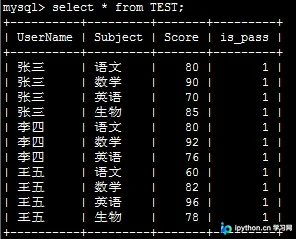
具体实现代码如下:
# -*- coding:utf-8 -*-

import pandas as pd

import MySQLdb

from warnings import filterwarnings

# 由于create table if not exists总会抛出warning,因此使用filterwarnings消除

filterwarnings('ignore', category = MySQLdb.Warning)

from sqlalchemy import create_engine

import sys

if sys.version_info.major<3:

 reload(sys)

 sys.setdefaultencoding("utf-8")

 # 此脚本适用于python2和python3

host,port,user,passwd,db,charset="192.168.1.193",3306,"leo","mysql","test","utf8"


def get_df():

 global host,port,user,passwd,db,charset

 conn_config={"host":host, "port":port, "user":user, "passwd":passwd, "db":db,"charset":charset}

 conn = MySQLdb.connect(**conn_config)

 result_df=pd.read_sql('select UserName,Subject,Score from TEST',conn)

 return result_df


def pivot(result_df):

 df_pivoted_init=result_df.pivot('UserName','Subject','Score')

 df_pivoted = df_pivoted_init.reset_index() # 将行索引也作为DataFrame值的一部分,以方便存储数据库

 return df_pivoted_init,df_pivoted

 # 返回的两个DataFrame,一个是以姓名作index的,一个是以数字序列作index,前者用于unpivot,后者用于save_to_mysql


def unpivot(df_pivoted_init):

 # unpivot需要进行df_pivoted_init二维表格的行、列索引遍历,需要拼SQL因此不能使用save_to_mysql存数据,这里使用SQL和MySQLdb接口存

 insert_sql="insert into test_unpivot(UserName,Subject,Score) values "

 # 处理值为NaN的情况

 df_pivoted_init=df_pivoted_init.fillna(0)

 for col in df_pivoted_init.columns:

  for index in df_pivoted_init.index:

   value=df_pivoted_init.at[index,col]

   if value!=0:

    insert_sql=insert_sql+"('%s','%s',%s)" %(index,col,value)+','

 insert_sql = insert_sql.strip(',')

 global host, port, user, passwd, db, charset

 conn_config = {"host": host, "port": port, "user": user, "passwd": passwd, "db": db, "charset": charset}

 conn = MySQLdb.connect(**conn_config)

 cur=conn.cursor()

 cur.execute("create table if not exists test_unpivot like TEST")

 cur.execute(insert_sql)

 conn.commit()

 conn.close()


def save_to_mysql(df_pivoted,tablename):

 global host, port, user, passwd, db, charset

 """

 只有使用sqllite时才能指定con=connection实例,其他数据库需要使用sqlalchemy生成engine,engine的定义可以添加?来设置字符集和其他属性

 """

 conn="mysql://%s:%s@%s:%d/%s?charset=%s" %(user,passwd,host,port,db,charset)

 mysql_engine = create_engine(conn)

 df_pivoted.to_sql(name=tablename, con=mysql_engine, if_exists='replace', index=False)


# 从TEST表读取源数据至DataFrame结构

result_df=get_df()

# 将源数据行转列为二维表格形式

df_pivoted_init,df_pivoted=pivot(result_df)

# 将二维表格形式的数据存到新表test中

save_to_mysql(df_pivoted,'test')

# 将被行转列的数据unpivot,存入test_unpivot表中

unpivot(df_pivoted_init)
执行后的结果如下所示:
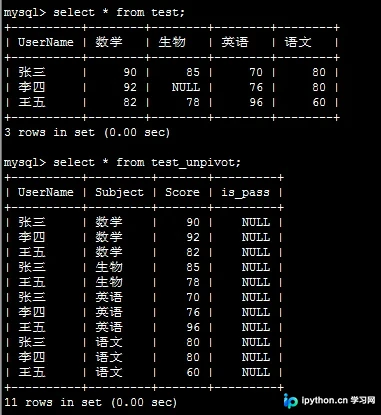
使用pivot方法进行数据重塑
接下来介绍Pandas DataFrame类中内置的pivot方法:
该方法的签名定义为:DataFrame.pivot(index=None, columns=None, values=None):
其功能是返回一个由指定的索引/列值重新组织后的DataFrame。
该方法仅包含三个参数,原因在于pivot后的结果必然是一个二维表格,只需指定行索引、列名及其对应的值即可。此外,由于结果限定为二维结构,在unpivot(逆转换)过程中,如is_pass这样的列将会丢失,因此在初始查询阶段我便未包含该列。
基于层次化索引的unstack方法
补充说明如下:
在学习Pandas层次化索引时,我发现了两个同样可用于行列互转的有趣函数,其用法如下:(许久之后我才意识到,pivot实际上只是unstack的一个封装快捷方式,其本质是先通过set_index建立层次化索引,再调用unstack进行重塑,正如我在下方示例中所演示的操作)
# -*- coding:utf-8 -*-

import pandas as pd

import MySQLdb

from warnings import filterwarnings

# 由于create table if not exists总会抛出warning,因此使用filterwarnings消除

filterwarnings('ignore', category = MySQLdb.Warning)

from sqlalchemy import create_engine

import sys

if sys.version_info.major<3:

 reload(sys)

 sys.setdefaultencoding("utf-8")

 # 此脚本适用于python2和python3

host,port,user,passwd,db,charset="192.168.1.193",3306,"leo","mysql","test","utf8"


def get_df():

 global host,port,user,passwd,db,charset

 conn_config={"host":host, "port":port, "user":user, "passwd":passwd, "db":db,"charset":charset}

 conn = MySQLdb.connect(**conn_config)

 result_df=pd.read_sql('select UserName,Subject,Score from TEST',conn)

 return result_df


def pivot(result_df):

 df_pivoted_init=result_df.pivot('UserName','Subject','Score')

 df_pivoted = df_pivoted_init.reset_index() # 将行索引也作为DataFrame值的一部分,以方便存储数据库

 return df_pivoted_init,df_pivoted

 # 返回的两个DataFrame,一个是以姓名作index的,一个是以数字序列作index,前者用于unpivot,后者用于save_to_mysql


def unpivot(df_pivoted_init):

 # unpivot需要进行df_pivoted_init二维表格的行、列索引遍历,需要拼SQL因此不能使用save_to_mysql存数据,这里使用SQL和MySQLdb接口存

 insert_sql="insert into test_unpivot(UserName,Subject,Score) values "

 # 处理值为NaN的情况

 df_pivoted_init=df_pivoted_init.fillna(0)

 for col in df_pivoted_init.columns:

  for index in df_pivoted_init.index:

   value=df_pivoted_init.at[index,col]

   if value!=0:

    insert_sql=insert_sql+"('%s','%s',%s)" %(index,col,value)+','

 insert_sql = insert_sql.strip(',')

 global host, port, user, passwd, db, charset

 conn_config = {"host": host, "port": port, "user": user, "passwd": passwd, "db": db, "charset": charset}

 conn = MySQLdb.connect(**conn_config)

 cur=conn.cursor()

 cur.execute("create table if not exists test_unpivot like TEST")

 cur.execute(insert_sql)

 conn.commit()

 conn.close()


def save_to_mysql(df_pivoted,tablename):

 global host, port, user, passwd, db, charset

 """

 只有使用sqllite时才能指定con=connection实例,其他数据库需要使用sqlalchemy生成engine,engine的定义可以添加?来设置字符集和其他属性

 """

 conn="mysql://%s:%s@%s:%d/%s?charset=%s" %(user,passwd,host,port,db,charset)

 mysql_engine = create_engine(conn)

 df_pivoted.to_sql(name=tablename, con=mysql_engine, if_exists='replace', index=False)


# 从TEST表读取源数据至DataFrame结构

result_df=get_df()

# 将源数据行转列为二维表格形式

df_pivoted_init,df_pivoted=pivot(result_df)

# 将二维表格形式的数据存到新表test中

save_to_mysql(df_pivoted,'test')

# 将被行转列的数据unpivot,存入test_unpivot表中

unpivot(df_pivoted_init)
上述操作利用了Pandas的层次化索引,这实际上也是层次化索引的主要用途之一。结合本例,我们可以将代码改写为如下形式:
result_df=pd.read_sql('select UserName,Subject,Score from TEST',conn)

# 在从数据库中获取的数据格式是这样的:

    UserName Subject Score

0    张三   语文  80.0

1    张三   数学  90.0

2    张三   英语  70.0

3    张三   生物  85.0

4    李四   语文  80.0

5    李四   数学  92.0

6    李四   英语  76.0

7    王五   语文  60.0

8    王五   数学  82.0

9    王五   英语  96.0

10    王五   生物  78.0

# 如果要使用层次化索引,那么我们只需要把UserName和Subject列设置为层次化索引,Score为其对应的值即可,我们借用set_index()函数:

df=result_df.set_index(['UserName','Subject'])

In [112]: df.unstack()

Out[112]:

     Score

Subject   数学  生物  英语  语文

UserName

张三    90.0 85.0 70.0 80.0

李四    92.0  NaN 76.0 80.0

王五    82.0 78.0 96.0 60.0

# 使用stack可以将unstack的结果转回来,这样就也在形式上实现了行列互转,之后的操作基本一致了。
以上就是本文的全部内容,希望对大家的学习有所帮助,也欢迎大家多多支持本站。
本站声明
本文内容仅供参考,不代表本站观点。转载或引用请注明出处。如发现内容问题,请通过联系我们页面反馈。















