


基于Python的人体姿态检测数据增强实战:裁剪、缩放与翻转

发布时间:2026-10-13 |
3人浏览过
本文详解在人体姿态检测项目中如何利用Python进行数据增强。通过实现裁剪、缩放、翻转和旋转算法,解决训练数据有限及模型过拟合问题。重点解析坐标变换逻辑与边界框处理,提供完整代码示例,帮助开发者提升模型鲁棒性。
数据增强简介
1.1 简介
深层神经网络通常需要海量数据才能取得理想效果。当可用数据受限时,采用数据增强(Data Augmentation)技术能有效扩充训练样本的多样性,从而提升模型的鲁棒性并防止过拟合。
在计算机视觉领域,常见的数据增强手段包括水平或垂直翻转(Flip)、旋转(Rotate)、缩放(Scale)、随机裁剪或补零填充(Random Crop or Pad)、色彩抖动(Color Jittering)以及添加噪声(Noise)。
笔者目前正专注于视频及图像中的人体姿态估计与关键点追踪(Human Pose Estimation and Tracking)项目。因此,本文所介绍的数据增强策略仅涵盖翻转(Flip)、旋转(Rotate)、缩放(Scale)以及裁剪操作。
图像裁剪实现
2.1 裁剪(Crop)
- image.shape--([3, width, height])一个视频序列中的一帧图片,裁剪前大小不统一
- bbox.shape--([4,])人体检测框,用于裁剪
- x.shape--([1,13]) 人体13个关键点的所有x坐标值
- y.shape--([1,13])人体13个关键点的所有y坐标值
def crop(image, bbox, x, y, length):
    x, y, bbox = x.astype(np.int), y.astype(np.int), bbox.astype(np.int)

    x_min, y_min, x_max, y_max = bbox
    w, h = x_max - x_min, y_max - y_min

    # Crop image to bbox
    image = image[y_min:y_min + h, x_min:x_min + w, :]

    # Crop joints and bbox
    x -= x_min
    y -= y_min
    bbox = np.array([0, 0, x_max - x_min, y_max - y_min])

    # Scale to desired size
    side_length = max(w, h)
    f_xy = float(length) / float(side_length)
    image, bbox, x, y = Transformer.scale(image, bbox, x, y, f_xy)

    # Pad
    new_w, new_h = image.shape[1], image.shape[0]
    cropped = np.zeros((length, length, image.shape[2]))

    dx = length - new_w
    dy = length - new_h
    x_min, y_min = int(dx / 2.), int(dy / 2.)
    x_max, y_max = x_min + new_w, y_min + new_h

    cropped[y_min:y_max, x_min:x_max, :] = image
    x += x_min
    y += y_min

    x = np.clip(x, x_min, x_max)
    y = np.clip(y, y_min, y_max)

    bbox += np.array([x_min, y_min, x_min, y_min])
    return cropped, bbox, x.astype(np.int), y.astype(np.int)
图像缩放处理
2.2 缩放(Scale)
- image.shape--([3, 256, 256])一个视频序列中的一帧图片,裁剪后输入网络为256*256
- bbox.shape--([4,])人体检测框,用于裁剪
- x.shape--([1,13]) 人体13个关键点的所有x坐标值
- y.shape--([1,13])人体13个关键点的所有y坐标值
- f_xy--缩放倍数
def scale(image, bbox, x, y, f_xy):
    (h, w, _) = image.shape
    h, w = int(h * f_xy), int(w * f_xy)
    image = resize(image, (h, w), preserve_range=True, anti_aliasing=True, mode='constant').astype(np.uint8)

    x = x * f_xy
    y = y * f_xy
    bbox = bbox * f_xy

    x = np.clip(x, 0, w)
    y = np.clip(y, 0, h)

    return image, bbox, x, y
图像翻转操作
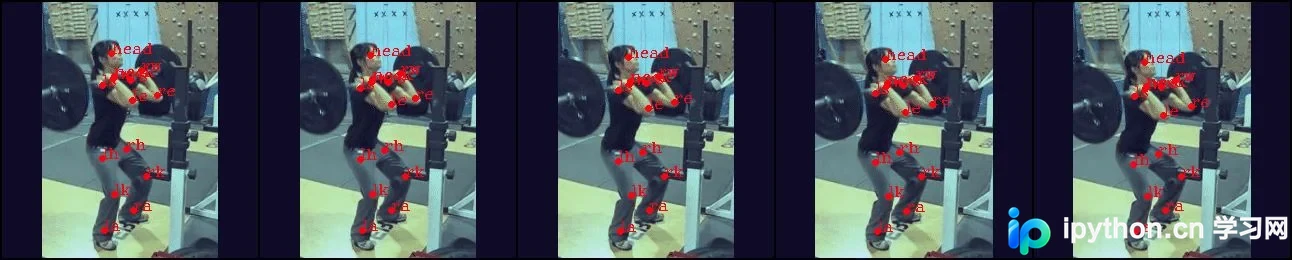
2.3 翻转(fillip)
此处执行的是图像沿对称轴的左右翻转操作。由于人体结构具有左右对称性,这种增强方式有助于防止关键点检测模型出现过拟合现象。
def flip(image, bbox, x, y):
    image = np.fliplr(image).copy()
    w = image.shape[1]
    x_min, y_min, x_max, y_max = bbox
    bbox = np.array([w - x_max, y_min, w - x_min, y_max])
    x = w - x
    x, y = Transformer.swap_joints(x, y)
    return image, bbox, x, y
翻转前:

翻转后:
图像旋转算法
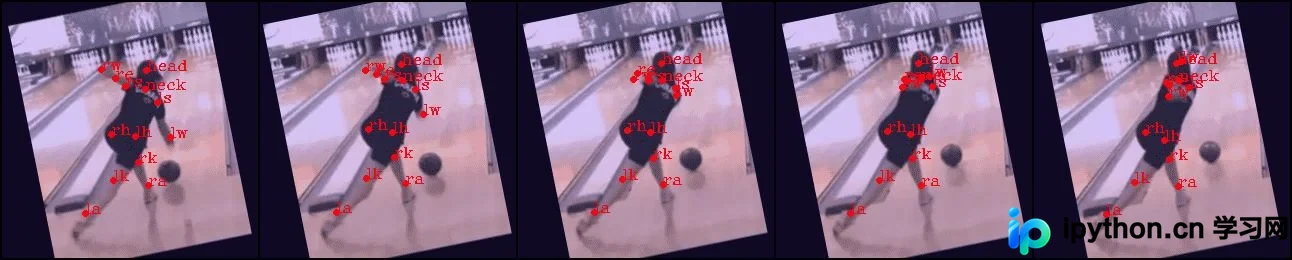
2.4 旋转(rotate)
angle--旋转角度
def rotate(image, bbox, x, y, angle):
    # image - -(256, 256, 3)
    # bbox - -(4,)
    # x - -[126 129 124 117 107 99 128 107 108 105 137 155 122 99]
    # y - -[209 176 136 123 178 225 65 47 46 24 44 64 49 54]
    # angle - --8.165648811999333
    # center of image [128,128]
    o_x, o_y = (np.array(image.shape[:2][::-1]) - 1) / 2.
    width,height = image.shape[0],image.shape[1]
    x1 = x
    y1 = height - y
    o_x = o_x
    o_y = height - o_y
    image = rotate(image, angle, preserve_range=True).astype(np.uint8)
    r_x, r_y = o_x, o_y
    angle_rad = (np.pi * angle) /180.0
    x = r_x + np.cos(angle_rad) * (x1 - o_x) - np.sin(angle_rad) * (y1 - o_y)
    y = r_y + np.sin(angle_rad) * (x1 - o_x) + np.cos(angle_rad) * (y1 - o_y)
    x = x
    y = height - y
    bbox[0] = r_x + np.cos(angle_rad) * (bbox[0] - o_x) + np.sin(angle_rad) * (bbox[1] - o_y)
    bbox[1] = r_y + -np.sin(angle_rad) * (bbox[0] - o_x) + np.cos(angle_rad) * (bbox[1] - o_y)
    bbox[2] = r_x + np.cos(angle_rad) * (bbox[2] - o_x) + np.sin(angle_rad) * (bbox[3] - o_y)
    bbox[3] = r_y + -np.sin(angle_rad) * (bbox[2] - o_x) + np.cos(angle_rad) * (bbox[3] - o_y)
    return image, bbox, x.astype(np.int), y.astype(np.int)
旋转前:

旋转后:
增强结果展示
3 结果(output)
数据增强前的原图:
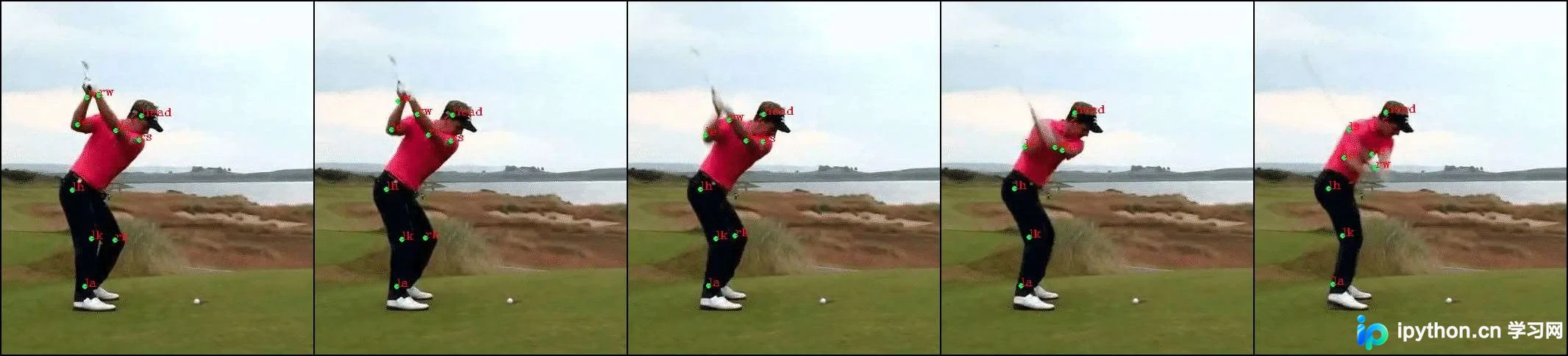
数据增强后:

以上就是本文的全部内容,希望对大家的学习有所帮助,也希望大家多多支持本站。
本站声明
本文内容仅供参考,不代表本站观点。转载或引用请注明出处。如发现内容问题,请通过联系我们页面反馈。















