


Python爬虫使用代理IP的实现

本文详解Python爬虫中代理IP的配置方法,涵盖Urllib、Requests及Selenium三种主流库的代理设置。通过搭建代理池接口获取IP,并结合httpbin.org验证IP伪装效果,帮助开发者解决IP被封禁问题,提升爬虫稳定性与效率。
代理IP在爬虫中的作用
在进行网络爬虫开发时,若目标网站对访问频率或速度有严格限制,原始IP极易被封锁,导致后续工作无法继续。此时,引入代理IP成为关键解决方案。只要能够获取到有效的代理IP,即可绕过封锁限制,确保持续执行数据采集任务。
尽管网络上存在大量免费代理IP,但其稳定性和速度通常不如付费代理。本文旨在演示如何有效使用代理IP,并验证前文所述的代理IP池搭建成果(详见《Python搭建代理IP池(一)- 获取 IP》)。通过访问代理池提供的接口,即可获取可用IP,下文将具体介绍调用方法。
为验证代理设置是否生效,测试目标选定为 http://httpbin.org/get。该接口会返回请求的详细信息,其中 origin 字段明确显示了客户端的真实IP。通过对比该字段,可以判断代理是否成功隐藏了原始IP,即是否实现了IP伪装。
获取代理IP
获取 IP
本示例中的代理池基于 Flask 框架开发,提供了统一的IP获取接口:http://localhost:5555/random。
只需对该接口发起访问请求,服务器返回的内容即为可用的代理IP地址。
Urllib配置代理
Urllib
首先介绍标准库 Urllib 的代理配置方式,具体实现如下:
from urllib.error import URLError
import urllib.request
from urllib.request import ProxyHandler, build_opener

# 获取IP
ip_response = urllib.request.urlopen("http://localhost:5555/random")
ip = ip_response.read().decode('utf-8')

proxy_handler = ProxyHandler({
  'http': 'http://' + ip,
  'https': 'https://' + ip
})
opener = build_opener(proxy_handler)
try:
  response = opener.open('http://httpbin.org/get')
  print(response.read().decode('utf-8'))
except URLError as e:
  print(e.reason)
运行结果:
{
 "args": {},
 "headers": {
  "Accept-Encoding": "identity",
  "Host": "httpbin.org",
  "User-Agent": "Python-urllib/3.7"
 },
 "origin": "108.61.201.231, 108.61.201.231",
 "url": "https://httpbin.org/get"
}
在 Urllib 中,需使用 ProxyHandler 来配置代理。该参数接受一个字典,键名为协议类型(如 http 或 https),键值为对应的代理地址。注意,代理地址前必须包含协议头。当请求链接为 http 协议时,系统调用 http 代理;若为 https 协议,则调用 https 代理。因此,本例中生效的代理地址为 http://108.61.201.231 和 https://108.61.201.231。
创建 ProxyHandler 对象后,需将其传入 build_opener() 方法以生成一个 Opener 实例。该 Opener 已内置代理配置,直接调用其 open() 方法即可通过代理访问目标链接。
Requests配置代理
Requests
使用 Requests 库设置代理更为简便,只需在请求时传入 proxies 参数即可:
import requests

# 获取IP
ip_response = requests.get("http://localhost:5555/random")
ip = ip_response.text

proxies = {
  'http': 'http://' + ip,
  'https': 'https://' + ip,
}
try:
  response = requests.get('http://httpbin.org/get', proxies=proxies)
  print(response.text)
except requests.exceptions.ConnectionError as e:
  print('Error', e.args)
运行结果:
{
 "args": {},
 "headers": {
  "Accept": "*/*",
  "Accept-Encoding": "gzip, deflate",
  "Host": "httpbin.org",
  "User-Agent": "python-requests/2.21.0"
 },
 "origin": "47.90.28.54, 47.90.28.54",
 "url": "https://httpbin.org/get"
}
Requests 库仅需构造包含代理信息的字典,并通过 proxies 参数传递给请求函数,配置过程简单直观。
Selenium配置代理
Selenium
import requests
from selenium import webdriver
import time

# 借助requests库获取IP
ip_response = requests.get("http://localhost:5555/random")
ip = ip_response.text

chrome_options = webdriver.ChromeOptions()
chrome_options.add_argument('--proxy-server=http://' + ip)
browser = webdriver.Chrome(chrome_options=chrome_options)
browser.get('http://httpbin.org/get')
time.sleep(5)
运行结果:
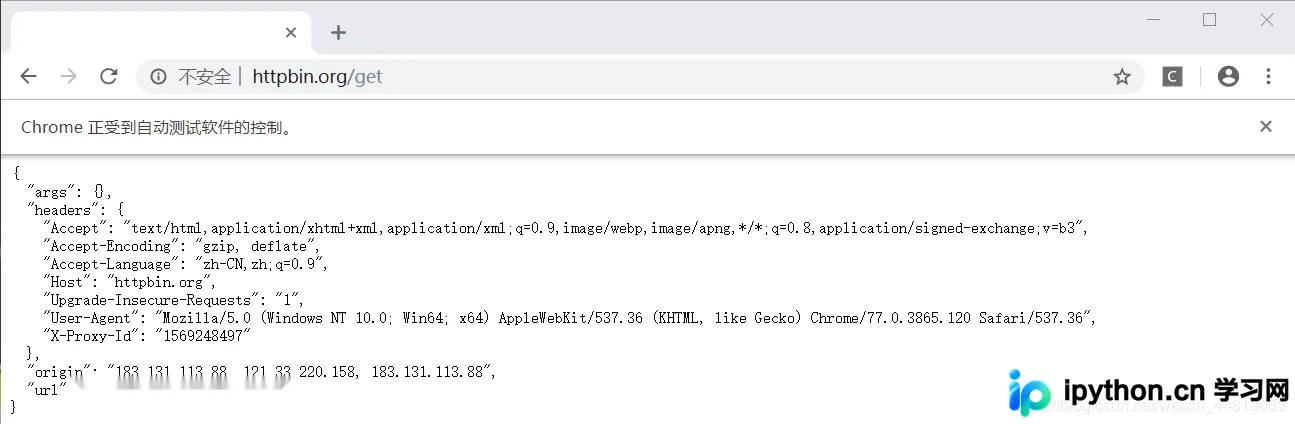
以上内容涵盖了Python爬虫中代理IP的主要配置方法,希望能为读者提供帮助。欢迎继续关注本站,获取更多技术分享。
本站声明
本文内容仅供参考,不代表本站观点。转载或引用请注明出处。如发现内容问题,请通过联系我们页面反馈。















