


Python操作MySQL:fetchone与fetchall的区别及数据提取实战

本文详细解析Python中MySQL数据库操作的两个核心方法:fetchone()与fetchall()。通过对比两者在返回单个元组与多个元组时的行为差异,并结合NULL与None的类型说明,帮助开发者准确处理查询结果。文章进一步提供基于pandas的数据统计、排序及格式转换实战代码,展示如何高效从MySQL提取并处理业务数据。
fetchone()
fetchone与fetchall基础用法对比
fetchone()方法用于从查询结果中获取单条记录,返回一个包含该记录数据的元组;若查询无匹配结果,则返回None。
fetchall()
fetchall()方法用于获取查询结果集中的所有剩余记录,返回一个包含多个元组的列表(或类似结构);若查询无匹配结果,则返回空元组()。
需注意数据库与Python的类型映射差异:在MySQL数据库中,空值表示为NULL,而在Python中对应的值为None。
fetchall数据提取与统计处理实战
补充知识:深入探讨Python中cur.fetchall()与cur.fetchone()提取数据后的统计处理流程。
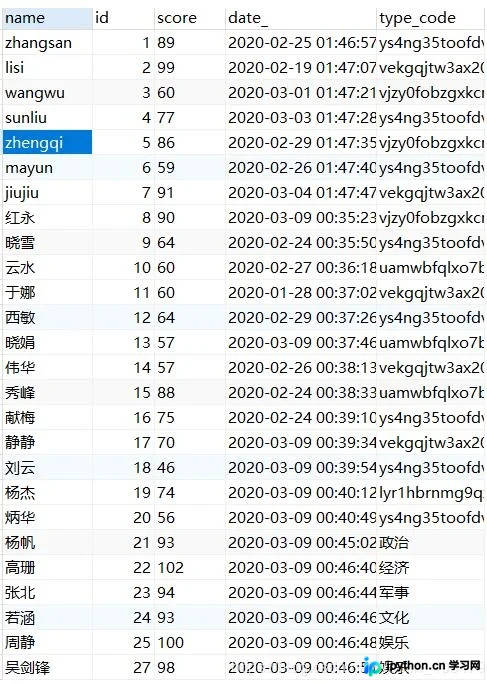
假设数据库中存在一个type_code字段,该字段包含中文分类名称及其对应的32位随机编码。现需对该字段数据进行统计处理,编码与中文名称的映射字典如下所示:
{'ys4ng35toofdviy9ce0pn1uxw2x7trjb':'娱乐',
  'vekgqjtw3ax20udsniycjv1hdsa7t4oz':'经济',
  'vjzy0fobzgxkcnlbrsduhp47f8pxcoaj':'军事',
  'uamwbfqlxo7bu0warx6vkhefigkhtoz3':'政治',
  'lyr1hbrnmg9qzvwuzlk5fas7v628jiqx':'文化',
 }
其中,数据库中32位随机编码的生成逻辑如下代码所示:
代码中使用了string模块,其中string.ascii_letters包含所有大小写英文字母,string.digits包含数字,string.punctuation包含特殊字符。
import string
import random

def get_code():
 return ''.join(random.sample(string.ascii_letters + string.digits + string.punctuation, 32))
print(get_code())

def get_code1():
 return ''.join(random.sample(string.ascii_letters + string.digits, 32))
testresult= get_code1()
print(testresult.lower())
print(type(testresult))
执行上述编码生成逻辑后的输出结果示例如下:
)@+t37/b|UQ[K;!spj<(>%r9"PokwTe=
igwle98kgqtcprke7byvq12xnhucmz4v
<class 'str'>
使用cur.fetchall()提取数据的结果展示:
import pymysql
import pandas as pd

conn = pymysql.Connect(host="127.0.0.1",port=3306,user="root",password="123456",charset="utf8",db="sql_prac")

cur = conn.cursor()
print("连接成功")
sql = "SELECT type_code,count(1) as num FROM test GROUP BY type_code ORDER BY num desc"

cur.execute(sql)
res = cur.fetchall()
print(res)
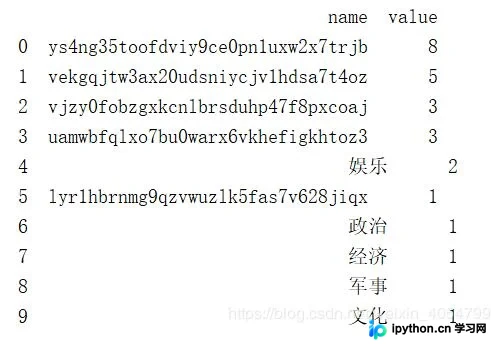
具体输出数据为:(('ys4ng35toofdviy9ce0pn1uxw2x7trjb', 8), ('vekgqjtw3ax20udsniycjv1hdsa7t4oz', 5), ('vjzy0fobzgxkcnlbrsduhp47f8pxcoaj', 3), ('uamwbfqlxo7bu0warx6vkhefigkhtoz3', 3), ('娱乐', 2), ('lyr1hbrnmg9qzvwuzlk5fas7v628jiqx', 1), ('政治', 1), ('经济', 1), ('军事', 1), ('文化', 1))
将提取结果转换为DataFrame并打印: res = pd.DataFrame(list(res), columns=['name','value']) print(res)
dicts = {'ys4ng35toofdviy9ce0pn1uxw2x7trjb':'娱乐',
  'vekgqjtw3ax20udsniycjv1hdsa7t4oz':'经济',
  'vjzy0fobzgxkcnlbrsduhp47f8pxcoaj':'军事',
  'uamwbfqlxo7bu0warx6vkhefigkhtoz3':'政治',
  'lyr1hbrnmg9qzvwuzlk5fas7v628jiqx':'文化',
  }
res['name'] = res['name'].map(lambda x:dicts[x] if x in dicts else x)
print(res)
 name value
0 娱乐  8
1 经济  5
2 军事  3
3 政治  3
4 娱乐  2
5 文化  1
6 政治  1
7 经济  1
8 军事  1
9 文化  1
#分组统计
result = res.groupby(['name']).sum().reset_index()
print(result)
 name value
0 军事  4
1 娱乐  10
2 政治  4
3 文化  2
4 经济  6
对结果按value字段进行降序排序: #排序 result = result.sort_values(['value'], ascending=False)
 name value
1 娱乐  10
4 经济  6
0 军事  4
2 政治  4
3 文化  2
#输出为list,前端需要的数据格式
data_dict = result.to_dict(orient='records')
print(data_dict)
排序并转换为列表字典后的最终输出格式为:[{'name': '娱乐', 'value': 10}, {'name': '经济', 'value': 6}, {'name': '军事', 'value': 4}, {'name': '政治', 'value': 4}, {'name': '文化', 'value': 2}]
fetchone单条记录提取与结果对比
接下来演示cur.fetchone()的用法。
首先测试相关的SQL语句:
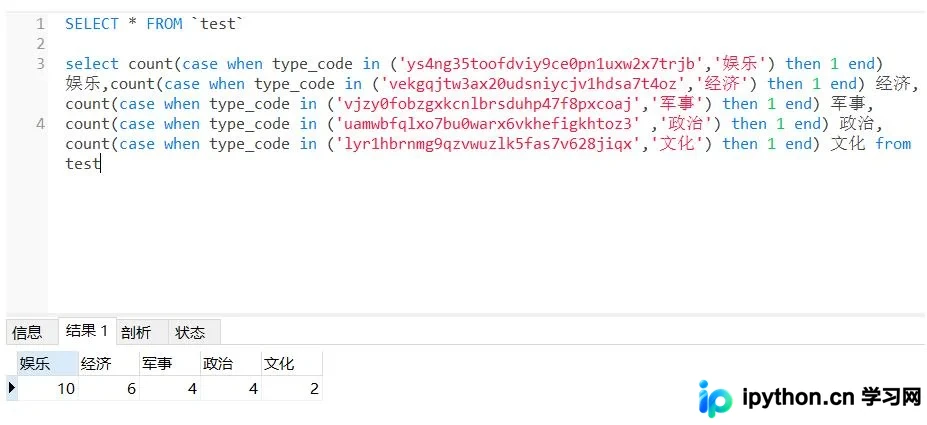
对应的Python代码实现如下:
import pymysql
import pandas as pd

conn = pymysql.Connect(host="127.0.0.1",port=3306,user="root",password="123456",charset="utf8",db="sql_prac")

cur = conn.cursor()
print("连接成功")
sql = "select count(case when type_code in ('ys4ng35toofdviy9ce0pn1uxw2x7trjb','娱乐') then 1 end) 娱乐," \
  "count(case when type_code in ('vekgqjtw3ax20udsniycjv1hdsa7t4oz','经济') then 1 end) 经济," \
  "count(case when type_code in ('vjzy0fobzgxkcnlbrsduhp47f8pxcoaj','军事') then 1 end) 军事," \
  "count(case when type_code in ('uamwbfqlxo7bu0warx6vkhefigkhtoz3' ,'政治') then 1 end) 政治," \
  "count(case when type_code in ('lyr1hbrnmg9qzvwuzlk5fas7v628jiqx','文化') then 1 end) 文化 from test"
cur.execute(sql)
res = cur.fetchone()
print(res)
执行后返回的结果为一个元组:
具体元组内容为:(10, 6, 4, 4, 2)
data = [
    {"name": "娱乐", "value": res[0]},
    {"name": "经济", "value": res[1]},
    {"name": "军事", "value": res[2]},
    {"name": "政治", "value": res[3]},
    {"name": "文化", "value": res[4]}
]
result = sorted(data, key=lambda x: x['value'], reverse=True)
print(result)
对比发现,cur.fetchone返回的结果经过后续处理后,与cur.fetchall处理后的结果完全一致:
最终输出列表为:[{'name': '娱乐', 'value': 10}, {'name': '经济', 'value': 6}, {'name': '军事', 'value': 4}, {'name': '政治', 'value': 4}, {'name': '文化', 'value': 2}]
以上关于Python操作MySQL数据中fetchone()和fetchall()的使用方式及数据处理技巧即为全部内容,希望能为读者提供参考,欢迎支持。
本站声明
本文内容仅供参考,不代表本站观点。转载或引用请注明出处。如发现内容问题,请通过联系我们页面反馈。















