


基于Scrapy框架的拉勾网Python职位爬虫实战

本文详细解析使用Scrapy框架爬取拉勾网Python相关职位信息的完整流程。从分析搜索结果页的Ajax请求入手,提取职位ID与ShowID,拼接详情页URL。针对反爬机制,通过携带Cookie和模拟POST请求解决访问限制,并配置随机User-Agent中间件。最终实现职位详情数据的自动化抓取与JSON存储,提供完整的代码实现与配置说明。
项目概述
本实例演示如何利用Python爬虫技术抓取拉勾网上与Python相关的职位数据,包括职位名称、薪资范围、公司名称等关键信息,这些数据均位于职位详情页中。
分析思路
分析思路
分析查询结果页
分析查询结果页
在拉勾网搜索框输入'python'关键字后,浏览器地址栏显示的搜索结果页URL为'https://www.lagou.com/jobs/list_python?labelWords=&fromSearch=true&suginput='。经测试,删除问号后的参数并不影响访问结果,URL结构相对简洁。
利用Chrome浏览器开发者工具(F12)检查页面元素,发现每条搜索结果(即单个职位)均位于HTML中class为'item_con_list'的ul标签下的li标签内。
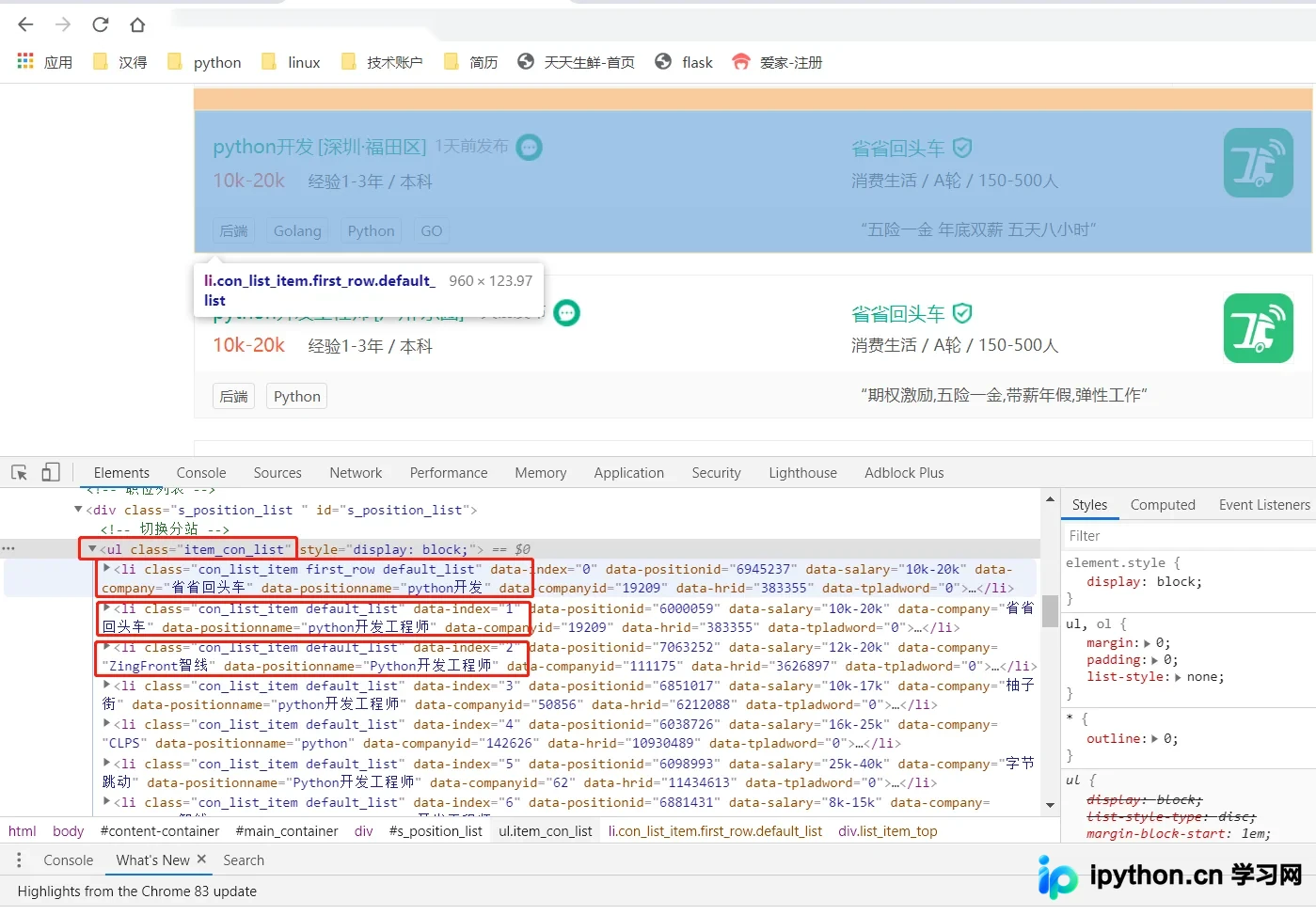
为了获取每个职位的详细信息,必须从搜索结果页提取出指向详情页的URL,即点击搜索结果后跳转的目标链接。
进一步检查li标签内的元素结构,定位到详情URL,其格式示例为href=https://www.lagou.com/jobs/6945237.html?show=b6e8e778fcae4c2aa2111ba58f9ebfa0。
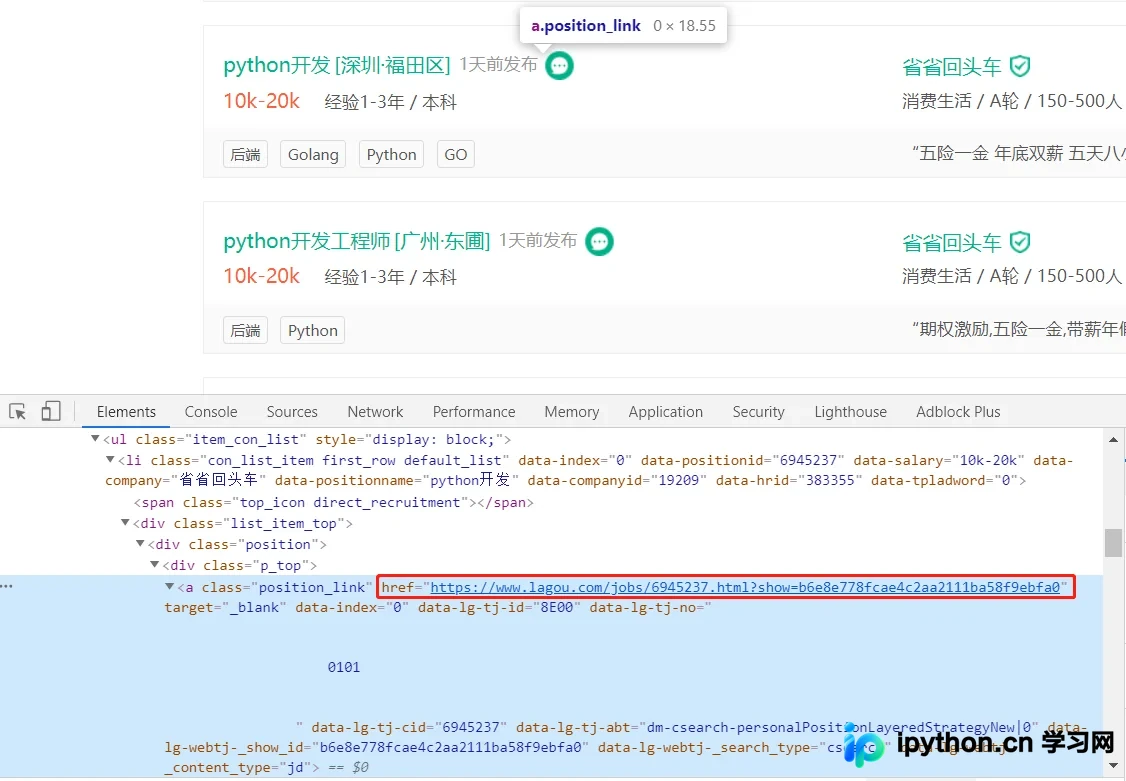
观察其他搜索结果的详情URL,发现其统一格式为:href="https://www.lagou.com/jobs/{某个id}.html?show={show_id}" rel="external nofollow"。
对比发现,第一个ID(positionId)随职位不同而变化,推测为职位的唯一标识;第二个ID(showId)在多条结果中保持一致。尝试删除show参数后,仍能正常访问具体职位详情页。
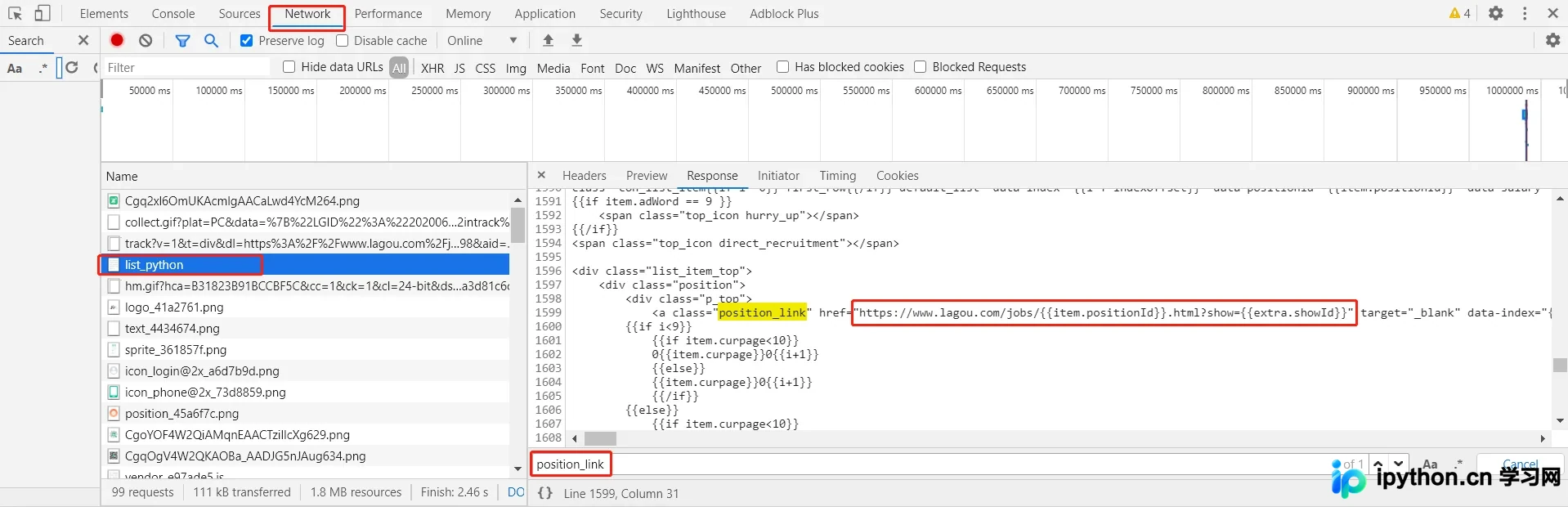
若直接通过XPath提取每个职位的第一个ID,需确保提取自服务器返回的Response而非浏览器渲染后的DOM。切换到Network标签并刷新页面,定位到https://www.lagou.com/jobs/list_python的请求,查看其Response。搜索关键字'position_link'(即前文在Elements中找到的详情URL),发现返回的网址中并未直接包含两个关键ID,而是由JavaScript动态生成。这表明具体数据并非通过该初始请求直接返回。
因此,需要寻找真正返回搜索结果数据的请求。通常此类情况由Ajax异步加载数据。在Network中筛选类型为XHR(Ajax)的请求,逐一检查Response,发现positionAjax.json返回的数据中包含所需的搜索结果信息。此外,点击下一页时地址栏URL未变且仅局部刷新数据,进一步证实搜索结果通过Ajax接口获取。
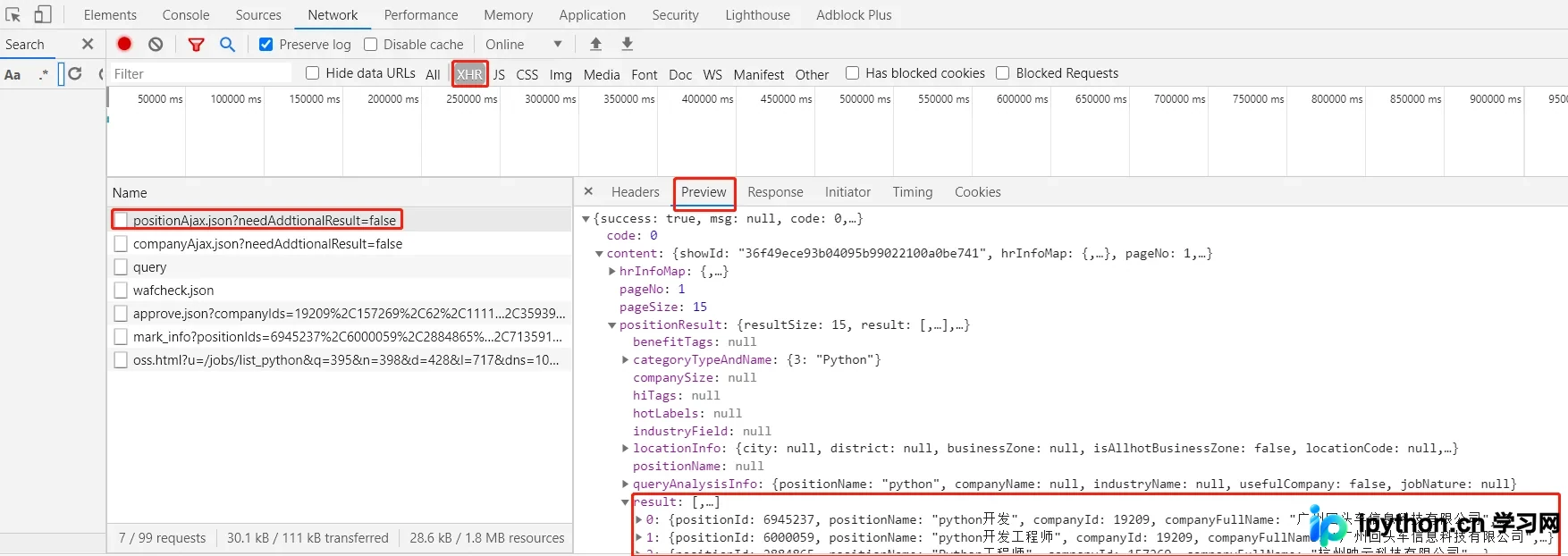
分析上述Ajax接口的Response,在Preview中搜索前文在Elements中找到的职位URL的两个ID,确认两者均存在于Response中。分析可知,第一个ID对应positionId,第二个对应showId。此外,Response中还包含了当前页码pageNo。
因此,只需访问上述Ajax对应的URL:https://www.lagou.com/jobs/positionAjax.json?needAddtionalResult=false,即可获取所需的ID。将获取的positionId和showId填入详情页模板:https://www.lagou.com/jobs/{position_id}.html?show={show_id},即可构造出详情页URL进行访问。
然而,直接访问https://www.lagou.com/jobs/positionAjax.json?needAddtionalResult=false时,返回结果提示:{"status":false,"msg":"您操作太频繁,请稍后再访问","clientIp":"139.226.66.44","state":2402}。

经查询发现,直接访问该接口会被拉勾网视为反爬策略拦截。解决方法是携带之前访问查询结果页(https://www.lagou.com/jobs/list_python?)的Cookie。由于本项目使用Scrapy框架,其机制会自动在后续请求中携带前一次请求的Cookie,因此无需手动添加Cookie,只需确保首先访问查询结果页即可。即设置start_url = https://www.lagou.com/jobs/list_python。
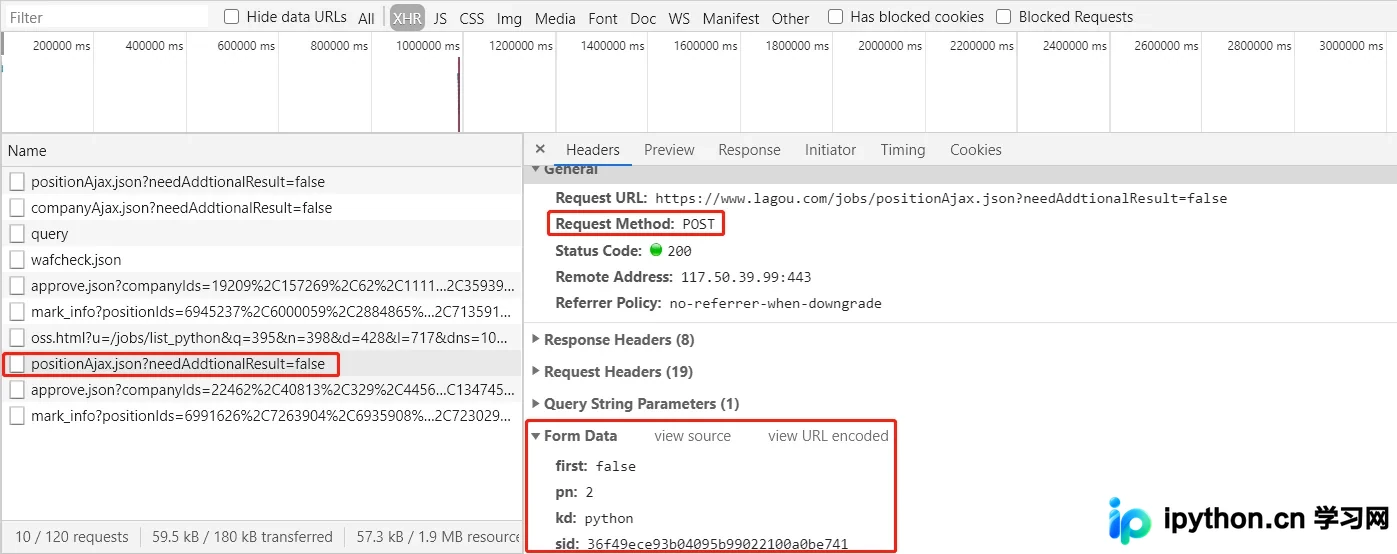
此外,发现该Ajax请求采用POST方式提交,因此需分析其提交的Form数据。第一页数据中,first参数为true,pn为1,kd为python;第二页数据中,first为false,pn为2,kd仍为python,且多出一个sid参数。
分析这四个参数:first表示是否为第一页,pn表示当前页码,kd表示搜索关键字,sid经与前述showId对比,发现其值即为showId。
分析职位详情页
分析职位详情页
完成上述分析后,即可拼接出职位详情页的URL。打开详情页,沿用相同思路分析所需数据(如职位名称、工资、地点、经验要求、关键字、公司信息等)是否直接存在于详情页URL对应的Response中。
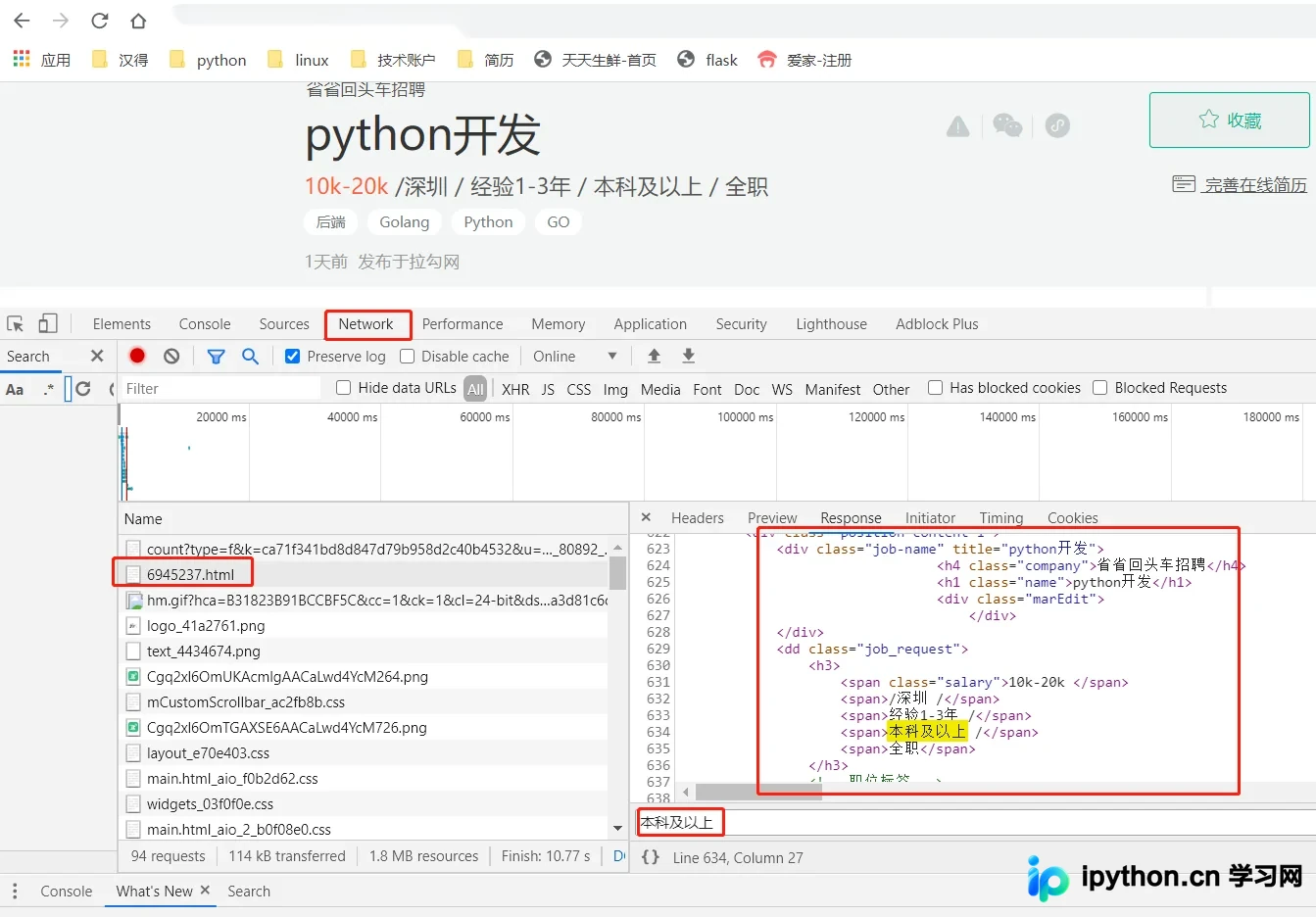
在Network中查找对应的Response,确认数据确实存在于其中,因此可直接通过XPath提取所需数据。
代码实现
编写爬虫代码
具体代码托管于GitHub:
此处仅展示关键代码片段。
创建Scrapy项目
scrapy startproject LaGou创建爬虫
scrapy genspider lagou www.lagou.com编写items.py,定义需要爬取的字段。
# -*- coding: utf-8 -*-

# Define here the models for your scraped items
#
# See documentation in:
# https://docs.scrapy.org/en/latest/topics/items.html

import scrapy


class LagouItem(scrapy.Item):
 # define the fields for your item here like:
 job_url = scrapy.Field()
 job_name = scrapy.Field()
 salary = scrapy.Field()
 city = scrapy.Field()
 area = scrapy.Field()
 experience = scrapy.Field()
 education = scrapy.Field()
 labels = scrapy.Field()
 publish_date = scrapy.Field()
 company = scrapy.Field()
 company_feature = scrapy.Field()
 company_public = scrapy.Field()
 company_size= scrapy.Field()
编写爬虫代码lagou.py
# -*- coding: utf-8 -*-
import scrapy
from LaGou.items import LagouItem
import json
from pprint import pprint
import time


class LagouSpider(scrapy.Spider):
 name = 'lagou'
 allowed_domains = ['www.lagou.com']
 start_urls = ['https://www.lagou.com/jobs/list_python?']

 def __init__(self):
  # 设置头信息, 若不设置的话, 在请求第二页时即被拉勾网认为是爬虫而不能爬取数据
  self.headers = {
   "Accept": "application/json, text/javascript, */*; q=0.01",
   "Connection": "keep-alive",
   "Host": "www.lagou.com",
   "Referer": 'https://www.lagou.com/jobs/list_Python?',
   "Content-Type": "application/x-www-form-urlencoded; charset=UTF-8",
   "referer": "https://www.lagou.com/jobs/list_python?"
  }
  self.sid = ''
  self.job_url_temp = 'https://www.lagou.com/jobs/{}.html?show={}'
  # 清空文件
  with open('jobs.json', 'w') as f:
   f.truncate()

 def parse(self, response):
  """
  解析起始页
  """
  # response为GET请求的起始页, 自动获取cookie
  # 提交POST带上前面返回的cookies, 访问数据结果第一页
  yield scrapy.FormRequest(
   'https://www.lagou.com/jobs/positionAjax.json?needAddtionalResult=false',
   callback=self.parse_list,
   formdata={"first": "false",
      "pn": "1",
      "kd": "python",
      },
   headers=self.headers
  )
 def parse_list(self, response):
  """
  解析结果列表页的json数据
  """
  # 获取返回的json,转为字典
  res_dict = json.loads(response.text)
  # 判断返回是否成功
  if not res_dict.get('success'):
   print(res_dict.get('msg', '返回异常'))
  else:
   # 获取当前页数
   page_num = res_dict['content']['pageNo']
   print('正在爬取第{}页'.format(page_num))
   # 获取sid
   if not self.sid:
    self.sid = res_dict['content']['showId']
   # 获取响应中的职位url字典
   part_url_dict = res_dict['content']['hrInfoMap']
   # 遍历职位字典
   for key in part_url_dict:
    # 初始化保存职位的item
    item = LagouItem()
    # 拼接完整职位url
    item['job_url'] = self.job_url_temp.format(key, self.sid)
    # 请求职位详情页
    yield scrapy.Request(
     item['job_url'],
     callback=self.parse_detail,
     headers=self.headers,
     meta={'item': item}
    )

   # 获取下一页
   if page_num < 30:
    # time.sleep(2)
    yield scrapy.FormRequest(
     'https://www.lagou.com/jobs/positionAjax.json?needAddtionalResult=false',
     callback=self.parse_list,
     formdata={"first": "false",
        "pn": str(page_num+1),
        "kd": "python",
        "sid": self.sid
        },
     headers=self.headers
    )

 def parse_detail(self, response):
  """
  解析职位详情页
  """
  # 接收item
  item = response.meta['item']
  # 解析数据
  # 获取职位头div
  job_div = response.xpath('//div[@class="position-content-l"]')
  if job_div:
   item['job_name'] = job_div.xpath('./div/h1/text()').extract_first()
   item['salary'] = job_div.xpath('./dd/h3/span[1]/text()').extract_first().strip()
   item['city'] = job_div.xpath('./dd/h3/span[2]/text()').extract_first().strip('/').strip()
   item['area'] = response.xpath('//div[@class="work_addr"]/a[2]/text()').extract_first()
   item['experience'] = job_div.xpath('./dd/h3/span[3]/text()').extract_first().strip('/').strip()
   item['education'] = job_div.xpath('./dd/h3/span[4]/text()').extract_first().strip('/').strip()
   item['labels'] = response.xpath('//ul[@class="position-label clearfix"]/li/text()').extract()
   item['publish_date'] = response.xpath('//p[@class="publish_time"]/text()').extract_first()
   item['publish_date'] = item['publish_date'].split('&')[0]
   # 获取公司dl
   company_div = response.xpath('//dl[@class="job_company"]')
   item['company'] = company_div.xpath('./dt/a/img/@alt').extract_first()
   item['company_feature'] = company_div.xpath('./dd//li[1]/h4[@class="c_feature_name"]/text()').extract_first()
   item['company_feature'] = item['company_feature'].split(',')
   item['company_public'] = company_div.xpath('./dd//li[2]/h4[@class="c_feature_name"]/text()').extract_first()
   item['company_size'] = company_div.xpath('./dd//li[4]/h4[@class="c_feature_name"]/text()').extract_first()
   yield item
编写middlewares.py,自定义DownloaderMiddleware,用于在每次发送请求前随机设置User-Agent。此处使用第三方库fake_useragent,可随机生成User-Agent,使用前需安装:pip install fake_useragent。
from fake_useragent import UserAgent
import random

class RandomUserAgentDM:
 """
 随机获取userAgent
 """
 def __init__(self):
  self.user_agent = UserAgent()

 def process_request(self, request, spider):
  request.headers['User-Agent'] = self.user_agent.random
编写pipelines.py,将抓取的数据保存为JSON文件。
import json

class LagouPipeline:
 def process_item(self, item, spider):
  with open('jobs.json', 'a', encoding='utf-8') as f:
   item_json = json.dumps(dict(item), ensure_ascii=False, indent=2)
   f.write(item_json)
   f.write('\n')
编写settings.py,配置爬虫运行参数。
# 设置日志显示
LOG_LEVEL = 'WARNING'

# 设置ROBOTSTXT协议, 若为true则不能爬取数据
ROBOTSTXT_OBEY = False

# 设置下载器延迟, 反爬虫的一种策略
DOWNLOAD_DELAY = 0.25

# 开启DOWNLOADER_MIDDLEWARES
DOWNLOADER_MIDDLEWARES = {
 # 'LaGou.middlewares.LagouDownloaderMiddleware': 543,
 'LaGou.middlewares.RandomUserAgentDM' :100,
}

# 开启ITEM_PIPELINES
ITEM_PIPELINES = {
 'LaGou.pipelines.LagouPipeline': 300,
}
启动爬虫
scrapy crawl lagou
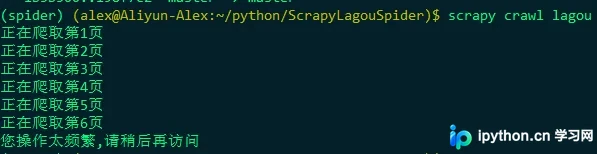
运行后发现仅能抓取5至6页数据,说明拉勾网的反爬机制较为严格。可进一步使用代理IP进行反反爬处理,此处不再赘述。
查看爬取结果
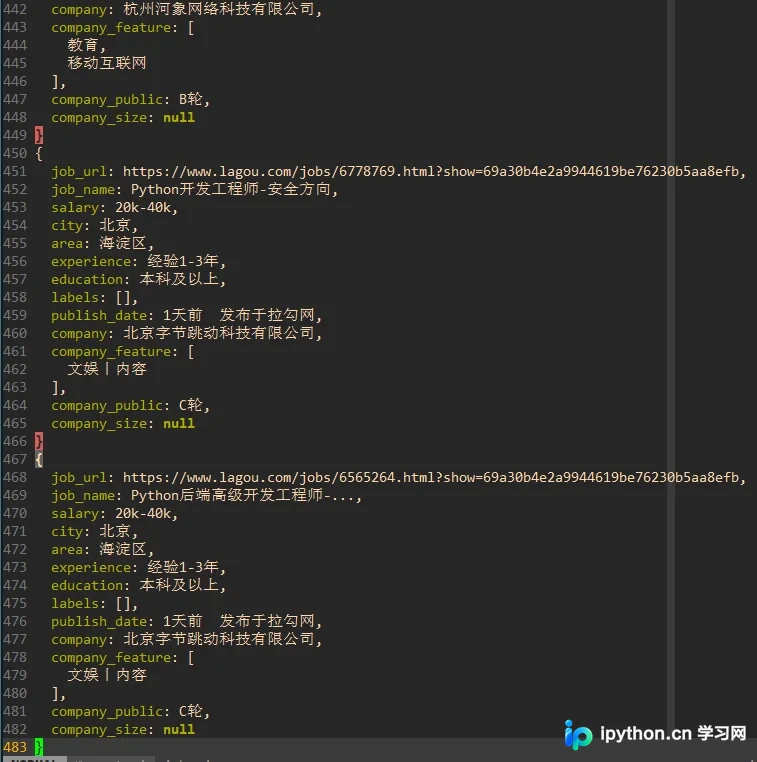
以上即为基于Python Scrapy框架爬取拉勾网招聘信息的完整实例。更多关于Python爬虫及招聘信息爬取的资料,请关注本站其他相关文章!
本站声明
本文内容仅供参考,不代表本站观点。转载或引用请注明出处。如发现内容问题,请通过联系我们页面反馈。















