


Python实现天天酷跑游戏:完整代码与核心逻辑解析

发布时间:2026-10-14 |
3人浏览过
本文详细介绍如何使用Python和Pygame库实现经典的天天酷跑游戏。文章涵盖游戏配置初始化、角色类(Role)的运动与状态管理、障碍物类(Object)的生成与碰撞逻辑,以及背景滚动机制。通过完整的代码示例,解析重力加速度、跳跃速度及分数统计等核心参数,帮助开发者快速掌握2D跑酷游戏的基本开发流程。
Python天天酷跑游戏开发概述
鉴于上一篇关于植物大战僵尸和俄罗斯方块的文章获得了良好的反馈,本次我们更有动力来深入探讨另一个经典案例。今天我们将聚焦于如何实现一个“天天酷跑”风格的游戏。
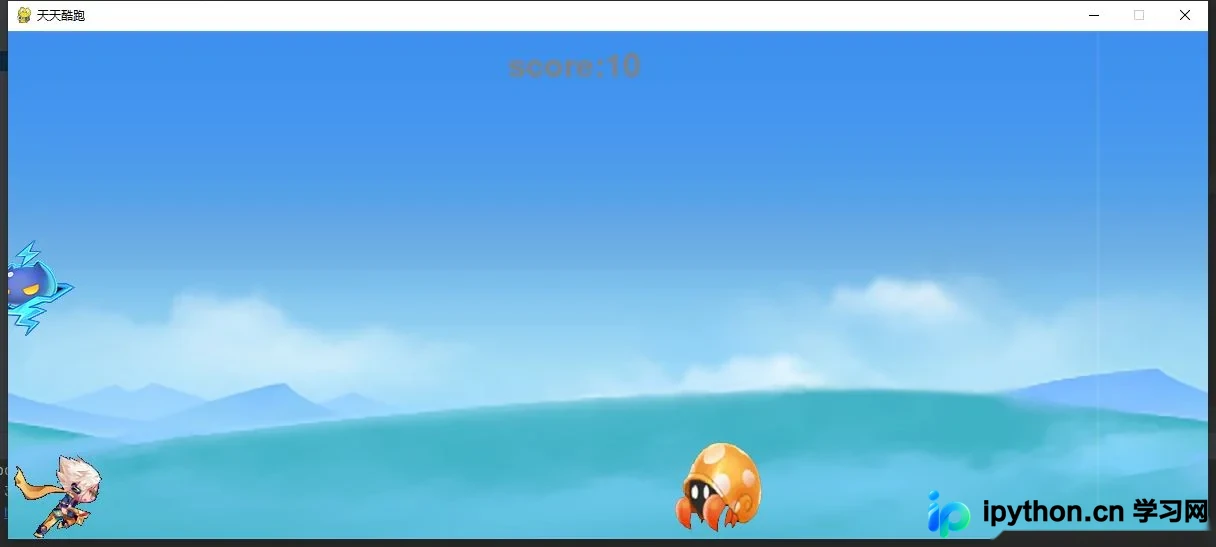
最终呈现的游戏效果如上图所示。接下来,我们将逐步展示并解析实现该游戏所需的全部代码。首先,我们需要按照惯例进行基础定义。
游戏基础配置与初始化
import pygame,sys
import random
接下来,我们需要编写游戏的基础配置部分,包括窗口大小、全局变量初始化以及游戏状态的设定。
width = 1200   #窗口宽度
height = 508   #窗口高度
size = width, height
score=None    #分数
myFont=myFont1=None  #字体
surObject=None   #障碍物图片
surGameOver=None  #游戏结束图片
bg=None     #背景对象
role=None    #人物对象
object=None    #障碍物对象
objectList=[]   #障碍物对象数组
clock=None    #时钟
gameState=None   #游戏状态(0,1)表示(游戏中,游戏结束)
随后,定义游戏中的人物角色类,处理其外观、运动状态(跑步、跳跃)以及物理属性。
角色运动与状态管理逻辑
class Role: #人物
 def __init__(self,surface=None,y=None):
  self.surface=surface
  self.y=y
  self.w=(surface.get_width())/12
  self.h=surface.get_height()/2
  self.currentFrame=-1
  self.state=0  #0代表跑步状态,1代表跳跃状态,2代表连续跳跃
  self.g=1   #重力加速度
  self.vy=0   #y轴速度
  self.vy_start=-20 #起跳开始速度
 def getRect(self):
  return (0,self.y+12,self.w,self.h)
接着,实现障碍物类的逻辑,包括障碍物的生成、移动以及关键的角色碰撞检测机制。
障碍物生成与碰撞检测机制
class Object: #障碍物
 def __init__(self,surface,x=0,y=0):
  self.surface=surface
  self.x=x
  self.y=y
  self.w=surface.get_width()
  self.h=surface.get_height()
  self.currentFrame=random.randint(0,6)
  self.w = 100
  self.h = 100
 def getRect(self):
  return (self.x,self.y,self.w,self.h)
 def collision(self,rect1,rect2):
  #碰撞检测
  if (rect2[0]>=rect1[2]-20) or (rect1[0]+40>=rect2[2])or (rect1[1]+rect1[3]<rect2[1]+20) or (rect2[1]+rect2[3]<rect1[1]+20):
   return False
  return True
最后,处理背景层的滚动效果,确保游戏场景能够持续向前推进,营造奔跑的视觉体验。
背景滚动与游戏主循环
class Bg: #背景
 def __init__(self,surface):
  self.surface=surface
  self.dx=-10
  self.w=surface.get_width()
  self.rect=surface.get_rect()
def initGame():

 global bg,role,clock,gameState,surObject,surGameOver,score,myFont,myFont1,objectList
 #分数初始化
 score=0
 #初始化
 objectList=[]
 #加载字体
 myFont=pygame.font.Font("./freesansbold.ttf",32)
 myFont1=pygame.font.Font("./freesansbold.ttf",64)
 # 创建时钟对象 (可以控制游戏循环频率)
 clock = pygame.time.Clock()
 #初始化游戏状态
 gameState=0
 #游戏背景
 surBg=pygame.image.load("image/bg.bmp").convert_alpha()
 bg=Bg(surBg)
 #结束画面
 surGameOver=pygame.image.load("image/gameover.bmp").convert_alpha()
 #人物图片
 surRole=pygame.image.load("image/role.png").convert_alpha()
 role=Role(surRole,508-85)
 #障碍物图片
 surObject=pygame.image.load("image/object.png").convert_alpha()


def addObject():
 global surObject,object,objectList,object
 rate=4
 #是否生成障碍物
 if not random.randint(0,300)<rate:
  return
 y=random.choice([height-100,height-200,height-300,height-400])
 object=Object(surObject,width+40,y)
 objectList.append(object)


def updateLogic():
 global gameState,score
 #键盘事件处理
 for event in pygame.event.get():
  if event.type == pygame.QUIT:
    sys.exit()
  elif event.type==pygame.KEYDOWN:
   #空格键跳跃
   if gameState==0:
    if event.key==pygame.K_SPACE:
     if role.state==0:
      role.state=1
      role.vy=role.vy_start
     elif role.state==1:
      role.state=2
      role.vy=role.vy_start
   elif gameState==1:
    if event.key==pygame.K_SPACE:
     #重新开始游戏
     initGame()

 if gameState==0:
  #背景的移动
  bg.dx+=10
  if bg.dx==1200:
   bg.dx=0

  #人物的移动
  if role.state==0:
   role.currentFrame+=1
   if role.currentFrame==12:
    role.currentFrame=0
  else:
   role.y+=role.vy
   role.vy+=role.g
   if role.y>=508-85:
    role.y=508-85
    role.state=0
  #障碍物的移动
  addObject()

  for object in objectList:
   object.x-=10  #障碍物移动
   # 障碍物超出屏幕,移除障碍物
   if object.x+object.w<=0:
    objectList.remove(object)
    score+=10 #避开障碍物,加10分
    print("移除了一个目标")
   #碰撞检测
   if object.collision(role.getRect(),object.getRect()):
    if(object.currentFrame==6):
     objectList.remove(object)
     score+=100 #吃金币加100分
     print(score)
     print("吃了一个金币")
    else:
     gameState=1 #游戏失败
     print("发生了碰撞!")
至此,天天酷跑游戏的全部核心代码已展示完毕。如果在实现过程中遇到任何问题,欢迎在评论区留言,我会及时回复并协助解决。
本篇关于基于Python实现天天酷跑功能的教程到此结束。如需了解更多Python游戏开发相关内容,建议查阅本站过往文章或继续浏览后续更新。感谢大家的支持!
本站声明
本文内容仅供参考,不代表本站观点。转载或引用请注明出处。如发现内容问题,请通过联系我们页面反馈。















