


Python爬虫实战:解析某婚恋网站征婚数据抓取流程

本文详细演示如何使用Python抓取某婚恋网站的公开征婚数据。通过浏览器开发者工具分析页面加载机制,确定采用同步加载处理方式。文章逐步解析URL规律、构造请求头、利用XPath提取关键信息,并完整展示数据保存至CSV文件的代码实现,为初学者提供清晰的爬虫开发思路。
本次抓取的目标网址为:https://www.csflhjw.com/zhenghun/34.html?page=1
一、打开界面

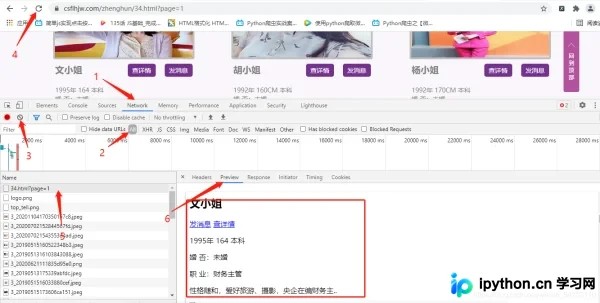
在浏览器中右键点击检查元素,观察页面结构。如截图所示,可以看到一位文姓女士的征婚信息。通过观察页面刷新行为,可以判断该列表页数据为同步加载模式。
切换到Elements面板,定位图片元素以获取其地址。方框内显示了该女士的个人主页URL及头像图片地址,这是后续数据提取的关键字段。
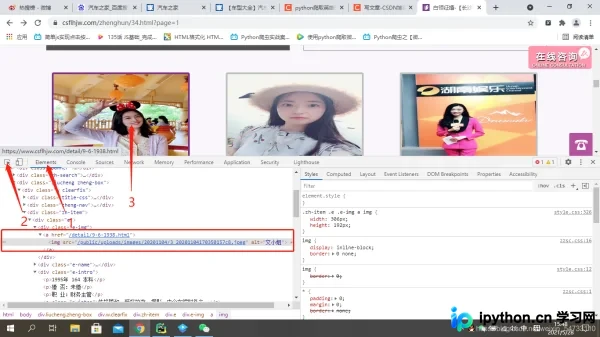
观察发现,列表页中直接给出的女士URL并不完整,需要在代码中进行URL拼接。接下来需要分析翻页链接的变化规律,以便批量获取数据。
点击第2页,观察URL变化,地址变为:https://www.csflhjw.com/zhenghun/34.html?page=2
点击第3页,URL进一步变为:https://www.csflhjw.com/zhenghun/34.html?page=3
通过对比可以发现,页面变化的规律仅体现在URL末尾的page参数上。该网站共有10页数据,可以通过for循环格式化输出每一页的URL,从而遍历所有页面。

二、代码解析
第一步是获取所有女士的个人主页URL。这里使用XPath路径进行解析,具体路径选择将在代码中体现,不再赘述。
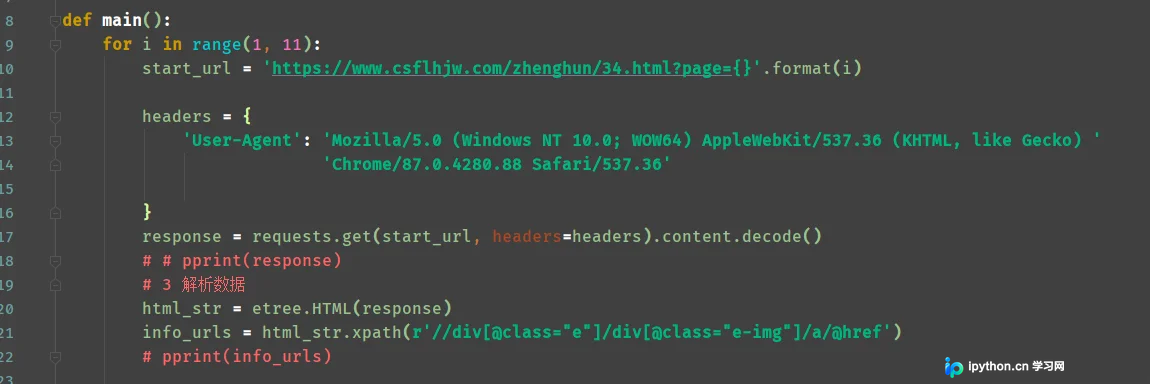
第二步是构造每一位女士的完整URL地址。由于列表页提供的链接不完整,需要结合域名前缀进行拼接。

第三步是访问某位女士的个人主页URL,同样通过开发者工具确认该页面也为同步加载,无需处理复杂的异步请求。
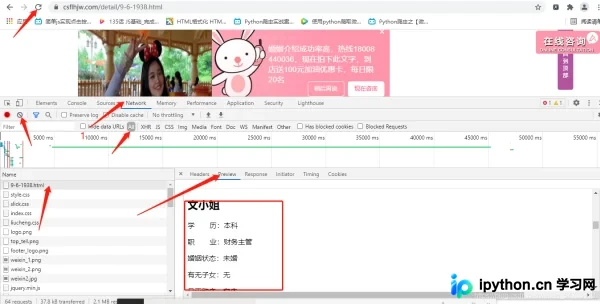
第四步是对女士个人主页HTML进行XPath数据提取。依次打印各项字段,并根据需要过滤掉无关信息,保留核心数据。
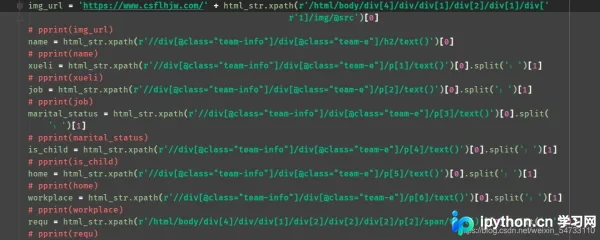
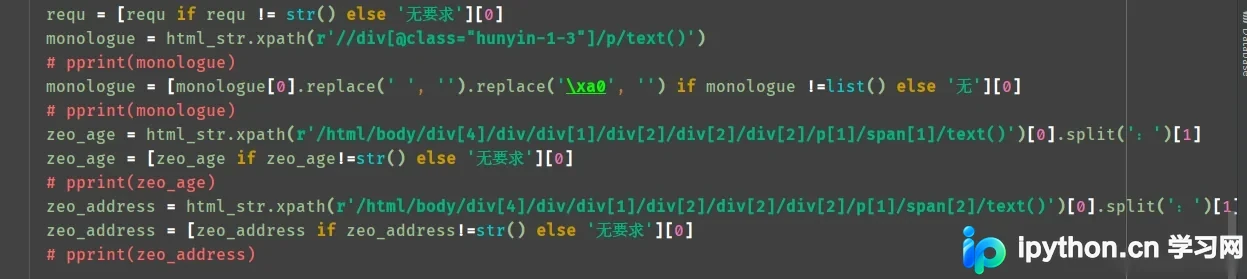
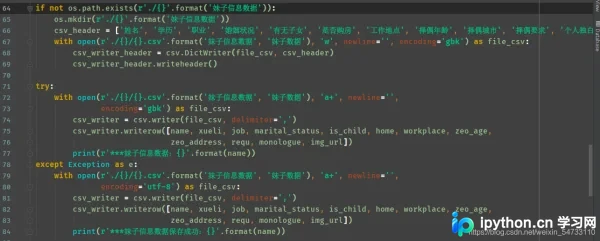
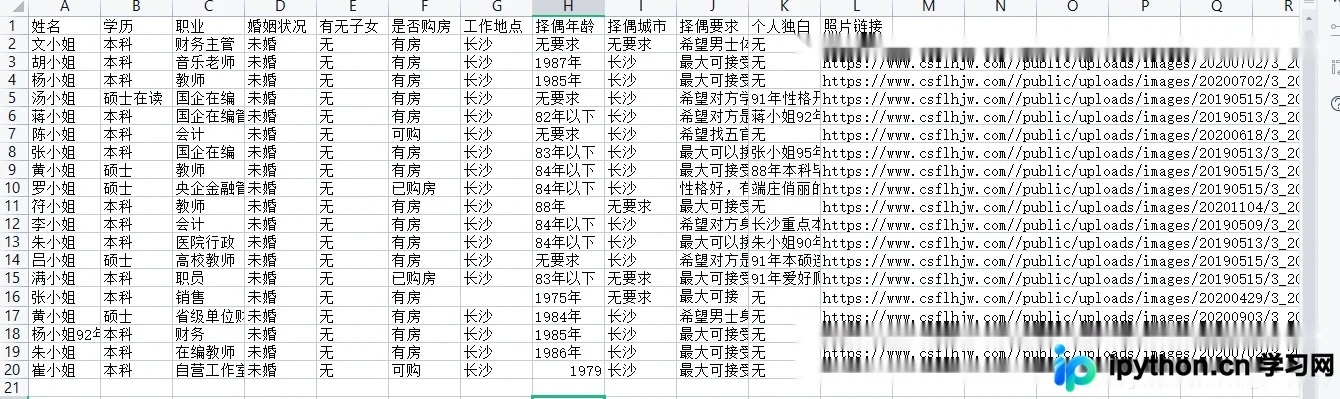
第五步是将提取到的数据保存到本地文件中,通常使用CSV格式以便后续处理。
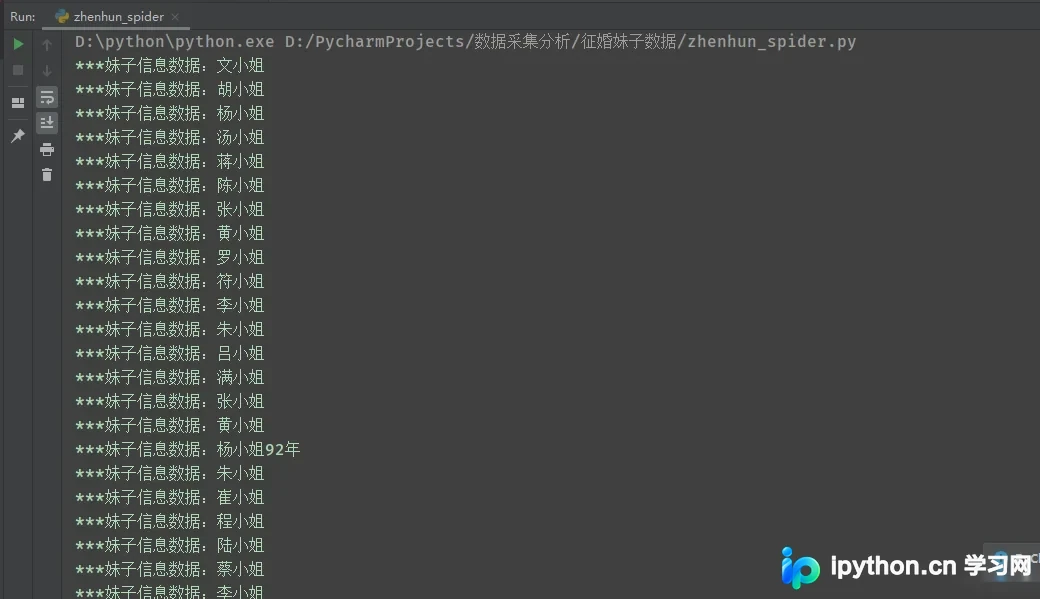
最终打印结果如下:
三、完整代码
# !/usr/bin/nev python
# -*-coding:utf8-*-

import requests, os, csv
from pprint import pprint
from lxml import etree

def main():
    for i in range(1, 11):
        start_url = 'https://www.csflhjw.com/zhenghun/34.html?page={}'.format(i)

        headers = {
            'User-Agent': 'Mozilla/5.0 (Windows NT 10.0; WOW64) AppleWebKit/537.36 (KHTML, like Gecko) '
                          'Chrome/87.0.4280.88 Safari/537.36'

        }
        response = requests.get(start_url, headers=headers).content.decode()
        # # pprint(response)
        # 3 解析数据
        html_str = etree.HTML(response)
        info_urls = html_str.xpath(r'//div[@class="e"]/div[@class="e-img"]/a/@href')
        # pprint(info_urls)

        # 4、循环遍历 构造img_info_url
        for info_url in info_urls:
            info_url = r'https://www.csflhjw.com' + info_url
            # print(info_url)
            # 5、对info_url发请求,解析得到img_urls
            response = requests.get(info_url, headers=headers).content.decode()
            html_str = etree.HTML(response)
            # pprint(html_str)
            img_url = 'https://www.csflhjw.com/' + html_str.xpath(r'/html/body/div[4]/div/div[1]/div[2]/div[1]/div['
                                                                r'1]/img/@src')[0]
            # pprint(img_url)
            name = html_str.xpath(r'//div[@class="team-info"]/div[@class="team-e"]/h2/text()')[0]
            # pprint(name)
            xueli = html_str.xpath(r'//div[@class="team-info"]/div[@class="team-e"]/p[1]/text()')[0].split(':')[1]
            # pprint(xueli)
            job = html_str.xpath(r'//div[@class="team-info"]/div[@class="team-e"]/p[2]/text()')[0].split(':')[1]
            # pprint(job)
            marital_status = html_str.xpath(r'//div[@class="team-info"]/div[@class="team-e"]/p[3]/text()')[0].split(
                ':')[1]
            # pprint(marital_status)
            is_child = html_str.xpath(r'//div[@class="team-info"]/div[@class="team-e"]/p[4]/text()')[0].split(':')[1]
            # pprint(is_child)
            home = html_str.xpath(r'//div[@class="team-info"]/div[@class="team-e"]/p[5]/text()')[0].split(':')[1]
            # pprint(home)
            workplace = html_str.xpath(r'//div[@class="team-info"]/div[@class="team-e"]/p[6]/text()')[0].split(':')[1]
            # pprint(workplace)
            requ = html_str.xpath(r'/html/body/div[4]/div/div[1]/div[2]/div[2]/div[2]/p[2]/span/text()')[0].split(':')[1]
            # pprint(requ)
            requ = [requ if requ != str() else '无要求'][0]
            monologue = html_str.xpath(r'//div[@class="hunyin-1-3"]/p/text()')
            # pprint(monologue)
            monologue = [monologue[0].replace(' ', '').replace('\xa0', '') if monologue !=list() else '无'][0]
            # pprint(monologue)
            zeo_age = html_str.xpath(r'/html/body/div[4]/div/div[1]/div[2]/div[2]/div[2]/p[1]/span[1]/text()')[0].split(':')[1]
            zeo_age = [zeo_age if zeo_age!=str() else '无要求'][0]
            # pprint(zeo_age)
            zeo_address = html_str.xpath(r'/html/body/div[4]/div/div[1]/div[2]/div[2]/div[2]/p[1]/span[2]/text()')[0].split(':')[1]
            zeo_address = [zeo_address if zeo_address!=str() else '无要求'][0]
            # pprint(zeo_address)

            if not os.path.exists(r'./{}'.format('妹子信息数据')):
                os.mkdir(r'./{}'.format('妹子信息数据'))
                csv_header = ['姓名', '学历', '职业', '婚姻状况', '有无子女', '是否购房', '工作地点', '择偶年龄', '择偶城市', '择偶要求', '个人独白', '照片链接']
                with open(r'./{}/{}.csv'.format('妹子信息数据', '妹子数据'), 'w', newline='', encoding='gbk') as file_csv:
                    csv_writer_header = csv.DictWriter(file_csv, csv_header)
                    csv_writer_header.writeheader()

            try:
                with open(r'./{}/{}.csv'.format('妹子信息数据', '妹子数据'), 'a+', newline='',
                          encoding='gbk') as file_csv:
                    csv_writer = csv.writer(file_csv, delimiter=',')
                    csv_writer.writerow([name, xueli, job, marital_status, is_child, home, workplace, zeo_age,
                                         zeo_address, requ, monologue, img_url])
                    print(r'***妹子信息数据:{}'.format(name))
            except Exception as e:
                with open(r'./{}/{}.csv'.format('妹子信息数据', '妹子数据'), 'a+', newline='',
                          encoding='utf-8') as file_csv:
                    csv_writer = csv.writer(file_csv, delimiter=',')
                    csv_writer.writerow([name, xueli, job, marital_status, is_child, home, workplace, zeo_age,
                                         zeo_address, requ, monologue, img_url])
                    print(r'***妹子信息数据保存成功:{}'.format(name))


if __name__ == '__main__':
    main()
至此,关于使用Python爬取某婚恋网站征婚数据的教程介绍完毕。更多相关Python爬取征婚数据的内容,请搜索本站以前的文章或继续浏览下面的相关文章,希望大家以后多多支持本站!
本站声明
本文内容仅供参考,不代表本站观点。转载或引用请注明出处。如发现内容问题,请通过联系我们页面反馈。















