


使用Cython将Python代码编译为C以提升执行效率

本文介绍如何利用Cython将Python代码编译为C语言以提升运行速度。通过一个寻找1000以内勾股数的示例,对比纯Python、Cython编译后以及Java实现的执行时间。结果显示,经过类型声明并编译为C后,耗时从57603毫秒降至35毫秒左右,性能提升超过1600倍,展示了Cython在高性能计算场景下的优势。
Cython编译Python实现性能加速
前言
本文测试环境基于Anaconda3 2019.7版本。示例程序旨在找出所有满足条件的1000以内的勾股数组合,其中变量a、b、c的取值范围均为[1, 1000]。
问题定义与纯Python实现
满足a² + b² = c²的解共有多少种?
若使用标准Python编写该逻辑,参考代码如下:
首先创建主程序文件main.py。
# encoding=utf-8
# cython: language_level=3
import time
import pyximport

pyximport.install()
import pyth_triples


def main():
    start = time.time()
    result = pyth_triples.count_triples(1000)
    duration = time.time() - start
    print(result, duration * 1000, "ms")


if __name__ == '__main__':
    main()
接着创建用于定义核心逻辑的文件pyth_triples.py。
# encoding=utf-8
# cython: language_level=3
def count_triples(limit):
    result = 0

    for a in range(1, limit + 1):
        for b in range(a + 1, limit + 1):
            for c in range(b + 1, limit + 1):
                if c ** 2 > a ** 2 + b ** 2:
                    break
                if c ** 2 == (a ** 2 + b ** 2):
                    result += 1
    return result
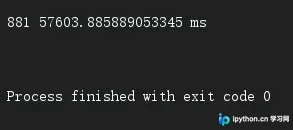
此时尚未进行C语言编译,仅是从pyx文件导入函数进行调用。执行完毕后,程序返回结果881,但耗时达到57603毫秒,运行效率较低。
Cython类型声明与编译配置
接下来尝试将代码编译为C语言执行,以观察性能变化。需要修改pyth_triples.pyx文件,将其中定义的变量类型显式声明为cdef int xxx = 0。
# encoding=utf-8
# cython: language_level=3
def count_triples(limit):
    cdef int result = 0
    cdef int a = 0
    cdef int b = 0
    cdef int c = 0
    for a in range(1, limit + 1):
        for b in range(a + 1, limit + 1):
            for c in range(b + 1, limit + 1):
                if c ** 2 > a ** 2 + b ** 2:
                    break
                if c ** 2 == (a ** 2 + b ** 2):
                    result += 1
    return result
创建setup.py文件(此步骤可选,主要用于将编译结果写入本地磁盘,以便展示生成的C语言代码结构)。
# encoding=utf-8
# cython: language_level=3
from distutils.core import setup

from Cython.Build import cythonize

# set PYTHONHOME=D:\Anaconda3
# conda activate
# python setup.py build_ext --inplace
setup(
    ext_modules=cythonize("pyth_triples.pyx")
)
在PyCharm终端中依次执行以下命令:
set PYTHONHOME=D:\Anaconda3
conda activate
python setup.py build_ext --inplace
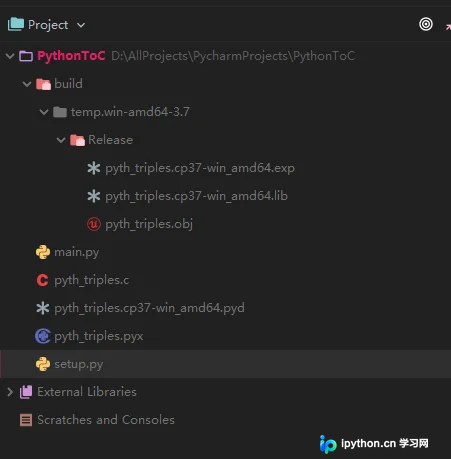
该操作将生成对应的.c文件及其他中间文件。
编译前后性能对比
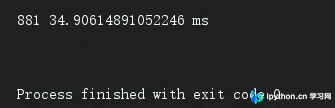
执行main.py后,程序返回结果不变,但执行时间由原来的57603毫秒大幅缩短至35毫秒左右,性能提升超过1600倍。
Java实现性能参考
作为对比,若使用Java语言实现相同的逻辑:
Java实现代码如下:
public class TriplesTest {
    public static void main(String[] args) {
        long startTime = System.currentTimeMillis();
        System.out.println(count_triples(1000));
        long endTime = System.currentTimeMillis();
        System.out.println("run time:" + (endTime - startTime) + "ms");
    }

    public static int count_triples(int limit) {
        int result = 0;
        for (int a = 1; a <= limit; a++) {
            for (int b = a + 1; b <= limit; b++) {
                for (int c = b + 1; c <= limit; c++) {
                    if (Math.pow(c, 2) > Math.pow(a, 2) + Math.pow(b, 2)) {
                        break;
                    }
                    if (Math.pow(c, 2) == Math.pow(a, 2) + Math.pow(b, 2)) {
                        result += 1;
                    }
                }
            }
        }
        return result;
    }
}
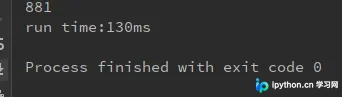
Java版本的执行时间约为130毫秒。
至此,关于如何将Python编译为C语言以优化性能的介绍已完成。如需了解更多相关内容,请搜索本站往期文章或继续阅读后续章节,感谢支持。
本站声明
本文内容仅供参考,不代表本站观点。转载或引用请注明出处。如发现内容问题,请通过联系我们页面反馈。















