


Python基于DFA算法实现内容敏感词过滤

本文详细介绍如何利用Python实现基于DFA(确定有限状态自动机)算法的敏感词过滤系统。通过构建树状查找结构,算法能高效识别文本中的违规词汇。文章包含基础匹配逻辑、通配符支持以及特殊符号绕过处理的完整代码示例,帮助开发者快速部署内容审核功能。
DFA算法原理与树状结构构建
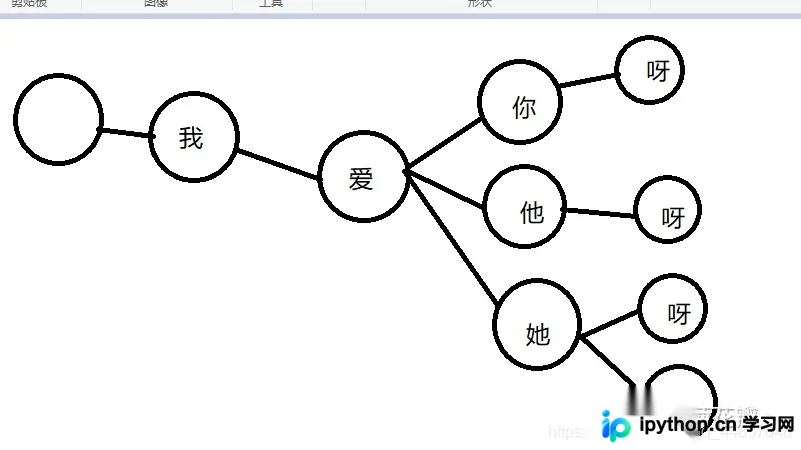
DFA(确定有限状态自动机)算法的核心在于预先构建一个树状查找结构。一旦结构建立,系统即可根据输入字符串在该结构中执行高效的匹配查找。
假设存在一个敏感词库,其中包含以下词汇:
- 我爱你
- 我爱他
- 我爱她
- 我爱你呀
- 我爱他呀
- 我爱她呀
- 我爱她啊
基于上述词汇,可以构建出如下所示的树状结构:
敏感词匹配流程详解
假设用户输入的字符串为:“白菊我爱你呀哈哈哈”。
我们遍历用户输入的字符串 str,并设置指针 i 指向树状结构的根节点(即最左侧的空节点):
- 当 str[0] 为 ‘白’ 时,由于 tree[i] 没有指向值为 ‘白’ 的子节点,不满足匹配条件,指针继续向下遍历。
- str[1] 为 ‘菊’,同样不满足匹配条件,继续遍历。
- str[2] 为 ‘我’,此时 tree[i] 存在一条指向 ‘我’ 节点的路径,满足匹配条件,指针 i 指向 ‘我’ 节点,随后继续遍历。
- str[3] 为 ‘爱’,tree[i] 存在指向 ‘爱’ 节点的路径,满足条件,指针 i 指向 ‘爱’,继续遍历。
- str[4] 为 ‘你’,存在对应路径,指针 i 指向 ‘你’,继续遍历。
- str[5] 为 ‘呀’,存在对应路径,指针 i 指向 ‘呀’。
此时,指针 i 已到达树状结构的末尾,表示完成了一次敏感词匹配。我们可以记录匹配开始和结束时的字符串下标,再次遍历并将对应字符替换为 * 即可。
完成一次匹配后,将指针 i 重新指向树状结构的根节点。
由于用户输入的字符串尚未遍历完毕,继续执行遍历:
str[6] 为 ‘哈’,不满足匹配条件,继续遍历。
str[7] 为 ‘哈’ …
str[8] 为 ‘哈’ …
由此可见,只需遍历一次用户输入的字符串,即可找出其中包含的敏感词汇。
Python代码实现与测试
DFA算法Python实现
class DFA:
    """DFA 算法
       敏感字中“*”代表任意一个字符
    """

    def __init__(self, sensitive_words: list, skip_words: list):  # 对于敏感词sensitive_words及无意义的词skip_words可以通过数据库、文件或者其他存储介质进行保存
        self.state_event_dict = self._generate_state_event(sensitive_words)
        self.skip_words = skip_words

    def __repr__(self):
        return '{}'.format(self.state_event_dict)

    @staticmethod
    def _generate_state_event(sensitive_words) -> dict:
        state_event_dict = {}
        for word in sensitive_words:
            tmp_dict = state_event_dict
            length = len(word)
            for index, char in enumerate(word):
                if char not in tmp_dict:
                    next_dict = {'is_end': False}
                    tmp_dict[char] = next_dict
                    tmp_dict = next_dict
                else:
                    next_dict = tmp_dict[char]
                    tmp_dict = next_dict
                if index == length - 1:
                    tmp_dict['is_end'] = True
        return state_event_dict

    def match(self, content: str):
        match_list = []
        state_list = []
        temp_match_list = []

        for char_pos, char in enumerate(content):
            if char in self.skip_words:
                continue
            if char in self.state_event_dict:
                state_list.append(self.state_event_dict)
                temp_match_list.append({
                    "start": char_pos,
                    "match": ""
                })
            for index, state in enumerate(state_list):
                is_match = False
                state_char = None
                if '*' in state: # 对于一些敏感词,比如大傻X,可能是大傻B,大傻×,大傻...,采用通配符*,一个*代表一个字符
                    state_list[index] = state['*']
                    state_char = state['*']
                    is_match = True
                if char in state:
                    state_list[index] = state[char]
                    state_char = state[char]
                    is_match = True
                if is_match:
                    if state_char["is_end"]:
                        stop = char_pos + 1
                        temp_match_list[index]['match'] = content[
                                                          temp_match_list[index]['start']:stop]
                        match_list.append(copy.deepcopy(temp_match_list[index]))
                        if len(state_char.keys()) == 1:
                            state_list.pop(index)
                            temp_match_list.pop(index)
                else:
                    state_list.pop(index)
                    temp_match_list.pop(index)
        for index, match_words in enumerate(match_list):
            print(match_words['start'])
        return match_list
_generate_state_event 方法用于生成敏感词的树状结构(以字典形式保存)。针对上述示例,生成的树状结构保存如下:
if __name__ == '__main__':
    dfa = DFA(['我爱你', '我爱他', '我爱她', '我爱你呀', '我爱他呀', '我爱她呀', '我爱她啊'], skip_words=[])  # 暂时不配置skip_words
    print(dfa)
结果:
{'我': {'is_end': False, '爱': {'is_end': False, '你': {'is_end': True, '呀': {'is_end': True}}, '他': {'is_end': True, '呀': {'is_end': True}}, '她': {'is_end': True, '呀': {'is_end': True}, '啊': {'is_end': True}}}}}
随后调用 match 方法,输入内容进行敏感词匹配:
if __name__ == '__main__':
    dfa = DFA(['我爱你', '我爱他', '我爱她', '我爱你呀', '我爱他呀', '我爱她呀', '我爱她啊'], ['\n', '\r\n', '\r'])
    # print(dfa)
    print(dfa.match('白菊我爱你呀哈哈哈'))
结果:
[{'start': 2, 'match': '我爱你'}, {'start': 2, 'match': '我爱你呀'}]
通配符与特殊符号处理策略
对于一些敏感词,例如“大傻X”,可能变体为“大傻B”、“大傻×”或“大傻...”。是否可以通过通配符 * 来解决此类问题?
见代码:48 ~51行
if '*' in state: # 对于一些敏感词,比如大傻X,可能是大傻B,大傻×,大傻...,采用通配符*,一个*代表一个字符
 state_list[index] = state['*']
 state_char = state['*']
 is_match = True
验证一下:
if __name__ == '__main__':
    dfa = DFA(['大傻*'], [])
    print(dfa)
    print(dfa.match('大傻X安乐飞大傻B'))
{'大': {'is_end': False, '傻': {'is_end': False, '*': {'is_end': True}}}} [{'start': 0, 'match': '大傻X'}, {'start': 6, 'match': '大傻B'}]
上例中,如果输入内容“大傻X安乐飞大傻B”写成“大%傻X安乐飞大&傻B”,能否识别出敏感词?结果显示无法识别。
if __name__ == '__main__':
    dfa = DFA(['大傻*'], [])
    print(dfa)
    print(dfa.match('大%傻X安乐飞大&傻B'))
结果:
{'大': {'is_end': False, '傻': {'is_end': False, '*': {'is_end': True}}}} [
诸如“,&,!,!,@,#,$,¥,*,^,%,?,?,<,>,《,》”等符号虽无实际语义,但可插入敏感词中间以破坏结构,从而规避敏感词检查。
通过配置无意义词列表,再进行敏感词检查,可见即使敏感词结构被破坏也能被识别,如下所示:
if __name__ == '__main__':
    dfa = DFA(['大傻*'], ['%', '&'])
    print(dfa)
    print(dfa.match('大%傻X安乐飞大&傻B'))
结果:
{'大': {'is_end': False, '傻': {'is_end': False, '*': {'is_end': True}}}} [{'start': 0, 'match': '大%傻X'}, {'start': 7, 'match': '大&傻B'}]
以上就是Python基于DFA算法实现内容敏感词过滤的详细内容,更多关于Python敏感词过滤的资料请关注本站其它相关文章!
本站声明
本文内容仅供参考,不代表本站观点。转载或引用请注明出处。如发现内容问题,请通过联系我们页面反馈。















