


Python可视化:绘制带趋势线的散点图与边缘直方图

发布时间:2026-10-15 |
6人浏览过
本文介绍如何使用Python的Seaborn库进行数据可视化。通过lmplot函数在散点图中添加线性拟合趋势线,直观展示变量间的相关性;利用GridSpec布局绘制边缘直方图,同时呈现双变量关系及单变量分布。代码示例基于mpg数据集,涵盖环境配置、数据筛选及图表美化,适用于数据探索性分析。
一、绘制带趋势线的散点图
功能说明:
在散点图中引入趋势线(即线性拟合线),用于直观反映两个变量之间是呈现正相关、负相关还是无明显相关关系。
具体实现代码:
import pandas as pd
import matplotlib as mpl
import matplotlib.pyplot as plt
import seaborn as sns
import warnings
warnings.filterwarnings(action='once')
plt.style.use('seaborn-whitegrid')
sns.set_style("whitegrid")
print(mpl.__version__)
print(sns.__version__)
def draw_scatter(file):
    # Import Data
    df = pd.read_csv(file)
    df_select = df.loc[df.cyl.isin([4, 8]), :]

    # Plot
    gridobj = sns.lmplot(
        x="displ",
        y="hwy",
        hue="cyl",
        data=df_select,
        height=7,
        aspect=1.6,
        palette='Set1',
        scatter_kws=dict(s=60, linewidths=.7, edgecolors='black'))
    # Decorations
    sns.set(style="whitegrid", font_scale=1.5)
    gridobj.set(xlim=(0.5, 7.5), ylim=(10, 50))
    gridobj.fig.set_size_inches(10, 6)
    plt.tight_layout()
    plt.title("Scatterplot with line of best fit grouped by number of cylinders")
    plt.show()
draw_scatter("F:\数据杂坛\datasets\mpg_ggplot2.csv")
运行效果:
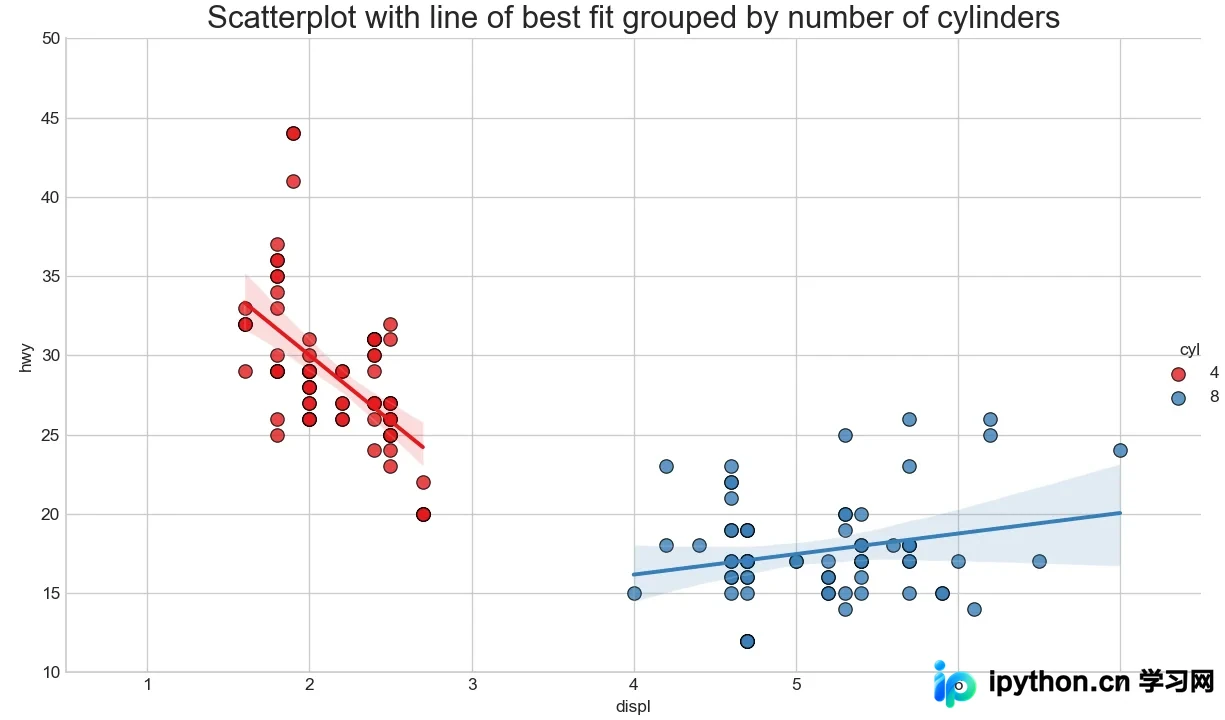
如图所示,散点图中添加了趋势线以展示变量间的线性关系。图中红蓝两组数据分别对应不同的分类,并各自绘制了最佳的线性拟合直线。
二、绘制边缘直方图
功能说明:
利用Python绘制边缘直方图,旨在同时展示X轴与Y轴变量之间的相互关系,以及X和Y各自的单变量分布情况。这种图表类型常用于数据探索性分析阶段。
具体实现代码:
import pandas as pd
import matplotlib as mpl
import matplotlib.pyplot as plt
import seaborn as sns
import warnings
warnings.filterwarnings(action='once')
plt.style.use('seaborn-whitegrid')
sns.set_style("whitegrid")
print(mpl.__version__)
print(sns.__version__)
def draw_Marginal_Histogram(file):
    # Import Data
    df = pd.read_csv(file)

    # Create Fig and gridspec
    fig = plt.figure(figsize=(10, 6), dpi=100)
    grid = plt.GridSpec(4, 4, hspace=0.5, wspace=0.2)
    # Define the axes
    ax_main = fig.add_subplot(grid[:-1, :-1])
    ax_right = fig.add_subplot(grid[:-1, -1], xticklabels=[], yticklabels=[])
    ax_bottom = fig.add_subplot(grid[-1, 0:-1], xticklabels=[], yticklabels=[])
    # Scatterplot on main ax
    ax_main.scatter('displ',
                    'hwy',
                    s=df.cty * 4,
                    c=df.manufacturer.astype('category').cat.codes,
                    alpha=.9,
                    data=df,
                    cmap="Set1",
                    edgecolors='gray',
                    linewidths=.5)
    # histogram on the right
    ax_bottom.hist(df.displ,
                   40,
                   histtype='stepfilled',
                   orientation='vertical',
                   color='#098154')
    ax_bottom.invert_yaxis()
    # histogram in the bottom
    ax_right.hist(df.hwy,
                  40,
                  histtype='stepfilled',
                  orientation='horizontal',
                  color='#098154')
    # Decorations
    ax_main.set(title='Scatterplot with Histograms \n displ vs hwy',
                xlabel='displ',
                ylabel='hwy')
    ax_main.title.set_fontsize(10)
    for item in ([ax_main.xaxis.label, ax_main.yaxis.label] +
                 ax_main.get_xticklabels() + ax_main.get_yticklabels()):
        item.set_fontsize(10)

    xlabels = ax_main.get_xticks().tolist()
    ax_main.set_xticklabels(xlabels)
    plt.show()
draw_Marginal_Histogram("F:\数据杂坛\datasets\mpg_ggplot2.csv")
运行效果:
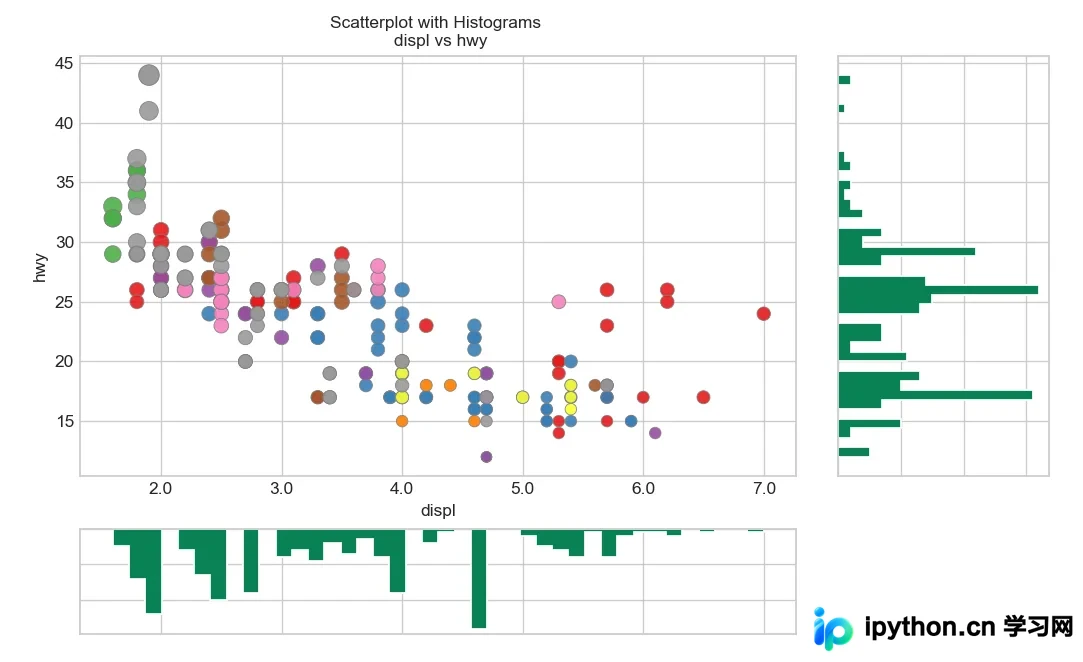
至此,关于Python可视化分析中绘制带趋势线散点图和边缘直方图的介绍已完成。如需了解更多Python绘图相关内容,建议搜索本站往期文章或继续浏览后续教程。感谢大家的支持!
本站声明
本文内容仅供参考,不代表本站观点。转载或引用请注明出处。如发现内容问题,请通过联系我们页面反馈。















