


Python实现图像随机Patch提取:策略、代码与优化技巧

发布时间:2026-10-15 |
4人浏览过
本文详解在Python中从大图像随机截取多个固定大小Patch的策略,旨在解决数据丰富性不足、IO开销大及覆盖不均等问题。通过固定步长获取坐标并加入随机扰动,结合边界修正与ROI功能,实现高效且覆盖均匀的Patch提取。代码仅计算边界框,后续可根据边缘效应、方差过滤及数量限制进行优化,适用于超分辨率等训练场景。
图像Patch提取的核心挑战
在许多图像任务中,我们需要从一张大图中截取固定大小的Patch用于模型训练。这一过程通常面临几个关键挑战。
- 首先,Patch的位置应当尽可能随机,以避免数据丰富性不足,从而降低模型过拟合的风险。
- 其次,若原图尺寸较大,读取图像带来的I/O开销可能极高,进而拖慢训练速度。因此,优化策略应支持一次性截取多个Patch以提高效率。
- 此外,我们通常不希望因随机性导致图像某些区域未被覆盖。因此,必须关注Patch位置的覆盖均匀程度。
随机Patch提取策略详解
针对上述问题,可采用以下策略从图像中获取位置随机的多个Patch。
- 第一步,以固定的步长(stride)获取所有潜在Patch的左上角坐标。
- 第二步,对这些左上角坐标引入随机扰动(jitter),以增加位置的随机性。
- 第三步,在Patch的左上角坐标基础上加上宽度和高度,计算出右下角坐标。
- 第四步,检查Patch坐标是否超出图像边界。若超出,需将其向内收缩,确保在收缩过程中Patch的尺寸保持不变。
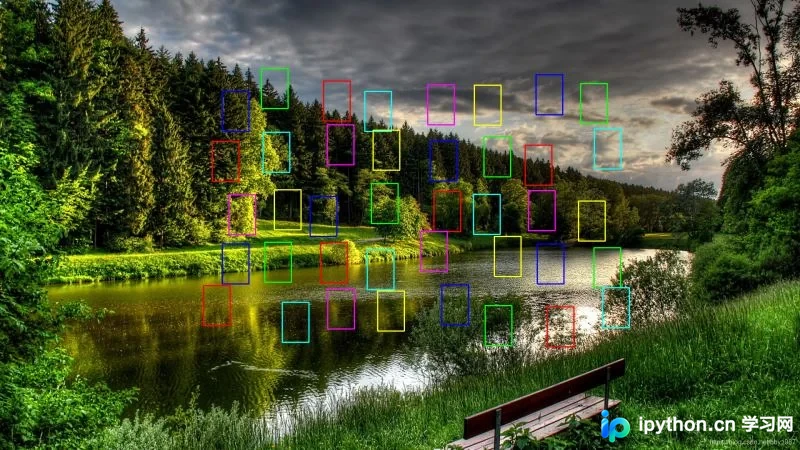
- 第五步,引入ROI(感兴趣区域)功能。这意味着Patch不必从整张图中获取,而是可以指定特定的ROI区域进行截取。
Python代码实现与边界框计算
以下是具体的实现代码及示例演示。
请注意,上述代码仅负责获取Patch的边界框(bounding box),并未实际执行Patch的截取操作。
# -*- coding: utf-8 -*-
import cv2
import numpy as np


def get_random_patch_bboxes(image, bbox_size, stride, jitter, roi_bbox=None):
    """
    Generate random patch bounding boxes for a image around ROI region

    Parameters
    ----------
    image: image data read by opencv, shape is [H, W, C]
    bbox_size: size of patch bbox, one digit or a list/tuple containing two
        digits, defined by (width, height)
    stride: stride between adjacent bboxes (before jitter), one digit or a
        list/tuple containing two digits, defined by (x, y)
    jitter: jitter size for evenly distributed bboxes, one digit or a
        list/tuple containing two digits, defined by (x, y)
    roi_bbox: roi region, defined by [xmin, ymin, xmax, ymax], default is whole
        image region

    Returns
    -------
    patch_bboxes: randomly distributed patch bounding boxes, n x 4 numpy array.
        Each bounding box is defined by [xmin, ymin, xmax, ymax]
    """
    height, width = image.shape[:2]
    bbox_size = _process_geometry_param(bbox_size, min_value=1)
    stride = _process_geometry_param(stride, min_value=1)
    jitter = _process_geometry_param(jitter, min_value=0)

    if bbox_size[0] > width or bbox_size[1] > height:
        raise ValueError('box_size must be <= image size')

    if roi_bbox is None:
        roi_bbox = [0, 0, width, height]

    # tl is for top-left, br is for bottom-right
    tl_x, tl_y = _get_top_left_points(roi_bbox, bbox_size, stride, jitter)
    br_x = tl_x + bbox_size[0]
    br_y = tl_y + bbox_size[1]

    # shrink bottom-right points to avoid exceeding image border
    br_x[br_x > width] = width
    br_y[br_y > height] = height
    # shrink top-left points to avoid exceeding image border
    tl_x = br_x - bbox_size[0]
    tl_y = br_y - bbox_size[1]
    tl_x[tl_x < 0] = 0
    tl_y[tl_y < 0] = 0
    # compute bottom-right points again
    br_x = tl_x + bbox_size[0]
    br_y = tl_y + bbox_size[1]

    patch_bboxes = np.concatenate((tl_x, tl_y, br_x, br_y), axis=1)
    return patch_bboxes


def _process_geometry_param(param, min_value):
    """
    Process and check param, which must be one digit or a list/tuple containing
    two digits, and its value must be >= min_value

    Parameters
    ----------
    param: parameter to be processed
    min_value: min value for param

    Returns
    -------
    param: param after processing
    """
    if isinstance(param, (int, float)) or \
            isinstance(param, np.ndarray) and param.size == 1:
        param = int(np.round(param))
        param = [param, param]
    else:
        if len(param) != 2:
            raise ValueError('param must be one digit or two digits')
        param = [int(np.round(param[0])), int(np.round(param[1]))]

    # check data range using min_value
    if not (param[0] >= min_value and param[1] >= min_value):
        raise ValueError('param must be >= min_value (%d)' % min_value)
    return param


def _get_top_left_points(roi_bbox, bbox_size, stride, jitter):
    """
    Generate top-left points for bounding boxes

    Parameters
    ----------
    roi_bbox: roi region, defined by [xmin, ymin, xmax, ymax]
    bbox_size: size of patch bbox, a list/tuple containing two digits, defined
        by (width, height)
    stride: stride between adjacent bboxes (before jitter), a list/tuple
        containing two digits, defined by (x, y)
    jitter: jitter size for evenly distributed bboxes, a list/tuple containing
        two digits, defined by (x, y)

    Returns
    -------
    tl_x: x coordinates of top-left points, n x 1 numpy array
    tl_y: y coordinates of top-left points, n x 1 numpy array
    """
    xmin, ymin, xmax, ymax = roi_bbox
    roi_width = xmax - xmin
    roi_height = ymax - ymin

    # get the offset between the first top-left point of patch box and the
    # top-left point of roi_bbox
    offset_x = np.arange(0, roi_width, stride[0])[-1] + bbox_size[0]
    offset_y = np.arange(0, roi_height, stride[1])[-1] + bbox_size[1]
    offset_x = (offset_x - roi_width) // 2
    offset_y = (offset_y - roi_height) // 2

    # get the coordinates of all top-left points
    tl_x = np.arange(xmin, xmax, stride[0]) - offset_x
    tl_y = np.arange(ymin, ymax, stride[1]) - offset_y
    tl_x, tl_y = np.meshgrid(tl_x, tl_y)
    tl_x = np.reshape(tl_x, [-1, 1])
    tl_y = np.reshape(tl_y, [-1, 1])

    # jitter the coordinates of all top-left points
    tl_x += np.random.randint(-jitter[0], jitter[0] + 1, size=tl_x.shape)
    tl_y += np.random.randint(-jitter[1], jitter[1] + 1, size=tl_y.shape)
    return tl_x, tl_y


if __name__ == '__main__':
    image = cv2.imread('1.bmp')
    patch_bboxes = get_random_patch_bboxes(
        image,
        bbox_size=[64, 96],
        stride=[128, 128],
        jitter=[32, 32],
        roi_bbox=[500, 200, 1500, 800])

    colors = [
        (255, 0, 0),
        (0, 255, 0),
        (0, 0, 255),
        (255, 255, 0),
        (255, 0, 255),
        (0, 255, 255)]
    color_idx = 0

    for bbox in patch_bboxes:
        color_idx = color_idx % 6
        pt1 = (bbox[0], bbox[1])
        pt2 = (bbox[2], bbox[3])
        cv2.rectangle(image, pt1, pt2, color=colors[color_idx], thickness=2)
        color_idx += 1

    cv2.namedWindow('image', 0)
    cv2.imshow('image', image)
    cv2.waitKey(0)
    cv2.destroyAllWindows()
    cv2.imwrite('image.png', image)
实际应用中的功能优化
在实际应用场景中,可进一步扩展以下功能以优化数据质量。
1. 增加基于位置的过滤机制。例如,剔除过于靠近边缘的Patch。某些算法对边缘效应敏感,此时应避免将边缘数据纳入训练集。
2. 基于简单算法策略进行过滤。以超分辨率任务为例,通常无需关注面积巨大的平坦区域(如纯色墙面或大片天空)。此时可利用方差分析来过滤低信息量的Patch。
3. 设置最大保留数量。由于原图像大小差异可能导致生成的Patch数量波动较大,为保持训练数据的均衡性,可设定最大保留数。为确保覆盖程度,通常在截取前对Patch进行洗牌(shuffle)或重新计算步长。
以上为Python实现从图像中随机获取多个Patch的完整解析,更多相关技术细节请参阅本站其他文章。
本站声明
本文内容仅供参考,不代表本站观点。转载或引用请注明出处。如发现内容问题,请通过联系我们页面反馈。















