python用pytest测试函数怎么写

详细讲解在Python中使用pytest编写函数测试的具体方法,包括测试文件与函数命名规则、原生assert断言技巧、参数化测试、异常捕获以及常用执行排查命令。
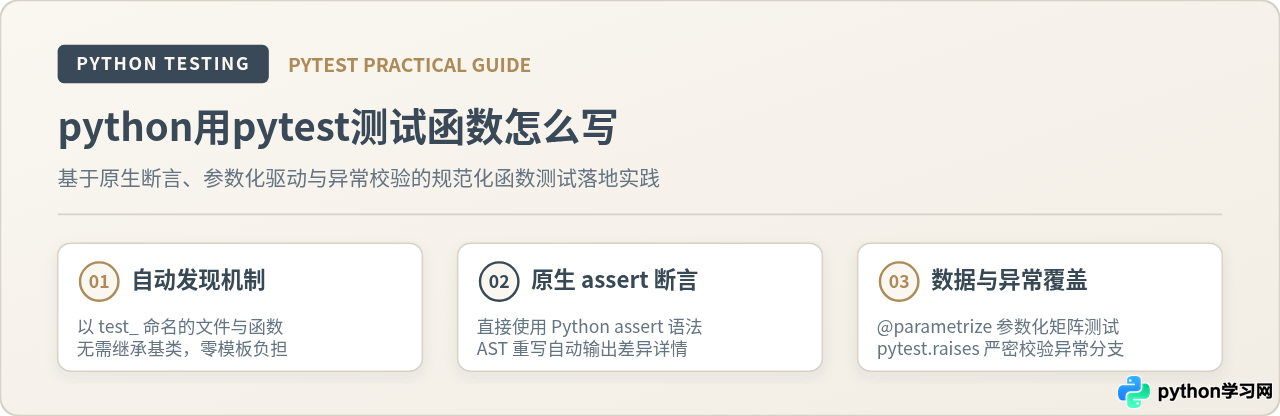
test_ 开头的普通 Python 函数,并在函数内部直接使用原生 assert 表达式对比预期输出与实际结果。pytest 依靠自动化测试发现(Test Discovery)机制与抽象语法树(AST)重写技术,能够自动查找目标函数并提供清晰直观的断言失败详情。本文通过待测业务函数、基础断言测试、参数化矩阵、异常分支捕获及测试命令执行,完整梳理规范化编写函数测试的全流程。
一、测试发现规则与文件命名规范
pytest 最显著的特点是“约定优于配置”。编写测试函数时,既不需要从任何基类继承,也不需要手动将测试函数注册到某个测试套件中。pytest 在执行时会在当前工作目录下递归扫描所有文件,依据固定规则收集测试用例:
- 测试文件命名:文件名必须以
test_开头或以_test.py结尾,例如test_calculator.py。 - 测试函数命名:测试函数必须是无参或仅接收 fixture 参数的普通函数,函数名必须以
test_开头,例如def test_calculate_discount():。 - 测试类命名(可选):若使用类组织多个测试函数,类名必须以
Test开头,且不能包含__init__构造方法。测试类中的测试方法同样必须以test_开头。
在实际工程项目中,推荐将业务源码与测试代码分开放置。一个清晰且符合主流规范的目录结构示例如下:
my_project/
├── src/
│   ├── __init__.py
│   └── calculator.py       # 业务代码:存放待测试的目标函数
├── tests/
│   ├── __init__.py
│   └── test_calculator.py  # 测试代码:存放对应的 pytest 测试函数
└── pyproject.toml
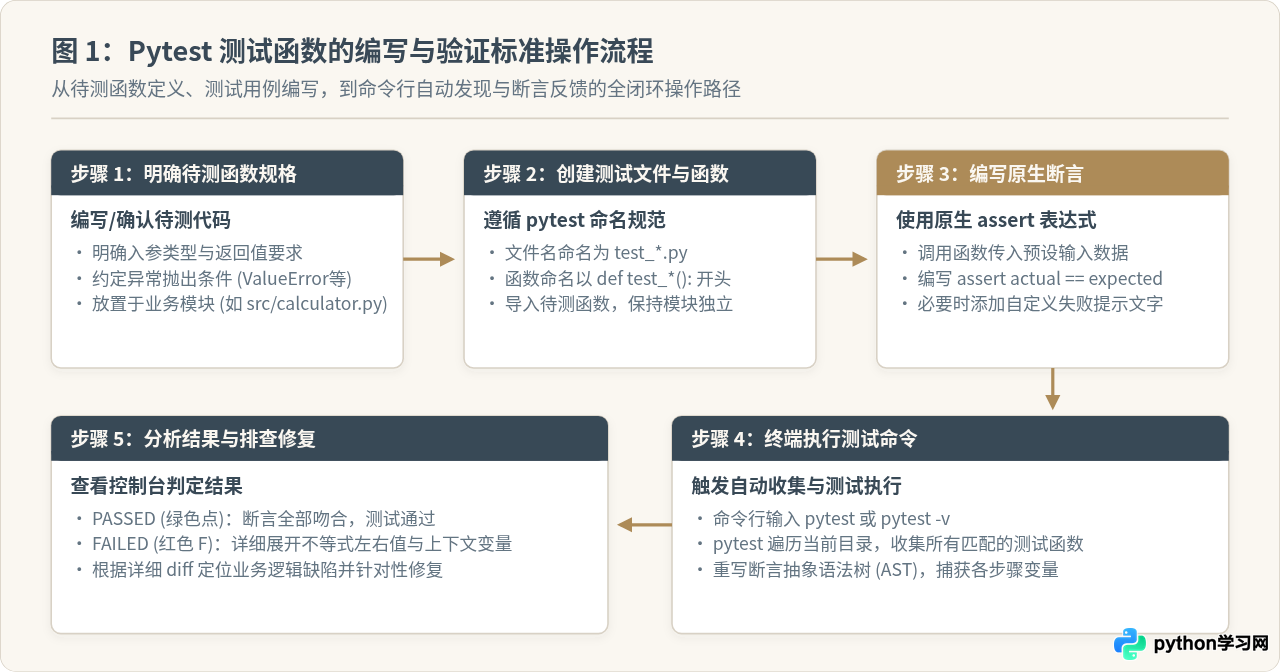
在这种结构下,直接在项目根目录下输入 pytest 命令,pytest 就会自动定位到 tests/ 目录下的测试文件并执行所有 test_* 函数。
二、编写第一个测试函数:基础断言与运行
理解测试函数的写法,最直接的方法是跟随一个具体待测函数展开操作。假设我们在 src/calculator.py 中实现了一个商品折扣计算函数 calculate_discount,该函数接收原价和折扣率,返回折后价格,要求折扣率在 0 到 1 之间:
# 文件位置:src/calculator.py

def calculate_discount(price: float, discount_rate: float) -> float:
    """计算折后金额。discount_rate 为 0 到 1 之间的小数。"""
    if price < 0:
        raise ValueError("原价不能为负数")
    if not (0.0 <= discount_rate <= 1.0):
        raise ValueError("折扣率必须在 0.0 到 1.0 之间")

    discounted = price * (1.0 - discount_rate)
    return round(discounted, 2)
接下来在 tests/test_calculator.py 中编写针对此函数的测试函数。编写测试函数时,首先导入待测函数,然后编写一个独立的 test_* 函数,调用该函数并用 assert 语句进行验证:
# 文件位置:tests/test_calculator.py
from src.calculator import calculate_discount

def test_calculate_discount_regular():
    """测试常规打折场景:100 元打 8 折应为 80 元"""
    result = calculate_discount(100.0, 0.2)
    assert result == 80.0

def test_calculate_discount_zero_rate():
    """测试不打折场景:折扣率为 0 时价格不变"""
    result = calculate_discount(250.0, 0.0)
    assert result == 250.0

def test_calculate_discount_full_free():
    """测试全额折扣场景:折扣率为 1.0 时折后为 0"""
    result = calculate_discount(199.0, 1.0)
    assert result == 0.0
运行测试与执行输出解析
在项目根目录的终端中执行带有详细输出标志的测试命令:
控制台将输出测试发现和用例执行状态:
platform darwin -- Python 3.10.12, pytest-7.4.0, pluggy-1.3.0 -- /usr/bin/python3
cachedir: .pytest_cache
rootdir: /path/to/my_project
collected 3 items
tests/test_calculator.py::test_calculate_discount_regular PASSED [ 33%]
tests/test_calculator.py::test_calculate_discount_zero_rate PASSED [ 66%]
tests/test_calculator.py::test_calculate_discount_full_free PASSED [100%]
============================== 3 passed in 0.02s ===============================
输出中 tests/test_calculator.py::test_calculate_discount_regular 表明具体执行到了哪一个文件下的哪个函数,末尾的 PASSED 代表断言完全成立。
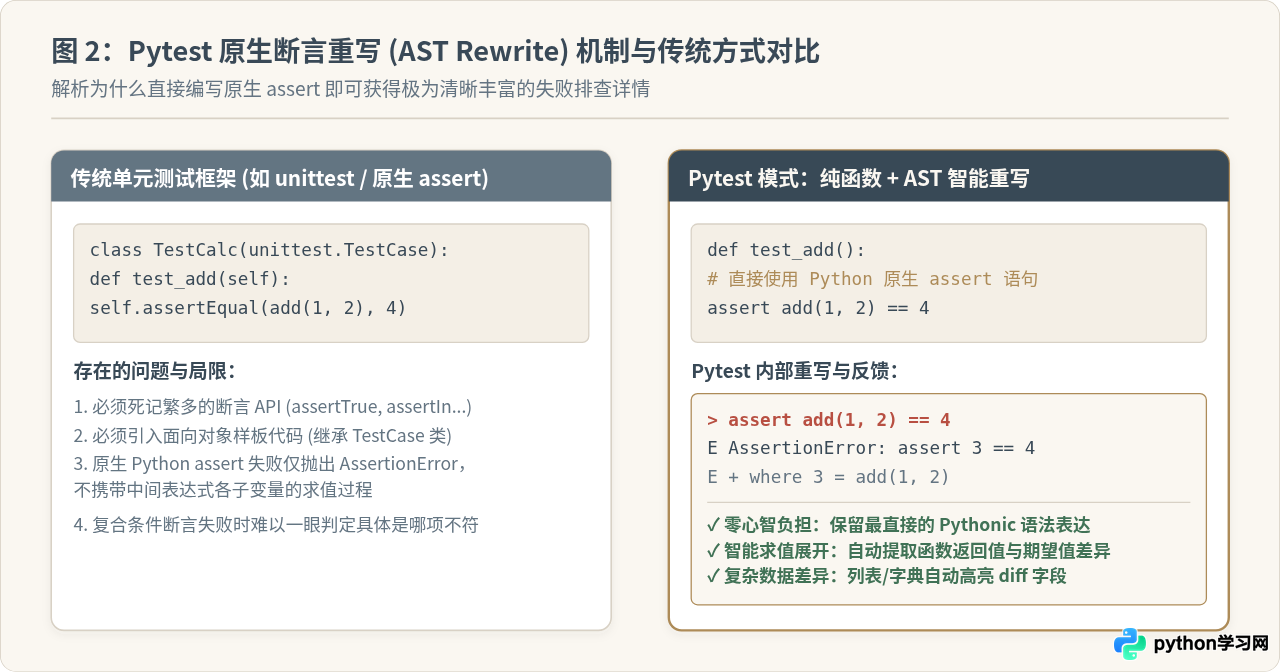
传统测试框架(如 Python 内置的
unittest)要求必须使用 self.assertEqual(a, b) 或 self.assertTrue(x) 等方法,否则断言失败时只能捕获笼统的布尔值结果。而 pytest 会在导入测试模块阶段重写抽象语法树(AST Rewrite),当普通的 assert a == b 失败时,pytest 能自动提取出 a 和 b 的计算值、表达式子项乃至类型差异并格式化打印,在保证代码简洁的同时获得更详尽的诊断信息。
三、浮点数与复杂容器的断言处理
在函数测试中,直接使用 == 断言并不总是适用于所有数据类型。针对浮点数计算和复合数据结构,pytest 提供了更为稳健的验证方法。
1. 浮点数精度断言:pytest.approx
由于计算机二进制表示浮点数的舍入误差,0.1 + 0.2 == 0.3 在 Python 中会判定为 False(实际为 0.30000000000000004)。如果待测函数涉及浮点运算,直接使用 == 容易引发偶发性测试失败。此时应使用 pytest.approx:
import pytest

def calculate_tax(amount: float, tax_rate: float) -> float:
    return amount * tax_rate

def test_calculate_tax_floating_precision():
    # 使用 pytest.approx 避免由于浮点精度造成的断言误判
    tax = calculate_tax(100.0, 0.065)
    assert tax == pytest.approx(6.5, rel=1e-3)
2. 复合数据结构对比
当待测函数返回字典、列表、集合或自定义数据类时,依然可以直接使用 assert。断言失败时,pytest 会自动对集合做 diff 比较,精准展示哪些键缺失、哪些元素不匹配:
def get_user_profile(user_id: int) -> dict:
    return {"id": user_id, "role": "member", "active": True}

def test_get_user_profile():
    profile = get_user_profile(42)
    assert profile["role"] == "member"
    assert "active" in profile
    assert profile == {"id": 42, "role": "member", "active": True}
四、多数据场景:使用 @pytest.mark.parametrize 参数化测试
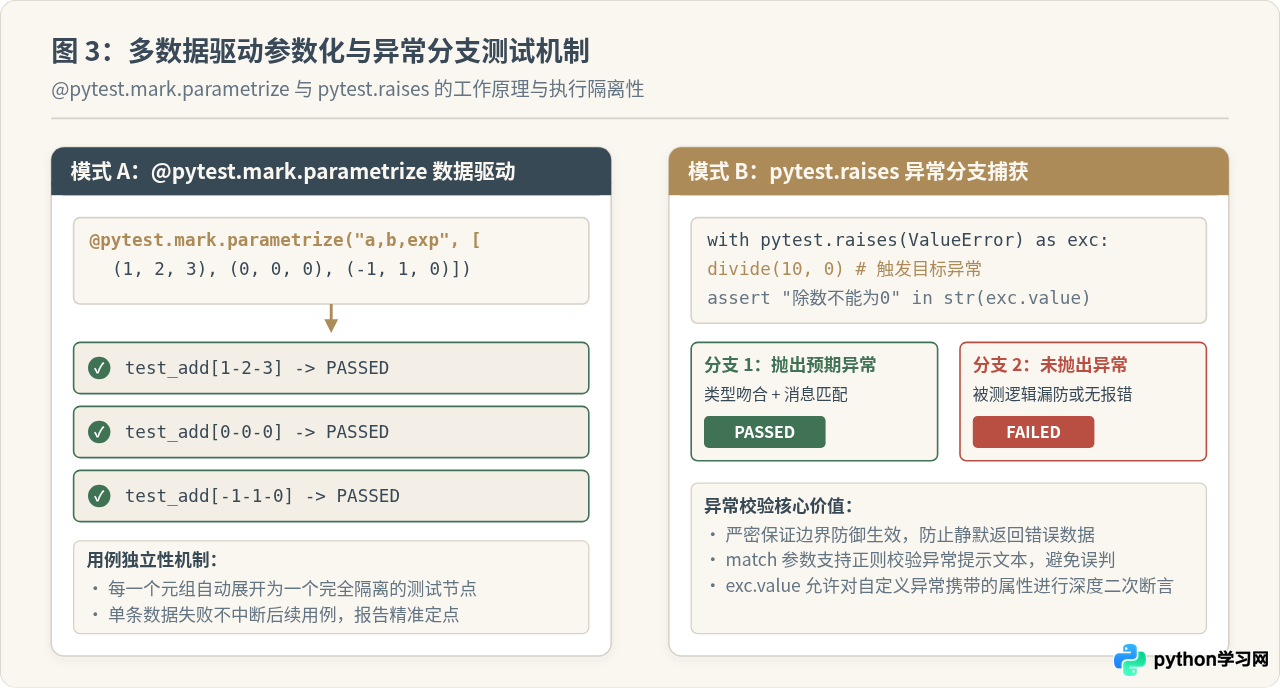
在实际业务中,一个函数通常需要验证多个不同输入组合,例如正数、边界零、高精度小数等。如果为每组输入都复制一个独立的测试函数,会导致大量样板代码;若在同一个测试函数内用 for 循环执行断言,一旦循环中某一项失败,后续所有用例都会被阻断无法执行。
针对这一需求,pytest 提供了 @pytest.mark.parametrize 装饰器。它将参数定义为列表,并自动将每个数据元组解包为一个完全独立的测试用例:
import pytest
from src.calculator import calculate_discount

@pytest.mark.parametrize(
    "price, discount_rate, expected",
    [
        (100.0, 0.1, 90.0),    # 常规 9 折
        (50.0, 0.5, 25.0),     # 半价折扣
        (200.0, 0.0, 200.0),   # 边界:0 折扣率
        (99.0, 1.0, 0.0),      # 边界:全免
        (10.5, 0.2, 8.4),      # 浮点输入
    ],
    ids=["ten_percent", "half_price", "no_discount", "free", "decimal_price"]
)
def test_calculate_discount_multi_cases(price, discount_rate, expected):
    result = calculate_discount(price, discount_rate)
    assert result == pytest.approx(expected)
执行 pytest -v tests/test_calculator.py -k "test_calculate_discount_multi_cases" 时的终端效果如下:
tests/test_calculator.py::test_calculate_discount_multi_cases[half_price] PASSED [ 40%]
tests/test_calculator.py::test_calculate_discount_multi_cases[no_discount] PASSED [ 60%]
tests/test_calculator.py::test_calculate_discount_multi_cases[free] PASSED [ 80%]
tests/test_calculator.py::test_calculate_discount_multi_cases[decimal_price] PASSED [100%]
============================== 5 passed in 0.03s ===============================
通过配置 ids 参数,每个测试子项都会在控制台中展示对应的描述名称。即使其中某一个边界条件失败,其他测试仍然会照常执行,极大提升了边界测试的完整性与排查效率。
五、边界与异常测试:使用 pytest.raises 检验函数报错
测试函数不仅要验证“正常输入产生正确输出”,还必须严格验证“非法输入时函数是否按预期抛出异常”。在 calculate_discount 函数中,传入负数价格或超过 1.0 的折扣率应当抛出 ValueError。
pytest 提供了上下文管理器 pytest.raises,专门用于捕获并断言预期的异常:
import pytest
from src.calculator import calculate_discount

def test_calculate_discount_negative_price_raises_error():
    """验证传入负数价格时必须抛出 ValueError,且提示语匹配"""
    with pytest.raises(ValueError) as exc_info:
        calculate_discount(-10.0, 0.2)

    # 验证捕获到的异常消息文本
    assert "原价不能为负数" in str(exc_info.value)

def test_calculate_discount_invalid_rate_match():
    """使用 match 参数通过正则精确匹配异常提示文本"""
    with pytest.raises(ValueError, match=r"折扣率必须在 0\.0 到 1\.0 之间"):
calculate_discount(100.0, 1.5)当进入
with pytest.raises(...) 代码块时,如果内部代码抛出了指定类型的异常,上下文管理器将捕获该异常,并判定该测试分支通过;如果代码块执行完毕却没有产生任何异常,或者抛出的异常类型与预期不符,pytest 会直接将该用例标记为 FAILED,并输出 DID NOT RAISE <class 'ValueError'>。
六、测试函数依赖管理:使用 Fixture 准备前置数据
当多个测试函数需要使用相同的初始配置、测试数据集或外部对象时,反复在每个函数内部实例化会导致代码冗余。pytest 提供了轻量且解耦的 Fixture 机制。
使用 @pytest.fixture 装饰一个函数作为数据工厂,测试函数只需直接将该 fixture 函数的名称作为入参,pytest 就会在执行时自动调用 fixture 并将返回值注入给测试函数:
import pytest

# 声明一个测试前置数据 fixture
@pytest.fixture
def sample_order_items():
    return [
        {"name": "键盘", "price": 299.0, "discount": 0.1},
        {"name": "鼠标", "price": 120.0, "discount": 0.2},
    ]

def calculate_order_total(items: list) -> float:
    total = sum(item["price"] * (1.0 - item["discount"]) for item in items)
    return round(total, 2)

# 测试函数直接将 fixture 名 sample_order_items 作为形参传入
def test_calculate_order_total(sample_order_items):
    total = calculate_order_total(sample_order_items)
    # 299 * 0.9 = 269.1, 120 * 0.8 = 96.0 -> 269.1 + 96.0 = 365.1
    assert total == 365.1
Fixture 保证了每个测试函数执行时获取到的都是一份独立生成的全新对象,避免了函数之间由于共享全局变量而相互污染。
七、常用执行命令与排查技巧
编写完测试函数后,高效利用 pytest 提供的命令行参数可以大幅缩短排查与调试周期:
| 命令行参数 | 执行效果与典型使用场景 |
|---|---|
pytest |
基础命令,自动递归扫描当前目录下所有 test_*.py 文件并执行所有测试。 |
pytest -v |
详细模式(Verbose),逐行打印每个测试文件的测试函数名称及 PASSED/FAILED 状态。 |
pytest tests/test_calculator.py |
限定只执行指定的某一个测试文件,不遍历其它用例。 |
pytest -k "discount and not free" |
按表达式筛选测试函数名称。只执行函数名包含 discount 且不含 free 的用例。 |
pytest -x |
遇到第一个失败用例(Failure)时立刻终止运行,适合快速迭代修复问题。 |
pytest --lf |
仅重新运行上次执行失败的用例(Last Failed),极大节省大量用例下的回测时间。 |
pytest -s |
禁止输出捕获。测试函数中的 print(...) 输出会直接打印在控制台中,便于临时排查。 |
八、总结与编写规范检查清单
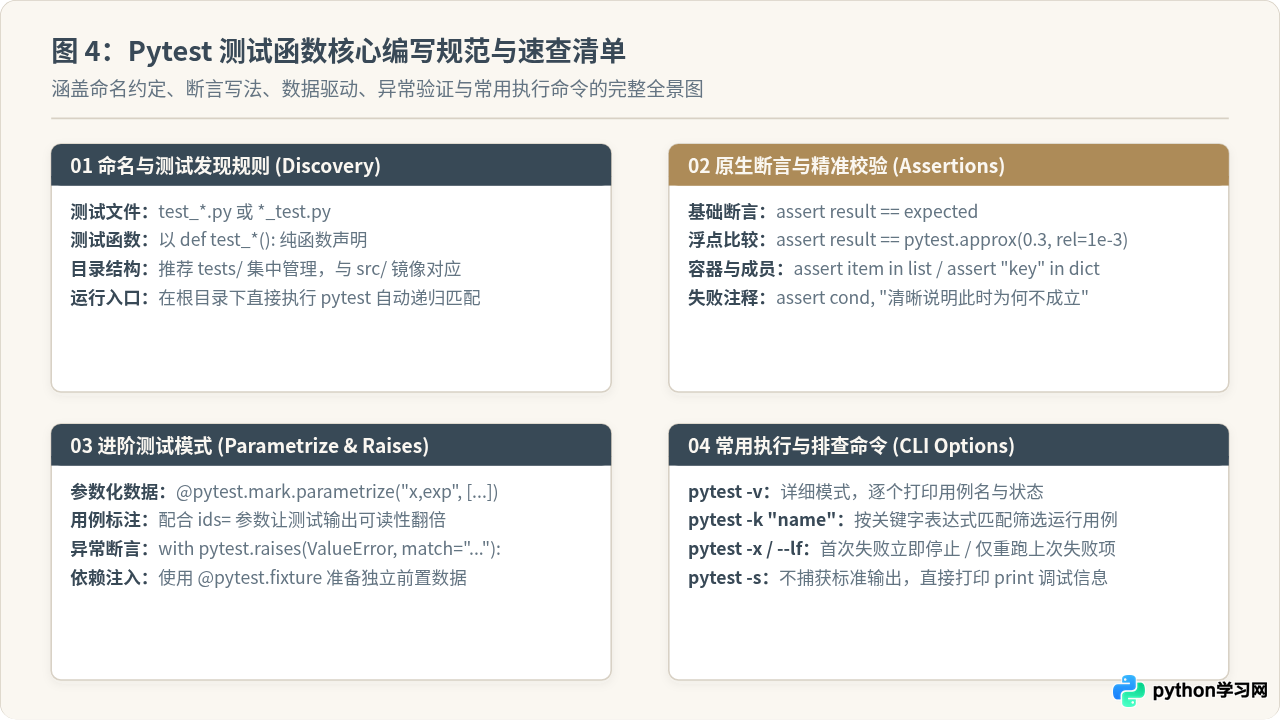
在 Python 中使用 pytest 编写函数测试,核心在于遵循其轻量、纯净的设计哲学。在提交或合并测试代码前,可以通过以下清单快速核对是否符合规范:
- 命名是否达标:测试文件命名为
test_*.py,测试函数命名为def test_*():。 - 断言是否直接:优先使用原生
assert actual == expected表达逻辑;对于浮点数运算,使用pytest.approx()规避精度抖动。 - 测试粒度是否单一:一个测试函数应重点验证一个特定的输入输出场景,避免把几十个断言混在一个巨大函数中。
- 边界与异常是否完整:针对合法输入验证返回值;针对非法参数使用
pytest.raises验证异常类型与错误信息。 - 多数据是否参数化:重复逻辑的测试场景使用
@pytest.mark.parametrize提取为参数矩阵,并配置清晰的ids便于定位。
本站声明
本文内容仅供参考,不代表本站观点。转载或引用请注明出处。如发现内容问题,请通过联系我们页面反馈。