


基于Python与Pygame实现动态粒子烟花特效

本文详细介绍如何使用Python结合Pygame库实现动态烟花粒子特效。通过构建发射物与爆炸粒子的物理模型,包含重力、阻力与透明度衰减算法,并提供完整可运行代码、环境配置步骤及交互控制说明,帮助开发者快速掌握粒子动画的实现原理。
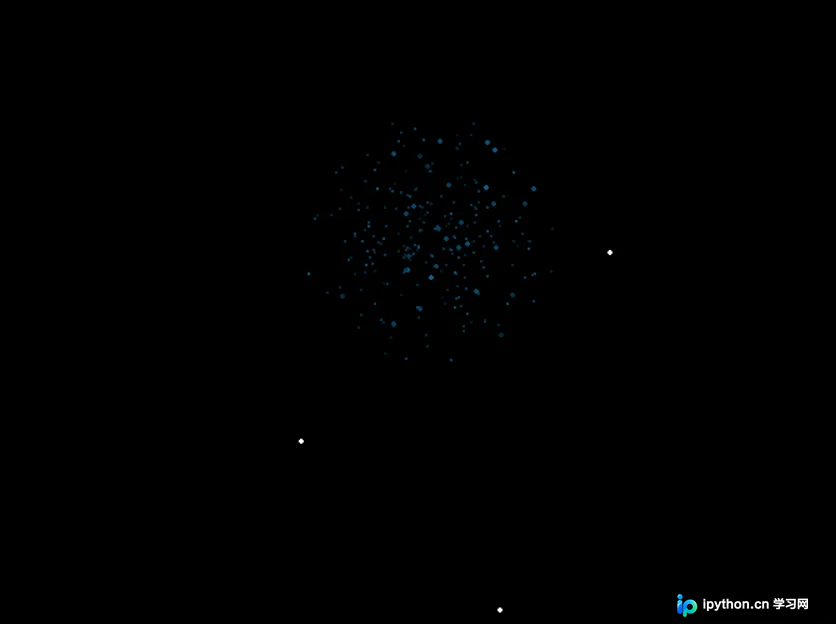
一、演示效果与核心逻辑
该方案基于经典的粒子系统(Particle System)原理,在二维画布上模拟三维空间的视觉效果。程序通过持续生成并更新大量独立粒子,结合物理运动学公式计算位置偏移、速度衰减与亮度变化,从而呈现出连续的升空、爆炸与消散动画。整体渲染流畅,支持实时交互控制。
二、运行环境与前置准备
代码依赖标准的图形渲染扩展库。请在终端执行安装命令:
pip install pygame程序初始化时会自动调用混音模块播放音效。若目录内缺少音频文件,运行时将抛出警告或静默跳过。建议在同级目录放置名为 firew.wav 的WAV格式音频。如需修改窗口分辨率,可在源码中调整 ww, wh = (1200, 800) 的值。
三、完整代码实现
以下为完整可运行的脚本。代码封装了粒子生命周期管理、受力计算与事件监听循环,直接保存为 firework.py 即可执行。
import pygame
from math import *
from pygame.locals import *
import random

class firew:
    def __init__(self, pos, color, light, size, move):
        self.pos = list(pos)
        self.color = list(color)
        self.light = light
        self.size = size
        self.move = list(move)

    def force(self, force):
        self.move[0] += force[0]
        self.move[1] += force[1]
        self.move[0] *= force[2]
        self.move[1] *= force[2]

    def update(self):
        self.pos[0] += self.move[0]
        self.pos[1] += self.move[1]

    def render(self, fenster, glitter):
        glitter = (glitter and random.randint(40, 100)/100) or 1
        c = rund( mult(self.color, self.light*glitter) )
        rad = int(round(self.light* self.size))
        rad += rad < 1
        pygame.draw.circle(fenster, c, rund(self.pos), rad)


def summon(fws, pos, pre_move = [0,0]):
    mix.stop()
    anz = random.randint(200, 350)
    r = random.randint(0, 255)
    g = random.randint(0, 255)
    b = random.randint(0, 255)

    for i in range(anz):
        ang = random.randint(0, 360)
        speed = random.randint(100, 1000) / 250
        move = (cos(radians(ang))*speed + pre_move[0],
                sin(radians(ang))*speed + pre_move[1])

        light = random.randint(60, 100)/100
        size = random.randint(100, 300)/100

        fws.append( firew(pos, (r,g,b), light, size, move) )

    l, r = ( 0.2 + 0.8*(ww-pos[0])/ww, 0.2 + 0.8*pos[0]/ww )
    mix.set_volume(l, r)
    mix.play(sound)
    return fws


def rund(liste):
    new = []
    for i in liste:
        new.append(int(round(i)))
    return new

def mult(color, multi):
    new = list(color)
    new[0] *= multi
    new[1] *= multi
    new[2] *= multi
    return new


pygame.init()

sound = pygame.mixer.Sound("firew.wav")
mix = pygame.mixer.Channel(0)
mix.set_volume(1, 1)

bg = (0, 0, 0)
ww, wh = (1200, 800)
fenster = pygame.display.set_mode((ww, wh))

fws = [] # firework particles
rockets = []
force = [0, 0.02, 0.985]

max_counter = random.randint(0, 200)
counter = max_counter

auto  = True
pause = False

run = 1
clock = pygame.time.Clock()

while run:
    pygame.display.set_caption("[Spacebar] to pause; [c] disable automatic fireworks")
    counter -= (auto and not pause)

    if counter <= 0: # neues erstellen
        pos = [random.randint(ww*2/5, ww*3/5), wh]
        move = [random.randint(-100, 100)/100, -random.randint(800, 1500)/110]
        rockets.append( firew(pos, (255, 255, 255), 1, 2, move) )
        fuse = random.randint(50, 80)
        rockets[-1].fuse = fuse
        max_counter = random.randint(10, 100)
        counter = max_counter

    for e in pygame.event.get():
        if e.type == QUIT:
            run = 0
        if e.type == KEYDOWN:
            if e.key == K_c:
                auto = not auto
            if e.key == K_SPACE:
                pause = not pause
            if e.key == K_v:
                fws = []; rockets = []
        if e.type == MOUSEBUTTONDOWN:
            fws = summon(fws, e.pos)

    fenster.fill(bg)
    dellist1 = []
    dellist2 = []

    for i, rocket in enumerate(rockets):
        if not pause:
            rocket.force(force)
            rocket.update()
        rocket.render(fenster, False)
        rocket.fuse -= not pause
        if rocket.fuse < 0:
            dellist1.append(i)
            fws = summon(fws, rocket.pos, rocket.move)

    for i, f in enumerate(fws):
        if not pause:
            f.force(force)
            f.update()
        f.render(fenster, True and not pause)
        f.light -= (not pause) * random.randint(0, 150) / 7500
        if f.light < 0:
            dellist2.append(i)

    dellist1.reverse()
    dellist2.reverse()

    for d in dellist1:
        del rockets[d]
    for d in dellist2:
        del fws[d]

    pygame.display.update()
    clock.tick(80)

pygame.quit()
四、操作指引与参数说明
程序运行后打开全屏渲染窗口,可通过以下按键与鼠标操作控制粒子状态:
空格键 (Space):切换暂停/继续状态,冻结当前帧的物理计算。C 键:开关自动发射模式。关闭后将仅响应手动点击,便于观察单个爆炸细节。V 键:清空所有火箭与爆炸粒子列表,释放内存。鼠标左键单击:在点击坐标处立即触发一次彩色粒子爆炸。
核心物理参数说明:
force = [0, 0.02, 0.985]:分别代表X轴加速度、Y轴重力系数与空气阻力乘数。微调可改变粒子下落速度与扩散半径。light变量:控制粒子透明度与渲染半径衰减,值低于0时粒子会被标记为删除状态,防止内存泄漏。clock.tick(80):限制主循环最大帧率为80 FPS,兼顾视觉效果与CPU占用。
五、常见问题排错
第1步:处理音频文件或路径缺失报错
若终端提示 OSError 或混音模块无法初始化,请检查同级目录下是否存在 firew.wav。可将代码中的 sound = pygame.mixer.Sound("firew.wav") 临时注释,或替换为任意有效的短音频路径。
第2步:解决高负载下卡顿或掉帧
当屏幕同时存在数千个活跃粒子时,CPU可能成为瓶颈。可将 clock.tick(80) 降低至 60 或 50,并适当缩小 anz = random.randint(200, 350) 的范围。避免频繁调用 pygame.display.flip(),本代码已统一使用 display.update() 确保刷新效率。
六、总结
以上就是基于Python与Pygame实现动态粒子烟花特效的详细内容,更多关于粒子动画开发与物理模拟技术的资料请关注本站其它相关文章!
本站声明
本文内容仅供参考,不代表本站观点。转载或引用请注明出处。如发现内容问题,请通过联系我们页面反馈。















