


C#自定义控件:在RichTextBox左侧添加行号与顶部标尺

发布时间:2026-10-15 |
5人浏览过
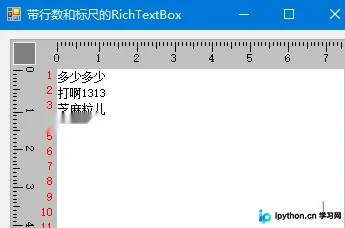
在开发文本编辑器或IDE插件时,标准的RichTextBox缺乏类似VS或Sublime中的行号标记和坐标标尺。通过继承UserControl并重构OnPaint事件,可以低成本地实现这一需求,帮助开发者更直观地进行排版对齐和内容校对。
实践过程
效果展示
设计思路
实现该功能的核心在于“重绘”而非修改原有控件的内部行为。我们需要构建一个继承自 UserControl 的自定义类 GuageRichTextBox,其内部包含一个标准 RichTextBox。主要的视觉元素(边框、标尺背景、刻度线、行号)均由 PictureBox 的 Paint 事件触发绘制。
关键操作逻辑如下:
- 布局隔离:将
RichTextBox嵌入控件边缘,预留出左侧(用于行号)和顶部(用于横标尺)的空间。 - 状态同步:监听
RichTextBox的横向和纵向滚动事件(HScroll和VScroll),记录当前的滚动偏移量,以便在重绘标尺时正确定位刻度起始点。 - 精准绘图:根据当前分辨率(DPI)和单位设置(厘米/像素),循环绘制刻度线和数字,并根据
RulerStyle枚举切换显示模式。
核心实现代码
以下是实现行号显示与双轴标尺(横/纵)的完整 C# 代码。代码采用了较旧式的 C# Windows Forms 语法,保留了原有的逻辑结构以确保兼容性。
public partial class GuageRichTextBox : UserControl
{
    public GuageRichTextBox()
    {
        InitializeComponent();
        richTextBox1.WordWrap = false;
        // 初始化时设定基础边距
        richTextBox1.Top = Distance_X;
        richTextBox1.Left = Distance_Y;
        richTextBox1.Width = this.Width - Distance_X - 2;
        richTextBox1.Height = this.Height - Distance_Y - 2;
    }

    #region 变量及常量
    // 预留空间:左侧宽Distance_Y,顶部高Distance_X
    const int Distance_X = 30;
    const int Distance_Y = 30;
    const int SpaceBetween = 3;

    public static float thisleft = 0;
    public static float StartBitH = 0; // 记录横向滚动条的位置
    public static float StartBitV = 0; // 记录纵向滚动条的位置

    const int Scale1 = 3; // 短刻度线长
    const int Scale5 = 6; // 中刻度线长
    const int Scale10 = 9; // 长刻度线长

    public static float Degree = 0;
    public static float CodeSize = 1;

    #endregion

    #region 属性

    [Browsable(true), Category("设置标尺控件"), Description("设置RichTextBox控件的相关属性")]
    public RichTextBox NRichTextBox
    {
        get { return richTextBox1; }
    }

    public enum Ruler
    {
        Graduation = 0, // 仅刻度
        Rule = 1,      // 完整标尺样式
    }

    private bool TCodeShow = false;

    [Browsable(true), Category("设置标尺控件"), Description("是否在RichTextBox控件的前面添加代码的行号")]
    public bool CodeShow
    {
        get { return TCodeShow; }
        set
        {
            TCodeShow = value;
            this.Invalidate();
        }
    }

    private Ruler TRulerStyle = Ruler.Graduation;

    [Browsable(true), Category("设置标尺控件"), Description("设置标尺样式:\nGraduation为刻度\nRule为尺子")]
    public Ruler RulerStyle
    {
        get { return TRulerStyle; }
        set
        {
            TRulerStyle = value;
            this.Invalidate();
        }
    }

    public enum Unit
    {
        Cm = 0,
        Pels = 1,
    }

    private Unit TUnitStyle = Unit.Cm;

    [Browsable(true), Category("设置标尺控件"), Description("设置标尺的单位:\nCm为厘米\nPels为像素")]
    public Unit UnitStyle
    {
        get { return TUnitStyle; }
        set
        {
            TUnitStyle = value;
            this.Invalidate();
        }
    }

    #endregion

    #region 事件处理 - 绘制逻辑核心

    private void GuageRichTextBox_Paint(object sender, PaintEventArgs e)
    {
        // 1. 绘制外边框
        e.Graphics.DrawRectangle(new Pen(Color.DarkGray), 0, 0, this.Width - 1, this.Height - 1);

        // 2. 计算并调整 RichTextBox 的位置(取决于是否显示行号)
        if (CodeShow)
        {
            // 获取行号的宽度
            float tem_code = (float) StringSize(
                (Convert.ToInt32(CodeSize + (float) (richTextBox1.Height /
                    StringSize(CodeSize.ToString(), richTextBox1.Font, false)))).ToString(),
                this.Font, true);

            richTextBox1.Top = Distance_X;
            richTextBox1.Left = Distance_Y + (int) Math.Ceiling(tem_code);
            richTextBox1.Width = this.Width - Distance_X - 2 - (int) Math.Ceiling(tem_code);
            richTextBox1.Height = this.Height - Distance_Y - 2;
            thisleft = Distance_Y + tem_code;
        }
        else
        {
            richTextBox1.Top = Distance_X;
            richTextBox1.Left = Distance_Y;
            richTextBox1.Width = this.Width - Distance_X - 2;
            richTextBox1.Height = this.Height - Distance_Y - 2;
            thisleft = Distance_Y;
        }

        // 3. 绘制控件背景及边框装饰
        e.Graphics.DrawRectangle(new Pen(Color.LightSteelBlue), richTextBox1.Location.X - 1, thisleft - 1,
            richTextBox1.Width + 1, richTextBox1.Height + 1);
        e.Graphics.FillRectangle(new SolidBrush(Color.Silver), 1, 1, this.Width - 2, Distance_Y - 2);
        e.Graphics.FillRectangle(new SolidBrush(Color.Silver), 1, 1, Distance_X - 2, this.Height - 2);
        e.Graphics.FillRectangle(new SolidBrush(Color.Gray), 3, 3, Distance_X - 7, Distance_Y - 8);
        e.Graphics.DrawRectangle(new Pen(SystemColors.Control), 3, 3, Distance_X - 8, Distance_Y - 8);

        // 4. 若为标尺模式,绘制标尺背景板
        if (RulerStyle == Ruler.Rule)
        {
            // 上边标尺背景
            e.Graphics.FillRectangle(new SolidBrush(Color.Gray), thisleft - 3, 3, this.Width - (thisleft - 2),
                Distance_Y - 9);
            e.Graphics.DrawLine(new Pen(SystemColors.Control), thisleft - 3, 3, this.Width - 2, 3);
            e.Graphics.DrawLine(new Pen(SystemColors.Control), thisleft - 3, Distance_Y - 5, this.Width - 2, Distance_Y - 5);
            e.Graphics.FillRectangle(new SolidBrush(Color.WhiteSmoke), thisleft - 2, 9,
                this.Width - (thisleft - 2) - 1, Distance_Y - 19);

            // 左边标尺背景
            e.Graphics.FillRectangle(new SolidBrush(Color.Gray), 3, Distance_Y - 3, Distance_X - 7,
                this.Height - (Distance_Y - 3) - 2);
            e.Graphics.DrawLine(new Pen(SystemColors.Control), 3, Distance_Y - 3, 3, this.Height - 2);
            e.Graphics.DrawLine(new Pen(SystemColors.Control), Distance_X - 5, Distance_Y - 3, Distance_X - 5, this.Height - 2);
            e.Graphics.FillRectangle(new SolidBrush(Color.WhiteSmoke), 9, Distance_Y - 3, Distance_X - 19,
                this.Height - (Distance_Y - 3) - 2);
        }

        // 5. 绘制横向刻度(Top Ruler / Graduation)
        int tem_temHeight = 0;
        string tem_value = "";
        int divide = 5;
        Pen tem_p = new Pen(new SolidBrush(Color.Black));

        if (UnitStyle == Unit.Cm)
            Degree = e.Graphics.DpiX / 25.4F;
        if (UnitStyle == Unit.Pels)
            Degree = 10;

        int tem_width = this.Width - 3;
        int tem_n = (int) StartBitH;
        if (tem_n != StartBitH) StartBitH = (int) StartBitH;

        for (float i = 0; i < tem_width;)
        {
            tem_temHeight = Scale1;
            float j = (i + (int) StartBitH) / Degree;
            tem_value = "";
            j = (int) j;

            if (j % (divide * 2) == 0)
            {
                tem_temHeight = Scale10;
                if (UnitStyle == Unit.Cm) tem_value = Convert.ToString(j / 10);
                if (UnitStyle == Unit.Pels) tem_value = Convert.ToString((int) j * 10);
            }
            else if (j % divide == 0)
            {
                tem_temHeight = Scale5;
            }

            tem_p.Width = 1;
            if (RulerStyle == Ruler.Graduation)
            {
                e.Graphics.DrawLine(tem_p, i + 1 + thisleft, SpaceBetween, i + 1 + thisleft, SpaceBetween + tem_temHeight);
                if (tem_value.Length > 0)
                    ProtractString(e.Graphics, tem_value.Trim(), i + 1 + thisleft, SpaceBetween, i + 1 + thisleft, SpaceBetween + tem_temHeight, 0);
            }

            if (RulerStyle == Ruler.Rule)
            {
                if (tem_value.Length > 0)
                {
                    e.Graphics.DrawLine(tem_p, i + 1 + thisleft, 4, i + 1 + thisleft, 7);
                    e.Graphics.DrawLine(tem_p, i + 1 + thisleft, Distance_Y - 9, i + 1 + thisleft, Distance_Y - 7);
                    float tem_space = 3 + (Distance_X - 19F - 9F - StringSize(tem_value.Trim(), this.Font, false)) / 2F;
                    ProtractString(e.Graphics, tem_value.Trim(), i + 1 + thisleft, (float) Math.Ceiling(tem_space), i + 1 + thisleft, (float) Math.Ceiling(tem_space) + tem_temHeight, 0);
                }
            }
            i += Degree;
        }

        // 6. 绘制纵向刻度(Left Ruler / Graduation)
        if (UnitStyle == Unit.Cm)
            Degree = e.Graphics.DpiX / 25.4F;
        if (UnitStyle == Unit.Pels)
            Degree = 10;

        int tem_height = this.Height - 3;
        int tem_n2 = (int) StartBitV;
        if (tem_n2 != StartBitV) StartBitV = (int) StartBitV;

        for (float i = 0; i < tem_height;)
        {
            tem_temHeight = Scale1;
            float j = (i + (int) StartBitV) / Degree;
            tem_value = "";
            j = (int) j;
            if (j % 10 == 0)
            {
                tem_temHeight = Scale10;
                if (UnitStyle == Unit.Cm) tem_value = Convert.ToString(j / 10);
                if (UnitStyle == Unit.Pels) tem_value = Convert.ToString((int) j * 10);
            }
            else if (j % 5 == 0)
            {
                tem_temHeight = Scale5;
            }

            tem_p.Width = 1;
            if (RulerStyle == Ruler.Graduation)
            {
                e.Graphics.DrawLine(tem_p, SpaceBetween, i + 1 + Distance_Y, SpaceBetween + tem_temHeight, i + 1 + Distance_Y);
                if (tem_value.Length > 0)
                    ProtractString(e.Graphics, tem_value.Trim(), SpaceBetween, i + 1 + Distance_Y, SpaceBetween + tem_temHeight, i + 1 + Distance_Y, 1);
            }

            if (RulerStyle == Ruler.Rule)
            {
                if (tem_value.Length > 0)
                {
                    e.Graphics.DrawLine(tem_p, 4, i + 1 + Distance_Y, 7, i + 1 + Distance_Y);
                    e.Graphics.DrawLine(tem_p, Distance_Y - 9, i + 1 + Distance_Y, Distance_Y - 7, i + 1 + Distance_Y);
                    float tem_space = 3 + (Distance_X - 19F - 9F - StringSize(tem_value.Trim(), this.Font, false)) / 2F;
                    ProtractString(e.Graphics, tem_value.Trim(), (float) Math.Floor(tem_space), i + 1 + Distance_Y, (float) Math.Floor(tem_space) + tem_temHeight, i + 1 + Distance_Y, 1);
                }
            }
            i += Degree;
        }

        // 7. 绘制行号(CodeShow == true)
        if (CodeShow)
        {
            float tem_FontHeight = (float) (richTextBox1.Height / (StringSize(CodeSize.ToString(), richTextBox1.Font, false)));
            float tem_tep = richTextBox1.Top;
            int tem_mark = 0;
            for (int i = 0; i < (int) tem_FontHeight; i++)
            {
                tem_mark = i + (int) CodeSize;
                e.Graphics.DrawString(tem_mark.ToString(), this.Font, new SolidBrush(Color.Red),
                    new PointF(richTextBox1.Left - StringSize(tem_mark.ToString(), this.Font, true) - 2, tem_tep));
                tem_tep = tem_tep + StringSize("懂", richTextBox1.Font, false);
            }
        }
    }

    #endregion

    #region 辅助事件与方法

    private void GuageRichTextBox_Resize(object sender, EventArgs e)
    {
        richTextBox1.Top = Distance_X;
        richTextBox1.Left = Distance_Y;
        richTextBox1.Width = this.Width - Distance_X - 2;
        richTextBox1.Height = this.Height - Distance_Y - 2;
        this.Invalidate();
    }

    private void richTextBox1_HScroll(object sender, EventArgs e)
    {
        StartBitH = (int) (Math.Abs((float) richTextBox1.GetPositionFromCharIndex(0).X - 1));
        this.Invalidate();
    }

    private void richTextBox1_VScroll(object sender, EventArgs e)
    {
        StartBitV = (int) (Math.Abs((float) richTextBox1.GetPositionFromCharIndex(0).Y - 1));
        if (CodeShow)
            CodeSize = (int) Math.Abs((richTextBox1.GetPositionFromCharIndex(0).Y /
                                       StringSize("懂", richTextBox1.Font, false)));
        this.Invalidate();
    }

    /// <summary>
    /// 在指定区域绘制文字
    /// </summary>
    public void ProtractString(Graphics e, string str, float x1, float y1, float x2, float y2, float n)
    {
        float TitWidth = StringSize(str, this.Font, true);
        if (n == 0)
            e.DrawString(str, this.Font, new SolidBrush(Color.Black), new PointF(x2 - TitWidth / 2, y2 + 1));
        else
        {
            StringFormat drawFormat = new StringFormat();
            drawFormat.FormatFlags = StringFormatFlags.DirectionVertical;
            e.DrawString(str, this.Font, new SolidBrush(Color.Black), new PointF(x2 + 1, y2 - TitWidth / 2), drawFormat);
        }
    }

    /// <summary>
    /// 测量文本尺寸
    /// </summary>
    public float StringSize(string str, Font font, bool n)
    {
        Graphics TitG = this.CreateGraphics();
        SizeF TitSize = TitG.MeasureString(str, font);
        if (n) return TitSize.Width;
        else return TitSize.Height;
    }

    #endregion
}
使用建议
- 性能优化:上述代码在滚动时频繁调用
Invalidate()会引发重绘。对于超长文本,建议引入双缓冲机制或使用UpdateStyles减少闪烁。 - 单位校准:
Degree变量的计算依赖于当前窗口的 Dpi。若应用支持高 DPI 缩放,建议在启动时动态读取 SystemInformation 进行校正。 - 滚动同步:如果同时实现了垂直滚动条的跟随,需额外监听
VScroll事件以更新行号区域的顶部基准线。
总结
通过上述步骤,我们成功为一个简单的 WinForms 组件添加了专业的编辑环境外观。虽然未使用复杂的第三方库,但这种基于 GDI+ 重绘的方法提供了极高的灵活性,可以根据项目需求自由调整标尺样式、颜色以及行号的交互逻辑。
以上就是C#实现带行数和标尺的RichTextBox的详细内容,更多关于C# RichTextBox自定义控件的资料请关注本站其它相关文章!本站声明
本文内容仅供参考,不代表本站观点。转载或引用请注明出处。如发现内容问题,请通过联系我们页面反馈。















