


Python正则表达式re.match()与re.search()详解及Jupyter Notebook模块调用技巧

本文深入解析Python中正则表达式模块re的match()与search()函数的核心区别,通过代码示例展示两者在匹配位置与返回结果上的差异。此外,针对Jupyter Notebook环境中主函数调用类文件时常见的模块未找到问题,提供了基于Ipynb_importer.py的完整解决方案,帮助开发者顺利实现notebook间的模块引用与运行。
re.match()函数详解
1. re.match()函数解析
re.match()函数的作用是从字符串的起始位置开始,尝试匹配符合正则表达式的子串。若匹配成功,该函数返回一个匹配对象(Match Object);若起始位置无法匹配,则返回None。
该函数主要包含以下参数:
pattern:定义正则表达式的模式字符串。
string:待进行匹配操作的原始字符串。
flags:用于指定匹配模式(如忽略大小写等)的标志位。
当match()方法成功匹配后,将返回一个match object对象。该对象提供了若干方法用于提取匹配详情:
group():返回由正则表达式匹配到的具体字符串内容。
start():返回匹配子串在原字符串中的起始索引位置。
end():返回匹配子串在原字符串中的结束索引位置(不包含该位置字符)。
span():返回一个包含匹配起始和结束位置的元组 (start, end)。
具体代码示例如下:
import re
# re.match 返回一个Match Object 对象
# 对象提供了 group() 方法,来获取匹配的结果
result = re.match("hello","hello,world")
if result:
  print(result.group())
else:
  print("匹配失败!")
运行上述代码的输出结果为:
hello
re.search()函数详解
2. re.search()函数解析
re.search()函数会在整个字符串中扫描,寻找第一个符合正则表达式的匹配项。一旦找到匹配内容即返回对应的匹配对象;若遍历完整个字符串仍未找到匹配,则返回None。
其标准调用格式为:re.search(pattern, string, flags=0)。
以下示例旨在匹配出字符串中表示文章阅读次数的数字。
import re

ret = re.search(r"\d+", "阅读次数为 9999")
print(ret.group())
该示例的输出结果为:
9999
match()与search()的区别对比
3. match()与search()的核心区别
match()函数仅检测正则表达式(RE)是否在字符串的起始位置(索引0)匹配成功。
search()函数则会扫描整个字符串,查找任意位置是否存在匹配项。
因此,只有当匹配发生在字符串的0位置时,match()才会返回匹配对象;若匹配成功但不在起始位置,match()将返回None。
通过以下代码对比可直观看出差异:
import re print(re.match('super', 'superstition').span())
(0, 5)
print(re.match('super','insuperable'))
None
print(re.search('super','superstition').span())
(0, 5)
print(re.search('super','insuperable').span())
(2, 7)
Jupyter Notebook模块调用解决方案
补充知识:Jupyter Notebook中主函数文件调用类文件的解决方案
在使用Jupyter Notebook编写Python程序时,若rw_visual.jpynb作为主函数文件,而random_walk.jpynb定义为类文件(如示意图所示),直接在主函数中实例化该类并运行通常会报错。经排查,该问题源于缺少Ipynb_importer.py这一必要的链接导入文件。
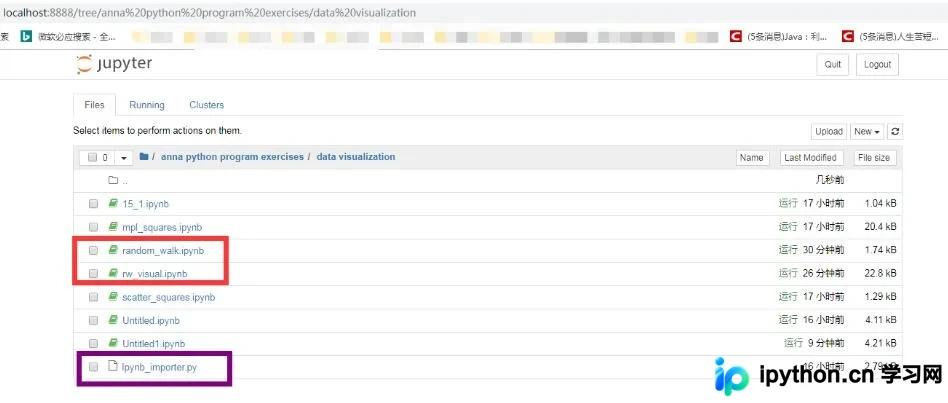
解决该问题的具体步骤如下:
1、在相同目录下创建一个名为Ipynb_importer.py的文件。可通过File菜单选择Download as->Python(.py)生成,该文件的具体内容如下:
#!/usr/bin/env python
# coding: utf-8
# In[ ]:

import io, os,sys,types
from IPython import get_ipython
from nbformat import read
from IPython.core.interactiveshell import InteractiveShell

class NotebookFinder(object):
  """Module finder that locates Jupyter Notebooks"""
  def __init__(self):
    self.loaders = {}

  def find_module(self, fullname, path=None):
    nb_path = find_notebook(fullname, path)
    if not nb_path:
      return

    key = path
    if path:
      # lists aren't hashable
      key = os.path.sep.join(path)

    if key not in self.loaders:
      self.loaders[key] = NotebookLoader(path)
    return self.loaders[key]

def find_notebook(fullname, path=None):
  """find a notebook, given its fully qualified name and an optional path
  This turns "foo.bar" into "foo/bar.ipynb"
  and tries turning "Foo_Bar" into "Foo Bar" if Foo_Bar
  does not exist.
  """
  name = fullname.rsplit('.', 1)[-1]
  if not path:
    path = ['']
  for d in path:
    nb_path = os.path.join(d, name + ".ipynb")
    if os.path.isfile(nb_path):
      return nb_path
    # let import Notebook_Name find "Notebook Name.ipynb"
    nb_path = nb_path.replace("_", " ")
    if os.path.isfile(nb_path):
      return nb_path

class NotebookLoader(object):
  """Module Loader for Jupyter Notebooks"""
  def __init__(self, path=None):
    self.shell = InteractiveShell.instance()
    self.path = path

  def load_module(self, fullname):
    """import a notebook as a module"""
    path = find_notebook(fullname, self.path)

    print ("importing Jupyter notebook from %s" % path)

    # load the notebook object
    with io.open(path, 'r', encoding='utf-8') as f:
      nb = read(f, 4)


    # create the module and add it to sys.modules
    # if name in sys.modules:
    #  return sys.modules[name]
    mod = types.ModuleType(fullname)
    mod.__file__ = path
    mod.__loader__ = self
    mod.__dict__['get_ipython'] = get_ipython
    sys.modules[fullname] = mod

    # extra work to ensure that magics that would affect the user_ns
    # actually affect the notebook module's ns
    save_user_ns = self.shell.user_ns
    self.shell.user_ns = mod.__dict__

    try:
     for cell in nb.cells:
      if cell.cell_type == 'code':
        # transform the input to executable Python
        code = self.shell.input_transformer_manager.transform_cell(cell.source)
        # run the code in themodule
        exec(code, mod.__dict__)
    finally:
      self.shell.user_ns = save_user_ns
    return mod
sys.meta_path.append(NotebookFinder())
2、在主函数文件中添加语句:import Ipynb_importer。
import matplotlib.pyplot as plt
import Ipynb_importer

from random_walk import RandomWalk

rw = RandomWalk()
rw.fill_walk()
plt.scatter(rw.x_values, rw.y_values, s=15)
plt.show()
3、再次运行主函数,即可成功调用类文件。
注:random_walk.jpynb文件的具体代码如下:
from random import choice

class RandomWalk():
  def __init__(self, num_points=5000):
    self.num_points = num_points
    self.x_values = [0]
    self.y_values = [0]

  def fill_walk(self):
    while len(self.x_values) < self.num_points:
      x_direction = choice([1,-1])
      x_distance = choice([0,1,2,3,4])
      x_step = x_direction * x_distance

      y_direction = choice([1,-1])
      y_distance = choice([0,1,2,3,4])
      y_step = y_direction * y_distance

      if x_step == 0 and y_step == 0:
        continue

      next_x = self.x_values[-1] + x_step
      next_y = self.y_values[-1] + y_step

      self.x_values.append(next_x)
      self.y_values.append(next_y)
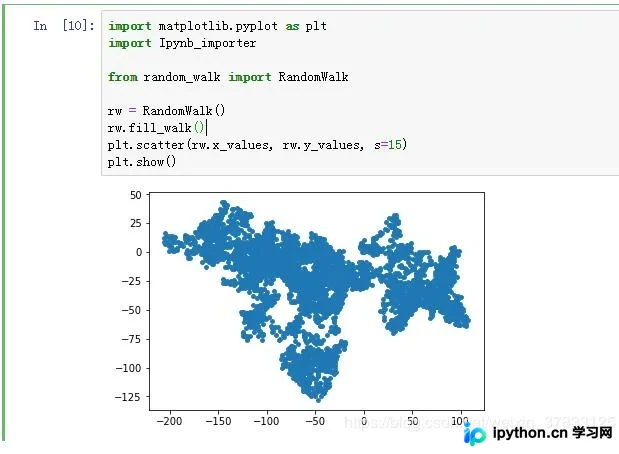
运行结果如图所示:
以上关于Python中re.match()和re.search()的使用及区别,以及Jupyter Notebook模块调用的解决方案的全部内容分享完毕,希望能对读者有所帮助,欢迎支持本站。
本站声明
本文内容仅供参考,不代表本站观点。转载或引用请注明出处。如发现内容问题,请通过联系我们页面反馈。















