


Python爬虫urllib库核心模块与用法详解

本文详细介绍Python内置urllib库的四大核心模块:urllib.request用于发起HTTP请求,urllib.error处理网络异常,urllib.parse解析与拼接URL,以及urllib.robotparser解析robots.txt。通过对比Python 2与3的差异,演示urlopen、Request对象、代理设置、Cookie处理及参数编码等关键用法,帮助开发者掌握底层网络请求原理。
一、说明:
urllib库是Python标准库中内置的HTTP请求模块,后续流行的requests库正是基于此库封装开发而来。尽管requests在易用性上更具优势,但深入理解urllib的原理与用法,对于掌握网络请求底层机制仍具有重要意义。
二、urllib四个模块组成:
urllib.request:负责请求模块,功能类似于在浏览器地址栏输入网址并回车。
urllib.error:负责异常处理模块,用于捕获和处理请求过程中出现的各类错误。
urllib.parse:负责URL解析模块,用于处理网址的拆分、拼接与编码。
urllib.robotparser:负责解析robots.txt文件,用于判断网站是否允许爬取,该模块在实际开发中使用频率较低。
在Python 2与Python 3中,urllib库的使用方式存在显著差异。
在Python 2中:
import urllib2
response = urllib2.urlopen('http://www.baidu.com')
在Python 3中:
import  urllib.request
response = urllib.request.urlopen('http://www.baidu.com')
三、urllib.request
1、urlopen函数
urllib.request.urlopen(url, data=None, timeout=socket._GLOBAL_DEFAULT_TIMEOUT,*, cafile=None, capath=None, cadefault=False, context=None)
url参数
from urllib import request
response = request.urlopen('http://www.baidu.com')
print(response.read().decode('utf-8'))
data参数
当不传递data参数时,发送的是GET请求;若传递data参数,则请求方式变为POST(可使用'http://httpbin.org'作为测试地址)。
import urllib.request
import urllib.parse

data1= bytes(urllib.parse.urlencode({'word':'hello'}),encoding='utf-8')
response = urllib.request.urlopen('http://httpbin.org/post',data = data1)
print(response.read())
data参数必须为bytes类型,因此需使用bytes()函数进行编码。由于bytes函数的第一个参数要求是str类型,故需先使用urllib.parse.urlencode将字典转换为字符串。
timeout参数
用于设置请求超时时间,若在规定时间内未收到响应,程序将抛出异常。
import urllib.request

try:
    response = urllib.request.urlopen('http://www.baidu.com', timeout=0.001)
    print(response.read())
except:
    print('error')
将超时时间设置为0.001秒,若在此时间内无响应,则输出error。
2、response 响应类型
import urllib
from urllib import request

response = urllib.request.urlopen('http://www.baidu.com')
print(type(response))
状态码与响应头
import urllib
from urllib import request

response = urllib.request.urlopen('http://www.baidu.com')
print(response.status)
print(response.getheaders())
print(response.getheader('Server'))
read方法
import urllib.request

response = urllib.request.urlopen('http://www.baidu.com')
print(type(response.read()))
print(response.read().decode('utf-8'))
response.read()返回的是bytes类型数据,因此需使用decode('utf-8')进行解码以获取字符串内容。
3、Request对象
若需发送更复杂的请求,在urllib库中需使用Request对象。
import urllib.request

#直接声明一个Request对象,并把url当作参数直接传递进来
request = urllib.request.Request('http://www.baidu.com')
response = urllib.request.urlopen(request)
print(response.read().decode('utf-8'))
声明一个Request对象,将url作为参数传入,随后将该对象作为urlopen函数的参数。
更复杂的请求,添加headers
#利用Request对象实现一个post请求
import urllib.request
url = 'http://httpbin.org/post'
headers = {
    'User-Agent': 'Mozilla/5.0 (Windows NT 6.1; WOW64) AppleWebKit/537.36 (KHTML, like Gecko) Chrome/86.0.4240.198 Safari/537.36'
}
data = {'word':'hello'}
data = bytes(str(data),encoding='utf-8')
req = urllib.request.Request(url = url,data = data,headers = headers,method = 'POST')
response = urllib.request.urlopen(req)
print(response.read().decode('utf-8'))
上述请求包含了请求方式、url、请求头及请求体,逻辑结构清晰。
Request对象还提供add_header方法,可用于添加多个键值对的header信息。
4、高级请求方式
设置代理
许多网站会监控特定IP在一段时间内的访问频率(通过流量统计或系统日志等),若访问频率异常高,可能会禁止该IP访问。使用ProxyHandler(设置代理的handler)可以变换IP地址以规避限制。
from urllib import request # 导入request模块

url = 'http://httpbin.org' # url地址
handler = request.ProxyHandler({'http': '122.193.244.243:9999'}) # 使用request模块ProxyHandler类创建代理
#handler = request.ProxyHandler({"http":"账号:密码@'122.193.244.243:9999'"})
#付费代理模式
opener = request.build_opener(handler) # 用handler创建opener
resp = opener.open(url) # 使用opener.open()发送请求
print(resp.read()) # 打印返回结果
cookie
import urllib.request
import urllib.parse

url = 'https://weibo.cn/5273088553/info'
# 正常的方式进行访问
# headers = {
#     'User-Agent': 'Mozilla/5.0 (Windows NT 10.0; WOW64) AppleWebKit/537.36 (KHTML, like Gecko) Chrome/63.0.3239.84 Safari/537.36'
# }
#携带cookie进行访问
headers = {
    'GET https': '//weibo.cn/5273088553/info HTTP/1.1',
    'Host': ' weibo.cn',
    'Connection': ' keep-alive',
    'Upgrade-Insecure-Requests': ' 1',
    'User-Agent': ' Mozilla/5.0 (Windows NT 10.0; WOW64) AppleWebKit/537.36 (KHTML, like Gecko) Chrome/63.0.3239.84 Safari/537.36',
    'Accept': ' text/html,application/xhtml+xml,application/xml;q=0.9,image/webp,image/apng,*/*;q=0.8',
    # 'Referer: https':'//weibo.cn/',
    'Accept-Language': ' zh-CN,zh;q=0.9',
    'Cookie': ' _T_WM=c1913301844388de10cba9d0bb7bbf1e; SUB=_2A253Wy_dDeRhGeNM7FER-CbJzj-IHXVUp7GVrDV6PUJbkdANLXPdkW1NSesPJZ6v1GA5MyW2HEUb9ytQW3NYy19U; SUHB=0bt8SpepeGz439; SCF=Aua-HpSw5-z78-02NmUv8CTwXZCMN4XJ91qYSHkDXH4W9W0fCBpEI6Hy5E6vObeDqTXtfqobcD2D32r0O_5jSRk.; SSOLoginState=1516199821',
}
request = urllib.request.Request(url=url, headers=headers)
response = urllib.request.urlopen(request)
# 输出所有
# print(response.read().decode('gbk'))
# 将内容写入文件中
with open('weibo.html', 'wb') as fp:
    fp.write(response.read())
四、urllib.error
该模块可捕获三种异常:URLError、HTTPError(是URLError类的子类)以及ContentTooShortError。
URLError仅包含reason属性。
HTTPError包含三个属性:code、reason和headers。
import urllib.request
from urllib import error

try:
    response = urllib.request.urlopen('http://123.com')
except error.URLError as e:
    print(e.reason)
import urllib
from urllib import request
from urllib import error
#先捕捉http异常,再捕捉url异常
try:
    response = urllib.request.urlopen('http://123.com')
except error.HTTPError as e:
    print(e.reason, e.code, e.headers)
except error.URLError as e:
    print(e.reason)
else:
    print('RequestSucess!')
五、URL解析urllib.parse
urlparse函数
该函数用于对传入的URL进行分割,将其拆分为多个部分并分别赋值。
import urllib
from urllib import parse

result = urllib.parse.urlparse('http://www,baidu.com/index.html;user?id=5#comment')
print(type(result))
print(result)
结果方便地拆分了URL。
<class 'urllib.parse.ParseResult'>
ParseResult(scheme='http', netloc='www,baidu.com', path='/index.html', params='user', query='id=5', fragment='comment')
Process finished with exit code 0
从输出结果可以看出,拆分后的部分包括:协议类型、域名、路径、参数、query(查询字符串)和fragment(片段标识符)。
urlparse包含几个参数:url、scheme和allow_fragments。
在使用urlparse时,可通过参数scheme='http'指定默认协议类型;若URL中已包含协议类型,则scheme参数不生效。
urlunparse函数
与urlparse函数作用相反,用于将拆分后的URL部分重新拼接。

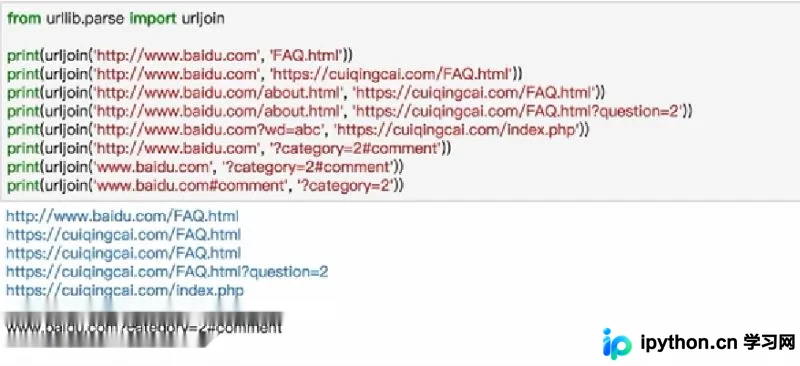
urljoin函数
用于拼接URL。
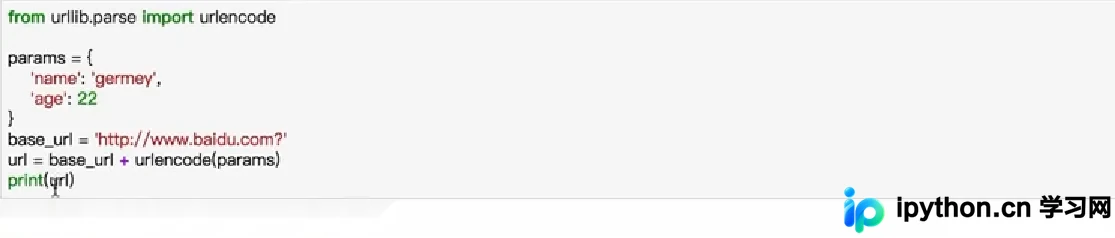
urlencode函数
可将字典转换为GET请求参数。
六、urllib.robotparser
使用较少,可作为了解内容。
总结
到此这篇关于Python爬虫之urllib库详解的文章就介绍到这了,更多相关Python urllib库内容请搜索本站以前的文章或继续浏览下面的相关文章希望大家以后多多支持本站!
本站声明
本文内容仅供参考,不代表本站观点。转载或引用请注明出处。如发现内容问题,请通过联系我们页面反馈。















