Python asyncio异步网络编程详解及aiohttp实战

深入解析Python标准库asyncio的核心机制、事件循环与协程调度,并通过aiohttp展示高并发网络请求实战、连接池管理、信号量限流与避坑指南。
在处理网络爬虫、API数据拉取或微服务接口聚合等I/O密集型任务时,传统同步阻塞模式常因等待远程服务器响应而浪费大量CPU时间。Python的asyncio模块采用单线程事件循环机制,通过非阻塞I/O与协作式上下文切换,以极低的系统开销实现成百上千个网络请求的并发执行。本文将系统梳理asyncio的核心运行机理,并基于主流异步HTTP库aiohttp,带你构建规范、稳定且受控的高并发网络请求程序。
一、为什么需要异步I/O:模型对比与性能差异
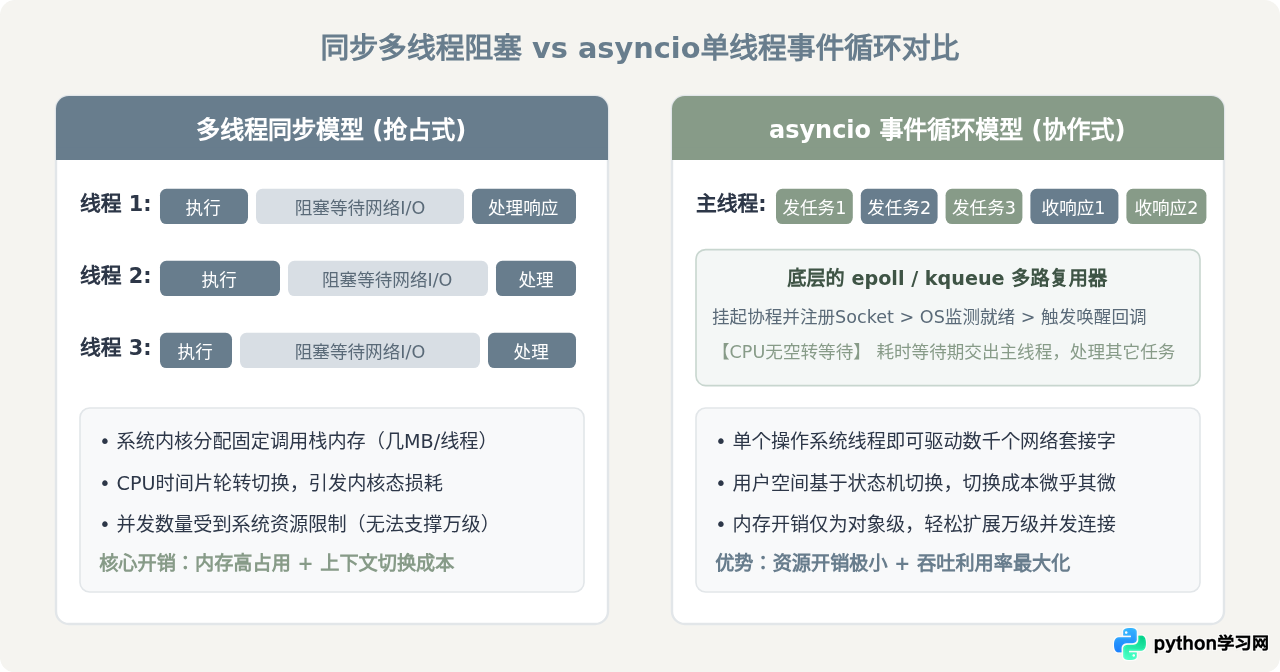
理解异步网络编程的前提,是明确它与传统同步多线程在调度与资源消耗上的核心差异。当编写网络请求代码时,程序的大部分时间都在等待操作系统完成网络报文的收发,而非进行复杂计算。
在同步阻塞模型中,每个线程在发起套接字读取后便被操作系统挂起。若要同时抓取500个页面,通常需要启动500个工作线程。操作系统为每个线程分配独立的调用栈空间(通常为几百KB到数MB),在线程之间频繁切换还需要触发内核态与用户态的上下文切换,导致显著的内存膨胀和调度延迟。而在asyncio单线程事件循环模型中,代码仅在等待I/O就绪时主动交出控制权(yield/await),底层依赖epoll(Linux)或kqueue(macOS)等多路复用机制监听就绪通知。整个过程运行在单个线程内,上下文切换仅是轻量级的Python状态机跳转,内存占用小且完全避开了线程死锁与数据竞态问题。
| 对比维度 | 多线程同步阻塞(如 requests + ThreadPool) | asyncio 单线程非阻塞(如 aiohttp + EventLoop) |
|---|---|---|
| 调度主体 | 操作系统内核(抢占式调度) | Python运行时事件循环(协作式调度) |
| 单任务资源开销 | 每个线程拥有独立调用栈(通常 512KB ~ 8MB) | 每个协程仅为一个小内存对象(通常几百字节) |
| 并发上限 | 通常受限于OS线程数上限与内存(百级到千级) | 主要受限于系统套接字限制与带宽(万级以上) |
| 数据共享与竞争 | 多线程共享内存,需使用锁(Lock/RLock)防竞态 | 单线程无同时运行的指令,天然无需互斥锁(I/O切换处需注意业务时序) |
二、asyncio 核心概念与执行生命周期
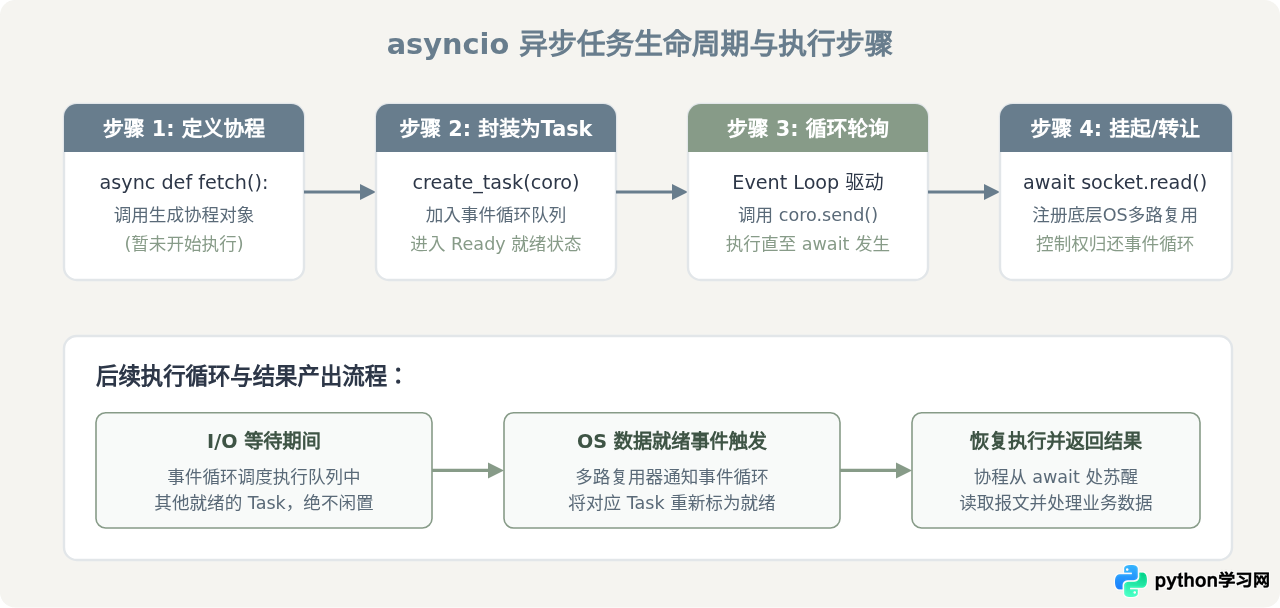
要编写可靠的异步程序,必须厘清 asyncio 中的四个基础概念:
- Coroutine(协程函数与协程对象):使用
async def定义的函数为协程函数,调用它不会立即执行,而是返回一个协程对象。协程内部使用await关键字挂起当前执行点,等待可等待对象(Awaitable)产出结果。 - Task(任务):对协程对象的封装,负责将其注册进事件循环的运行队列。使用
asyncio.create_task()后,该协程会立即由事件循环在后台排期执行。 - Future(期物):代表异步操作的底层最终结果对象。当异步I/O完成时,底层驱动会给 Future 写入结果或异常,从而唤醒挂起在此处的协程。日常开发中通常通过 Task 间接使用 Future。
- Event Loop(事件循环):负责调度所有注册的任务、监听系统级套接字读写事件,并在I/O就绪时触发对应回调的主轮询引擎。
标准入门示例:启动事件循环与并发调度
自 Python 3.7 起,推荐使用顶级入口 asyncio.run() 来管理事件循环的初始化、主协程执行和最后的销毁清理。以下代码展示了如何并发运行多个模拟的异步任务:
import asyncio
import time

async def simulated_download(item_id: int, delay: float) -> str:
    print(f"[{time.strftime('%X')}] 开始下载任务 {item_id}")
    # 必须使用 asyncio.sleep,如果误用 time.sleep 会阻塞整个事件循环
    await asyncio.sleep(delay)
    print(f"[{time.strftime('%X')}] 完成下载任务 {item_id}")
    return f"内容_{item_id}"

async def main():
    start_time = time.perf_counter()

    # 将多个协程并发打包为一个 Task 集合
    tasks = [
        simulated_download(1, 1.5),
        simulated_download(2, 0.8),
        simulated_download(3, 1.2),
    ]

    # asyncio.gather 保持任务传入顺序收集所有结果
    results = await asyncio.gather(*tasks)

    elapsed = time.perf_counter() - start_time
    print(f"所有任务执行完毕,结果: {results}")
    print(f"总耗时: {elapsed:.2f} 秒(接近单个最长任务耗时 1.5 秒,而非累加的 3.5 秒)")

if __name__ == "__main__":
    asyncio.run(main())
time.sleep() 或同步阻塞网络库(如 requests.get())。这些调用会抢占整个线程并使CPU处于休眠状态,事件循环在此期间无法调度任何其他协程,导致异步并发完全退化为串行单任务。
三、aiohttp 实战:构建高性能异步网络请求
虽然标准库提供了底层的 asyncio.open_connection,但在应用层进行 HTTP/HTTPS 通信时,成熟的第三方库 aiohttp 是首选工具。安装依赖只需执行:
pip install aiohttp核心架构:理解 aiohttp.ClientSession
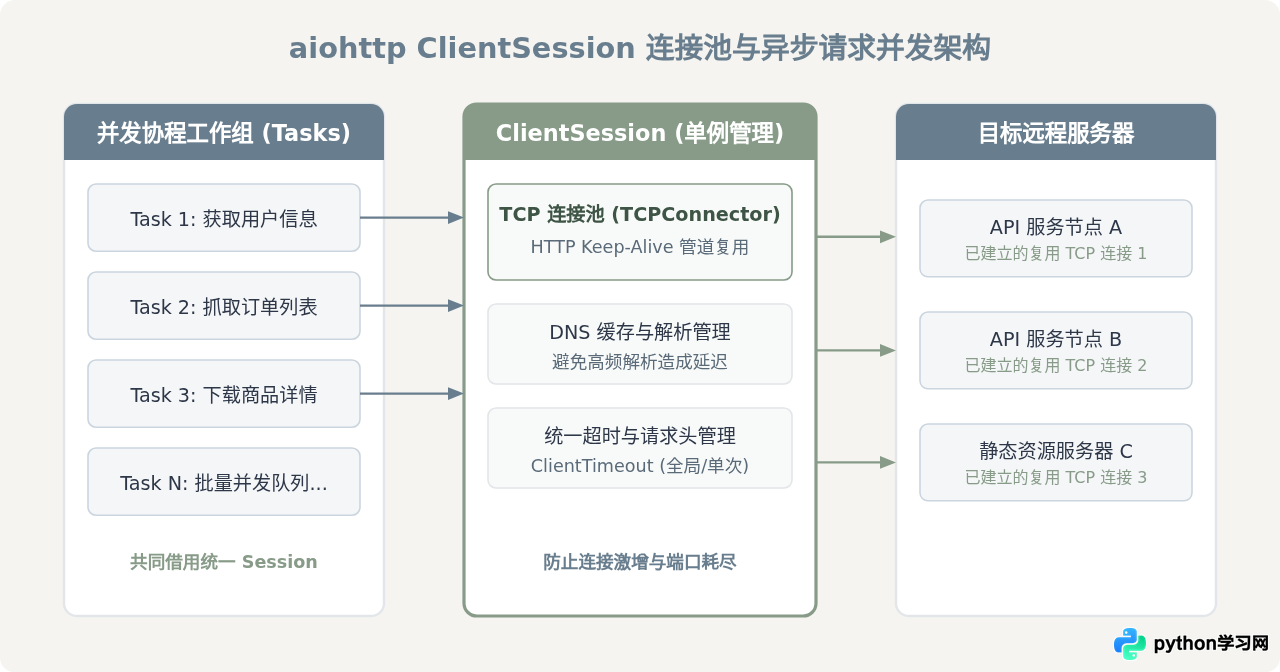
aiohttp.ClientSession 是管理网络连接的核心。它内部内置了底层 TCP 连接池(Connector),支持 HTTP Keep-Alive 连接复用、DNS 缓存解析、Cookie 管理以及重定向处理。
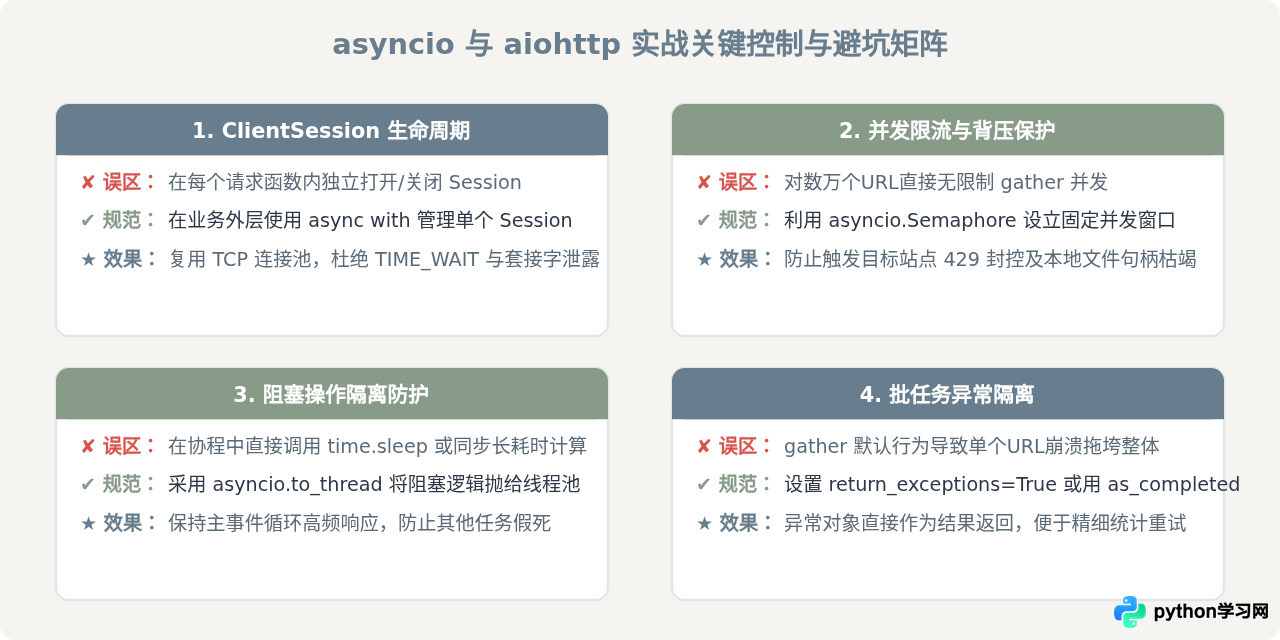
关键使用准则:绝不要在每次发起请求时临时创建并销毁 ClientSession。短生命周期的 Session 会导致无法复用底层 TCP 握手和 TLS 握手,产生大量 TIME_WAIT 状态的本地端口,极易耗尽系统文件描述符。正确的做法是:在一个应用生命周期或一个批次任务中,维持单一的 ClientSession 实例,供所有并发请求复用。
编写健壮的并发请求函数
以下示例展示了规范的单个异步网络请求实现。注意:获取响应对象 response 以及读取正文 await response.text() 或 await response.json() 都是异步操作,均需使用 async with 或 await。
import aiohttp
import asyncio
from typing import Optional, Dict, Any

async def fetch_json(
    session: aiohttp.ClientSession,
    url: str,
    params: Optional[Dict[str, Any]] = None,
    timeout_sec: float = 10.0
) -> Optional[Dict[str, Any]]:
    """发起异步GET请求并安全解析JSON响应"""
    timeout = aiohttp.ClientTimeout(total=timeout_sec)
    try:
        # 发送请求必须在 async with 语法块内,确保响应流正常关闭
        async with session.get(url, params=params, timeout=timeout) as response:
            if response.status == 200:
                # 读取报文体同样是I/O操作,必须使用 await
                data = await response.json()
                return data
            else:
                print(f"[请求告警] URL: {url} 返回非200状态码: {response.status}")
                return None
    except asyncio.TimeoutError:
        print(f"[请求超时] 请求 {url} 超过设定时限 {timeout_sec} 秒")
        return None
    except aiohttp.ClientError as err:
        print(f"[网络异常] 请求 {url} 发生客户端错误: {err}")
        return None
    except Exception as err:
        print(f"[未知异常] 处理 {url} 发生未预期错误: {err}")
        return None
四、工程实战核心控制:并发限流与异常容错
在实际生产环境中,若无节制地同时发起数千个网络请求,不仅可能瞬间压垮目标服务器触发封控(HTTP 429 Too Many Requests),也会导致本机因并发连接过载而报 Too many open files。我们需要引入并发控制器与科学的异常捕获机制。
1. 使用 asyncio.Semaphore 控制并发窗口
信号量 asyncio.Semaphore 是控制同时执行协程数的利器。通过为批处理任务绑定信号量,可以保证任意时刻处于网络传输中的连接数不超过设定的上限:
import asyncio
import aiohttp

async def bounded_fetch(sem: asyncio.Semaphore, session: aiohttp.ClientSession, url: str) -> dict:
    # 使用 async with 获取信号量许可证
    async with sem:
        async with session.get(url) as response:
            return {
                "url": url,
                "status": response.status,
                "text_length": len(await response.text())
            }

async def batch_fetch_urls(urls: list[str], max_concurrency: int = 20):
    # 限制同时发起的最大网络连接数为 20
    sem = asyncio.Semaphore(max_concurrency)

    # 设置 TCPConnector 的连接池上限
    connector = aiohttp.TCPConnector(limit=max_concurrency * 2, limit_per_host=10)

    async with aiohttp.ClientSession(connector=connector) as session:
        tasks = [bounded_fetch(sem, session, url) for url in urls]
        # return_exceptions=True 保证单个任务失败不中断整体流程
        results = await asyncio.gather(*tasks, return_exceptions=True)
        return results
2. 混合计算密集型与阻塞代码:asyncio.to_thread
在网络请求拿到数据后,如果需要进行繁杂的计算(如图像处理、密码哈希计算或写入同步数据库),这些CPU密集或阻塞I/O操作依然会卡住事件循环。Python 3.9+ 提供了 asyncio.to_thread(),能够透明地将阻塞函数分发到内置线程池中执行:
def sync_heavy_parsing(raw_html: str) -> dict:
    """一个包含大量正则计算或同步阻塞I/O的解析函数"""
    # 纯同步逻辑,不包含 async/await
    import time
    time.sleep(0.05)  # 模拟耗时解析
    return {"length": len(raw_html)}

async def process_page(session: aiohttp.ClientSession, url: str):
    async with session.get(url) as response:
        html = await response.text()

    # 将同步解析函数抛至后台线程池执行,主事件循环继续调度其他协程
    parsed_data = await asyncio.to_thread(sync_heavy_parsing, html)
    return parsed_data
五、实战完整案例:多接口并发聚合器
下面是一个完整的生产级范例,演示如何使用 aiohttp 配合 asyncio.Semaphore 抓取一批 URL,并针对超时、HTTP 状态码以及异常进行全方位处理:
import asyncio
import aiohttp
from typing import List, Dict, Any

async def safe_fetch(
    sem: asyncio.Semaphore,
    session: aiohttp.ClientSession,
    url: str
) -> Dict[str, Any]:
    async with sem:
        try:
            async with session.get(url) as resp:
                status = resp.status
                if status == 200:
                    text_content = await resp.text()
                    return {"url": url, "success": True, "size": len(text_content)}
                else:
                    return {"url": url, "success": False, "status": status}
        except asyncio.TimeoutError:
            return {"url": url, "success": False, "error": "Timeout"}
        except Exception as e:
            return {"url": url, "success": False, "error": str(e)}

async def run_batch_crawler(target_urls: List[str]) -> List[Dict[str, Any]]:
    # 限制并发量为 15,设置单次全局超时 8 秒
    sem = asyncio.Semaphore(15)
    timeout = aiohttp.ClientTimeout(total=8.0)

    # 全局单一会话管理器
    async with aiohttp.ClientSession(timeout=timeout) as session:
        tasks = [safe_fetch(sem, session, u) for u in target_urls]
        results = await asyncio.gather(*tasks)
        return results

if __name__ == "__main__":
    test_urls = [
        f"https://httpbin.org/delay/{i}" for i in [1, 2, 1, 2]
    ]
    outputs = asyncio.run(run_batch_crawler(test_urls))
    for item in outputs:
        print(item)
六、总结与开发备忘清单
通过本文的探讨,我们可以归纳出在 Python 中运用 asyncio 和 aiohttp 开展异步网络编程的核心原则:
- 理解事件循环的本质:
asyncio是单线程事件循环。切勿在协程中包含任何阻塞操作,必要时使用asyncio.to_thread()委托给线程池。 - 会话生命周期管理:严格保持
aiohttp.ClientSession的单例复用,避免在每个请求中频繁创建和关闭 Session。 - 防御性并发设计:高并发不等于无限并发。必须始终配合
asyncio.Semaphore设置合理的最大并发窗口,并为每个请求配置合理的ClientTimeout。 - 异常隔离与优雅降级:使用
asyncio.gather(..., return_exceptions=True)确保个别失败请求不会中断整个批处理流程。
本站声明
本文内容仅供参考,不代表本站观点。转载或引用请注明出处。如发现内容问题,请通过联系我们页面反馈。