Python math库实现科学计算器:三角函数与对数运算示例

使用Python内置math库实现科学计算器核心运算功能,详解三角函数、角度弧度换算、自然对数与任意底数对数计算、异常边界处理与代码实现示例。
math 模块提供了底层基于 C 语言标准的底层数学函数。三角函数与对数运算作为科学计算的核心基础,涉及输入参数的量纲转换(角度与弧度)、反函数主值区间界定以及对数定义域检查。本文以工程化、可运行的方式梳理这两类运算的实现细节,解决浮点残差与边界报错问题。
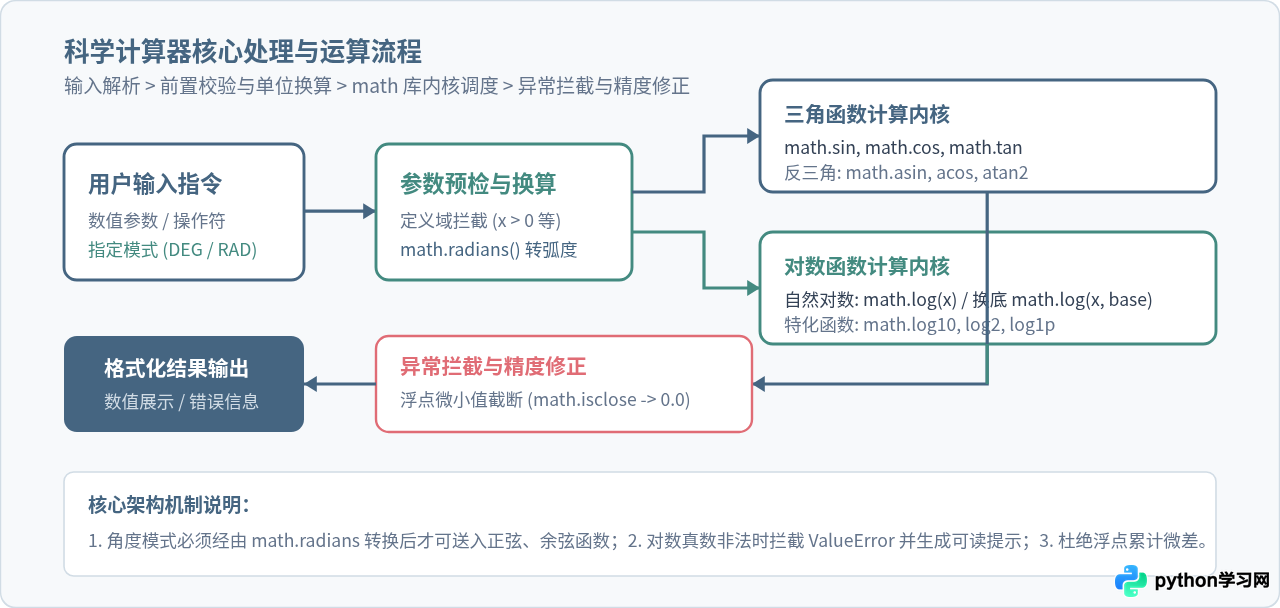
一、科学计算器核心架构与处理流程
科学计算器并非直接调用数学函数即可,而是需要建立一套严密的流程机制。用户在输入数值时,通常习惯使用角度制(如 30°、90°)或者以 10 为底的常用对数,而 math 库的原生函数默认基于弧度制与自然对数 $e$。因此,计算核心必须涵盖输入解析、单位换算、安全范围校验、函数分发以及结果格式化五个环节。
二、三角函数运算与角度/弧度转换机制
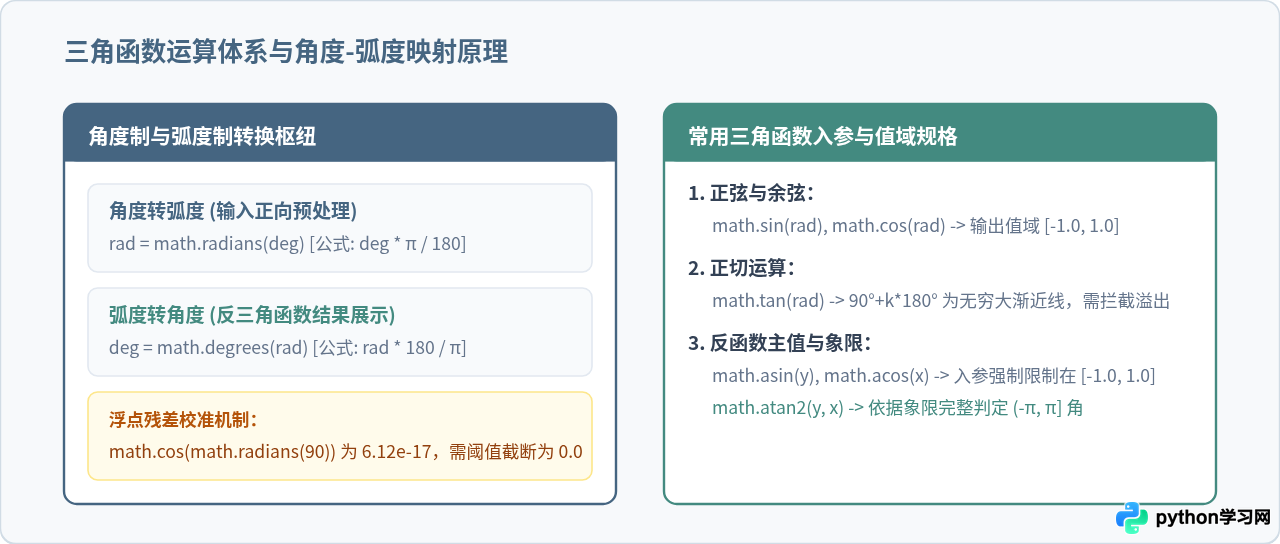
在 Python 的 math 库中,math.sin(x)、math.cos(x) 与 math.tan(x) 中的参数 x 统一要求为弧度(Radian)。如果用户输入 90 并期望计算 $\sin(90^\circ)$,若直接传入 math.sin(90),得到的将是 90 弧度的正弦值(约 0.89399666),这与预期的 1.0 完全不同。
1. 角度与弧度转换工具
标准库提供了两个高效的转换函数:
math.radians(deg):将角度转换为弧度,等价于 $deg \times \frac{\pi}{180}$。math.degrees(rad):将弧度还原为角度,等价于 $rad \times \frac{180}{\pi}$。
2. 反三角函数与象限确定
反三角函数(如正弦反函数 math.asin(y) 与余弦反函数 math.acos(x))的入参限制在 $[-1.0, 1.0]$ 区间内,若超出范围会立即触发 ValueError: math domain error。反反正切计算中,常规的 math.atan(k) 仅能返回 $(-\frac{\pi}{2}, \frac{\pi}{2})$ 之间的角度;而在物理与工程计算中,确定点 $(x, y)$ 的极角时推荐使用 math.atan2(y, x),它能根据横纵坐标的符号自动确定四个象限,返回值覆盖 $(-\pi, \pi]$,同时天然避免了分母为零的问题。
3. 三角函数计算模块代码实现
import math

class TrigonometricCalculator:
    """三角函数计算执行器,支持角度制(DEG)与弧度制(RAD)"""
    def __init__(self, mode="DEG"):
        self.mode = mode.upper()

    def _to_radians(self, angle: float) -> float:
        if self.mode == "DEG":
            return math.radians(angle)
        return angle

    def _from_radians(self, rad: float) -> float:
        if self.mode == "DEG":
            return math.degrees(rad)
        return rad

    def calculate_sin(self, angle: float) -> float:
        rad = self._to_radians(angle)
        result = math.sin(rad)
        # 修正浮点微小误差:例如 sin(180°) 应严格为 0
        return 0.0 if math.isclose(result, 0.0, abs_tol=1e-15) else result

    def calculate_cos(self, angle: float) -> float:
        rad = self._to_radians(angle)
        result = math.cos(rad)
        # 修正浮点微小误差:例如 cos(90°) 应严格为 0
        return 0.0 if math.isclose(result, 0.0, abs_tol=1e-15) else result

    def calculate_tan(self, angle: float) -> float:
        # 检查正切渐近线无定义点 (90°, 270° 等)
        if self.mode == "DEG" and abs((angle - 90) % 180) < 1e-9:
            raise ValueError(f"正切函数在 {angle}° 处无定义 (无穷大)")
        rad = self._to_radians(angle)
        result = math.tan(rad)
        return 0.0 if math.isclose(result, 0.0, abs_tol=1e-15) else result

    def calculate_asin(self, value: float) -> float:
        if value < -1.0 or value > 1.0:
            raise ValueError(f"反正弦函数参数越界: 输入值 {value} 不在 [-1, 1] 之间")
        rad = math.asin(value)
        return self._from_radians(rad)

    def calculate_atan2(self, y: float, x: float) -> float:
        rad = math.atan2(y, x)
        return self._from_radians(rad)
三、对数运算族谱与数学底数映射关系
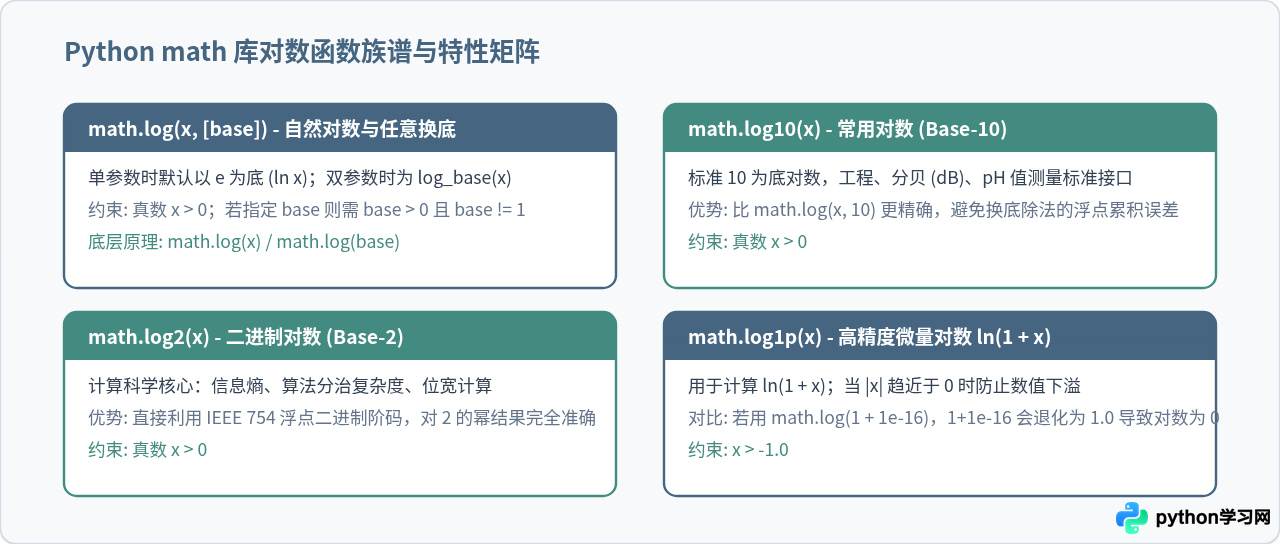
对数运算是科学工程中不可或缺的分析工具。根据数学定义,对于等式 $y = \log_b(x)$,真数 $x$ 必须严格大于零($x > 0$),底数 $b$ 必须大于零且不等于 1($b > 0, b \ne 1$)。Python 的 math 模块提供了灵活的函数族,既有通用的换底函数,也有面向常见底数的高度优化专用函数。
1. 为什么优先使用专用对数函数?
虽然 math.log(x, 10) 理论上能计算常用对数,但在底层它是由两次自然对数除法 log(x) / log(10) 实现的。由于二进制浮点数无法精确表示十进制小数,这种双重除法会产生精度损失。例如:
math.log(1000, 10)的计算结果可能是2.9999999999999996。- 而专用函数
math.log10(1000)直接调用硬件级专用指令,能够精确输出3.0。同理,以 2 为底时务必优先选用math.log2(x)。
2. 对数计算执行器实现
class LogarithmicCalculator:
    """对数运算执行器,整合定义域保护与专用算法"""

    @staticmethod
    def natural_log(x: float) -> float:
        if x <= 0:
            raise ValueError(f"对数真数必须严格大于0,接收到的输入值: {x}")
        return math.log(x)

    @staticmethod
    def common_log(x: float) -> float:
        if x <= 0:
            raise ValueError(f"常用对数真数必须严格大于0,接收到的输入值: {x}")
        return math.log10(x)

    @staticmethod
    def binary_log(x: float) -> float:
        if x <= 0:
            raise ValueError(f"二进制对数真数必须严格大于0,接收到的输入值: {x}")
        return math.log2(x)

    @staticmethod
    def custom_base_log(x: float, base: float) -> float:
        if x <= 0:
            raise ValueError(f"对数真数必须严格大于0,接收到的真数: {x}")
        if base <= 0 or math.isclose(base, 1.0, rel_tol=1e-12):
            raise ValueError(f"对数底数必须大于0且不等于1,接收到的底数: {base}")
        # 常见基准特化分发
        if math.isclose(base, 10.0):
            return math.log10(x)
        if math.isclose(base, 2.0):
            return math.log2(x)
        return math.log(x, base)

    @staticmethod
    def log1p_tiny(delta: float) -> float:
        """用于微小变化率的高精度对数计算 ln(1 + delta)"""
        if delta <= -1.0:
            raise ValueError(f"增量 delta 必须大于 -1.0,接收到的输入值: {delta}")
        return math.log1p(delta)
四、完整科学计算器综合集成示例
将上述三角函数与对数运算整合为一个统一的调度引擎,提供统一的计算接口,并具备模式切换(角度与弧度)和标准化的错误捕获:
class ScientificCalculator:
    """统一科学计算器集成类"""
    def __init__(self, angle_mode="DEG"):
        self.trig = TrigonometricCalculator(mode=angle_mode)
        self.log = LogarithmicCalculator()

    def set_angle_mode(self, mode: str):
        if mode.upper() not in ["DEG", "RAD"]:
            raise ValueError("角度模式仅支持 'DEG' (角度) 或 'RAD' (弧度)")
        self.trig.mode = mode.upper()

    def execute(self, operation: str, *args) -> dict:
        """
        统一计算执行分发函数
        返回字典结构: {"success": bool, "result": float, "error": str}
        """
        try:
            op = operation.lower()
            if op == "sin":
                res = self.trig.calculate_sin(args[0])
            elif op == "cos":
                res = self.trig.calculate_cos(args[0])
            elif op == "tan":
                res = self.trig.calculate_tan(args[0])
            elif op == "asin":
                res = self.trig.calculate_asin(args[0])
            elif op == "atan2":
                res = self.trig.calculate_atan2(args[0], args[1])
            elif op == "ln":
                res = self.log.natural_log(args[0])
            elif op == "log10":
                res = self.log.common_log(args[0])
            elif op == "log2":
                res = self.log.binary_log(args[0])
            elif op == "log":
                base = args[1] if len(args) > 1 else math.e
                res = self.log.custom_base_log(args[0], base)
            elif op == "log1p":
                res = self.log.log1p_tiny(args[0])
            else:
                return {"success": False, "result": None, "error": f"不支持的操作类型: {operation}"}

            return {"success": True, "result": res, "error": None}
        except Exception as e:
            return {"success": False, "result": None, "error": str(e)}

# 运行验证示例
if __name__ == "__main__":
    calc = ScientificCalculator(angle_mode="DEG")

    # 1. 三角函数验证 (角度制 DEG)
    print("sin(30°)  ->", calc.execute("sin", 30))      # 预期 0.5
    print("cos(90°)  ->", calc.execute("cos", 90))      # 预期 0.0 (消除了浮点残差)
    print("tan(45°)  ->", calc.execute("tan", 45))      # 预期 1.0
    print("tan(90°)  ->", calc.execute("tan", 90))      # 预期 拦截报错

    # 2. 对数函数验证
    print("log10(1000)  ->", calc.execute("log10", 1000))  # 预期 3.0
    print("log2(64)     ->", calc.execute("log2", 64))     # 预期 6.0
    print("log(81, base=3)->", calc.execute("log", 81, 3)) # 预期 4.0
    print("ln(-5)       ->", calc.execute("ln", -5))       # 预期 拦截报错
控制台示例输出结果:
sin(30°)  -> {'success': True, 'result': 0.5, 'error': None}
cos(90°)  -> {'success': True, 'result': 0.0, 'error': None}
tan(45°)  -> {'success': True, 'result': 1.0, 'error': None}
tan(90°)  -> {'success': False, 'result': None, 'error': '正切函数在 90° 处无定义 (无穷大)'}
log10(1000)  -> {'success': True, 'result': 3.0, 'error': None}
log2(64)     -> {'success': True, 'result': 6.0, 'error': None}
log(81, base=3)-> {'success': True, 'result': 4.0, 'error': None}
ln(-5)       -> {'success': False, 'result': None, 'error': '对数真数必须严格大于0,接收到的输入值: -5'}
五、科学计算器实现要点与避坑总结
在工程化落地科学计算器时,容易出现数学逻辑看似正确但数值结果异常的问题。以下四个维度是开发过程中必须关注的避坑核心要点:
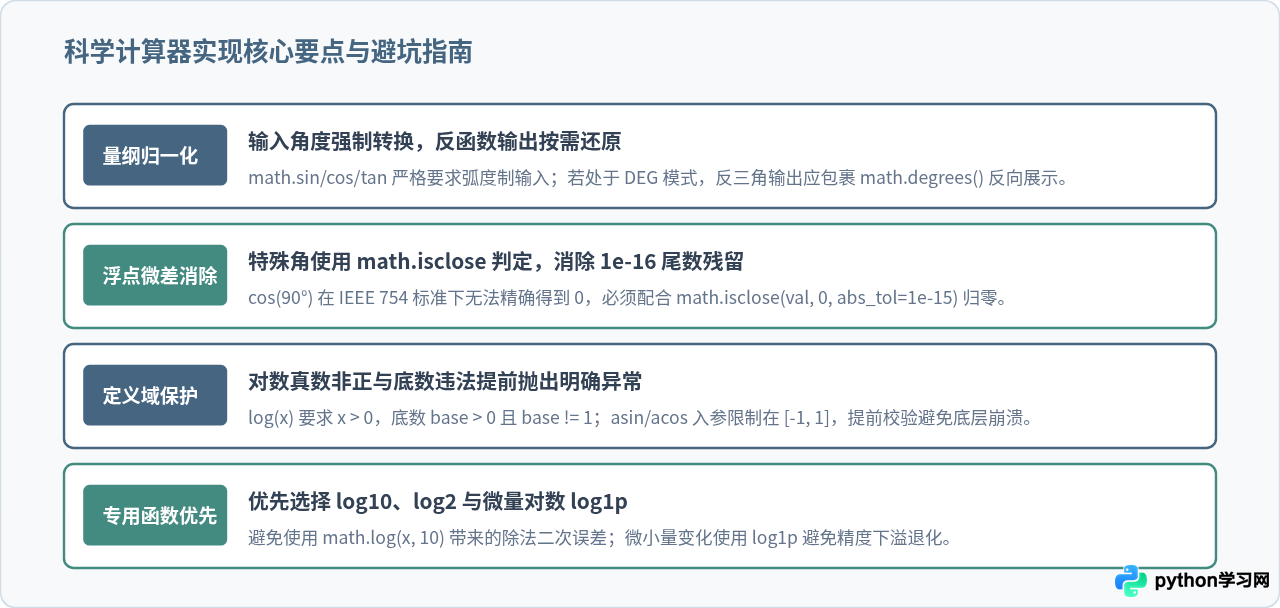
f"{res:.8g}")进行有效数字舍入,以防止中间计算环节丢失精度。
本站声明
本文内容仅供参考,不代表本站观点。转载或引用请注明出处。如发现内容问题,请通过联系我们页面反馈。