


Python结合Excel与Shp数据在Matplotlib中的可视化实现

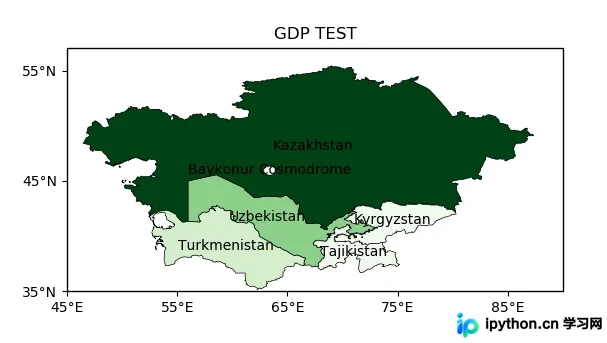
本文介绍如何利用Python将Excel中的气象站点数据与Shp格式的国家边界数据结合,通过Pandas进行数据清洗,并使用Cartopy和Matplotlib在地图上可视化展示。重点涵盖经纬度格式转换、Shp文件读取、基于GDP数据的着色处理以及地图坐标系的配置。
数据准备与下载
在开始绘图前,需要获取气象站点数据(Excel格式)和国家边界数据(Shp压缩文件)。以下代码定义了下载函数,用于从指定URL获取文件:
import requests

def download_file(url):
  """
  根据url下载文件
  :param url: str
  """
  r = requests.get(url, allow_redirects=True)
  try:
    open(url.split('/')[-1], 'wb').write(r.content)
  except Exception as e:
print(e)气象数据URL为:http://image.data.cma.cn/static/doc/A/A.0012.0001/SURF_CHN_MUL_HOR_STATION.xlsx,国家边界Shp数据URL为:http://www.naturalearthdata.com/http//www.naturalearthdata.com/download/10m/cultural/ne_10m_admin_0_countries.zip。
Excel数据处理与坐标转换
气象数据中的经纬度可能以“度分”格式存储,需转换为十进制格式以便绘图。以下函数实现了这一转换:
def degree_conversion_decimal(x):
  """
  度分转换成十进制
  :param x: float
  :return: integer float
  """
  integer = int(x)
  integer = integer + (x - integer) * 1.66666667
  return integer
使用Pandas读取Excel文件,并应用上述转换函数处理经度和纬度:
import pandas as pd
import matplotlib.pyplot as plt
import cartopy.crs as ccrs

def read_excel(path):
  data = pd.read_excel(path)
  # 坐标处理
  data['经度'] = data['经度'].apply(degree_conversion_decimal)
  data['纬度'] = data['纬度'].apply(degree_conversion_decimal)
  ax = plt.axes(projection=ccrs.PlateCarree())
  ax.set_extent([70, 140, 15, 55])
  ax.stock_img()
  ax.scatter(data['经度'], data['纬度'], s=0.3, c='g')
  plt.savefig('test.png')
  plt.show()
Shp文件读取与着色
使用Cartopy读取Shp文件,并根据GDP数据对特定区域进行着色。首先定义一个函数来提取特定字段记录:
import cartopy.io.shapereader as shaperead
from matplotlib import cm

def get_record(shp, key, value):
  countries = shp.records()
  result = [country for country in countries if country.attributes[key] == value]
  countries = shp.records()
  return result
接着,读取Shp文件,提取中亚地区(Central Asia)的GDP数据,并进行着色处理:
def gdp(shp_path):
  """
  GDP 着色图
  :return:
  """
  shp = shaperead.Reader(shp_path)
  cas = get_record(shp, 'SUBREGION', 'Central Asia')
  gdp = [r.attributes['GDP_MD_EST'] for r in cas]
  gdp_min = min(gdp)
  gdp_max = max(gdp)
  ax = plt.axes(projection=ccrs.PlateCarree())
  ax.set_extent([45, 90, 35, 55])
  for r in cas:
    color = cm.Greens((r.attributes['GDP_MD_EST'] - gdp_min) / (gdp_max - gdp_min))
    ax.add_geometries(r.geometry, ccrs.PlateCarree(),
             facecolor=color, edgecolor='black', linewidth=0.5)
    ax.text(r.geometry.centroid.x, r.geometry.centroid.y, r.attributes['ADMIN'],
        horizontalalignment='center',
        verticalalignment='center',
        transform=ccrs.Geodetic())
  ax.set_xticks([45, 55, 65, 75, 85], crs=ccrs.PlateCarree()) # x坐标标注
  ax.set_yticks([35, 45, 55], crs=ccrs.PlateCarree()) # y 坐标标注
  from cartopy.mpl.ticker import LongitudeFormatter, LatitudeFormatter
  lon_formatter = LongitudeFormatter(zero_direction_label=True)
  lat_formatter = LatitudeFormatter()
  ax.xaxis.set_major_formatter(lon_formatter)
  ax.yaxis.set_major_formatter(lat_formatter)
  plt.title('GDP TEST')
  plt.savefig("gdb.png")
  plt.show()
完整流程与执行
整合上述步骤,定义主函数以自动下载、解压并处理数据:
import zipfile
import os

def unzip(zip_path, out_path):
  """
  解压zip
  :param zip_path:str
  :param out_path: str
  :return:
  """
  zip_ref = zipfile.ZipFile(zip_path, 'r')
  zip_ref.extractall(out_path)
  zip_ref.close()

def run_excel():
  if os.path.exists("SURF_CHN_MUL_HOR_STATION.xlsx"):
    read_excel("SURF_CHN_MUL_HOR_STATION.xlsx")
  else:
    download_file(dataurl)
    read_excel("SURF_CHN_MUL_HOR_STATION.xlsx")

def run_shp():
  if os.path.exists("ne_10m_admin_0_countries"):
    gdp("ne_10m_admin_0_countries/ne_10m_admin_0_countries.shp")
  else:
    download_file(shpurl)
    unzip('ne_10m_admin_0_countries.zip', "ne_10m_admin_0_countries")
    gdp("ne_10m_admin_0_countries/ne_10m_admin_0_countries.shp")

if __name__ == '__main__':
  run_excel()
  run_shp()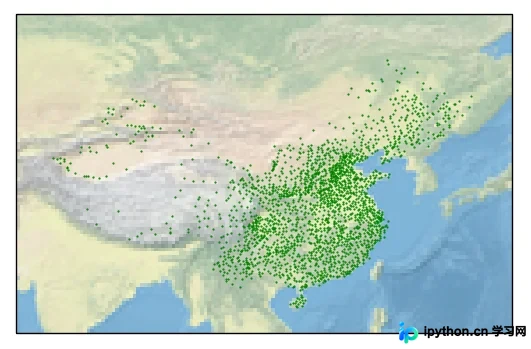
以上就是Python结合Excel与Shp数据在Matplotlib中的可视化实现的详细内容,更多关于Python数据处理与地图可视化的资料请关注本站其它相关文章!
本站声明
本文内容仅供参考,不代表本站观点。转载或引用请注明出处。如发现内容问题,请通过联系我们页面反馈。















