


Python开发网站目录扫描器的实现

发布时间:2026-10-12 |
2人浏览过
本文介绍如何使用Python开发一个网站目录扫描器。通过多线程技术提高扫描效率,利用requests库发送HTTP请求,并随机生成User-Agent以模拟不同浏览器。脚本支持指定目标URL、字典文件及线程数,最终将发现的目录结果保存为HTML文件。
Python开发网站目录扫描器的实现
在Web安全测试中,目录扫描是发现潜在入口点的重要手段。本文将展示如何使用Python编写一个轻量级的目录扫描工具,该工具具备多线程支持、User-Agent随机化以及结果导出功能。
核心功能与依赖
该扫描器主要面向Metasploitable Linux等测试环境,核心功能包括:
- 读取字典文件(如dict.txt)获取待扫描路径。
- 通过多线程并发发送HTTP请求,提升扫描速度。
- 随机生成User-Agent,模拟不同浏览器行为,降低被WAF拦截的概率。
- 实时显示扫描进度,并将状态码为200的目录保存为HTML文件。
运行脚本前,需确保已安装requests库。若未安装,可通过pip install requests进行安装。
代码实现详解
脚本命名为WebDirScanner.py,主要包含WebDirScan类和get_user_agent函数。以下是关键代码段及其逻辑说明:
# -*- coding:utf-8 -*-
__author__ = "Yiqing"
import sys
import threading
import random
from Queue import Queue
from optparse import OptionParser

try:
  import requests
except Exception:
  print "[!] You need to install requests module!"
  print "[!] Usage:pip install requests"
  exit()


class WebDirScan:
  """
  Web目录扫描器
  """

  def __init__(self, options):
    self.url = options.url
    self.file_name = options.file_name
    self.count = options.count

  class DirScan(threading.Thread):
    """
    多线程
    """

    def __init__(self, queue, total):
      threading.Thread.__init__(self)
      self._queue = queue
      self._total = total

    def run(self):
      while not self._queue.empty():
        url = self._queue.get()
        # 多线程显示进度
        threading.Thread(target=self.msg).start()
        try:
          r = requests.get(url=url, headers=get_user_agent(), timeout=5)
          if r.status_code == 200:
            sys.stdout.write('\r' + '[+]%s\t\t\n' % url)
            # 保存到本地文件,以HTML的格式
            result = open('result.html', 'a+')
            result.write('<a href="' + url + '" rel="external nofollow" target="_blank">' + url + '</a>')
            result.write('\r\n</br>')
            result.close()
        except Exception:
          pass

    def msg(self):
      """
      显示进度
      :return:None
      """
      per = 100 - float(self._queue.qsize()) / float(self._total) * 100
      percent = "%s Finished| %s All| Scan in %1.f %s" % (
        (self._total - self._queue.qsize()), self._total, per, '%')
      sys.stdout.write('\r' + '[*]' + percent)

  def start(self):
    result = open('result.html', 'w')
    result.close()
    queue = Queue()
    f = open('dict.txt', 'r')
    for i in f.readlines():
      queue.put(self.url + "/" + i.rstrip('\n'))
    total = queue.qsize()
    threads = []
    thread_count = int(self.count)
    for i in range(thread_count):
      threads.append(self.DirScan(queue, total))
    for thread in threads:
      thread.start()
    for thread in threads:
      thread.join()


def get_user_agent():
  """
  User Agent的细节处理
  :return:
  """
  user_agent_list = [
    {'User-Agent': 'Mozilla/4.0 (Mozilla/4.0; MSIE 7.0; Windows NT 5.1; FDM; SV1; .NET CLR 3.0.04506.30)'},
    {'User-Agent': 'Mozilla/4.0 (compatible; MSIE 8.0; Windows NT 6.0; en) Opera 11.00'},
    {
      'User-Agent': 'Mozilla/5.0 (X11; U; Linux i686; de; rv:1.9.0.2) Gecko/2008092313 Ubuntu/8.04 (hardy) Firefox/3.0.2'},
    {
      'User-Agent': 'Mozilla/5.0 (X11; U; Linux i686; en-GB; rv:1.9.1.15) Gecko/20101027 Fedora/3.5.15-1.fc12 Firefox/3.5.15'},
    {
      'User-Agent': 'Mozilla/5.0 (X11; U; Linux i686; en-US) AppleWebKit/534.10 (KHTML, like Gecko) Chrome/8.0.551.0 Safari/534.10'},
    {'User-Agent': 'Mozilla/5.0 (X11; U; Linux i686; en-US; rv:1.9.0.2) Gecko/2008092809 Gentoo Firefox/3.0.2'},
    {
      'User-Agent': 'Mozilla/5.0 (X11; U; Linux x86_64; en-US) AppleWebKit/534.10 (KHTML, like Gecko) Chrome/7.0.544.0'},
    {'User-Agent': 'Opera/9.10 (Windows NT 5.2; U; en)'},
    {
      'User-Agent': 'Mozilla/5.0 (iPhone; U; CPU OS 3_2 like Mac OS X; en-us) AppleWebKit/531.21.10 (KHTML, like Gecko)'},
    {'User-Agent': 'Opera/9.80 (X11; U; Linux i686; en-US; rv:1.9.2.3) Presto/2.2.15 Version/10.10'},
    {
      'User-Agent': 'Mozilla/5.0 (Windows; U; Windows NT 5.1; ru-RU) AppleWebKit/533.18.1 (KHTML, like Gecko) Version/5.0.2 Safari/533.18.5'},
    {'User-Agent': 'Mozilla/5.0 (Windows; U; Windows NT 5.1; ru; rv:1.9b3) Gecko/2008020514 Firefox/3.0b3'},
    {
      'User-Agent': 'Mozilla/5.0 (Macintosh; U; PPC Mac OS X 10_4_11; fr) AppleWebKit/533.16 (KHTML, like Gecko) Version/5.0 Safari/533.16'},
    {
      'User-Agent': 'Mozilla/5.0 (Macintosh; U; Intel Mac OS X 10_6_6; en-US) AppleWebKit/534.20 (KHTML, like Gecko) Chrome/11.0.672.2 Safari/534.20'},
    {
      'User-Agent': 'Mozilla/4.0 (compatible; MSIE 8.0; Windows NT 6.1; WOW64; Trident/4.0; SLCC2; .NET CLR 2.0.50727; InfoPath.2)'},
    {'User-Agent': 'Mozilla/4.0 (compatible; MSIE 6.0; X11; Linux x86_64; en) Opera 9.60'},
    {
      'User-Agent': 'Mozilla/5.0 (Macintosh; U; Intel Mac OS X 10_6_2; en-US) AppleWebKit/533.4 (KHTML, like Gecko) Chrome/5.0.366.0 Safari/533.4'},
    {'User-Agent': 'Mozilla/5.0 (Windows NT 6.0; U; en; rv:1.8.1) Gecko/20061208 Firefox/2.0.0 Opera 9.51'}
  ]

  return random.choice(user_agent_list)


def main():
  """
  主函数
  :return: None
  """
  print '''
   ____ _   ____
  | _ \(_)_ __/ ___| ___ __ _ _ __
  | | | | | '__\___ \ / __/ _` | '_ \
  | |_| | | |  ___) | (_| (_| | | | |
  |____/|_|_| |____/ \___\__,_|_| |_|

  Welcome to WebDirScan
  Version:1.0 Author: %s
  ''' % __author__
  parser = OptionParser('python WebDirScanner.py -u <Target URL> -f <Dictionary file name> [-t <Thread_count>]')
  parser.add_option('-u', '--url', dest='url', type='string', help='target url for scan')
  parser.add_option('-f', '--file', dest='file_name', type='string', help='dictionary filename')
  parser.add_option('-t', '--thread', dest='count', type='int', default=10, help='scan thread count')
  (options, args) = parser.parse_args()
  if options.url and options.file_name:
    dirscan = WebDirScan(options)
    dirscan.start()
    sys.exit(1)
  else:
    parser.print_help()
    sys.exit(1)


if __name__ == '__main__':
  main()
使用示例
假设字典文件dict.txt包含以下内容:
index.php
login
dvwa
phpMyAdmin
dav
twiki
login.php
执行扫描命令如下:
python WebDirScanner.py -u http://192.168.232.129 -f dict.txt -t 10扫描完成后,生成的result.html将包含发现的目录链接,例如:
<a href="http://192.168.232.129/twiki" rel="external nofollow" target="_blank">http://192.168.232.129/twiki</a>

</br><a href="http://192.168.232.129/index.php" rel="external nofollow" target="_blank">http://192.168.232.129/index.php</a>

</br><a href="http://192.168.232.129/phpMyAdmin" rel="external nofollow" target="_blank">http://192.168.232.129/phpMyAdmin</a>

</br>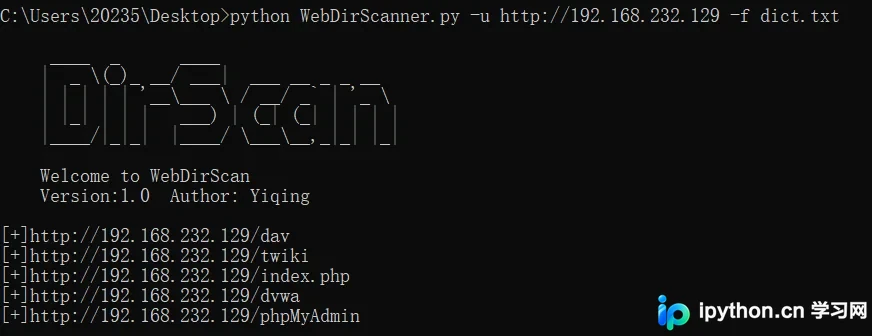
注意事项
- 该脚本仅用于学习和授权的安全测试,请勿用于非法用途。
- 多线程扫描可能对目标服务器造成压力,请合理设置线程数。
- User-Agent列表为示例数据,实际使用中可根据需要调整。
以上就是Python开发网站目录扫描器的详细内容,更多关于Python安全工具的资料请关注本站其它相关文章!
本站声明
本文内容仅供参考,不代表本站观点。转载或引用请注明出处。如发现内容问题,请通过联系我们页面反馈。















