


Python Matplotlib基础绘图20例:折线图、柱状图与散点图代码模板

在日常数据分析和学术报告中,折线图、柱状图与散点图构成了可视化中最核心的三大基础图表。本文整理了20套结构清晰、即拷即用的Matplotlib代码模板,统一基于现代面向对象接口(Object-Oriented API)编写,助你快速完成规范图表绘制。
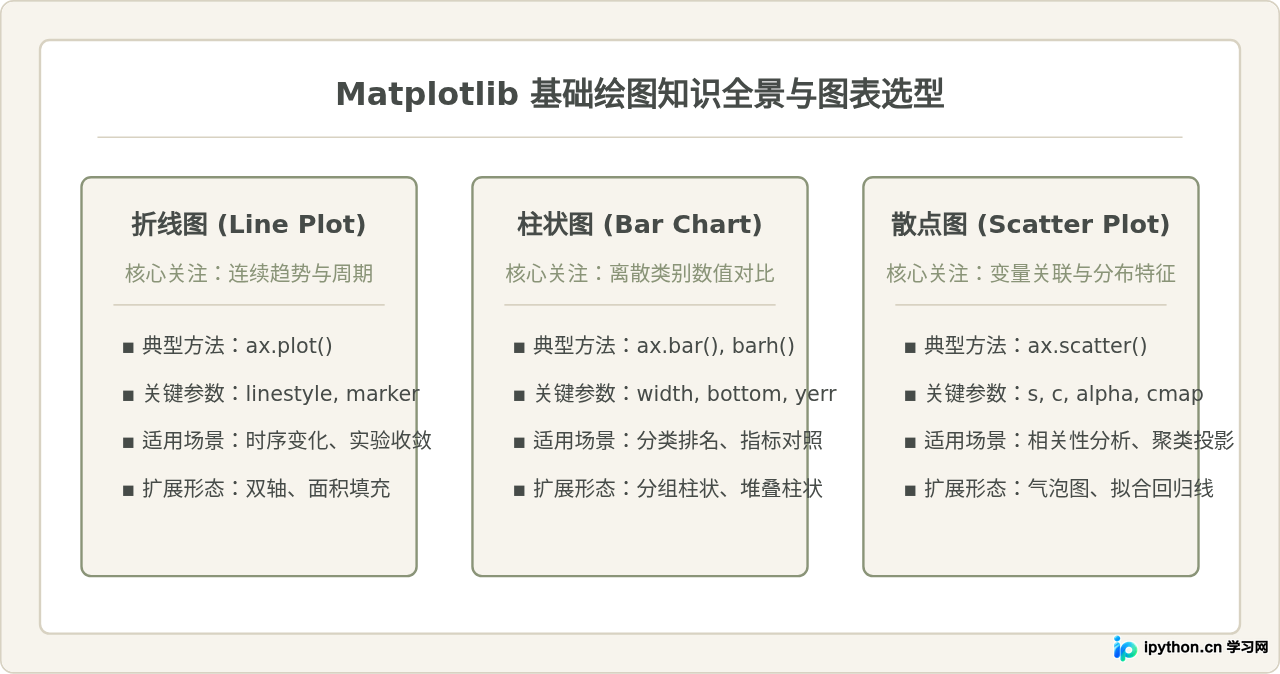
一、准备工作:绘图环境与通用配置
在开始绘制具体图表前,我们需要先准备绘图环境。许多初学者在Matplotlib中显示中文或负号时经常遇到方块乱码(Tofu),这通常是因为默认字体缺少中文字符集所致。在脚本开头配置以下全局参数即可一劳永逸:
import matplotlib.pyplot as plt
import numpy as np

# 设置中文字体与负号显示
plt.rcParams['font.sans-serif'] = ['SimHei', 'Songti SC', 'PingFang SC', 'Microsoft YaHei', 'DejaVu Sans']
plt.rcParams['axes.unicode_minus'] = False  # 保证坐标轴负号正常显示
plt.rcParams['figure.dpi'] = 100            # 设置清晰度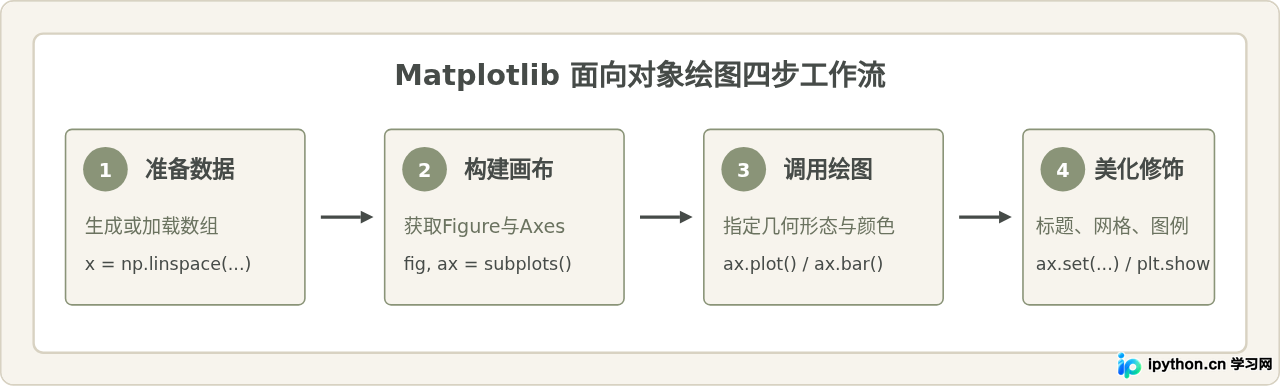
二、折线图核心模板(案例 1 - 7)
折线图主要用于反映变量随有序维度(如时间、距离、迭代轮次)的变化趋势。以下是7个最常用的折线图模板:
案例1:极简基础折线图
展示单一变量随时间的基本演变,使用实线连接数据点。
x = np.arange(1, 11)
y = np.array([12, 15, 18, 14, 22, 28, 25, 30, 34, 38])

fig, ax = plt.subplots(figsize=(7, 4))
ax.plot(x, y, color="#464B48", linewidth=2, label="指标趋势")
ax.set_title("基础折线图示例")
ax.set_xlabel("时间序号 (天)")
ax.set_ylabel("指标数值")
ax.grid(True, linestyle="--", alpha=0.5)
ax.legend()
plt.tight_layout()
plt.show()
案例2:带标记点(Markers)的折线图
当离散采样点数量不多时,在折线上加入标记可以更直观地标明具体采样位置。
x = np.arange(1, 8)
y = np.array([4.2, 5.1, 4.8, 6.3, 7.0, 6.8, 8.2])

fig, ax = plt.subplots(figsize=(7, 4))
ax.plot(x, y, color="#8A9478", linewidth=2, marker="o", markersize=6,
        markerfacecolor="#FFFFFF", markeredgewidth=1.5, label="采样序列")
ax.set_title("带空心圆标记的折线图")
ax.set_xlabel("采样点")
ax.set_ylabel("测量值")
ax.grid(True, linestyle=":", alpha=0.6)
ax.legend()
plt.tight_layout()
plt.show()
案例3:多系列对比折线图
通过不同线条样式、颜色与图例,对比多个指标或算法的性能差异。
x = np.linspace(0, 10, 50)
y1 = np.sin(x)
y2 = np.cos(x)

fig, ax = plt.subplots(figsize=(7, 4))
ax.plot(x, y1, color="#464B48", linestyle="-", linewidth=2, label="正弦曲线 (Sin)")
ax.plot(x, y2, color="#8A9478", linestyle="--", linewidth=2, label="余弦曲线 (Cos)")
ax.set_title("多线条样式对比折线图")
ax.set_xlabel("X (弧度)")
ax.set_ylabel("Y 数值")
ax.legend(loc="upper right", frameon=True)
ax.grid(True, alpha=0.3)
plt.tight_layout()
plt.show()
案例4:单侧面积填充折线图
使用 fill_between 对曲线下方区域进行颜色填充,增强趋势厚重感。
x = np.linspace(0, 10, 100)
y = np.exp(-0.2 * x) * np.sin(2 * x) + 1.5

fig, ax = plt.subplots(figsize=(7, 4))
ax.plot(x, y, color="#464B48", linewidth=2, label="信号强度")
ax.fill_between(x, y, 0, color="#8A9478", alpha=0.25)
ax.set_title("面积填充折线图")
ax.set_xlabel("时间")
ax.set_ylabel("幅度")
ax.set_ylim(bottom=0)
ax.legend()
plt.tight_layout()
plt.show()
案例5:置信区间与误差带折线图
科学绘图中常需要展示实验均值及其上下浮动范围(如均值±标准差)。
x = np.arange(1, 13)
mean_val = np.array([10, 12, 15, 14, 18, 22, 25, 27, 26, 30, 33, 35])
std_val = np.array([1.2, 1.5, 1.8, 1.4, 2.0, 2.3, 2.1, 2.5, 2.0, 2.7, 3.0, 2.8])

fig, ax = plt.subplots(figsize=(7, 4))
ax.plot(x, mean_val, color="#464B48", linewidth=2, label="实验均值")
ax.fill_between(x, mean_val - std_val, mean_val + std_val, color="#8A9478", alpha=0.3, label="置信区间 (±1 STD)")
ax.set_title("包含置信区间的折线图")
ax.set_xlabel("测试轮次")
ax.set_ylabel("指标输出")
ax.legend()
plt.tight_layout()
plt.show()
案例6:双Y轴折线图(Twinx)
当两组数据共享相同X轴但量纲单位相差悬殊时,使用次坐标轴分别标注。
x = np.arange(1, 11)
temp = np.array([20, 22, 25, 28, 30, 31, 29, 27, 24, 21])
humidity = np.array([65, 68, 70, 75, 82, 85, 80, 78, 72, 69])

fig, ax1 = plt.subplots(figsize=(7, 4))
ax2 = ax1.twinx()

line1 = ax1.plot(x, temp, color="#464B48", marker="o", label="气温 (°C)")
line2 = ax2.plot(x, humidity, color="#8A9478", marker="s", linestyle="--", label="湿度 (%)")

ax1.set_xlabel("观测时间 (小时)")
ax1.set_ylabel("气温 (°C)", color="#464B48")
ax2.set_ylabel("湿度 (%)", color="#8A9478")
ax1.set_title("双Y轴折线图示例")

# 合并双轴图例
lines = line1 + line2
labels = [l.get_label() for l in lines]
ax1.legend(lines, labels, loc="upper left")
plt.tight_layout()
plt.show()
案例7:阶梯折线图(Step Plot)
适用于离散状态突变、阶梯电价或库存盘点等离散变化量展示。
x = np.arange(1, 9)
y = np.array([10, 10, 25, 25, 40, 60, 60, 85])

fig, ax = plt.subplots(figsize=(7, 4))
ax.step(x, y, where="mid", color="#464B48", linewidth=2, label="状态步进")
ax.plot(x, y, "o", color="#8A9478", alpha=0.8)
ax.set_title("中点阶梯折线图 (Step Plot)")
ax.set_xlabel("阶段")
ax.set_ylabel("阶梯费率")
ax.grid(True, linestyle="--", alpha=0.5)
ax.legend()
plt.tight_layout()
plt.show()
三、柱状图核心模板(案例 8 - 14)
柱状图通过矩形长度或高度反映离散类别的绝对数值差异,是比较类图表中最稳健的形态:
案例8:经典垂直柱状图并标注数值
在每个柱子上方直接打印对应数值标签,免去读者视线在柱顶与Y轴之间反复游离。
categories = ["项目A", "项目B", "项目C", "项目D", "项目E"]
values = [42, 68, 55, 83, 71]

fig, ax = plt.subplots(figsize=(7, 4))
bars = ax.bar(categories, values, color="#8A9478", width=0.55, edgecolor="#464B48")
ax.bar_label(bars, padding=3, fmt="%d")  # 自动标注柱顶数值
ax.set_title("基础垂直柱状图")
ax.set_ylabel("达成量")
ax.set_ylim(0, max(values) * 1.15)
plt.tight_layout()
plt.show()
案例9:水平条形图(适合长标签)
当分类名称较长或分类多达十几个时,横向展开可以确保标签文字水平无遮挡排布。
items = ["华北研发中心一组", "华东敏捷开发团队", "华南数据运维组", "西南测试工程部", "华中系统集成组"]
scores = [88.5, 92.4, 79.8, 85.0, 90.6]

fig, ax = plt.subplots(figsize=(7, 4))
bars = ax.barh(items, scores, color="#464B48", height=0.5, edgecolor="#D8D2C2")
ax.bar_label(bars, padding=4, fmt="%.1f")
ax.set_title("横向条形图示例")
ax.set_xlabel("考核评分")
ax.set_xlim(0, 100)
plt.tight_layout()
plt.show()
案例10:并列分组柱状图
通过手动计算X轴偏移量,展示两个或多个维度并排对比。
labels = ["Q1", "Q2", "Q3", "Q4"]
group_a = [35, 48, 52, 60]
group_b = [40, 45, 58, 55]

x = np.arange(len(labels))
width = 0.35

fig, ax = plt.subplots(figsize=(7, 4))
rects1 = ax.bar(x - width/2, group_a, width, label="产品线 A", color="#8A9478")
rects2 = ax.bar(x + width/2, group_b, width, label="产品线 B", color="#464B48")

ax.set_ylabel("销量 (万件)")
ax.set_title("季度并列分组柱状图")
ax.set_xticks(x)
ax.set_xticklabels(labels)
ax.legend()
ax.bar_label(rects1, padding=2)
ax.bar_label(rects2, padding=2)
plt.tight_layout()
plt.show()
案例11:堆叠柱状图(部分与整体关系)
通过 bottom 参数将不同分部数值叠加在同一个柱体上。
depts = ["部门一", "部门二", "部门三", "部门四"]
fixed_cost = np.array([20, 25, 18, 30])
variable_cost = np.array([15, 18, 22, 12])

fig, ax = plt.subplots(figsize=(7, 4))
p1 = ax.bar(depts, fixed_cost, width=0.5, label="固定成本", color="#464B48")
p2 = ax.bar(depts, variable_cost, width=0.5, bottom=fixed_cost, label="可变成本", color="#8A9478")

ax.set_ylabel("成本支出 (万元)")
ax.set_title("各部门成本构成堆叠柱状图")
ax.legend()
plt.tight_layout()
plt.show()
案例12:百分比堆叠柱状图(归一化对比)
消除总量差异,纯粹比较不同类别内部子结构的百分比分布。
categories = ["方案1", "方案2", "方案3", "方案4"]
raw_a = np.array([40, 25, 30, 50])
raw_b = np.array([60, 75, 70, 50])
totals = raw_a + raw_b

pct_a = raw_a / totals * 100
pct_b = raw_b / totals * 100

fig, ax = plt.subplots(figsize=(7, 4))
ax.bar(categories, pct_a, width=0.5, label="占比 A (%)", color="#8A9478")
ax.bar(categories, pct_b, width=0.5, bottom=pct_a, label="占比 B (%)", color="#464B48")

ax.set_ylabel("比例 (%)")
ax.set_ylim(0, 100)
ax.set_title("百分比结构堆叠柱状图")
ax.legend(loc="lower right")
plt.tight_layout()
plt.show()
案例13:带误差棒的实验统计柱状图
使用 yerr 参数直接标明均值抽样误差或标准差区间。
conditions = ["对照组", "处理A", "处理B", "处理C"]
means = [50.2, 62.4, 58.1, 74.3]
errors = [3.5, 4.2, 3.8, 5.1]

fig, ax = plt.subplots(figsize=(7, 4))
ax.bar(conditions, means, yerr=errors, capsize=5, color="#8A9478",
       edgecolor="#464B48", alpha=0.9, width=0.5)
ax.set_ylabel("测量均值 ± 误差")
ax.set_title("带误差棒的实验对比柱状图")
ax.grid(axis="y", linestyle="--", alpha=0.4)
plt.tight_layout()
plt.show()
案例14:双向对比柱状图(正负离散偏差)
展示环比增长率、盈亏差额等包含正负符号的对比数据。
items = ["指标1", "指标2", "指标3", "指标4", "指标5"]
changes = np.array([12.5, -8.3, 19.2, -14.6, 5.8])
colors = ["#464B48" if c >= 0 else "#8A9478" for c in changes]

fig, ax = plt.subplots(figsize=(7, 4))
bars = ax.barh(items, changes, color=colors, height=0.5)
ax.axvline(0, color="#464B48", linewidth=1)
ax.set_xlabel("变动幅度 (%)")
ax.set_title("正负增长率双向条形图")
ax.bar_label(bars, padding=3, fmt="%.1f%%")
plt.tight_layout()
plt.show()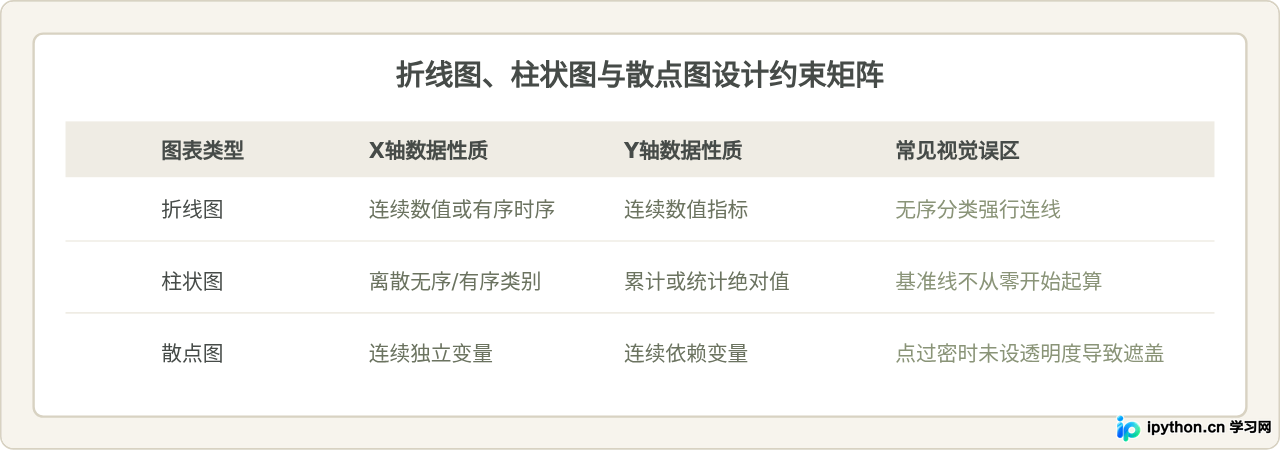
四、散点图核心模板(案例 15 - 20)
散点图专注于揭示两个或多个连续数值变量之间的相关性、聚集团簇以及离群异常点:
案例15:基础双变量散点图
最基本的XY平面坐标点分布展示,便于一眼发现整体相关趋势。
np.random.seed(42)
x = np.random.normal(50, 10, 100)
y = 1.8 * x + np.random.normal(0, 12, 100)

fig, ax = plt.subplots(figsize=(7, 4))
ax.scatter(x, y, color="#464B48", edgecolors="#FFFFFF", s=50, alpha=0.8)
ax.set_title("基础散点图示例")
ax.set_xlabel("特征 X (均值50)")
ax.set_ylabel("响应特征 Y")
ax.grid(True, linestyle="--", alpha=0.4)
plt.tight_layout()
plt.show()
案例16:气泡图(引入第三维度:点大小)
除了X和Y轴坐标外,将数据点的面积大小映射为第三个数值变量(例如样本权重或人口规模)。
np.random.seed(10)
x = np.random.rand(40) * 10
y = np.random.rand(40) * 10
weights = np.random.rand(40) * 800 + 100  # 点的面积

fig, ax = plt.subplots(figsize=(7, 4))
scatter = ax.scatter(x, y, s=weights, color="#8A9478", alpha=0.5, edgecolors="#464B48")
ax.set_title("气泡图(点大小映射权重)")
ax.set_xlabel("自变量 X")
ax.set_ylabel("自变量 Y")
ax.grid(True, linestyle=":", alpha=0.5)
plt.tight_layout()
plt.show()
案例17:连续色彩映射散点图(第四维度:Colormap)
使用颜色渐变色板(Colormap)及颜色条(Colorbar)直观展示密集数值的深浅高低。
np.random.seed(24)
x = np.random.randn(200)
y = np.random.randn(200)
density = np.sqrt(x**2 + y**2)

fig, ax = plt.subplots(figsize=(7, 4))
sc = ax.scatter(x, y, c=density, cmap="copper", s=45, alpha=0.85, edgecolors="none")
cbar = fig.colorbar(sc, ax=ax)
cbar.set_label("与原点欧氏距离")
ax.set_title("渐变颜色映射散点图")
ax.set_xlabel("维度 1")
ax.set_ylabel("维度 2")
plt.tight_layout()
plt.show()
案例18:带线性回归拟合线的散点图
结合 np.polyfit 拟合一条一次趋势线,让回归相关关系一目了然。
x = np.linspace(5, 50, 40)
y = 2.4 * x + 10 + np.random.normal(0, 15, len(x))

# 计算拟合斜率与截距
slope, intercept = np.polyfit(x, y, 1)
fit_line = slope * x + intercept

fig, ax = plt.subplots(figsize=(7, 4))
ax.scatter(x, y, color="#8A9478", label="采样数据", s=45, alpha=0.9)
ax.plot(x, fit_line, color="#464B48", linewidth=2, linestyle="--",
        label=f"拟合趋势线: y={slope:.2f}x+{intercept:.2f}")

ax.set_title("带回归拟合线的散点图")
ax.set_xlabel("输入变量 X")
ax.set_ylabel("输出变量 Y")
ax.legend()
ax.grid(True, alpha=0.3)
plt.tight_layout()
plt.show()
案例19:多分类对比散点图
不同类别采用不同的颜色与标记符号,常用于聚类算法或分类模型结果呈现。
np.random.seed(1)
cluster1 = np.random.randn(50, 2) + [2, 2]
cluster2 = np.random.randn(50, 2) + [6, 6]

fig, ax = plt.subplots(figsize=(7, 4))
ax.scatter(cluster1[:, 0], cluster1[:, 1], color="#464B48", marker="o", label="簇群 1 (Cluster A)")
ax.scatter(cluster2[:, 0], cluster2[:, 1], color="#8A9478", marker="^", label="簇群 2 (Cluster B)")

ax.set_title("多类别簇群散点图")
ax.set_xlabel("特征维度 1")
ax.set_ylabel("特征维度 2")
ax.legend()
ax.grid(True, linestyle="--", alpha=0.4)
plt.tight_layout()
plt.show()
案例20:边缘密度/直方图复合散点图
通过GridSpec组合布局,在散点图主图的上下侧添加X与Y的边际分布,清晰洞察单维度分布规律。
x = np.random.randn(300)
y = 0.5 * x + np.random.randn(300) * 0.8

fig = plt.figure(figsize=(7, 6))
gs = fig.add_gridspec(4, 4, hspace=0.1, wspace=0.1)

ax_main = fig.add_subplot(gs[1:4, 0:3])
ax_top = fig.add_subplot(gs[0, 0:3], sharex=ax_main)
ax_right = fig.add_subplot(gs[1:4, 3], sharey=ax_main)

# 主散点图
ax_main.scatter(x, y, color="#8A9478", s=25, alpha=0.7)
ax_main.set_xlabel("X 分布")
ax_main.set_ylabel("Y 分布")

# 边际直方图
ax_top.hist(x, bins=25, color="#464B48", edgecolor="#FFFFFF", alpha=0.8)
ax_top.axis("off")

ax_right.hist(y, bins=25, orientation="horizontal", color="#464B48", edgecolor="#FFFFFF", alpha=0.8)
ax_right.axis("off")

plt.show()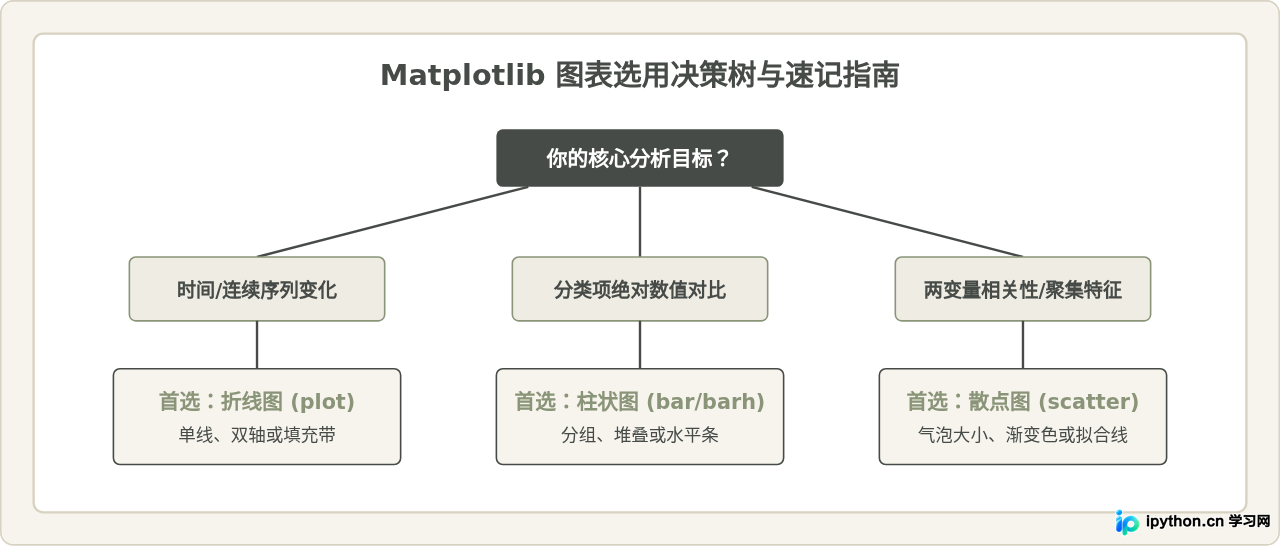
五、常见绘图问题排查与排版细节
避坑指南:
- 图例与数据点重叠: 建议显式传入
loc="upper left"或将图例放置于画布外部:ax.legend(bbox_to_anchor=(1.05, 1), loc='upper left')。 - 多子图标签重叠: 在调用
plt.show()或plt.savefig()之前,务必加上plt.tight_layout(),或在创建画布时使用layout="constrained"。 - 矢量图导出保持文字可编辑: 如需导出用于论文排版的PDF或SVG格式,可添加配置:
plt.rcParams['svg.fonttype'] = 'none'。
掌握以上面向对象模板与配置范式后,绝大多数日常科研与商业数据可视化需求都可以通过拼装这20个基础案例快速落地。
本站声明
本文内容仅供参考,不代表本站观点。转载或引用请注明出处。如发现内容问题,请通过联系我们页面反馈。















