



在 OpenResty 里做文件上传,难点通常不在“能不能收文件”,而在于怎样用较小内存稳定处理 `multipart/form-data`,再把文件安全落盘并返回可用结果。下面从 `lua-resty-upload` 的读取机制讲起,再拆解一个实际可用的上传封装,最后结合 `nginx.conf` 和测试请求说明它是如何跑通的,也方便你判断这套写法适合用在什么场景。
lua-resty-upload 是怎么处理上传流的
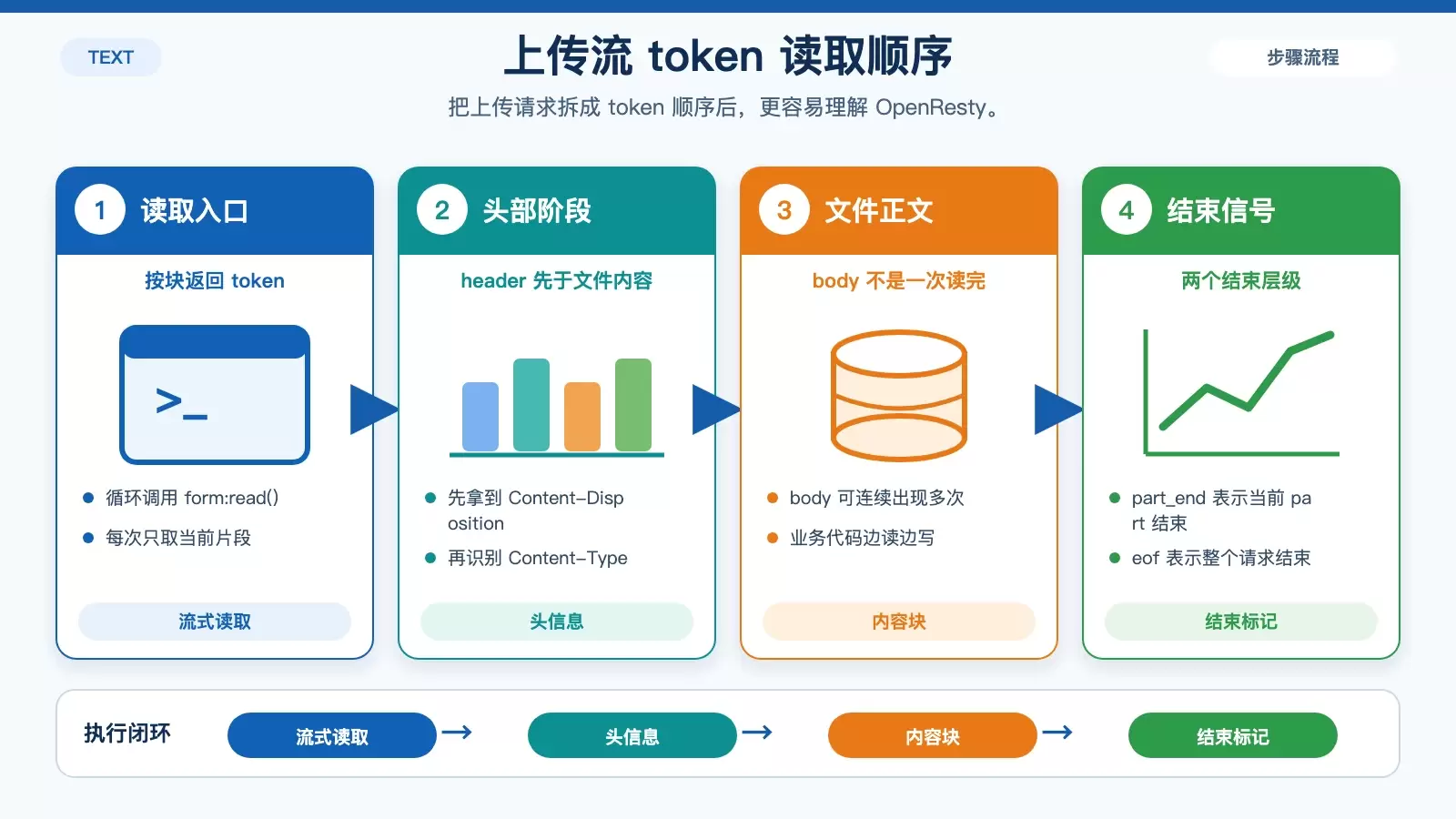
OpenResty 处理 `multipart/form-data` 上传时,常用的库是 lua-resty-upload。它不是一次性把整个文件读入内存,而是通过循环调用 form:read(),持续返回上传流中的 token。
先看一个库里的示例:
    lua_package_path "/path/to/lua-resty-upload/lib/?.lua;;";

    server {
        location /test {
            content_by_lua '
                local upload = require "resty.upload"
                local cjson = require "cjson"

                local chunk_size = 5 -- should be set to 4096 or 8192
                                     -- for real-world settings

                local form, err = upload:new(chunk_size)
                if not form then
                    ngx.log(ngx.ERR, "failed to new upload: ", err)
                    ngx.exit(500)
                end

                form:set_timeout(1000) -- 1 sec

                while true do
                    local typ, res, err = form:read()
                    if not typ then
                        ngx.say("failed to read: ", err)
                        return
                    end

                    ngx.say("read: ", cjson.encode({typ, res}))

                    if typ == "eof" then
                        break
                    end
                end

                local typ, res, err = form:read()
                ngx.say("read: ", cjson.encode({typ, res}))
            ';
        }
    }
这个示例的核心在于两点:
1. 上传内容按 token 顺序返回
form:read() 返回的不是完整文件,而是上传请求中的分段数据。常见类型包括 header、body、part_end、eof,一直读到结束为止。
示例输出大致如下:
read: ["header",["Content-Disposition","form-data; name="file1"; filename="a.txt"","Content-Disposition: form-data; name="file1"; filename="a.txt""]]
read: ["header",["Content-Type","text/plain","Content-Type: text/plain"]]
read: ["body","Hello"]
read: ["body",", wor"]
read: ["body","ld"]
read: ["part_end"]
read: ["header",["Content-Disposition","form-data; name="test"","Content-Disposition: form-data; name="test""]]
read: ["body","value"]
read: ["body","rn"]
read: ["part_end"]
read: ["eof"]
read: ["eof"]
从这里可以看出,一个文件字段会先返回头信息,再按块返回内容,最后以 part_end 结束;整个请求处理完成后,才会遇到 eof。
2. 流式读取让内存占用保持稳定
这种处理方式的意义在于,哪怕输入是很大的文件,只要业务代码不主动把所有 body 数据块累计在 Lua 内存里,整体内存占用就可以维持在较小且相对恒定的水平。对上传接口来说,这一点比“代码是否简短”更重要。
原文还特别提到,这个 Lua 库利用了 ngx_lua 的 cosocket API,因此整个过程保持了 100% 的非阻塞行为。这也是它适合放在 OpenResty 上传场景里的原因。
一个可直接使用的上传封装怎么写
理解读取机制后,再看实际业务封装会更容易。下面这段代码基于 openresty-practices 修改而来,目标是把“校验、创建目录、写文件、返回结果”这些动作收进一个上传函数里。
local _M = {
    _VERSION = '0.01'
}

local upload = require "resty.upload"
local chunk_size = 4096
local cjson = require 'cjson.safe'
local os_exec = os.execute
local os_date = os.date
local md5 = ngx.md5
local io_open = io.open
local tonumber = tonumber
local gsub = string.gsub
local ngx_var = ngx.var
local ngx_req = ngx.req
local os_time = os.time
local json_encode = cjson.encode

local function get_ext(res)
    local kvfile = string.split(res, "=")
    local filename = string.sub(kvfile[2], 2, -2)
    if filename then
        return filename:match(".+%.(%w+)$")
    end
    return ''
end

local function file_exists(path)
    local file = io.open(path, "rb")
    if file then file:close() end
    return file ~= nil
end

local function json_return(code, message, data)
    ngx.say(json_encode({code = code, msg = message, data = data}))
end

local function in_array(b,list)
    if not list then
        return false
    end
    if list then
        for k, v in pairs(list) do
            if v == b then
                return true
            end
        end
        return false
    end
end

-- 字符串 split 分割
string.split = function(s, p)
    local rt= {}
    gsub(s, '[^'..p..']+', function(w) table.insert(rt, w) end )
    return rt
end

-- 支持字符串前后 trim
string.trim = function(s)
    return (s:gsub("^%s*(.-)%s*$", "%1"))
end

local function uploadfile()
    local file
    local file_name
    local form = upload:new(chunk_size)
    local conf = {max_size = 1000000, allow_exts = {'jpg', 'png', 'gif', 'jpeg'} }
    local root_path = ngx_var.document_root
    local file_info = {extension = '', filesize = 0, url = '', mime = '' }
    local content_len = ngx_req.get_headers()['Content-length']
    local body_size = content_len and tonumber(content_len) or 0
    if not form then
        return nil, '没有上传的文件'
    end
    if body_size > 0 and body_size > conf.max_size then
        return nil, '文件过大'
    end
    file_info.filesize = body_size
    while true do
        local typ, res, err = form:read()
        if typ == "header" then
            if res[1] == "Content-Type" then
                file_info.mime = res[2]
            elseif res[1] == "Content-Disposition" then
                -- 如果是文件参数:Content-Disposition: form-data; name="data"; filename="1.jpeg"
                local kvlist = string.split(res[2], ';')
                for _, kv in ipairs(kvlist) do
                    local seg = string.trim(kv)
                    -- 带filename标识则为文件参数名
                    if seg:find("filename") then
                        local file_id = md5('upload'..os_time())
                        local extension = get_ext(seg)
                        file_info.extension = extension

                        if not extension then
                            return nil,  '未获取文件后缀'
                        end

                        if not in_array(extension, conf.allow_exts) then
                            return nil,  '不支持该文件格式'
                        end

                        local dir = root_path..'/uploads/images/'..os_date('%Y')..'/'..os_date('%m')..'/'..os_date('%d')..'/'
                        if file_exists(dir) ~= true then
                            local status = os_exec('mkdir -p '..dir)
                            if status ~= true then
                                return nil, '创建目录失败'
                            end
                        end
                        file_name = dir..file_id.."."..extension
                        if file_name then
                            file = io_open(file_name, "w+")
                            if not file then
                                return nil, '打开文件失败'
                            end
                        end
                    end
                end

            end
        elseif typ == "body" then
            -- 读取body内容
            if file then
                file:write(res)
            end
        elseif typ == "part_end" then
            -- 写结束,关闭文件
            if file then
                file:close()
                file = nil
            end
        elseif typ == "eof" then
            -- 读取结束返回
            file_name = gsub(file_name, root_path, '')
            file_info.url = file_name
            return file_info
        else

        end
    end
end

local file_info, err = uploadfile()
if file_info then
    json_return(200, '上传成功', {imgurl = file_info.url})
else
    json_return(5003, err)
end
请求头里解析什么信息
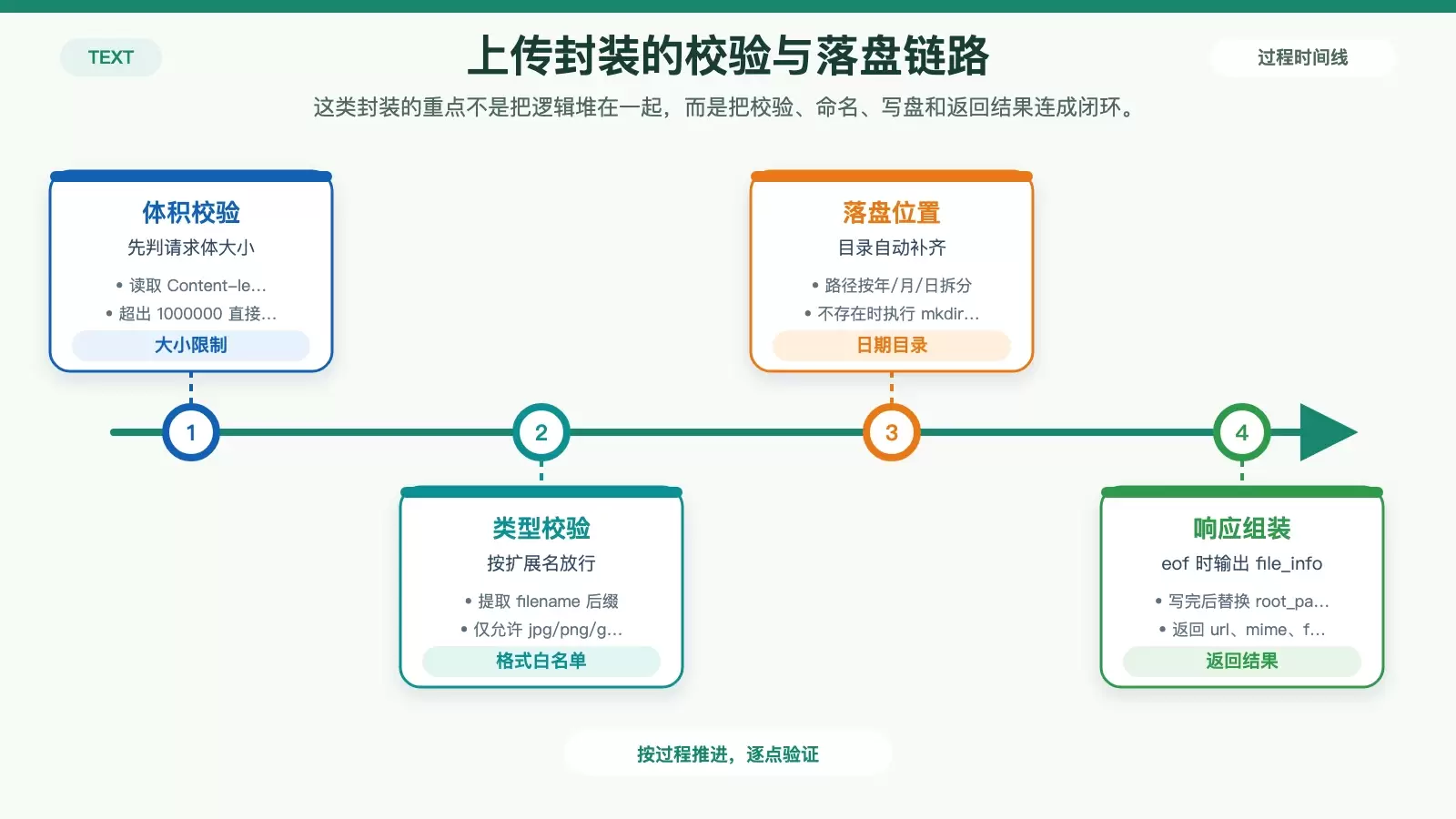
这段封装的入口仍然是 upload:new(chunk_size),但读取到 header 之后,它开始补全业务字段:
- 遇到
Content-Type时,记录文件的 MIME 类型到file_info.mime。 - 遇到
Content-Disposition时,从filename里提取后缀名。 - 通过
string.split和string.trim把头部参数拆开,判断当前 part 是否真的是文件字段。
这里的关键判断是 seg:find("filename")。只要当前分段带有 filename,就把它视为上传文件,而不是普通文本字段。
大小、后缀和文件名是怎么控制的
示例里给了一份很直接的配置:
local conf = {max_size = 1000000, allow_exts = {'jpg', 'png', 'gif', 'jpeg'} }
也就是:
- 最大上传大小限制为
1000000。 - 允许的扩展名只有
jpg、png、gif、jpeg。
代码通过 ngx.req.get_headers()['Content-length'] 读取请求头中的 Content-length,再用 tonumber 转成数值。只要请求体超过 conf.max_size,函数就直接返回“文件过大”。
文件名生成则采用:
local file_id = md5('upload'..os_time())
也就是说,最终文件名基于 md5('upload'..os_time()) 生成,再拼接原始扩展名。这样做的好处是简单,能避免直接使用用户上传文件名带来的覆盖和特殊字符问题。
如果你更希望使用 UUID 作为文件名,原文给出的替代方案是引入 lua-resty-uuid。将库复制到 OpenResty 安装目录的 lualib.resty 下,再在代码里通过 require 'resty.uuid' 引用即可。
文件保存路径和写入流程
目录结构按日期拆分,这在图片上传场景里很常见:
local dir = root_path..'/uploads/images/'..os_date('%Y')..'/'..os_date('%m')..'/'..os_date('%d')..'/'
实际效果会把文件写到类似 /uploads/images/年/月/日/ 的路径下。写入前会先判断目录是否存在,不存在就执行:
os_exec('mkdir -p '..dir)
随后在读取上传流时按 token 类型分别处理:
body:将数据块写入已打开的文件句柄。part_end:说明当前文件 part 写完,立即关闭文件。eof:整个请求读取结束,把绝对路径转换为相对路径后返回。
这也是流式上传封装最实用的部分:文件内容边读边写,不需要在 Lua 层把整个文件缓存起来。
如何在 nginx.conf 中挂载上传接口
要让上述 Lua 脚本真正对外提供上传能力,还需要一份对应的 OpenResty 配置。原文中的测试配置如下:
worker_processes 1;

events {
  worker_connections 1024;
}

http {
  lua_package_path "$prefix/lua/?.lua;$prefix/libs/?.lua;;";
  server {
    server_name localhost;
    listen 8080;
    charset utf-8;
    set $LESSON_ROOT lua/;
    error_log  logs/error.log;
    access_log logs/access.log;
    location /upload{
      default_type text/html;
      content_by_lua_file $LESSON_ROOT/upload.lua;
    }
  }

}
这份配置里有几个点值得注意:
lua_package_path指定了 Lua 模块搜索路径,方便加载本地库文件。- 服务监听在
8080端口,请求入口是/upload。 content_by_lua_file $LESSON_ROOT/upload.lua;直接把上传逻辑交给upload.lua处理。- 日志输出到
logs/error.log和logs/access.log,便于定位上传失败原因。
原文测试环境是在 Mac 上安装好的 OpenResty 中完成的,随后在当前目录启动服务。
目录结构、启动命令与上传测试
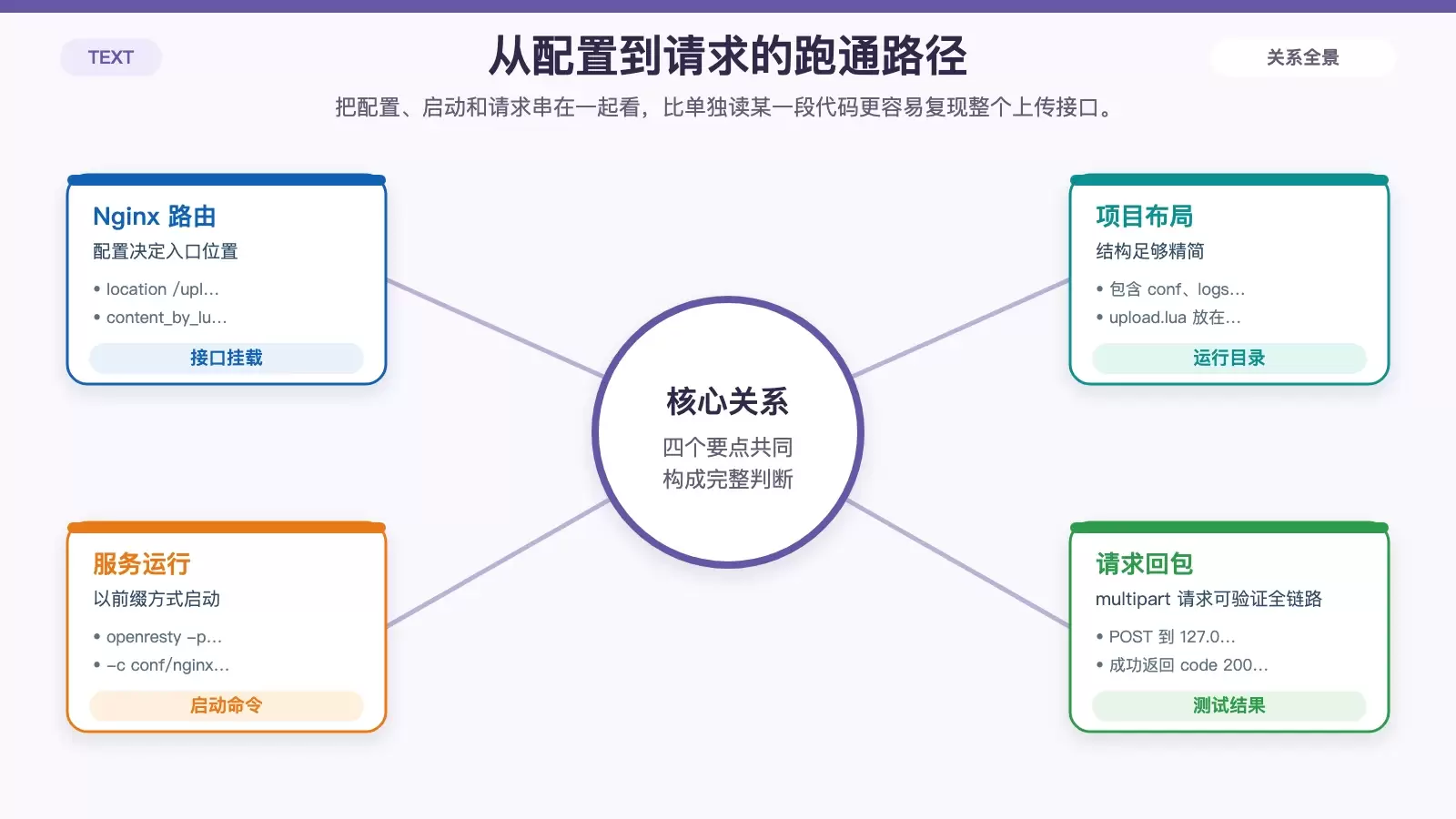
在测试前,原文给出的目录结构如下:
wukongdeMacBook-Pro:upload wukong$ tree

.

|-- conf

|   `-- nginx.conf

|-- logs

|   |-- access.log

|   `-- error.log

|-- lua

|   `-- upload.lua
进入项目目录后,使用下面的命令启动上传服务:
wukongdeMacBook-Pro:upload wukong$ openresty -p $PWD/ -c conf/nginx.conf
其中:
-p $PWD/指定当前目录作为运行前缀;-c conf/nginx.conf指定要加载的配置文件。
服务启动后,就可以向 http://127.0.0.1:8080/upload 发送一个 multipart/form-data 请求。原文使用的是 IDEA 的 HTTP Request,示例如下:
### Send a form with the text and file fields
POST http://127.0.0.1:8080/upload
Content-Type: multipart/form-data; boundary=WebAppBoundary

--WebAppBoundary
Content-Disposition: form-data; name="element-name"
Content-Type: text/plain

123
--WebAppBoundary
Content-Disposition: form-data; name="files"; filename="1.jpeg"

< /Users/wukong/Desktop/1.jpeg
--WebAppBoundary--
这个请求里同时包含一个普通文本字段和一个文件字段,文件路径是 /Users/wukong/Desktop/1.jpeg。
执行后返回结果如下:
{"msg":"上传成功","data":{"imgurl":"/Users/wukong/Desktop/tool/openresty-test/upload/html/uploads/images/2022/03/04/87671af7f050839a463fafff52d5156e.jpeg"},"code":200}
从结果来看,接口成功完成了几件事:识别文件类型、生成新的文件名、按日期创建目录、将图片写入目标位置,并以 JSON 格式返回上传后的路径。
这套实现适合什么场景,还要注意什么
把整篇内容串起来,这套上传实现的重点并不是“代码行数少”,而是它依赖 lua-resty-upload 的流式读取能力,把上传过程拆成了清晰的几个阶段:解析 header、校验大小和后缀、按块写入磁盘、在结束时返回结果。
它比较适合以下场景:
- 上传文件体积不算特别大,但希望接口实现简单直接。
- 需要在 OpenResty 层完成扩展名校验和路径组织。
- 希望上传时 Lua 内存保持稳定,而不是一次读完整个文件。
同时也要看到,这份示例更偏向“可跑通的基础实现”。例如它主要依赖 Content-length 判断大小、只按扩展名控制格式、目录创建直接通过 os.execute 调用 shell,这些在生产环境里通常还会继续补强。但如果你的目标是先理解 OpenResty 文件上传的处理链路,或者快速搭一个能工作的上传接口,这个版本已经足够清楚。















