


Python字符串格式化详解:%与format方法对比及实战

本文深入解析Python中两种主要的字符串格式化方式:%占位符与str.format()。详细对比了默认位置、指定索引、列表解包及字典键值对等format用法,并涵盖补零、精度控制等高级格式化技巧,帮助开发者掌握高效、灵活的字符串处理方案。
一、简介
自Python 2.6版本起,引入了str.format()方法,显著增强了字符串格式化的能力。其核心语法通过{}作为占位符,并配合:进行格式控制,从而取代了早期常用的%占位符方式。
二、占位符%方式
字符串格式符号的具体用法如下所示。
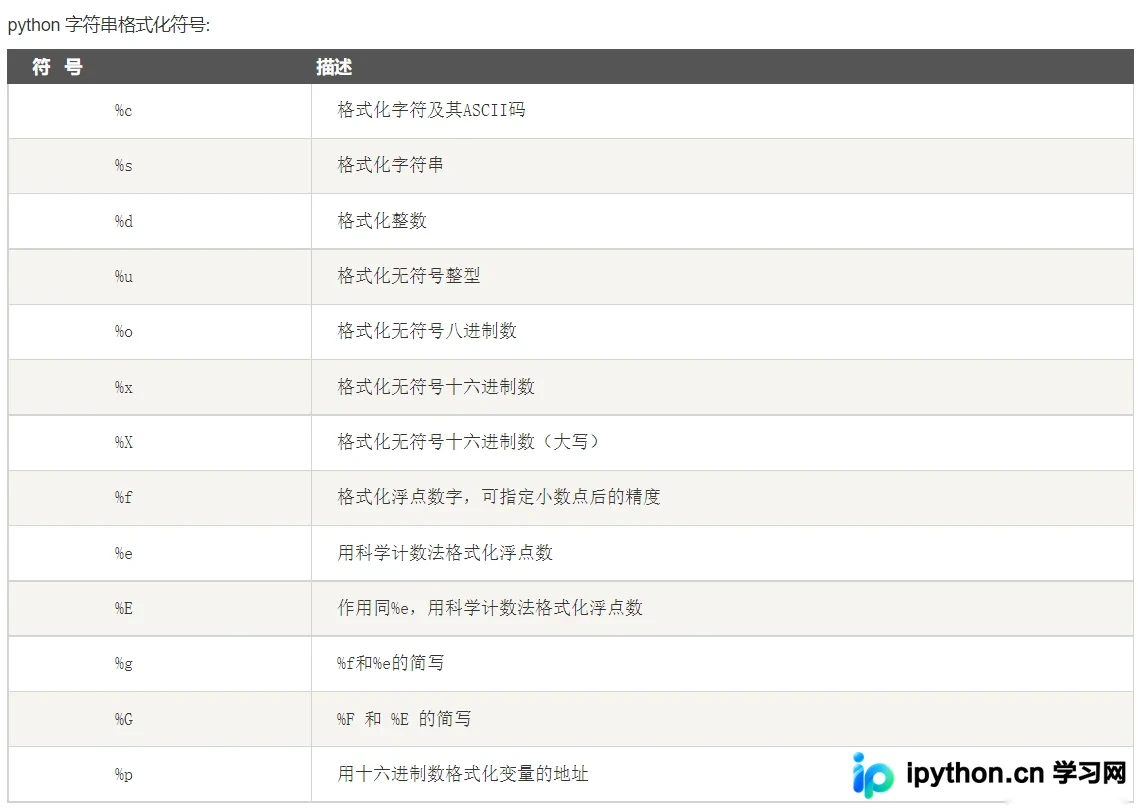
以下是一个基础示例:
name = 'sugar'
age = 21
print("His name is %s, and he is %d year old." %(name, age))
运行结果
His name is sugar, and he is 21 year old.
此外,还有多种格式化辅助指令可用,其中较为常用的是利用0进行前导零填充,以及通过.指定小数位数。
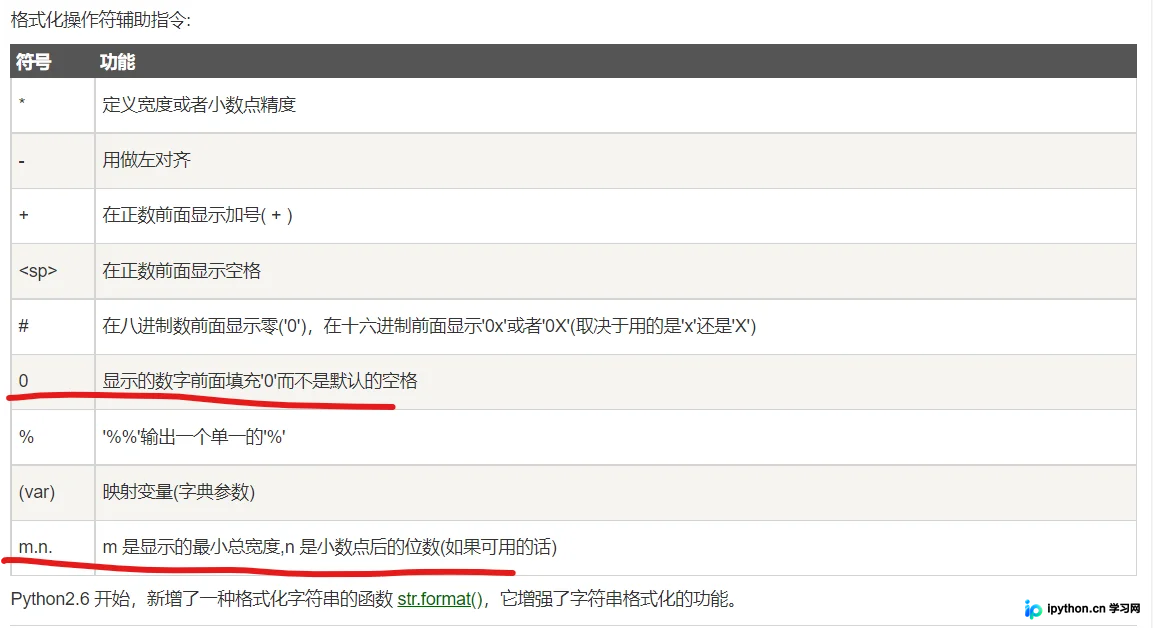
具体示例如下:
price = 23.1999
obj = 'milk'

print("The %s's price is %03f" %(obj, price))  # 前面补三个零
print("The %s's price is %3.0f" %(obj, price))  # 最小总占位长度为3,控制输出0个小数
print("The %s's price is %3.3f" %(obj, price))  # 最小总占位长度为3,控制输出3个小数
print("The %s's price is %5.4f" %(obj, price))  # 最小总占位长度为5,控制输出4个小数
输出结果:
The milk's price is 23.199900
The milk's price is  23
The milk's price is 23.200
The milk's price is 23.1999
三、format格式化方式
字符串format格式化主要包含以下四种实现方式。
1、使用默认位置方式
基本格式为:string{}.format(x1, x2)
示例代码如下:
price = 23.1999
obj = 'milk'
print("The {}'s price is {}".format(obj, price))
执行结果如下所示。
The milk's price is 23.1999
2、使用指定位置方式
基本格式为:string{0}.format(x1, x2)
示例代码如下:
price = 23.1999
obj = 'milk'
print("The {0}'s price is {1}".format(obj, price))
执行结果如下所示。
The milk's price is 23.1999
3、使用列表方式
这种方式本质上结合了默认位置和指定位置的特点,区别在于需要使用*运算符对列表进行解包操作,示例如下:
price = 23.1999
obj = 'milk'
info = [obj, price]
print("The {}'s price is {}".format(*info))  # 对info进行解包
执行结果如下所示。
The milk's price is 23.1999
4、使用字典的键值对方式
基本格式为:string(key).format(key=value)
示例中,还可以使用**运算符对字典进行解包处理。
price = 23.1999
obj = 'milk'
print("The {name}'s price is {pri}".format(name=obj, pri=price))

# 更进一步,对字典进行解包
dic = {'name':'milk', 'pri':23.1999}
print("The {name}'s price is {pri}".format(**dic))
执行结果如下所示。
The milk's price is 23.1999 The milk's price is 23.1999
5、其他数字格式化的方式
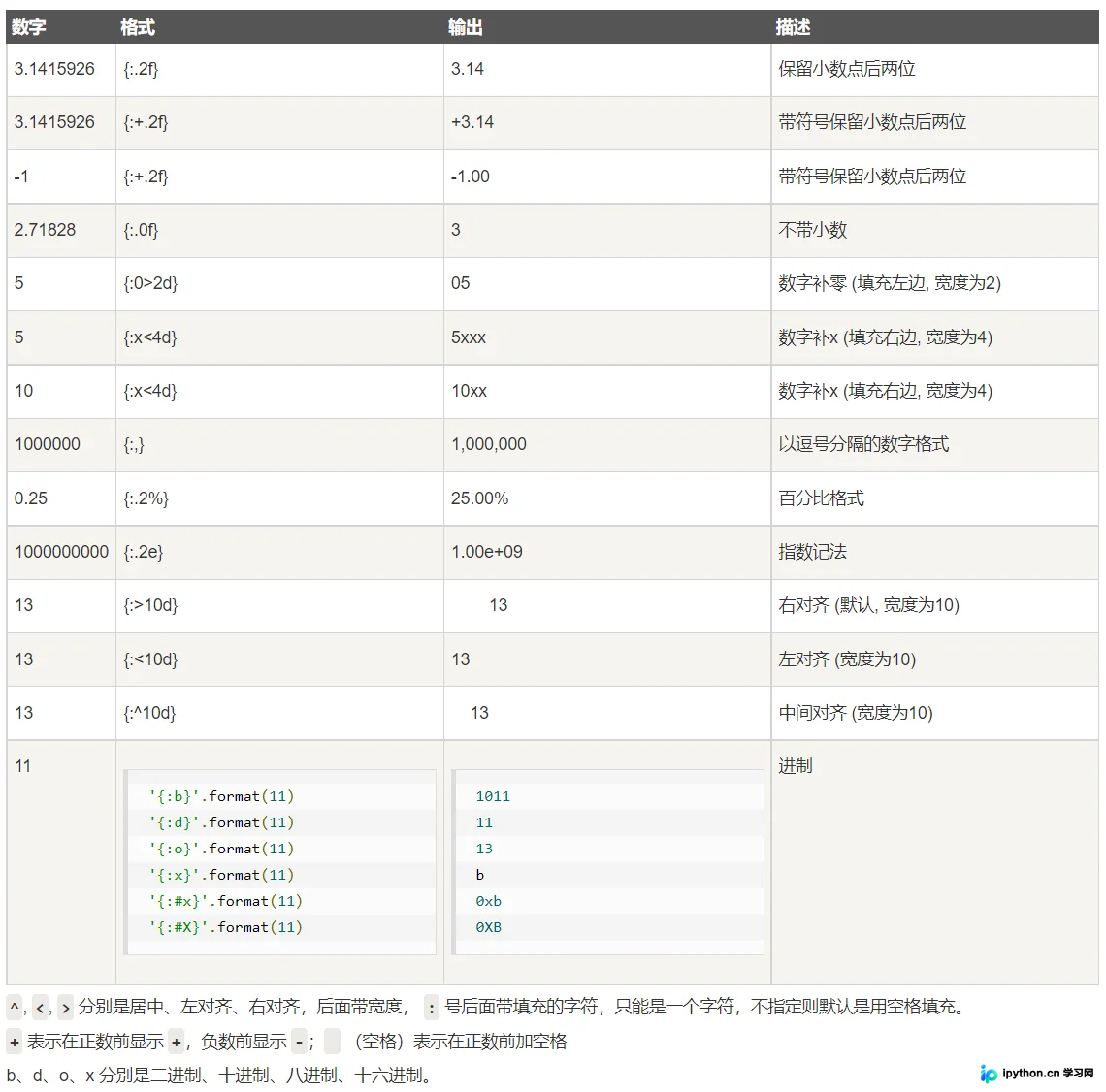
需要注意的是,在:冒号后指定填充内容时,可以结合上述四种格式化策略来控制文本格式,示例如下:
price = 23.1999
obj = 'bread'
print("The {}'s price is {:.2f}".format(obj, price))  # 使用默认位置方式,保留两位小数
print("The {0}'s price is {1:.2f}".format(obj, price))  # 使用指定位置方式,保留两位小数
print("The {name}'s price is {price:.2f}".format(name=obj, price=price))  # 使用字典方式,保留两位小数

li = [obj, price]
print("The {}'s price is {:.2f}".format(*li))  # 使用列表解包的方式,保留两位小数

info = {'name':obj, 'price':price}
print("The {name}'s price is {price:.2f}".format(**info))  # 使用字典解包的方式,保留两位小数
执行结果如下所示。
The bread's price is 23.20 The bread's price is 23.20 The bread's price is 23.20 The bread's price is 23.20 The bread's price is 23.20
四、Reference
https://www.runoob.com/python/python-strings.html
至此,关于Python format字符串格式化函数的使用介绍完毕。如需了解更多相关Python format字符串格式化内容,请搜索本站历史文章或继续浏览后续相关文章,感谢大家的支持!
本站声明
本文内容仅供参考,不代表本站观点。转载或引用请注明出处。如发现内容问题,请通过联系我们页面反馈。















