


Python实现字符串左右剪切功能代码示例

发布时间:2026-10-13 |
3人浏览过
本文提供了一段Python实现的字符串剪切功能代码,支持左剪切、右剪切及双向剪切操作。通过字典映射实现菜单选择,演示了如何使用列表操作处理字符串首尾空格,适合Python初学者参考学习字符串处理技巧。
本文分享了一段使用Python实现字符串剪切功能的具体代码,供读者参考学习。
#!/usr/bin/env python
#coding: utf8

import sys

mystr = []

def inputstr():
 item = raw_input('Please input your string:')
 mystr[:] = [] #清空列表
 mystr.extend(item) #将输入的字符串拆开为一个一个字符填入列表

def printstr():
 lenth = len(mystr) - 1
 index = 0
 print "Your result is :"
 print "*****" + ''.join(mystr) + "*****"
 #.join()与之前的extend对应,将字符合并为一个元素,用''里面的内容分割。''里面为空,则字符之间没有间隙
 print "----------------分割符----------------"

def leftstrip(): #左剪切
 while True:
 if mystr[0] == ' ':
  mystr.pop(0)
 else:
  break
 printstr()

def rightstrip():#右剪切
 while True:
 if mystr[-1] == ' ':
  mystr.pop()
 else:
  break
 printstr()

def bothsidestrip():
 while True:
 if mystr[-1] == ' ':
  mystr.pop()
 elif mystr[0] == ' ':
  mystr.pop(0)
 else:
  break
 printstr()
#使用字典的方式,实现case的语法功能
CMDs = {'l':leftstrip,'r':rightstrip,'b':bothsidestrip}

def showmenu():
 prompt = """(L)eftstrip
(R)ightstrip
(B)othsidestrip
(Q)uit
Please select a choice:"""
 while True:
 choice = raw_input(prompt).lower()
 if choice not in 'lrbq':
  continue
 if choice == 'q':
  break
 inputstr()
 CMDs[choice]()

if __name__=='__main__':
 showmenu()
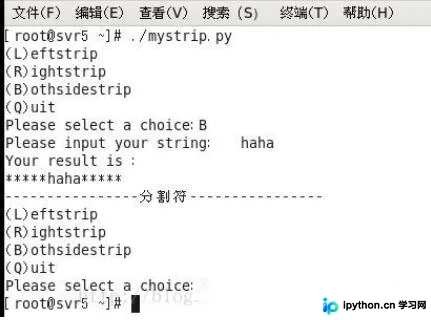
程序运行效果如下图所示:
以上就是本文的全部内容,希望这段代码能对大家的Python学习有所帮助,同时也欢迎大家继续支持本站获取更多技术资源。
本站声明
本文内容仅供参考,不代表本站观点。转载或引用请注明出处。如发现内容问题,请通过联系我们页面反馈。















