Python新手练手:10个经典小游戏代码实现与解析

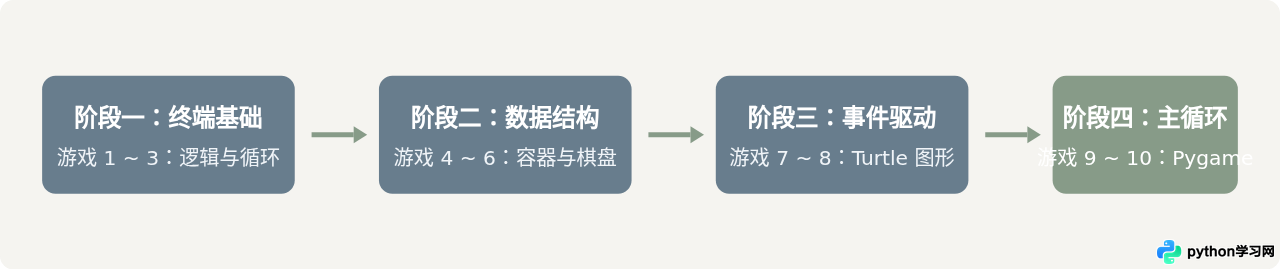
精选10个适合Python新手的经典小游戏,由浅入深覆盖控制台交互、数据结构与图形界面开发,提供可运行的完整源码与核心逻辑拆解。
turtle 与 pygame 库的图形化开发,每个案例均附带完整可运行代码、关键代码拆解与常见易错点。
1. 猜数字游戏(Guess the Number)
猜数字是绝大多数开发者接触的第一个互动程序。它考察条件判断 if/elif/else、循环控制 while 以及类型转换的基础应用。
代码实现
import random

def guess_number_game():
    target = random.randint(1, 100)
    attempts = 0
    print("【猜数字】已生成 1 到 100 之间的随机整数。")

    while True:
        user_input = input("请输入你的猜测:").strip()
        if not user_input.isdigit():
            print("输入无效,请输入一个纯数字!")
            continue

        guess = int(user_input)
        attempts += 1

        if guess < target:
            print("太小了,再试一次。")
        elif guess > target:
            print("太大了,再试一次。")
        else:
            print(f"恭喜你猜对了!目标数字是 {target},共尝试了 {attempts} 次。")
            break

if __name__ == "__main__":
    guess_number_game()
关键点解析
新手常犯的错误是直接使用 guess = int(input())。如果玩家输入了字母或直接回车,程序会直接抛出 ValueError 崩溃。通过 isdigit() 增加一层校验,可以保证程序稳健运行。
【猜数字】已生成 1 到 100 之间的随机整数。
请输入你的猜测:50
太小了,再试一次。
请输入你的猜测:75
太大了,再试一次。
请输入你的猜测:62
恭喜你猜对了!目标数字是 62,共尝试了 3 次。
2. 石头剪刀布(Rock Paper Scissors)
该项目核心在于建立“映射关系”并处理胜负的条件分支,同时引入字典来简化输出文本的逻辑。
代码实现
import random

def rock_paper_scissors():
    choices = {"1": "石头", "2": "剪刀", "3": "布"}
    winning_rules = {"1": "2", "2": "3", "3": "1"}

    print("出拳选项:1. 石头  2. 剪刀  3. 布  (输入 q 退出)")

    while True:
        user_choice = input("请选择出拳编号:").strip()
        if user_choice.lower() == 'q':
            print("游戏结束,再见!")
            break

        if user_choice not in choices:
            print("选项不存在,请重新输入 1、2 或 3。")
            continue

        comp_choice = random.choice(["1", "2", "3"])
        print(f"你出:{choices[user_choice]} | 电脑出:{choices[comp_choice]}")

        if user_choice == comp_choice:
            print("平局!")
        elif winning_rules[user_choice] == comp_choice:
            print("你赢了!")
        else:
            print("电脑赢了!")
        print("-" * 30)

if __name__ == "__main__":
    rock_paper_scissors()
关键点解析
胜负规则通常使用多重嵌套 if 表达,容易写得冗长。这里使用字典 winning_rules = {"1": "2", "2": "3", "3": "1"} 表达“键克制值”的关系,只需单行 winning_rules[user_choice] == comp_choice 即可判定胜负。
3. 简易文字冒险(Text Adventure)
文字冒险游戏利用函数调用和条件转移模拟游戏场景与玩家状态,是理解“状态机(State Machine)”概念的基础形式。
代码实现
def game_start():
    print("\n你醒来时发现自己身处一间阴暗的地牢中。眼前有两扇门:[1] 左侧铁门 [2] 右侧木门")
    choice = input("你选择打开哪扇门?(1/2): ").strip()
    if choice == "1":
        room_iron()
    elif choice == "2":
        room_wood()
    else:
        print("犹豫不决中,火把熄灭了……游戏结束。")

def room_iron():
    print("\n铁门后是一间宝库!你发现了一箱金币和一个神秘包裹。")
    action = input("你要 [1] 拿金币 还是 [2] 拆包裹?: ").strip()
    if action == "1":
        print("金币上涂有剧毒,你倒下了……游戏失败。")
    elif action == "2":
        print("包裹里是一把钥匙,成功打开了通向地面的密道!你通关了!")
    else:
        print("未知的选择触发了陷阱,游戏失败。")

def room_wood():
    print("\n木门后沉睡着一只地精守卫。地面散落着石子。")
    action = input("你要 [1] 蹑手蹑脚溜过去 [2] 捡石子投向远处?: ").strip()
    if action == "1":
        print("地精听觉敏锐,立刻惊醒抓住了你……游戏失败。")
    elif action == "2":
        print("石子的声响引开了地精,你趁机逃出木门!你通关了!")
    else:
        print("惊慌失措引来了怪物,游戏失败。")

if __name__ == "__main__":
    game_start()
4. 井字棋(Tic-Tac-Toe)
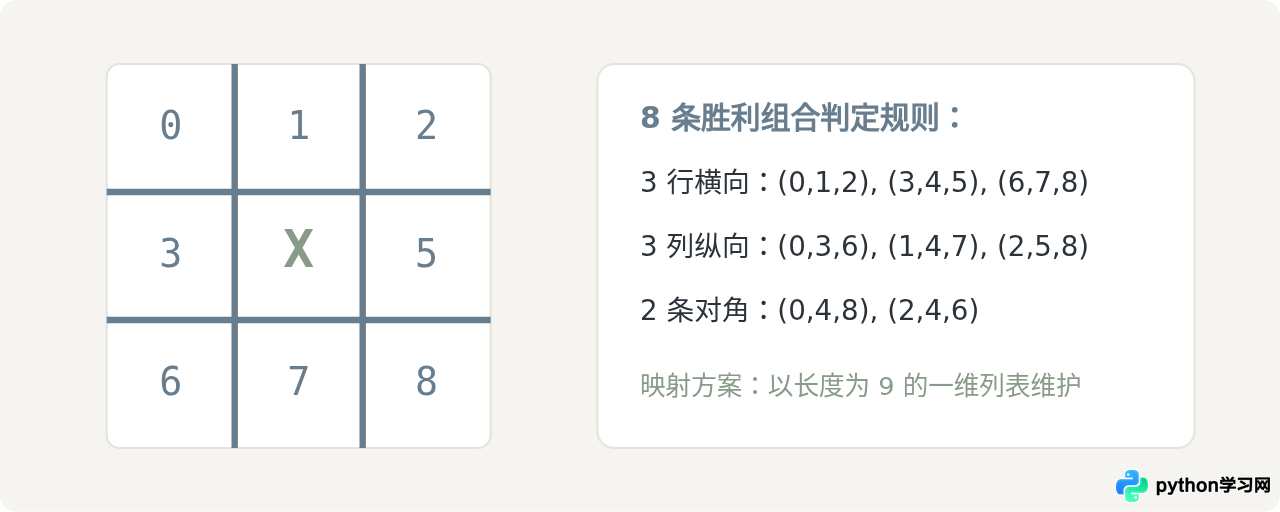
井字棋涉及用一维或二维列表管理游戏棋盘,并实现胜负判断算法与交替回合控制。
代码实现
def display_board(board):
    print("\n")
    print(f" {board[0]} | {board[1]} | {board[2]} ")
    print("---+---+---")
    print(f" {board[3]} | {board[4]} | {board[5]} ")
    print("---+---+---")
    print(f" {board[6]} | {board[7]} | {board[8]} ")
    print("\n")

def check_win(board, player):
    win_lines = [
        (0, 1, 2), (3, 4, 5), (6, 7, 8), # 横向
        (0, 3, 6), (1, 4, 7), (2, 5, 8), # 纵向
        (0, 4, 8), (2, 4, 6)             # 对角线
    ]
    return any(board[a] == board[b] == board[c] == player for a, b, c in win_lines)

def tic_tac_toe():
    board = [str(i) for i in range(1, 10)]
    current_player = "X"
    moves = 0

    while moves < 9:
        display_board(board)
        move = input(f"轮到玩家 {current_player},请输入位置 (1-9): ").strip()

        if not move.isdigit() or int(move) not in range(1, 10):
            print("输入无效,请重新选择 1 到 9。")
            continue

        idx = int(move) - 1
        if board[idx] in ["X", "O"]:
            print("该位置已被占用,请另选位置。")
            continue

        board[idx] = current_player
        moves += 1

        if check_win(board, current_player):
            display_board(board)
            print(f"玩家 {current_player} 获胜!")
            return

        current_player = "O" if current_player == "X" else "X"

    display_board(board)
    print("平局!棋盘已填满。")

if __name__ == "__main__":
    tic_tac_toe()
5. 单词猜谜(Hangman 刽子手)
Hangman 练习字符串解析与集合操作。核心逻辑是维护一个“已猜字母集合”,据此动态生成遮罩字符串(例如 p _ t h _ n)。
代码实现
import random

def hangman():
    words = ["python", "variable", "function", "boolean", "dictionary"]
    secret_word = random.choice(words)
    guessed_letters = set()
    attempts_left = 6

    print("【单词猜谜】你有 6 次猜错机会。")

    while attempts_left > 0:
        # 生成显示字符
        display_state = [c if c in guessed_letters else "_" for c in secret_word]
        print(f"当前单词:{' '.join(display_state)}")
        print(f"剩余生命值:{attempts_left} | 已猜字母:{', '.join(sorted(guessed_letters))}")

        if "_" not in display_state:
            print(f"恭喜胜利!正确单词是:{secret_word}")
            return

        guess = input("请输入猜测的单字母:").strip().lower()

        if len(guess) != 1 or not guess.isalpha():
            print("提示:只需输入一个英文字母!\n")
            continue

        if guess in guessed_letters:
            print("这个字母你已经猜过了!\n")
            continue

        guessed_letters.add(guess)

        if guess in secret_word:
            print("猜对了!\n")
        else:
            attempts_left -= 1
            print("猜错了,扣除 1 点生命!\n")

    print(f"游戏结束,生命耗尽。正确单词是:{secret_word}")

if __name__ == "__main__":
    hangman()
6. 21点扑克(Blackjack 极简版)
21点练习列表列表推导式、卡牌点数映射,特别是“A”(Ace)根据手牌总和动态计算为 1 点或 11 点的算法逻辑。
代码实现
import random

def calculate_hand(hand):
    total = sum(hand)
    aces = hand.count(11)
    # 当总和超过 21 且有 Ace 时,将 Ace 转为 1 点
    while total > 21 and aces > 0:
        total -= 10
        aces -= 1
    return total

def blackjack():
    deck = [2, 3, 4, 5, 6, 7, 8, 9, 10, 10, 10, 10, 11] * 4
    random.shuffle(deck)

    player_hand = [deck.pop(), deck.pop()]
    dealer_hand = [deck.pop(), deck.pop()]

    # 玩家回合
    while True:
        score = calculate_hand(player_hand)
        print(f"你的手牌:{player_hand},当前点数:{score}")
        print(f"庄家明牌:[{dealer_hand[0]}, ?]")

        if score > 21:
            print("你的点数爆掉了(Bust)!庄家获胜。")
            return

        action = input("是否要牌?(y/n): ").strip().lower()
        if action == 'y':
            player_hand.append(deck.pop())
        else:
            break

    # 庄家回合(规则:小于 17 必须拿牌)
    print("\n--- 庄家行动 ---")
    while calculate_hand(dealer_hand) < 17:
        dealer_hand.append(deck.pop())

    p_score = calculate_hand(player_hand)
    d_score = calculate_hand(dealer_hand)

    print(f"玩家最终点数:{p_score} | 庄家最终手牌:{dealer_hand},点数:{d_score}")

    if d_score > 21:
        print("庄家爆牌,你赢了!")
    elif p_score > d_score:
        print("点数大于庄家,你赢了!")
    elif p_score < d_score:
        print("点数小于庄家,你输了!")
    else:
        print("平局(Push)!")

if __name__ == "__main__":
    blackjack()
7. 贪吃蛇基础版(基于原生 turtle)
很多新手以为写带画面的游戏必须安装复杂的第三方依赖。实际上,Python 自带的 turtle 库支持屏幕渲染和键盘事件监听,非常适合制作极简版贪吃蛇。
turtle,无需执行 pip 安装。若在轻量终端或部分无界面的云端容器中运行,需保证本地环境已配置图形显示。
代码实现
import turtle
import time
import random

delay = 0.1
score = 0

# 屏幕设置
wn = turtle.Screen()
wn.title("Turtle 贪吃蛇")
wn.bgcolor("#f5f4f0")
wn.setup(width=600, height=600)
wn.tracer(0)

# 蛇头
head = turtle.Turtle()
head.speed(0)
head.shape("square")
head.color("#687D8D")
head.penup()
head.goto(0, 0)
head.direction = "stop"

# 食物
food = turtle.Turtle()
food.speed(0)
food.shape("circle")
food.color("#879B88")
food.penup()
food.goto(0, 100)

segments = []

def go_up():
    if head.direction != "down":
        head.direction = "up"

def go_down():
    if head.direction != "up":
        head.direction = "down"

def go_left():
    if head.direction != "right":
        head.direction = "left"

def go_right():
    if head.direction != "left":
        head.direction = "right"

def move():
    if head.direction == "up":
        head.sety(head.ycor() + 20)
    elif head.direction == "down":
        head.sety(head.ycor() - 20)
    elif head.direction == "left":
        head.setx(head.xcor() - 20)
    elif head.direction == "right":
        head.setx(head.xcor() + 20)

wn.listen()
wn.onkeypress(go_up, "Up")
wn.onkeypress(go_down, "Down")
wn.onkeypress(go_left, "Left")
wn.onkeypress(go_right, "Right")

# 主游戏循环
while True:
    wn.update()

    # 边界碰撞检测
    if abs(head.xcor()) > 290 or abs(head.ycor()) > 290:
        time.sleep(1)
        head.goto(0, 0)
        head.direction = "stop"
        for s in segments:
            s.goto(1000, 1000)
        segments.clear()
        score = 0

    # 食物碰撞
    if head.distance(food) < 20:
        food.goto(random.randint(-14, 14) * 20, random.randint(-14, 14) * 20)
        new_seg = turtle.Turtle()
        new_seg.speed(0)
        new_seg.shape("square")
        new_seg.color("#9cb2c4")
        new_seg.penup()
        segments.append(new_seg)

    # 移动身体节点
    for i in range(len(segments) - 1, 0, -1):
        x = segments[i - 1].xcor()
        y = segments[i - 1].ycor()
        segments[i].goto(x, y)
    if len(segments) > 0:
        segments[0].goto(head.xcor(), head.ycor())

    move()

    # 身体自碰检测
    for s in segments:
        if s.distance(head) < 20:
            time.sleep(1)
            head.goto(0, 0)
            head.direction = "stop"
            for seg in segments:
                seg.goto(1000, 1000)
            segments.clear()

    time.sleep(delay)
8. 弹球游戏(Pong / 简易乒乓)
两个挡板与一个运动球的碰撞逻辑是二维动力学的基础。通过 dx 和 dy 控制位移,并利用坐标差判断反弹。
代码实现
import turtle

wn = turtle.Screen()
wn.title("简易弹球游戏")
wn.bgcolor("#272c33")
wn.setup(width=800, height=600)
wn.tracer(0)

# 球拍
paddle = turtle.Turtle()
paddle.speed(0)
paddle.shape("square")
paddle.color("#FFFFFF")
paddle.shapesize(stretch_wid=1, stretch_len=5)
paddle.penup()
paddle.goto(0, -250)

# 小球
ball = turtle.Turtle()
ball.speed(0)
ball.shape("circle")
ball.color("#879B88")
ball.penup()
ball.goto(0, 0)
ball.dx = 3
ball.dy = 3

def paddle_left():
    x = paddle.xcor()
    if x > -340:
        paddle.setx(x - 40)

def paddle_right():
    x = paddle.xcor()
    if x < 340:
        paddle.setx(x + 40)

wn.listen()
wn.onkeypress(paddle_left, "Left")
wn.onkeypress(paddle_right, "Right")

while True:
    wn.update()
    ball.setx(ball.xcor() + ball.dx)
    ball.sety(ball.ycor() + ball.dy)

    # 左右边界碰撞反弹
    if ball.xcor() > 390 or ball.xcor() < -390:
        ball.dx *= -1

    # 上边界碰撞反弹
    if ball.ycor() > 290:
        ball.dy *= -1

    # 掉落底部重置
    if ball.ycor() < -290:
        ball.goto(0, 0)
        ball.dy *= -1

    # 挡板接球碰撞反弹
    if (-240 > ball.ycor() > -250) and (paddle.xcor() - 60 < ball.xcor() < paddle.xcor() + 60):
        ball.dy *= -1
9. 飞机避障(Pygame 入门)
从第 9 个游戏开始引入专业图形库 pygame。需先在终端运行 pip install pygame。本游戏主要演示标准的“游戏主循环”(Input → Update → Draw)。
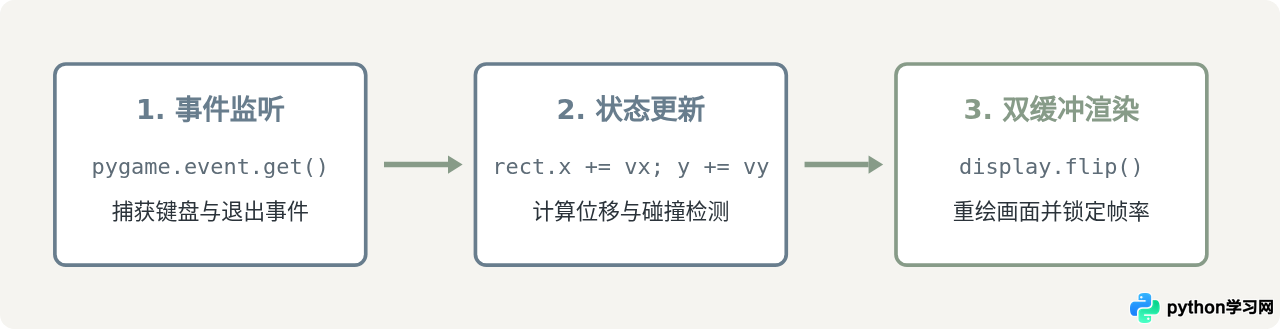
代码实现
import pygame
import random
import sys

pygame.init()
WIDTH, HEIGHT = 480, 600
screen = pygame.display.set_mode((WIDTH, HEIGHT))
pygame.display.set_caption("极简避障小游戏")
clock = pygame.time.Clock()

# 颜色定义
COLOR_BG = (245, 244, 240)
COLOR_PLAYER = (104, 125, 141)
COLOR_ENEMY = (135, 155, 136)

# 玩家方块
player = pygame.Rect(WIDTH // 2 - 20, HEIGHT - 70, 40, 40)
player_speed = 6

# 障碍物列表
enemies = []
ENEMY_EVENT = pygame.USEREVENT + 1
pygame.time.set_timer(ENEMY_EVENT, 600)

running = True
while running:
    clock.tick(60) # 维持 60 FPS

    for event in pygame.event.get():
        if event.type == pygame.QUIT:
            running = False
        elif event.type == ENEMY_EVENT:
            x_pos = random.randint(0, WIDTH - 30)
            enemies.append(pygame.Rect(x_pos, -30, 30, 30))

    # 按键持续监听
    keys = pygame.key.get_pressed()
    if keys[pygame.K_LEFT] and player.left > 0:
        player.x -= player_speed
    if keys[pygame.K_RIGHT] and player.right < WIDTH:
        player.x += player_speed

    # 更新障碍物位置
    for enemy in enemies[:]:
        enemy.y += 5
        if enemy.colliderect(player): # 碰撞检测
            print("发生了碰撞,游戏结束!")
            running = False
        if enemy.top > HEIGHT:
            enemies.remove(enemy)

    # 渲染
    screen.fill(COLOR_BG)
    pygame.draw.rect(screen, COLOR_PLAYER, player)
    for enemy in enemies:
        pygame.draw.rect(screen, COLOR_ENEMY, enemy)

    pygame.display.flip()

pygame.quit()
sys.exit()
10. 经典扫雷(Minesweeper 极简控制台版)
作为难度最高的综合练习,控制台扫雷综合考查二维数组构建、边界保护、雷区递归展开(洪水填充算法思路)与游戏状态维护。
代码实现
import random

SIZE = 5
NUM_MINES = 4

def create_board():
    # 初始化空网格与雷区
    grid = [[0 for _ in range(SIZE)] for _ in range(SIZE)]
    mines_placed = 0
    while mines_placed < NUM_MINES:
        r, c = random.randint(0, SIZE - 1), random.randint(0, SIZE - 1)
        if grid[r][c] != -1:
            grid[r][c] = -1
            mines_placed += 1

    # 统计周围地雷数
    for r in range(SIZE):
        for c in range(SIZE):
            if grid[r][c] == -1:
                continue
            count = 0
            for dr in [-1, 0, 1]:
                for dc in [-1, 0, 1]:
                    nr, nc = r + dr, c + dc
                    if 0 <= nr < SIZE and 0 <= nc < SIZE and grid[nr][nc] == -1:
                        count += 1
            grid[r][c] = count
    return grid

def print_board(grid, revealed):
    print("  " + " ".join([str(i) for i in range(SIZE)]))
    for r in range(SIZE):
        row_str = []
        for c in range(SIZE):
            if revealed[r][c]:
                val = grid[r][c]
                row_str.append("*" if val == -1 else str(val))
            else:
                row_str.append("#")
        print(f"{r} " + " ".join(row_str))

def minesweeper():
    grid = create_board()
    revealed = [[False for _ in range(SIZE)] for _ in range(SIZE)]
    non_mine_left = SIZE * SIZE - NUM_MINES

    while non_mine_left > 0:
        print_board(grid, revealed)
        user_input = input("输入翻开坐标 (行 列,例如 1 2): ").strip().split()
        if len(user_input) != 2:
            print("输入格式错误!")
            continue

        r, c = int(user_input[0]), int(user_input[1])
        if not (0 <= r < SIZE and 0 <= c < SIZE):
            print("坐标越界!")
            continue

        if revealed[r][c]:
            print("该格子已翻开!")
            continue

        revealed[r][c] = True

        if grid[r][c] == -1:
            print_board(grid, revealed)
            print("踩雷了,游戏结束!")
            return

        non_mine_left -= 1

    print_board(grid, revealed)
    print("恭喜!排雷成功,游戏胜利!")

if __name__ == "__main__":
    minesweeper()
两种核心开发模式对比:控制台 I/O 与 事件驱动循环
在上述 10 个游戏的演进中,读者会遇到编程思维方式的根本转变:阻塞式控制台交互转向非阻塞事件驱动循环。
| 对比维度 | 控制台交互(项目 1 ~ 6、10) | GUI / 事件驱动循环(项目 7 ~ 9) |
|---|---|---|
| 执行流程 | 线性执行,遇到 input() 立即阻塞,完全等待用户输入。 |
无限循环(while True),每秒循环几十次(如 60 FPS)。 |
| 状态推进 | 只有在用户交互发生后,内部状态才发生单次跳变。 | 即便玩家没有任何按键输入,重力、物体位移、时间仍持续更新。 |
| 适用场景 | 规则推导、回合制、算法逻辑验证、对硬件资源要求极低。 | 实时碰撞、多键位同时响应、动态音画同步。 |
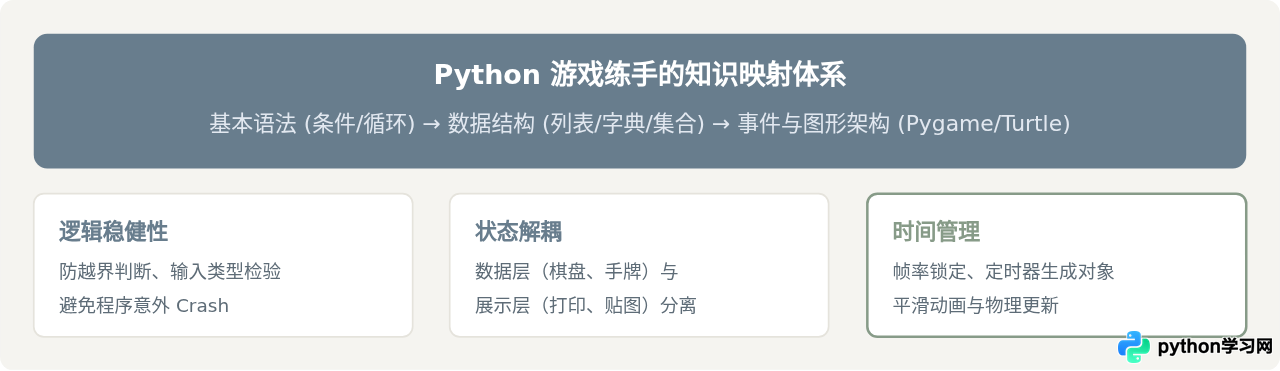
常见新手易错与避坑点
-
输入未作清洗与异常保护:在命令行游戏中,直接
int(input())是最普遍的崩溃源。务必结合isdigit()或try...except ValueError处理脏数据。 -
二维列表的浅拷贝陷阱:定义井字棋或扫雷网格时,切勿使用
[[0] * 5] * 5。这会导致 5 行共享同一个子列表的内存引用,修改其中一个元素会影响整列。应使用列表推导式[[0 for _ in range(5)] for _ in range(5)]。 -
游戏循环阻塞:在使用
pygame或turtle时,如果在循环中使用了time.sleep()或input(),会导致窗口失去响应并被操作系统判定为“卡死”。图形渲染必须依托定时回调或非阻塞轮询。
本站声明
本文内容仅供参考,不代表本站观点。转载或引用请注明出处。如发现内容问题,请通过联系我们页面反馈。