Python价格监控小工具:定时抓取数据并发送邮件通知

详细讲解如何使用Python编写实用的商品价格监控工具,涵盖网页抓取、价格提取、阈值比对、邮件预警通知及定时轮询防抖的完整实现方案。
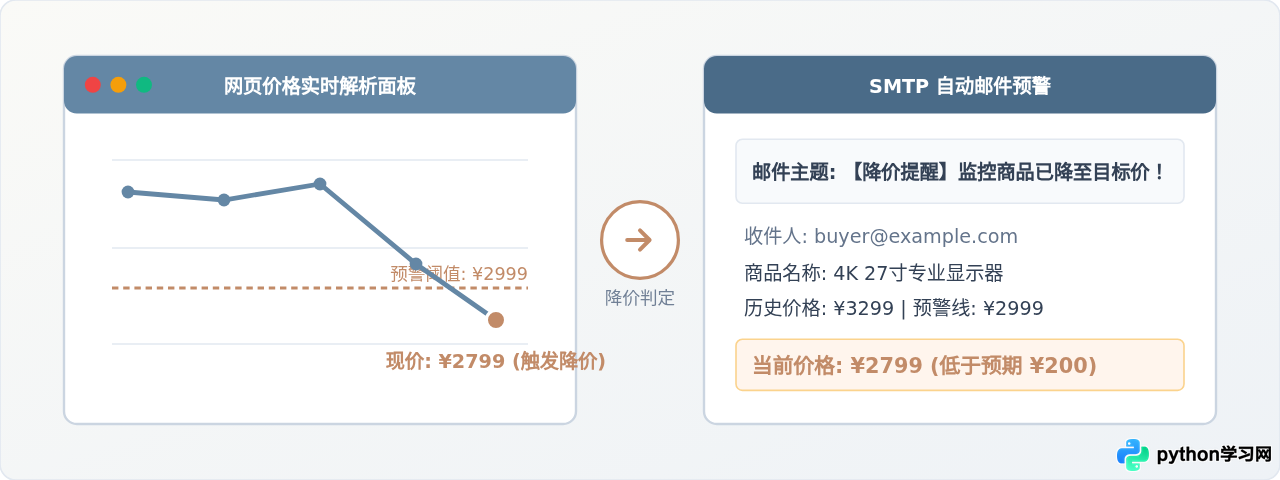
在电商购物或数码产品选购中,心仪商品的价格经常波动。人工反复刷新页面不仅费时费力,还容易错过限时降价。利用 Python 编写一个轻量级价格监控小工具,可以通过 requests 与 BeautifulSoup 周期性抓取目标商品页面的价格字段,当检测到价格低于设定的心理预期时,借助 smtplib 自动向指定邮箱发送告警邮件。本文将按实际搭建顺序,详细拆解从页面数据抓取、数值清洗比对、邮件安全推送,到定时防抖轮询的全套实现步骤。
一、整体架构与工作流设计
一个稳定运行的价格监控工具由四个核心环节组成:周期调度器、网络请求与解析模块、状态比对与持久化存储,以及邮件推送模块。系统并非简单地死循环发起请求,而需要兼顾频率控制、网络异常重试以及防邮件轰炸策略。
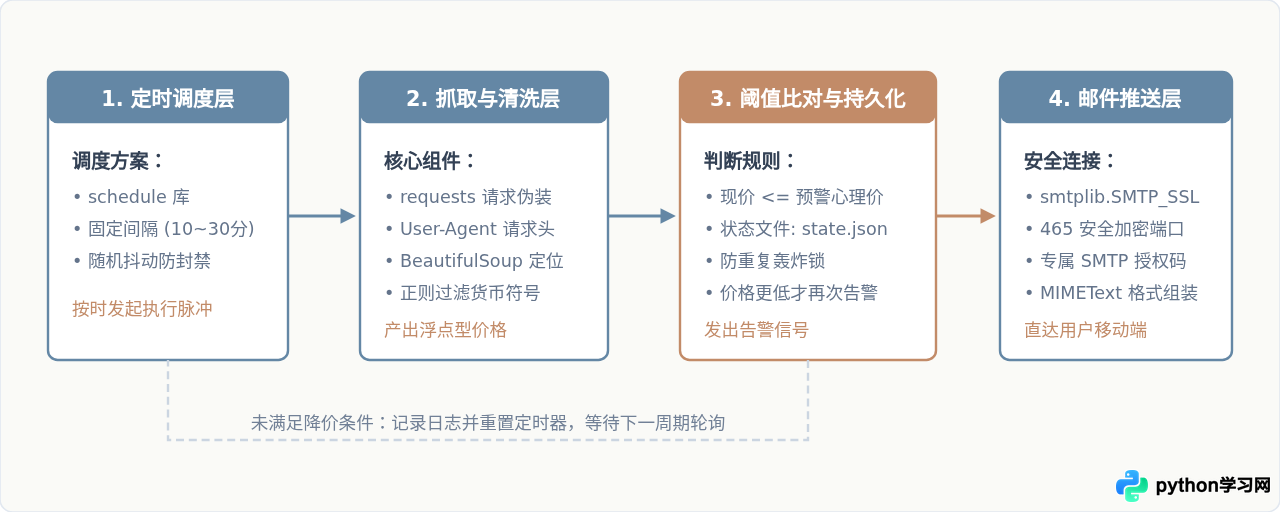
二、运行环境与准备工作
在编写代码前,需要准备两项前置条件:安装必要的 Python 第三方扩展库,以及获取发送邮件所必需的 SMTP 授权码。
1. 依赖库安装
打开终端执行以下命令,安装网络请求、HTML解析与定时调度库:
pip install requests beautifulsoup4 schedule其中 smtplib 与 email 属于 Python 标配内置库,无需额外安装。
2. 获取邮箱 SMTP 授权码
现代邮件服务商出于安全考虑,已禁止直接在代码中使用邮箱登录密码。需要使用服务商专用的授权码(App Password)。以常见邮箱为例:
| 邮箱服务商 | SMTP 主机地址 | SSL 端口 | 获取位置与操作 |
|---|---|---|---|
| QQ 邮箱 | smtp.qq.com | 465 | 设置 -> 账户 -> 开启“POP3/IMAP/SMTP/Exchange/CardDAV/CalDAV服务” -> 生成授权码 |
| 163 邮箱 | smtp.163.com | 465 | 设置 -> POP3/SMTP/IMAP -> 开启“POP3/SMTP服务” -> 新增授权密码 |
| Gmail | smtp.gmail.com | 465 | Google 账号安全中心 -> 开启两步验证 -> 创建“应用专用密码” |
三、核心操作步骤详解
我们将监控任务细分为三个标准步骤:抓取与清洗、邮件告警组装以及定时控制与异常容错。
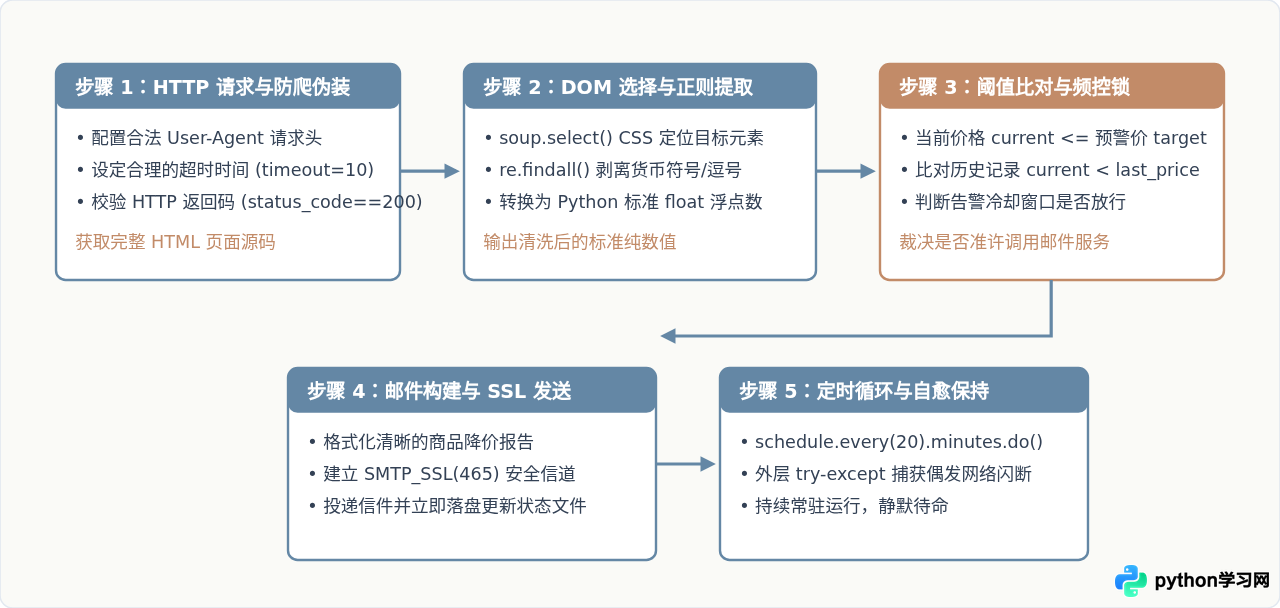
步骤一:网页抓取与价格提取
在请求网页时,必须传入合法的 User-Agent 标头,否则很多站点的防火墙会直接返回 403 Forbidden。获取到 HTML 后,使用 BeautifulSoup 通过 CSS 选择器精准定位价格标签,并使用正则表达式清理多余的货币符号(如 ¥、$)与千分位逗号,将其转为浮点数:
import requests
from bs4 import BeautifulSoup
import re

def get_product_price(url):
    headers = {
        "User-Agent": (
            "Mozilla/5.0 (Windows NT 10.0; Win64; x64) "
            "AppleWebKit/537.36 (KHTML, like Gecko) "
            "Chrome/120.0.0.0 Safari/537.36"
        ),
        "Accept-Language": "zh-CN,zh;q=0.9"
    }

    # 设置 10 秒超时,防止网络阻塞导致主线程无限挂起
    response = requests.get(url, headers=headers, timeout=10)
    response.raise_for_status()

    soup = BeautifulSoup(response.text, "html.parser")

    # 根据具体网页的 HTML 结构调整选择器
    # 示例假设价格节点类名为 price-tag
    price_element = soup.select_one(".price-tag")
    if not price_element:
        raise ValueError("未能找到价格标签,请检查 CSS 选择器或页面是否需要动态渲染")

    raw_text = price_element.get_text()

    # 利用正则提取纯数字浮点格式(包含可选的小数点)
    match = re.search(r"(\d+(\.\d+)?)", raw_text.replace(",", ""))
    if match:
        return float(match.group(1))
    raise ValueError(f"提取数字失败,原文本为: {raw_text}")
步骤二:邮件发送逻辑与安全认证
使用内置的 smtplib.SMTP_SSL 连接邮箱的 465 加密端口,构建符合 MIME 规范的邮件实体:
import smtplib
from email.mime.text import MIMEText
from email.header import Header

def send_alert_email(smtp_cfg, product_name, current_price, target_price, item_url):
    content = (
        f"您好!\n\n"
        f"监控的商品【{product_name}】当前价格已触发预警!\n"
        f"目标心理价:¥{target_price:.2f}\n"
        f"当前实时价:¥{current_price:.2f}\n"
        f"降价幅度:¥{(target_price - current_price):.2f}\n\n"
        f"商品快速链接:{item_url}\n\n"
        f"—— 来自 Python 自动化价格监控助手"
    )

    message = MIMEText(content, "plain", "utf-8")
    message["From"] = Header(f"价格监控服务 <{smtp_cfg['sender']}>", "utf-8")
    message["To"] = Header(f"关注者 <{smtp_cfg['receiver']}>", "utf-8")
    message["Subject"] = Header(f"【降价提醒】{product_name} 跌破 ¥{target_price}!", "utf-8")

    # 使用 SSL 协议安全连接
    with smtplib.SMTP_SSL(smtp_cfg["host"], smtp_cfg["port"]) as server:
        server.login(smtp_cfg["sender"], smtp_cfg["auth_code"])
        server.sendmail(smtp_cfg["sender"], [smtp_cfg["receiver"]], message.as_string())
    print(f"[{product_name}] 告警邮件已成功发送至 {smtp_cfg['receiver']}")
四、状态记录与防重复告警策略
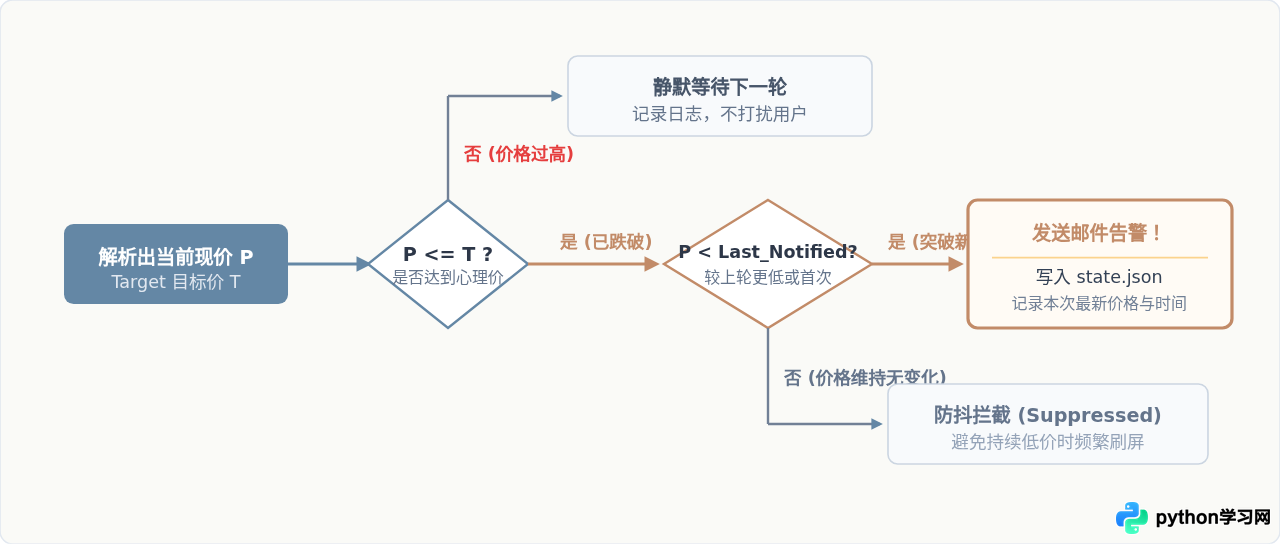
在价格监控中,如果只根据“当前价格 <= 预警价”判断,一旦价格降下来并持续停留几天,定时器每轮巡检都会重复发送一封邮件,造成严重的通知轰炸。为此,必须引入本地状态持久化文件(state.json),只有在以下两种场景下才准许触发邮件:
- 首次跌破预警线:此前价格高于预警线,本次首次触达。
- 价格刷新更低记录:当前价格不仅低于预警线,还进一步低于上一次通知时的记录价格(如从 2799 继续暴降至 2599)。
五、完整代码实现与运行配置
下面给出整合后的完整单文件脚本 price_monitor.py。代码中包含了状态持久化、异常保护机制以及基于 schedule 库的定时调度:
import os
import json
import time
import re
import smtplib
from datetime import datetime
from email.mime.text import MIMEText
from email.header import Header
import requests
from bs4 import BeautifulSoup
import schedule

# ==================== 1. 配置参数区 ====================
CONFIG = {
    # 监控目标商品
    "product_name": "4K 27寸专业显示器",
    "target_price": 2899.00,  # 心理预警价格
    "product_url": "https://example.com/item/display-4k-27", # 替换为实际商品链接

    # 状态持久化文件路径
    "state_file": "monitor_state.json",

    # 邮件发送端 (SMTP 配置)
    "smtp": {
        "host": "smtp.qq.com",        # 如使用163则为 smtp.163.com
        "port": 465,                  # SSL 统一安全端口
        "sender": "your_email@qq.com",
        "auth_code": "xxxxxxxxxxxx",  # 填入申请的授权码,而非密码
        "receiver": "target_notice@example.com"
    },

    # 定时轮询周期(单位:分钟)
    "check_interval_minutes": 20
}

# ==================== 2. 状态读写辅助 ====================
def load_state(file_path):
    if not os.path.exists(file_path):
        return {"last_notified_price": None, "last_check_time": None}
    try:
        with open(file_path, "r", encoding="utf-8") as f:
            return json.load(f)
    except Exception as e:
        print(f"[警告] 状态读取异常,重新初始化: {e}")
        return {"last_notified_price": None, "last_check_time": None}

def save_state(file_path, state_data):
    with open(file_path, "w", encoding="utf-8") as f:
        json.dump(state_data, f, ensure_ascii=False, indent=2)

# ==================== 3. 网页解析模块 ====================
def fetch_current_price(url):
    headers = {
        "User-Agent": (
            "Mozilla/5.0 (Windows NT 10.0; Win64; x64) "
            "AppleWebKit/537.36 (KHTML, like Gecko) "
            "Chrome/124.0.0.0 Safari/537.36"
        ),
        "Accept-Language": "zh-CN,zh;q=0.9",
    }

    response = requests.get(url, headers=headers, timeout=12)
    response.raise_for_status()

    soup = BeautifulSoup(response.text, "html.parser")

    # 注意:请根据目标站点的实际 DOM 标签调整选择器
    price_tag = soup.select_one(".price, .goods-price, #current-price")
    if not price_tag:
        raise ValueError("未能匹配到价格节点,请核实选择器规则")

    raw_price_str = price_tag.get_text().strip()
    match = re.search(r"(\d+(\.\d+)?)", raw_price_str.replace(",", ""))
    if not match:
        raise ValueError(f"提取价格数字失败: {raw_price_str}")

    return float(match.group(1))

# ==================== 4. 邮件推送模块 ====================
def send_email_alert(product_name, current_price, target_price, item_url, smtp_info):
    now_str = datetime.now().strftime("%Y-%m-%d %H:%M:%S")
    body = (
        f"【降价通知】您关注的商品降价啦!\n\n"
        f"商品名:{product_name}\n"
        f"预警阈值:¥{target_price:.2f}\n"
        f"当前价格:¥{current_price:.2f}\n"
        f"优惠降幅:¥{(target_price - current_price):.2f}\n"
        f"触发时间:{now_str}\n\n"
        f"点击购买链接直达:\n{item_url}\n\n"
        f"(本通知由 Python 监控脚本自动发出)"
    )

    msg = MIMEText(body, "plain", "utf-8")
    msg["From"] = Header(f"价格监控服务 <{smtp_info['sender']}>", "utf-8")
    msg["To"] = Header(f"关注者 <{smtp_info['receiver']}>", "utf-8")
    msg["Subject"] = Header(f"【降价提醒】{product_name} 仅售 ¥{current_price}!", "utf-8")

    with smtplib.SMTP_SSL(smtp_info["host"], smtp_info["port"]) as server:
        server.login(smtp_info["sender"], smtp_info["auth_code"])
        server.sendmail(smtp_info["sender"], [smtp_info["receiver"]], msg.as_string())

    print(f"[{now_str}] 邮件通知已成功投递至 {smtp_info['receiver']}")

# ==================== 5. 核心巡检工作流 ====================
def job_check_price():
    now_str = datetime.now().strftime("%Y-%m-%d %H:%M:%S")
    print(f"\n[{now_str}] 开始执行价格轮询任务...")

    try:
        current_price = fetch_current_price(CONFIG["product_url"])
        print(f"  当前抓取价格: ¥{current_price:.2f} (心理预期: ¥{CONFIG['target_price']:.2f})")

        state = load_state(CONFIG["state_file"])
        last_notified = state.get("last_notified_price")

        # 核心判断:不仅要低于预警线,还要防止同一低价重复打扰
        if current_price <= CONFIG["target_price"]:
            if (last_notified is None) or (current_price < last_notified):
                print("  => 触发降价告警条件,正在发送邮件...")
                send_email_alert(
                    CONFIG["product_name"],
                    current_price,
                    CONFIG["target_price"],
                    CONFIG["product_url"],
                    CONFIG["smtp"]
                )
                # 更新本地持久化记录
                state["last_notified_price"] = current_price
                state["last_check_time"] = now_str
                save_state(CONFIG["state_file"], state)
            else:
                print(f"  => 当前价格 ¥{current_price} 与此前通知价格持平,防抖抑制本次邮件。")
        else:
            print("  => 价格仍高于心理预警线,保持待命。")
            # 如果价格回调到预警线以上,重置记录,以便下次再度降价时能正常通知
            if last_notified is not None:
                state["last_notified_price"] = None
                save_state(CONFIG["state_file"], state)

    except Exception as err:
        # 外层全局兜底捕获,防止因单次网络抖动导致监控守护进程崩溃退出
        print(f"  [异常] 轮询任务出现错误: {err}")

# ==================== 6. 守护主进程 ====================
if __name__ == "__main__":
    print("=" * 50)
    print(f" 价格监控小工具已启动: 监控 [{CONFIG['product_name']}]")
    print(f" 巡检间隔: 每 {CONFIG['check_interval_minutes']} 分钟一次")
    print("=" * 50)

    # 脚本启动时立即执行一次首轮探测
    job_check_price()

    # 注册周期性定时任务
    schedule.every(CONFIG["check_interval_minutes"]).minutes.do(job_check_price)

    while True:
        schedule.run_pending()
        time.sleep(1)
六、排查指南与常见问题边界
在实际部署与长期运行中,爬虫和邮件服务可能会受到外部网络环境变动的影响。以下列出排查指引与解决途径:
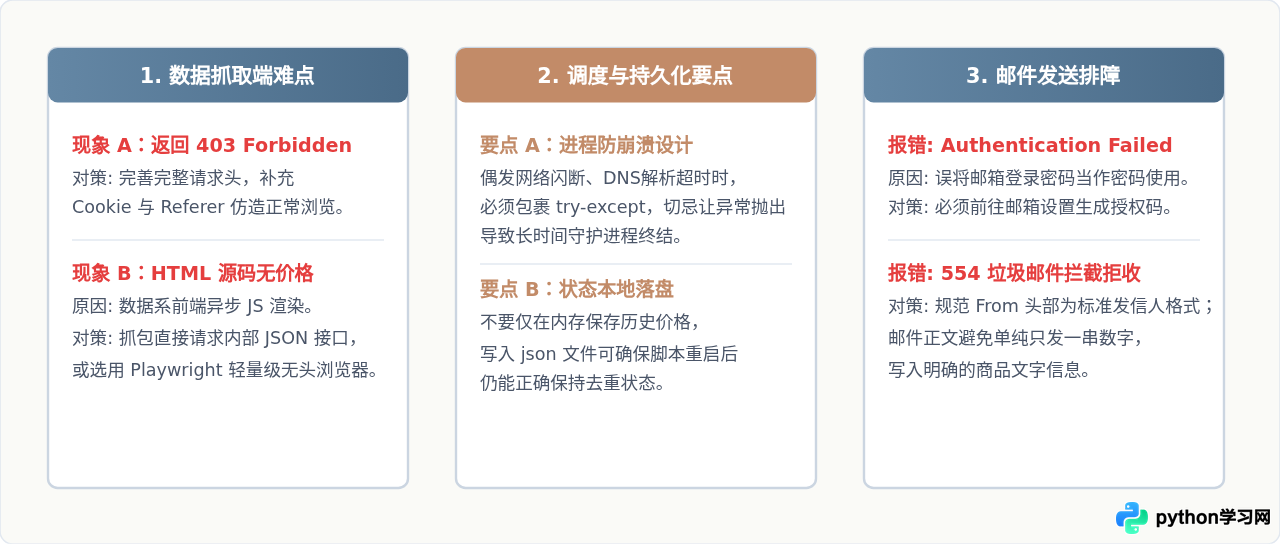
如果打算将该监控工具部署在云服务器或家用小主机(如群晖、树莓派)上 7×24 小时运行,推荐使用 nohup python3 -u price_monitor.py > monitor.log 2>&1 & 或配置为 systemd 系统服务,确保终端关闭后程序依然持续在后台监控。
本站声明
本文内容仅供参考,不代表本站观点。转载或引用请注明出处。如发现内容问题,请通过联系我们页面反馈。